





samsausages
Members
-
Joined
-
Last visited
Everything posted by samsausages
-
I didn't like that too many snapshots were created with 0 file changes. So I wrote a script that creates the snapshot only if data has been written to the dataset since the last snapshot, using the "written" property. It also prunes snapshots afterwards, keeping only the 100 most recent. Number to KEEP can be adjusted in the script. Use User-Scripts Plug-in to setup a cron schedule. Hope it helps someone! For the most current version, go to the simple-snapshot-zfs github repository. I will not update the code in this post. https://github.com/samssausages/simple-snapshot-zfs Sample output: Starting Snapshot 20221221-2349 _______________________________________ No changes detected in pool/dataset1. No snapshot created. Total snapshots for pool/dataset1: 1 Space used by snapshots for pool/dataset1: 0B _______________________________________ Snapshot created: pool/dataset2@20221221-2349 Total snapshots for pool/dataset2: 6 Space used by snapshots for pool/dataset2: 8.06M _______________________________________ No changes detected in pool/dataset3. No snapshot created. Total snapshots for pool/dataset3: 3 Space used by snapshots for pool/dataset3: 947K _______________________________________ No changes detected in pool/dataset4. No snapshot created. Total snapshots for pool/dataset4: 4 Space used by snapshots for pool/dataset4: 17.5G _______________________________________ No changes detected in pool/dataset4/nextcloud. No snapshot created. Total snapshots for pool/dataset4/nextcloud: 2 Space used by snapshots for pool/dataset4/nextcloud: 20.0G _______________________________________ -----------------Done!----------------- Code: #!/bin/bash #v0.9 ########################simple-snapshot-zfs####################### ###################### User Defined Options ###################### # List your ZFS datasets. You can add/remove sets # readarray -t DATASETS < <(zfs list -o name -H) # when replacing DATASETS below, should return all pools/Datasets, not thoroughly tested yet. If you test this let me know! DATASETS=("workpool/admin" "workpool/archive") # Set Number of Snapshots to Keep SHANPSHOT_QTY=100 # Snapshot Name Format SNAPSHOTNAME=$(date "+simplesnap_%Y-%m-%d-%H:%M:%S") ###### Don't change below unless you know what you're doing ###### ################################################################## echo "Starting Snapshot ${SNAPSHOTNAME}" echo "_____________________________________________________________" ## Validation Steps # Validate SHANPSHOT_QTY if ! [[ $SHANPSHOT_QTY =~ ^[0-9]+$ ]]; then echo "Error: SHANPSHOT_QTY must be a positive integer." exit 1 fi # Validate DATASETS for dataset in "${DATASETS[@]}"; do if ! zfs list "$dataset" &>/dev/null; then echo "Error: Dataset '$dataset' does not exist." exit 1 fi done # Function to handle errors handle_error() { local error_message="$1" echo "Error: $error_message" exit 1 } # Function to create snapshot if there is changed data create_snapshot_if_changed() { local DATASET="$1" local WRITTEN WRITTEN=$(zfs get -H -o value written "${DATASET}") if [[ "${WRITTEN}" != "0" ]]; then if ! zfs snapshot "${DATASET}@${SNAPSHOTNAME}"; then handle_error "Failed to create snapshot for ${DATASET}" fi echo "Snapshot created: ${DATASET}@${SNAPSHOTNAME}" else echo "No changes detected in ${DATASET}. No snapshot created." fi } # Function to prune snapshots prune_snapshots() { local DATASET="$1" local KEEP="${SHANPSHOT_QTY}" # Declare the SNAPSHOTS array declare -a SNAPSHOTS # Use mapfile to split the output into the SNAPSHOTS array if ! mapfile -t SNAPSHOTS < <(zfs list -t snapshot -o name -s creation -r "${DATASET}" | grep "^${DATASET}@"); then echo "Error: Failed to list snapshots for ${DATASET}" return 1 fi local SNAPSHOTS_COUNT=${#SNAPSHOTS[@]} echo "Total snapshots for ${DATASET}: ${SNAPSHOTS_COUNT}" local SNAPSHOTS_SPACE if ! SNAPSHOTS_SPACE=$(zfs get -H -o value usedbysnapshots "${DATASET}"); then echo "Error: Failed to get space used by snapshots for ${DATASET}" return 1 fi echo "Space used by snapshots for ${DATASET}: ${SNAPSHOTS_SPACE}" if [[ ${SNAPSHOTS_COUNT} -gt ${KEEP} ]]; then local TO_DELETE=$((SNAPSHOTS_COUNT - KEEP)) for i in "${SNAPSHOTS[@]:0:${TO_DELETE}}"; do if ! zfs destroy "${i}"; then echo "Error: Failed to delete snapshot: ${i}" return 1 fi echo "Deleted snapshot: ${i}" echo "_____________________________________________________________" done else echo "_____________________________________________________________" fi } # Iterate over each dataset and call the functions for dataset in "${DATASETS[@]}"; do create_snapshot_if_changed "${dataset}" prune_snapshots "${dataset}" done echo "----------------------------Done!----------------------------"
-
I had a tough time managing my snapshots, too many were created with 0 file changes. So I wrote a script that creates the snapshot only if data has been written to the dataset, using the "written" property. It also prunes snapshots afterwards, keeping only the 100 most recent. Can be adjusted using the "keep" variable below. To use, put your full Dataset, including the pool name. Such as pool/dataset Hope it helps someone! #!/bin/bash # List your ZFS datasets DATASETS=("pool/dataset1" "pool/dataset2" "pool/dataset3" "pool/dataset4" "pool/dataset5") # Function to create snapshot if there is changed data create_snapshot_if_changed() { local DATASET="$1" local WRITTEN=$(zfs get -H -o value written "${DATASET}") if [ "${WRITTEN}" != "0" ]; then local TIMESTAMP=$(date "+%Y%m%d-%H%M") zfs snapshot "${DATASET}@${TIMESTAMP}" echo "Snapshot created: ${DATASET}@${TIMESTAMP}" else echo "No changes detected in ${DATASET}. No snapshot created." fi } # Function to prune snapshots prune_snapshots() { local DATASET="$1" local KEEP=100 local SNAPSHOTS=( $(zfs list -t snapshot -o name -s creation -r "${DATASET}" | grep "^${DATASET}@") ) local SNAPSHOTS_COUNT=${#SNAPSHOTS[@]} echo "Total snapshots for ${DATASET}: ${SNAPSHOTS_COUNT}" if [ ${SNAPSHOTS_COUNT} -gt ${KEEP} ]; then local TO_DELETE=$((SNAPSHOTS_COUNT - KEEP)) for i in "${SNAPSHOTS[@]:0:${TO_DELETE}}"; do zfs destroy "${i}" echo "Deleted snapshot: ${i}" done fi } # Iterate over each dataset and call the functions for dataset in "${DATASETS[@]}"; do create_snapshot_if_changed "${dataset}" prune_snapshots "${dataset}" done
-
I have made this work, but I use docker-compose, so my process may be different. This could be a permissions issue. Make sure to check your logs for permission errors. You can try chmod 777 the folder and see if it works then. Do this for testing only and change it back when done. If it works with 777, you know it's probably permissions. I'd then look at the UID & GID settings, make sure they match what your docker is using. Uraid likes UID 99 and GID 100. This means User "nobody" and Group "nogroup". If your docker is using something else, it likely won't have permissions to write/read to that folder you made, especially if the user for that is root.
-
I hope someone can give more info. Been fighting this for a while and the issue popped up out of nowhere months ago. Usually I'm told it's from using a VPN to pass DNS queries through. (If you use something like pfsense for your DNS resolver) That is something I do, but I tried it with just standard DNS settings and still have the same problem. The only thing that made it better for me is removing the unraid.net plugin. But that also is the approved way of backing up your thumbdrive... so you do lose that ability. If you do delete the plugin manually, it won't go away until you reboot, as unraid loaded it to memory on boot.
-
I think you can uninstall it by deleting the plugin from your thumb drive. Should be located here: /boot/config/plugins
-
I had this problem a lot, then I uninstalled the unraid.net plugin and I stopped having the issue randomly. But I can still recreate the issue with these steps: 1. Go to "main" page 2. Browse a directory on the storage 3. Hit the "back" button on my browser. At least I don't have this issue randomly anymore, but I do get it every time I'm in the file browser and then use the back button.
-
Yeah, I read that and it seems silly to run a VM for what is usually a highly dependent core feature. Reverse proxies work very well, but I don't see how they replace proper user & group permissions as a security layer, when using web facing docker containers. I like Unraid for the storage array, everything else has been a nice bonus. If I spool up a VM, I'd probably Virtualize Unraid and use it just for the storage array, then run VM's and Docker on the host. But that makes everything a bit overly complicated for my liking.
-
I have been working on hardening my Unraid server the past few days, and realized that system users and groups don't work as expected. I guess now I know why everyone is suggesting 99:100 for just about everything. But this seems like a big downside, especially as I look to open up some dockers to the harsh interwebs.
-
Try the CoreFreq plugin, you can use it to run a benchmark that will stress your CPU. If it crashes or gets into the high 90's, you'll know. Can do it from the "tools" menu and use Atomic Burn.
-
56c sounds high if you're at idle. If you have processes running, then 56c isn't bad. My intel 5960x idles around 35-40c and I'm overclocked by 1Ghz with upped vcore. I top out at 70c under full load. Cooler and CPU will make temps vary greatly as well.
-
It's a bit of stab in the dark, but I have had it happen to my own system in the spring. Since then I always eliminate that variable, especially when going into spring & when it seems random. if your thermal paste job is bad then it may result in a HSF that feels cold. You'll know if it feels cold and your CPU temps are high. I think I'm using: Dynamix System Temp
-
This may sound silly, but check your CPU temps and that your CPU cooler is in good condition. Coming out of the cool winter months, I often see stability issues related to heat from dirty coolers/bad thermal paste. Works fine on cool days, but then on warmer days you get errors.
-
Depends on what protocol you are trying to make the connection with. It sounds like you're trying to connect the scanner to save a document to an SMB share. I haven't tried this, so I don't know if it works. But I did see that cloudflare tunnels have settings for SMB: https://developers.cloudflare.com/cloudflare-one/connections/connect-apps/use_cases/smb/ EDIT: Reading more on that cloudflare SMB access, sounds like it needs cloudflared installed on the server machine and on the client. So don't know if that will work for you since you have a dumb scanner. (no insult intended, haha) What you are describing I would usually accomplish with a VPN tunnel, usually using pfsense. If open ports are a concern against VPN, tailscale would work well without opening ports.
-
The more I use ChatGDP, the more I see its limitations. Great for some things, but only skin deep... and it gives you bad info with confidence.
-
If you have gone down the pfsense rabbit hole, their implementation is pretty good and moves it off your server.
-
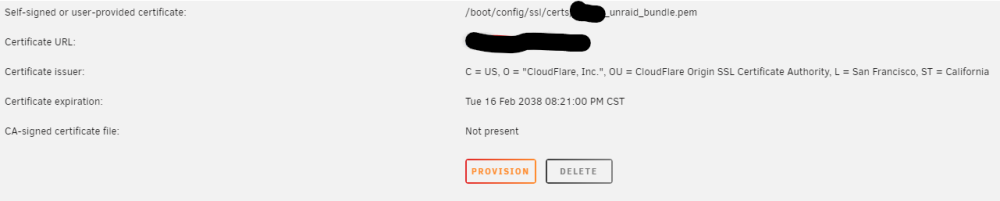
I use Cloudflare and have a wildcard certificate that is tied to my domain name. I would like to use this with unraid, but am experiencing issues importing the cert. When I add the certificate to /boot/config/ssl/certs/hostname_unraid_bundle.pem and navigate to the server in the browser, I get an ERR_CERT_AUTHORITY_INVALID error. Inspecting the Cert does show the custom cert in the browser. I can see it in the /Settings/ManagementAccess page, but it also says: "CA-signed certificate file: Not present" I found the directions in the wiki, but they are lacking information on how the /boot/config/ssl/certs/hostname_unraid_bundle.pem file should be structured. I get separate Certificate, Key & CA files from Cloudflare and I need to combine them into the _unraid_bundle.pem Also, cloudflare gives me certificates for "Edge", "Origin" and "Client", I'm using the "Origin" certificate. hostname_unraid_bundle.pem I made: -----BEGIN CERTIFICATE----- Origin Certificate -----END CERTIFICATE----- -----BEGIN CERTIFICATE----- Origin CA certificate (RSA PEM) -----END CERTIFICATE----- -----BEGIN PRIVATE KEY----- Origin Certificate Private Key -----END PRIVATE KEY----- So, am I overlooking something? Formatting the bundle.pem file wrong? Using the wrong Cloudflare Cert? Thanks for the help! Sam
-
-
Thank you for this Plugin. I have been using it for a few months now and it's great! It gave me the option to have fast storage that is durable on Unraid. The Unraid Array is great, but too slow for big 10G Ethernet transfers.


