





Lolight
Members
-
Joined
Everything posted by Lolight
-
You can easily eliminate the cache HDD from your system by replacing it with a NVMe SSD in the new setup. Then you won't need to deal with (buy) any HBAs or SATA cards just to get one extra SATA port.
-
If any any of those HDDs are old and of small(ish) capacity then it would be just easier (and cheaper) in the long run to get some of them replaced with new drives in the biggest capacity you can afford, starting with the parity. By reducing the number of drives, you will improve overall reliability, reduce power consumption while still expanding your overall storage capacity. Would also alleviate a need for getting any SATA expansion cards. Instead get an ATX motherboard with 8 onboard SATA ports. https://pcpartpicker.com/list/
-
With integrated Intel graphics - no need for a discrete GPU to get a monitor output (usually used only during the initial Unraid setup) or transcoding capability if utilized.
-
https://aoostar.com/blogs/news/aoostar-new-diy-nas-metal-shell-mini-pc-with-6-hdd-bays-6-nvme-slots-10-gbe-ethernet-port-2-x-2-5-gbe-ethernet-ports-led-screen-and-a-ryzen-7-5800u-processor
-
Welcome! I'd advise against any of that. Underclocking or undervolting experiments should be reserved for "play" systems. You'd need to look into stability and simplicity in a first NAS build. Especially with a goal to achieve good power efficiency at idle. That means an Intel-based with QuickSync system. Also, you don't "have" to build a home NAS around ECC RAM or a "server" motherboard . Consumer boards are fully designed and capable of running 24/7 without any stability problems. Stay away from discrete video cards and SATA expansion cards unless or until it becomes absolutely necessary. Get a motherboard with enough of onboard SATA ports and a compatible computer case to reserve enough of room for future expansion. If you have no need for VMs then even a cheap dual-core Intel pentium like G7400 would be more than enough.
-
Instead choose one of the tested by Gamers Nexus coolers:
-
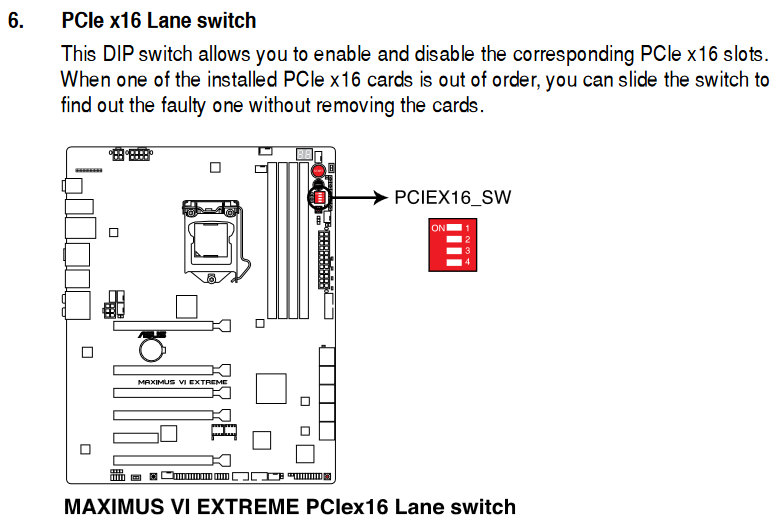
But that's just an assumption.According to the manual, all your SATA ports are connected to the chipset. I'd recommend downloading the board's BIOS manual and studying all power related settings.Yeah, but his board's manual doesn't mention anything about its existence. According to the manual all SATA ports are connected to the chipset.Which DiY NAS Case Should You Buy??? The Fractal Design Node 804 😉Backer Zoom discussion:The latest review:Use the DIP switch.
 To attend the zoom session, you can register here: https://zoom.us/meeting/register/tJMocuCuqTwpH9cq7shH5ptqQLxe9YyIcx7-#/registrationA self-built system. You'd probably need more CPU cores for VMs, e.g. the i5-12400. The 804 can hold 8 HDDs. Get a mATX mobo with 6 SATA ports for future expansions. If you're after maximum efficiency then you might want check this thread: https://www.hardwareluxx.de/community/threads/die-sparsamsten-systeme-30w-idle.1007101/page-96 https://de.pcpartpicker.com/list/A legit Basic Unraid License included - confirmed by @SpencerJAccording to this post the EPC timings problem seem to be related to HBAs: "Some kind of activity that I haven't identified yet―possibly some mildly intensive I/O―puts the drives into a state where they're not doing EPC anymore. I want to blame the LSI HBA because I bought 4 more Seagate Exos X20 hard drives, put them in another server that doesn't have an HBA (direct SATA to motherboard), and saw that their EPC timers were working as advertised with no fuss." https://github.com/Seagate/openSeaChest/issues/111Connected to an HBA, SATA card or motherboard ports?Sure, an LTS option won't be popular on the new feature desire thread. 😉I've found this informative post on ASPM, in the contest of Debian. And particularly this quote: "Its normally not a thing an OS plays with but should be handled by BIOS. The problem is that motherboard vendors mostly only design for windows. So in case that your motherboard does not have any options, you can at least have linux kernel overpower the BIOS. A warning though, only do this if you are absolutely sure that your device does support ASPM." https://www.reddit.com/r/debian/comments/8c6ytj/active_state_power_management_aspm/



Account
Navigation
Search
Configure browser push notifications
Chrome (Android)
- Tap the lock icon next to the address bar.
- Tap Permissions → Notifications.
- Adjust your preference.
Chrome (Desktop)
- Click the padlock icon in the address bar.
- Select Site settings.
- Find Notifications and adjust your preference.
Safari (iOS 16.4+)
- Ensure the site is installed via Add to Home Screen.
- Open Settings App → Notifications.
- Find your app name and adjust your preference.
Safari (macOS)
- Go to Safari → Preferences.
- Click the Websites tab.
- Select Notifications in the sidebar.
- Find this website and adjust your preference.
Edge (Android)
- Tap the lock icon next to the address bar.
- Tap Permissions.
- Find Notifications and adjust your preference.
Edge (Desktop)
- Click the padlock icon in the address bar.
- Click Permissions for this site.
- Find Notifications and adjust your preference.
Firefox (Android)
- Go to Settings → Site permissions.
- Tap Notifications.
- Find this site in the list and adjust your preference.
Firefox (Desktop)
- Open Firefox Settings.
- Search for Notifications.
- Find this site in the list and adjust your preference.