





Lolight
Members
-
Joined
Everything posted by Lolight
-
Ultimately it's your choice. I'd go with a set of brand new hardware and try to build a NAS system that would require no add-on cards. There's absolutely no need for additional complexity and unnecessary power consumption. Which means going with an Intel CPU containing a built-in iGPU that could be utilized for its very efficient transcoding abilities. Also choosing an ATX motherboard with 8 SATA ports and an ATX case. Then you won't need to have a discrete video card and an HBA. Unless if you're absolutely set on having ECC RAM in your system then you can disregard this advice.
-
The Ironwolf has a worse workload rate limit (180 TB/year vs 300 TB/year) and shorter warranty (3 years vs 5 years) Those processors have no efficiency cores. The 12600 has a more powerful iGPU (only useful for multiple 4K transcoding streams).
-
Well, yeah, it would be nice if ECC had become a standard RAM throughout the PC industry. But the way it is now, you would need to spend a significant extra just for the "luxury" of having it in your system. It's NOT necessary to have it in a home NAS. It will not make much of a difference for your overall data resiliency. What you should be concerned is with the ability to recover from the far more likely to happen events such as: user errors (accidental deletion), lightning strikes, electrical surges, fires, floods, earthquakes etc, etc... Why would you need to limit power? To save your CPU from overheating? Low TDP doesn't mean higher efficiency. TDP - thermal design profile. Your Node 804 has more than enough room for a chunky CPU cooler - no reason to limit anything. Your CPU will fall back into its idle state as soon as it's done doing the work. A low TDP CPU will not save electricity - might actually consume more since it will keep the rest of the system stay active for longer.
-
And this one - https://aoostar.com/blogs/news/aoostar-new-diy-nas-metal-shell-mini-pc-with-6-hdd-bays-6-nvme-slots-10-gbe-ethernet-port-2-x-2-5-gbe-ethernet-ports-led-screen-and-a-ryzen-7-5800u-processor
-
-
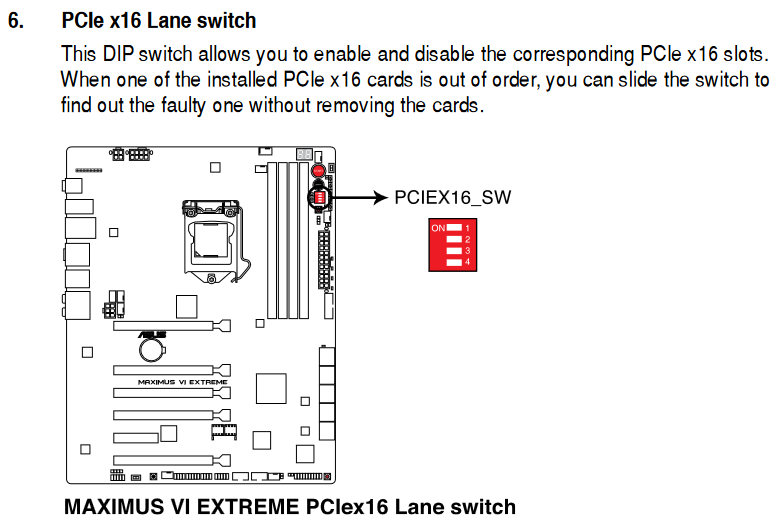
There is quite a selection of modern boards with 8 SATA ports: https://pcpartpicker.com/products/motherboard/#K=8,9&sort=price&page=1You can easily eliminate the cache HDD from your system by replacing it with a NVMe SSD in the new setup. Then you won't need to deal with (buy) any HBAs or SATA cards just to get one extra SATA port.If any any of those HDDs are old and of small(ish) capacity then it would be just easier (and cheaper) in the long run to get some of them replaced with new drives in the biggest capacity you can afford, starting with the parity. By reducing the number of drives, you will improve overall reliability, reduce power consumption while still expanding your overall storage capacity. Would also alleviate a need for getting any SATA expansion cards. Instead get an ATX motherboard with 8 onboard SATA ports. https://pcpartpicker.com/list/With integrated Intel graphics - no need for a discrete GPU to get a monitor output (usually used only during the initial Unraid setup) or transcoding capability if utilized.https://aoostar.com/blogs/news/aoostar-new-diy-nas-metal-shell-mini-pc-with-6-hdd-bays-6-nvme-slots-10-gbe-ethernet-port-2-x-2-5-gbe-ethernet-ports-led-screen-and-a-ryzen-7-5800u-processorWelcome! I'd advise against any of that. Underclocking or undervolting experiments should be reserved for "play" systems. You'd need to look into stability and simplicity in a first NAS build. Especially with a goal to achieve good power efficiency at idle. That means an Intel-based with QuickSync system. Also, you don't "have" to build a home NAS around ECC RAM or a "server" motherboard . Consumer boards are fully designed and capable of running 24/7 without any stability problems. Stay away from discrete video cards and SATA expansion cards unless or until it becomes absolutely necessary. Get a motherboard with enough of onboard SATA ports and a compatible computer case to reserve enough of room for future expansion. If you have no need for VMs then even a cheap dual-core Intel pentium like G7400 would be more than enough.Instead choose one of the tested by Gamers Nexus coolers:But that's just an assumption.According to the manual, all your SATA ports are connected to the chipset. I'd recommend downloading the board's BIOS manual and studying all power related settings.Yeah, but his board's manual doesn't mention anything about its existence. According to the manual all SATA ports are connected to the chipset.Which DiY NAS Case Should You Buy??? The Fractal Design Node 804 😉Backer Zoom discussion:The latest review:Use the DIP switch.
 To attend the zoom session, you can register here: https://zoom.us/meeting/register/tJMocuCuqTwpH9cq7shH5ptqQLxe9YyIcx7-#/registration


Account
Navigation
Search
Configure browser push notifications
Chrome (Android)
- Tap the lock icon next to the address bar.
- Tap Permissions → Notifications.
- Adjust your preference.
Chrome (Desktop)
- Click the padlock icon in the address bar.
- Select Site settings.
- Find Notifications and adjust your preference.
Safari (iOS 16.4+)
- Ensure the site is installed via Add to Home Screen.
- Open Settings App → Notifications.
- Find your app name and adjust your preference.
Safari (macOS)
- Go to Safari → Preferences.
- Click the Websites tab.
- Select Notifications in the sidebar.
- Find this website and adjust your preference.
Edge (Android)
- Tap the lock icon next to the address bar.
- Tap Permissions.
- Find Notifications and adjust your preference.
Edge (Desktop)
- Click the padlock icon in the address bar.
- Click Permissions for this site.
- Find Notifications and adjust your preference.
Firefox (Android)
- Go to Settings → Site permissions.
- Tap Notifications.
- Find this site in the list and adjust your preference.
Firefox (Desktop)
- Open Firefox Settings.
- Search for Notifications.
- Find this site in the list and adjust your preference.