





writablevulture
Members
-
Joined
-
Last visited
Everything posted by writablevulture
-
No, I'm afraid I didn't. However, I did move to barrycarey/speedmon and this has been running solidly ever since.
-
I am getting auth issues. Looking at the SpeedFlux log: I have run an InfluxDb container. When I first accessed it it prompted me to create a user, bucket and organisation which I did. Then when I setup the Speedtest container I entered the user & password that I have just created However, the fact that SpeedFlux talks about "databases" makes me think that SpeedFlux is using the v1 InfluxDb API which is apparently not available in the latest InfluxDb container image without some work. Maybe that is what the "<2" in the log message above means. Is anyone using SpeedFlux with the latest version of InfluxDb?
-
Hi all, I'm seeing this warning when getting programmes: Is AtomicParsley not supposed to be part of this container image? I also see that Plex has a very hard time matching any of the downloads and I guess this is why. Am I supposed to be installing AtomicParsley seperately or something? Thanks!
-
Thank you for looking. my-netdata.xml
-
This has happedned again. This time I include full diagnostics immedately after I see the 403 error in case anyone can help me shed some light on this please. Thank you! tower-diagnostics-20211222-1410.zip
-
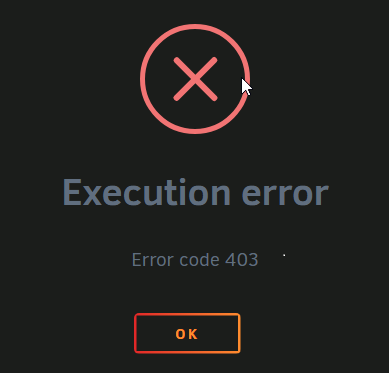
Initially Netdata was working well for me but I have now noticed that every time after the container image is updated I get an Executiion error = Error code 403. After reading around I a have managed to fix this by performing: docker network disconnect host Netdata ...and I can then start the container normally. All is well until the container image next gets updated and I have to do this again. This only happens with this particular container. Does anyone know why this might be happening? Thanks!
-
I have been using the template from Merrrp's GitHub repo mostly without issue. However, I got a werid warning from the Fix Common Problems plugin this morning: But this is really confusing me because the URL specified in the fix is in someone else's repository entirely and I have never made reference to that repository in unraid before. Does anyone understand how that warning can come about or what I should do about it?
-
Specifying a previous tag got me up and running though. This is also reported on Github.
-
Same for me too.
-
Thank you, these variables work as you describe.
-
To answer my own question see WireGuard quickstart. WireGuard doesn't seem to work with proxied connections.
-
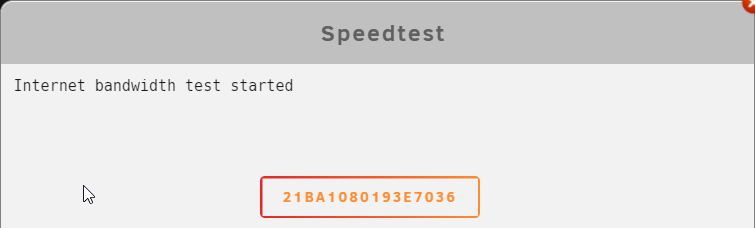
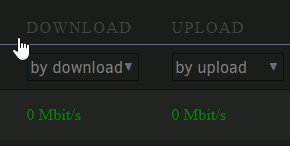
I installed this via CA on Unraid 6.9.2 and python-2.7.11 via NerdPack but when I click on "Begin Test" I just see "Internet bandwidth test started" and an odd button with some sort of GUID as its text: If I try running at a terminal I see: root@Tower:~# speedtest-xml ERROR:root:code for hash md5 was not found. Traceback (most recent call last): File "/usr/lib64/python2.7/hashlib.py", line 147, in <module> globals()[__func_name] = __get_hash(__func_name) File "/usr/lib64/python2.7/hashlib.py", line 97, in __get_builtin_constructor raise ValueError('unsupported hash type ' + name) ValueError: unsupported hash type md5 ERROR:root:code for hash sha1 was not found. Traceback (most recent call last): File "/usr/lib64/python2.7/hashlib.py", line 147, in <module> globals()[__func_name] = __get_hash(__func_name) File "/usr/lib64/python2.7/hashlib.py", line 97, in __get_builtin_constructor raise ValueError('unsupported hash type ' + name) ValueError: unsupported hash type sha1 ERROR:root:code for hash sha224 was not found. Traceback (most recent call last): File "/usr/lib64/python2.7/hashlib.py", line 147, in <module> globals()[__func_name] = __get_hash(__func_name) File "/usr/lib64/python2.7/hashlib.py", line 97, in __get_builtin_constructor raise ValueError('unsupported hash type ' + name) ValueError: unsupported hash type sha224 ERROR:root:code for hash sha256 was not found. Traceback (most recent call last): File "/usr/lib64/python2.7/hashlib.py", line 147, in <module> globals()[__func_name] = __get_hash(__func_name) File "/usr/lib64/python2.7/hashlib.py", line 97, in __get_builtin_constructor raise ValueError('unsupported hash type ' + name) ValueError: unsupported hash type sha256 ERROR:root:code for hash sha384 was not found. Traceback (most recent call last): File "/usr/lib64/python2.7/hashlib.py", line 147, in <module> globals()[__func_name] = __get_hash(__func_name) File "/usr/lib64/python2.7/hashlib.py", line 97, in __get_builtin_constructor raise ValueError('unsupported hash type ' + name) ValueError: unsupported hash type sha384 ERROR:root:code for hash sha512 was not found. Traceback (most recent call last): File "/usr/lib64/python2.7/hashlib.py", line 147, in <module> globals()[__func_name] = __get_hash(__func_name) File "/usr/lib64/python2.7/hashlib.py", line 97, in __get_builtin_constructor raise ValueError('unsupported hash type ' + name) ValueError: unsupported hash type sha512 Traceback (most recent call last): File "/usr/local/emhttp/plugins/speedtest/scripts/speedtest-latest.py", line 120, in <module> from md5 import md5 File "/usr/lib64/python2.7/md5.py", line 10, in <module> from hashlib import md5 ImportError: cannot import name md5 Internet bandwidth test started I never get a proper test result, just a row in the results showing 0/0: Can anyone suggest what might be wrong please?
-
I have this working and I am pleased with it. However, I am using Cloudflare with Nginx Proxy Manager to provide reverse proxy access to various services on my Unraid box without having to open ports for each of them in my router. Is is possible to do the same with WireGuard so I can avoid forwarding its port in my router? Is this even desirable and would it give me any additional security? Thanks!
-
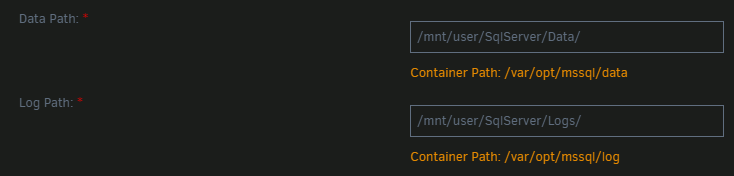
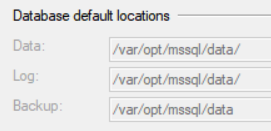
@Merrrp, thanks very much for your template - I'm using it successfully bar an issue with paths... In the template I set both the data and log volume mounts and they appear to be mapped correctly: ...however, when I look at the server properties in SQL Server Management Studio all the Data, Log and Backup paths have all been set to the same directory /var/opt/mssql/data: So it looks like setting the data directory is successful but not the log directory and there appears to be no way to set the backup directory. I know I can set them after the container is running using mssql-conf but I'd really like to have them set properly as part of the template. Do you have any ideas what is wrong here? Thanks!
-
Unfortunately I haven't got past this.
-
Hi all, I am currently backing up to an unassigned device. However, I'd like to mount & spin-up this device before the backup and then unmount & spin-down after. The idea being that the backup is safer from things like ransomware etc when unmounted and I'll save power with it spun down. Is this possible with Duplicati? I don't even seem to be able to mount and unmount it manually before and after backups as Duplicati doesn't realise it has been mounted and reports the existing backup files as missing. Is this problem an Unraid, Docker or Duplicati issue? Thanks!
-
Not having an RSS feed means I can't follow Unraid on aggregation services like Feedly. I'd love to get an RSS feed.
-
Yes, I guess it's a case of the chicken and egg. I'm sure the guide I followed set Cloudflare to force encryption all the way but didn't have this issue. Maybe I miss-remember and they set the full encryption setting on at the end of the process. Thanks for your help, I'm happy it is working correctly and now adding any other NPM hosts will be infrequent it's not really an issue.
-
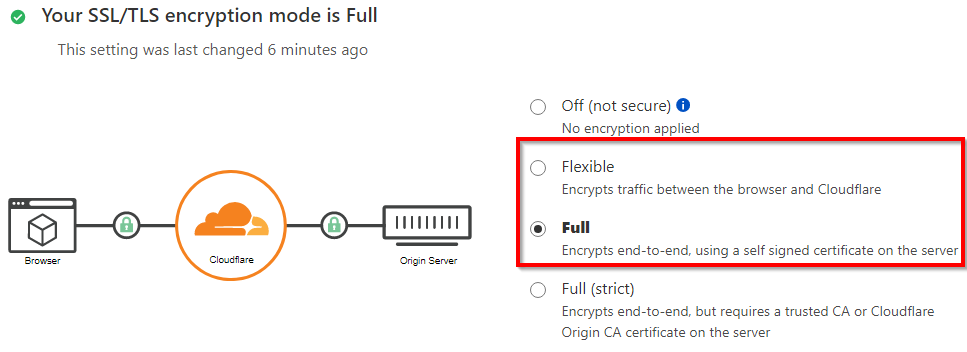
Thanks, I thought that Letsencrypt would be contacting my server on the subdomain deluge.yourdomain.tld rather than yourdomain.tld? Anyway, since you say that Letsencrypt needs an unencrypted port I changed the "SSL/TLS encryption mode" setting in Cloudflare from Full to Flexible to allow that insecure connection and then I could get my certificates. One I had done that I set "SSL/TLS encryption mode" back to Full and everything seems to be working. I still think I have misunderstood something and I don't think I should have to relax "SSL/TLS encryption mode" every time I want to create a new host in NPM. This is the setting I have to relax each time:
-
I am running this Nginx Proxy Manager container and I successfully set up a reverse proxy for Plex: Created a "dynamic" subdomain in CloudFlare updated with my current WAN IP Created a "plex" subdomain in CloudFlare using a CNAME record pointing to the "dynamic" subdomain Cloudflare SSL/TLS encryption mode is set to "Full" Cloudflarte Always Use HTTPS is "On" Created a host in Nginx that redirects fromn the "plex" subdomain to the IP address and port that the Plex UI is running on in Unraid with: Cache assets on Block Common Exploits on Requested a new SSL certificate from Let's Encrypt with: Force SSL on HTTP/2 Support on HSTS Enabled on HSTS Subdomains on This all seems to work well. Now, when I come to create a reverse proxy host for other services (doign exactly the same as above), they always seem to fail when trying to get a new certificate. Looking in the letsencrypt.log I can see: Can anyone give me some pointers as to why I can create my first reverse proxy but no more? I assume I am forwarding the ports in my router correctly to Nginx otherwsie none of them would work. Is trying to create a cert per subdomain the correct thing to do? Thanks!

