





ixit
Members
-
Joined
-
Last visited
Everything posted by ixit
-
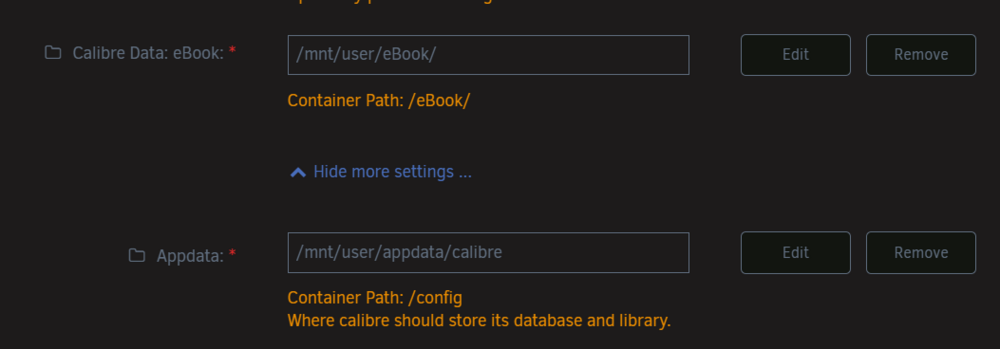
Hello Unraid Community and Devs, I'm a huge fan of the power and flexibility of the Docker implementation in Unraid. Based on a recent deep-dive into container management, I'd like to propose a feature request that I believe is a minor-to-moderate implementation effort but would address a high-risk scenario for many Docker users, while still respecting advanced and automated workflows. Unraid 7.1.2 The Challenge: A High-Risk, "Below the Fold" SettingThe core issue arises when a user duplicates a Docker template to create a new, concurrent container but forgets to change the appdata path. This is a high-risk scenario where two running containers could be writing to the same database or config files, risking corruption. Several factors amplify this risk: Hidden Setting: The Host Path configuration is located "below the fold" in the "Show more settings" section, making it very easy to overlook. Common Workflow: The risk is highest for users testing new containers on a production/home server, as they are likely to be rapidly creating and modifying containers and are more likely to have important production data at stake. No Guardrails: Actions like renaming a container do not trigger a suggestion to also change the appdata path to prevent a collision. This creates a conflict contrasted to other, perfectly safe workflows (like recreating a stopped container with the same path), where a warning would be unnecessary. Proposed Solution: A GUI-Only "Smart" Check 💡To address the high-risk scenario without impacting other workflows, I suggest a GUI-only "smart" check. The Logic: To ensure all automation (via API, CLI, plugins, etc.) is unaffected, this check would only be performed when a user clicks "Apply" within the Unraid Web GUI. The check would only trigger if the specified Host Path is already in use by another currently running Docker container. The User Experience: If these conditions are met, a warning modal would appear: This feature could be configurable in Docker settings to be disabled by advanced users who understand and accept the risk. Alternative SolutionAs a different approach, the system could offer to create a "safe redirection" by prompting the user to change the appdata path automatically when a container's name is changed, but the appdata path is not. Thank you for considering this suggestion to add a valuable guardrail to the Docker management experience.
-
May already be supported via a recent kernel update or may be quickly supported via future similar kernel updates. https://docs.unraid.net/unraid-os/release-notes/7.1.0/
-
Just a quick note requesting Intel Arc Pro Battlemage series B50 and B60 kernel and driver support for local AI and transcoding, along with noting I fully understand that this will take time and I'm sure there will be dependencies. Embargo lift coming shortly with Linux details: https://www.phoronix.com/review/intel-arc-pro-b-series
-
Thank you for your hard work! I hope they can support and promote this data to Dynamix System Statistics for long term retention someday soon! The newest release (2025.03.12) addresses prior Intel XE issues and now displays XE information consistently, but it seems to experience flapping while transcoding video - the data display refreshing wipes out all the data then displays again repeatedly. The flapping issue doesn't seem to occur while it's not transcoding but I didn't attempt other workloads or burden it to full load. I'm running an A310, .7, 1.3, on 7.0 with Unraid Patch; nothing unusual. Edit: I removed and reinstalled both apps, and restarted the relevant dockers. The flapping has stopped, so this is likely a me issue, but there could be some cleanup needs for some users.
-
Flash, and most especially the cheap flash on USB drives (even "good" USB drives), does not endure forever, even if it is rarely written to. If your drive is that old, you should likely purchase a replacement proactively to prevent a failure. Do your research. A lot of people will refer to "high endurance" or similar flash drives, but I don't trust that term to be more than marketing slang that unless it's an industrial drive that tells me the specific type of flash and it's actual endurance rating, just like a full SSD would. Though 7.0.0 sums up years of improvements, as a peer, I think you should just spend a few bucks to prevent potential misery.
-
Confirming the upgrade to 7.0.0 with Intel Arc A310 worked with Plex, apparently including Dolby Vision and HDR tonemapping ("works"...). Had to follow the guide as before, and manually select the device from the dropdown menu in Plex; auto didn't use hardware transcode. I switched over from Nvidia and there will be a few errors and things you'll have to resolve. These should be self-evident, or won't matter. I also removed the Nvidia before 7.0.0 reboot to avoid an extra reboot, and had no issues. Plex will fail to start due to Nvidia missing, just remove the nvidia references, click save to reestablish the docker, and then on to the guide. Supermicro X10 dual Xeon broadwell + Sparkle Intel Arc A310, previously Asus Nvidia 1650 OC. No resizeable BAR support on my motherboard.
-
Confirming that this guide still works for Unraid 7.0.0 and Intel Arc. I added the /dev/dri/ device as we used to do with this guide. I had to manually select Transcoder: Hardware transcoding device and change to "Intel DG2 [Arc A310]". This step may not required be in future Unraid versions if we move to kernel 6.10 or move past i915 driver, and/or if Plex addresses this. It seems to be a selection issue, but if Unraid later presents it differently, Plex auto-select may improve. This could be due to my server MB offering a built-in VGA adapter that's not Plex supported, though. Tests: Manually select transcoding option, verify "(hw)" present on dashboard when forcing transcode Transcode with PGS subs and "hw" appears. Switch to transcode midstream Tested on PC Forced 4K Dolby Vision transcode to non-DV screen...and it seems to have worked!
-
I went with an industrial 8GB a few years ago and I've never looked back. Commercial is just different stuff, and I don't trust their endurance ratings, or unpowered data retention. Usually I'm price moderate, but if I want something to be bulletproof, I'm going to buy something purpose built. Example in this direction: https://www.swissbit.com/en/products/product-finder/products/?pn=SFU3008GC2AE1TO-I-GE-1AP-STD I'm waiting for some comments on Intel Arc dGPU before upgrading due to kernel 6.8.10 vs kernel 6.10 (newer driver version). I want to be sure to hear it's working from a peer, and I'm continuing to read up on the kernel/driver to see what is supported when and where and how much. Nvidia 1650 (current) vs Intel Arc A310 (soon(tm))
-
Since the support link was redirected, I'll have to post here. It looks like the source project is now deprecated so frak-gvm may need to be deprecated or replaced. https://github.com/Secure-Compliance-Solutions-LLC/GVM-Docker/commit/d5fa0ed1edf63faf06230270c7c006bb5d013a80?diff=split&w=0 CC @Squid in case this should be added to Fix Common Problems
-
Necro necro! Bump! I'd like multipath as well.
-
Thanks for the clarification on shares vs disks usage. It helped validate that this was the tool I wanted to use to try this, rather than an external one which would have inherent limitations. I thought I didn't need to do this and I was just checking. My process is very clean, so I shouldn't have needed to do this. Despite that, I still found a fair number of dupes. This was a good reminder of the old accountant's saying: 99% correct is 1% wrong. It doesn't mean your process doesn't work. It's a reminder of why there are checks and balances. I definitely think it's worth running occasionally, probably first on shares then secondly on disks. Observations: this takes a few gigs of memory with larger data sets just against filenames, and can probably easily consume even more with more complicated data sets or filters. It takes some time to process, so it's probably best to fire it off (before you run out of space ) and return later. Delete Dedupe with care.... Good luck. Edit: Most of these were simple name collision dupes (i.e. "Book 1") 😂🤦♂️but enough were real to be worth the effort.
-
Intel Arc (and Arc Pro!) Better collective scrub scheduling - sequential, groups. While I would like better collective intelligence on executing the scrub (i.e. pause while there's io contention for parity) apparently scrub pause doesn't exist at the filesystem level. Oh wells! Better formal advice and tools on how to recover when you've balanced and "lost" space 😅
-
I was up for nearly a year back around COVID while we were in that long time gap between versions, and then for awhile I didn't upgrade. I just didn't have a reason to restart, so I kept stalling the upgrade. At that point in time, I was using ESXi for my craziness, so that VM (or server, occasionally) would get the restart instead.
-
128GB DDR4 Multi ECC Will be upgrading to 128GB DDR5 or DDR5 ECC as soon as someone makes a right angle AMD board that isn't crap, and supports bifurcation for all the breakouts I want. I run 1-3 VMs, and I would use only 64 Gigs, but I like using the overhead as cache for transcode or other experimental nonsense without wear and tear on SSDs. Additionally, I keep my appdata on a separate optane AIC cache drive which does not transit files, so I can beat up my dockers as much as I want. THAAAAAANK you so much for allowing multiple uses for cache drives.
-
When I had faced this issue upon a migration from Windows Server to BinHex, I had eventually identified that somehow my blobs DB had become corrupted - but only the copy that had been moved over to Unraid. My original copy was OK. I copied the unzipped blobs DB back over and overwrote it, did permissions tweaks and was right as rain. TLDR: Check the integrity of your Blobs DB as well. You may need to do this pragma integrity check manually, outside of the script.
-
I see this setting now on Unraid 12.6.3. It seems to me that it would be extremely helpful to implement compression per user share, which seems to me to align more with how humans sort content, and then to be implemented as per path as the user shares are laid out on the underlying disks. Is this on the radar? While one could do this per disk and shuffle the media accordingly, that seems to add implementation complexity for the end user, such that adding an extra 500GB drive might be a solution one choses, rather than setting compression on an existing 8TB drive...by enabling compression on a share holding highly compressible books and documents. As such, approaching the feature with this user-share-centric thought may also reduce barriers to adoption. i.e. Disks 1-6 (each, individually would show...) FS BTRFS: Compression is not set per disk. The compression option is currently set to: Compression options available to User Shares. To set compression per disk, change your selection under the Compression options available to... setting under Settings-->Disk Settings. User share ebooks compression=yes User share familydocs compression=yes User share comics compression=no User share HEVC compression=no If possible, it may be wise to allow exclusively setting compression at the user level or at the disk level, where setting one disables the other, to avoid contested settings. IMHO setting them at the share level adds complexity, but I would hope to reduce unnecessary compute. I'm very new to the concept, just trying to save space on a lot of compressible data, with a fair amount of data I can't compress in the wings, and I know for me, at least, it would seem to help.
-
This seems uncommon and old, so I thought I'd add that I've just run into this error on 6.12.1 and am attempting to resolve it with step by step escalations so I can try to pin down what's going on. I am using a SwissBit 8GB PSLC industrial high endurance drive (SFU3008GC2AE1TO-I-GE-1AP-STD). After a reboot (nothing forced), I'm now bootlooping - but pressing enter is required each time or it stays stuck. I will pursue the plugin route. I will update this post as well as later crosspost to 6.12.1 if relevant. I was at: device descriptor read/64, error -110 I resolved with: Delete Nerd Tools Plugin. FINAL EDIT: Deleted nerd tools plugin and directory. Booted fine.
-
I spent a few hours on-again troubleshooting connectivity issues on my unraid server. Observed the following: eth0 - 10gig direct link eth1 - 10gig direct link eth2 & 3 - bonded 1 gig - intended default route to internet Can connect by IP on direct ethernet link across static IP interface with route defined Can connect by IP on DHCP on this general subnet (after I fixed the route from the prior setup which had locked me out) Can connect by IP on Static IP on this general subnet. Hostname: did not test Field Observations: Unraid Plugins: Unraid plugins failed connectivity Fix Common Problems: fix common problems could not download definition data Root cause: eth0 had the DNS applicable to eth0 set, but should have been set for the bond. Default routes were set correct, but traffic did not flow because of this misleading DNS entry I missed that the bond did not have it's own DNS. Requested fix: Disambiguate DNS in UX if it applies collectively; but ideally provide DNS lookup across interfaces such that my internal-only network can lookup hostnames, and so can I look up google.com. I may be misinterpreting what goes where by like... a long shot. Bottom line I'd like more clarity on how the DNS is handled in the UX. I think there's also some eth0 preference issues at play here, due to my ill-advised use of eth0 and eth1 as dcs, rather than the primary connections.
-
I experienced a similar issue on my Windows box and diagnosed it as CHIA-3417. https://github.com/Chia-Network/chia-blockchain/issues/3417 I followed all of the various approaches mentioned in this article, including the detailed one at the end utilizing taskkill and TCPview, but in the end I was only able to get things again working by completely nuking all chia files (including both /username/.chia/ and /username/appdata/local/chia-blockchain/) except for my config.yaml, then reinstalling. I would be extremely curious if we can find evidence suggesting that this is the same case on the docker, but I can't see that as my full node is on Windows.

