





FreeMan
Members
-
Joined
-
Last visited
Everything posted by FreeMan
-
Sorry, my sarcasm font is broken... 😏
-
I don't think this is a docker issue, but there seem to be plenty of folks here who understand CP reasonably well, so I'd like to ask here. (Maybe it is a docker issue, I dunno...) I get a weekly email from CrashPlan with a backup summary. This is what it tells me: What does it mean by "completed backup" and why wouldn't it have completed for nearly 2 months? Does that mean that CP is kicking off its backups, but it never finishes pushing data to their servers? OK, I'm more than a bit of a n00b for that question. I just watched this video and it shows where to go in the CP client to check. Now to see if I can track down the 1 file that it's not backing up... EDIT: After digging around some, I could not find a way to get it to tell me what files are and are not backed up. So, I clicked "backup now" and sat here and watched it. I've got a 10GB log file that it's not wanting to backup (dunno why...). I'm removing that from the backup set and I'm going to investigate why the heck my log file is so massive and if there's something I can do to trim it to a reasonable size.
-
Interesting thought. I do have a WD MyBook and another Seagate Expansion external drive that I've precleared in their enclosures then shucked, this is the first time this has happened. By no means am I implying you're wrong, just that it's never happened (to me) before. Of course, they may have changed something in the SATA->USB interface since my last purchase. It's annoying and time consuming, but A) I'm happy to be able to run the preclear just to be sure it's not DOA (I just hit my first ever DOA with my last 2 drives purchased!), and B) there doesn't seem to be a darn thing I can do about it, so I'll just live with it. I was hoping that if there was an issue that could be solved, it could be taken care of for the next person.
-
Very odd... I picked up a Seagate Expansion 8TB on sale from NewEgg for $125 (not a bad deal) and it came with a green-labeled Barracuda drive, so I'm happy with my purchase! Using this docker, I ran a preclear (about 51 hrs) with the drive still in its external enclosure. (I pointed a small desktop fan at the vents at the back and had the case sitting with the bottom vents on top - never topped 35°C!) This morning, after finishing the preclear late last night, I unplugged the USB cables, powered the drive off & shut down my server. I shucked the drive (BTW- I don't think Seagate wants you to do that anymore. I ended up using a metal putty knife to pry the case open - plastic ones wouldn't do it - and did enough damage that I doubt they'd take it back under warranty) and installed it in my server. When I booted the server up, I stopped the array, added the drive, started the array and it's now 26 minutes and 4% into clearing the drive before adding it to the array. I've attached the preclear report - everything there indicates to me that it completed successfully. Any indication of why UNRAID may have thought that the drive was not cleared? I did look at the list of devices in UD, just to make sure it had been detected, but I did not mount the drive - I know better than that... As far as I know, nothing would have written to it overnight. preclear_rpt_ZCT1199D_2020-02-21
-
Unfortunately, the update to 6.8.2 (on both servers) doesn't appear to have resolved my issue.
-
I had this set up and working just fine, then issues started. I have my main server set up with the port-forwarded at my router. I can reach it from my phone, my kids can reach it from their laptops (in other states) - everything is good there. However, my backup server does seem to be able to reach it, but the GUI locks up on the backup server when I activate WG on it. There's a rather long saga of my attempts to resolve this at this thread: https://forums.unraid.net/topic/86607-webgui-not-responding/ Long story short, I rebuilt the USB stick on my backup server. I added plugins 1 by 1, enabling and configuring as I went. When I got to WG, I installed the plug in, then imported the .conf file. As soon as I click the "Inactive/Active" slider to activate the tunnel, the WebGUI hangs and never comes back. I had full access to the shares, and could telnet in, but now, I can't even do that. I have to go to the attached console and powerdown from there. When it reboots, it comes up with WG disabled and I have full access to the WebGUI. I can repeat this at will, though I don't really want to... Here's a screen shot of the config on my main server showing how it's set up And this is what it looks like on the Backup server The diagnostics dated 2020.01.26 are fresh from the backup server today. backup-diagnostics-20200126-1332.zip The diagnostics dated 2020.01.22 are from the backup server via the command line after I had enabled WG and the WebGUI hung. backup-diagnostics-20200122-1850.zip As I said, this had been working. I don't know what I've done differently now to make it not work, or if this was the initial cause of my WebGUI hangs a month ago. UPDATE for clarity: My goal is to have the backup server off-site and have it connect to the main server. I don't want LAN-to-LAN access, and I don't want the main server initiating the connection to the backup server. I'm not 100% certain that I'll have access to the remote location's router to punch a hole through for WG to pass through, thus, I want to initiate the connection from there. At the moment, the two servers are sitting side-by-side at my house, both on the same network (192.168.1.x).
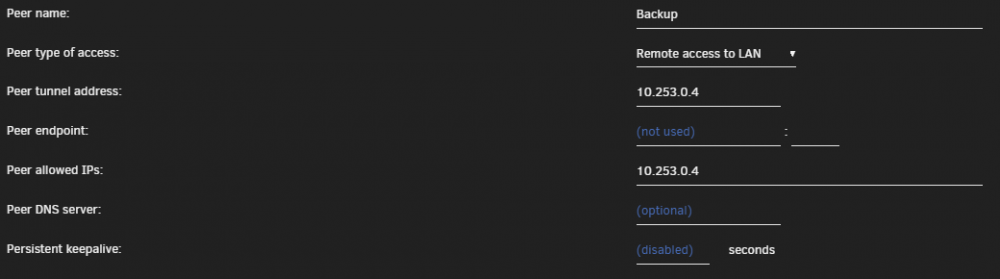
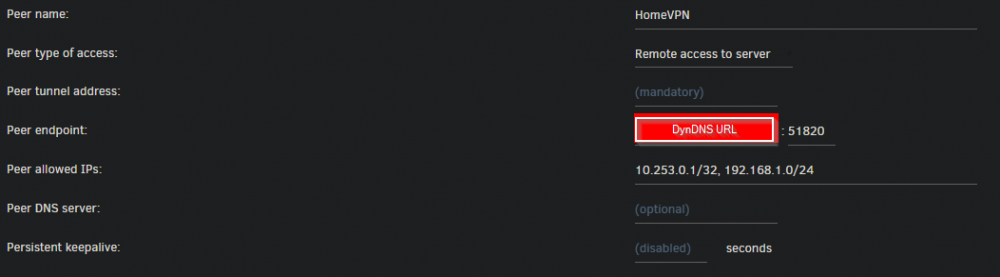
-
Disabled the ZT docker, enabled WG and boom. No GUI. Here's the diagnostics from that exercise (with time zone corrected). backup-diagnostics-20200122-1850.zip Have I somehow misconfigured WG?
-
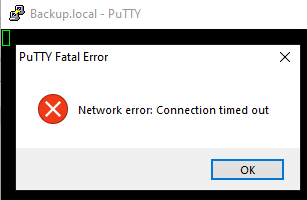
Started from scratch again with the same USB stick. Somehow, I managed to copy over all of my docker config, though I didn't intend to, but it led me directly to the problem! I have these dockers installed: Binhex-preclear (stopped) DiskSpeed (stopped) DuckDNS (stopped) OpenVPN-AS (stopped) ZeroTier (Auto-started) I have these plugins currently installed: CA CA Auto Update ControlR Dynamix File Integrity Dynamix SSD TRIM Dynamix WireGuard I rebooted after installing and configuring each plugin. Everything was fine until I enabled WireGuard. As soon as I did "Import Tunnel" (pulling in the same config file I created on my primary server and have used previously) then activated the tunnel, I lost connection to the GUI and could not even connect using PuTTY. I logged in at the console and issued "powerdown". When the server came back up, I started with GUI at the console and logged in to disable the WireGuard auto-start (which I'd also selected). Auto-start was disabled, so it looks like whatever happened happened before the server could store this setting. Of course, I did not pull diagnostics before rebooting - that would have made sense. The current diagnostics (after the reboot, timestamp 1821) are attached. It seems that I can recreate at will by activating the WireGuard tunnel (click the "Inactive" slider to "Active", click the "Done" button). The diagnostics pulled from the console after doing that but before rebooting the server are also attached (time stamp 1527 - it seems the server is still on PST, while I'm on EST - oops 🤷♂️). I would guess that the issue is a conflict between ZeroTier and WireGuard, except, that I had ZT installed and enabled when I first set up WG. I'm going to do some testing to see if it's just WG or the WG/ZT combo that causes it, or if there's something else at play here, too. Any additional suggestions are more than welcome! backup-diagnostics-20200122-1821.zip backup-diagnostics-20200122-1527.zip
-
Haven't tried doing that again, but I guess I will. I'll also give a think to exactly what this machine needs to have running on it - it should be a very small set of additions to the base OS. Sent from my moto g(7) using Tapatalk
-
Nobody has any ideas or suggestions? Sent from my moto g(7) using Tapatalk
-
@limetech @jonp - hate to ping you guys directly, but this one seems to have stumped our otherwise excellent tech support team. Do you guys have any thoughts on what might be going on? Sent from my moto g(7) using Tapatalk
-
Just for fun, the GUI decided to respond! I grabbed new diagnostics just to see if there's anything different. backup-diagnostics-20200115-1930.zip
-
Sadly, this is back. Now, sometimes, I'll attempt to log in, the spinner icon will stop, and it will tell me that the server is taking too long to respond. Then after a few moments, the spinner (running Brave) will start again and the Dashboard will load. I just replaced 2 2TB drives with one 4TB drive - I had to do that from the GUI on the console. After booting, I was able to connect for a bit and edited my shares to remove the ban on the two drives that I'd pulled (I'd previously emptied them). I got through all of them, clicked the "Main" link and the GUI quit responding. Here are the latest diagnostics. Any thoughts at all on this? Any suggestions other than rebuilding the USB stick again? That can't be my fallback solution - this is going to be an off-site backup machine and I have to be able to access the GUI (using WireGuard) to do the remote management. My son could do things locally, but he'd still need to be able to access the GUI from the local LAN. backup-diagnostics-20200115-1857.zip
-
I've been having issues with movies from my collections (from Emby) not showing up properly in Kodi's movie sets (they're incomplete or missing entirely). In my research, I've come across mentions of this plugin, but couldn't find it in Kodi. Today, I came to look through this thread to see if anyone else had ever had issues like I was having, and there it was, in one of the very first posts on this thread. Thank you!!!
-
And, I was able to SSH in to it. Thank you again, good sir!
-
@binhex Here's the preclear with errors as requested. preclear_rpt_Z303DVL4_2020-01-05 Interesting to note that all the speeds listed are in the 120-140 MB/s range, yet the display consistently showed 200.1 MB/s during the post-read and was showing in the 170-180 MB/s range for the pre-read. (not just at the beginning of the disk, towards the middle, too.)
-
le sigh... Honestly, though, this is the first drive I've ever had fail during a preclear. I'm glad I ran it! It's currently at 86% of the post-read and chugging along at rock-steady 200.1 MB/s so it's moving nicely. I'll plug it into my Windoze desktop via a USB adapter and run Seatools on it then RMA it.
-
1. Done, then reinstalled. Now uninstalled again. 2. Done 3. Will do as soon as the preclear finishes. Thanks, will report back. I'm at 78% of the post-read on a 4TB drive reading at 200MB/s, so it should be fairly soon.
-
I'm preclearing a brand new drive (it hasn't finished yet, so no report to post) and I've got "Warning [BACKUP] - reallocated sector ct is 8". That's not a good sign, is it...
-
None are zero bytes. They range from 93 to 3272 bytes. Interesting, I don't think I'd ever looked there. Both my main and backup servers are set to "local". I'd never noticed that it said that in the title bar of the window because it only shows that when I'm logging in. Once logged in it shows "< user >@< server >" and there's no TLD displayed at all. Thanks for pointing that out!
-
The contents of /backup/flash/config/ssh: I have no idea of what "normal" should look like, so I can't say if that's it or not... All files are dated 12/31/2019 except for sshd_config which is dated today, I presume since I just reinstalled the SSH plugin
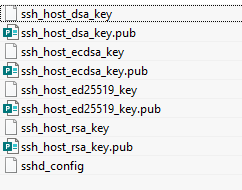
-
Nope, same "Access denied" with or without the SSH Plugin installed.
-
@itimpi in response to your question on my OP: SSH is working just fine on my main server with the plugin and 6.8.0, so I don't think there are any compatibility issues on the Backup server between the plugin and 6.8.0. I haven't tried without the plugin on my Backup server, but will go ahead and do so, just because... you never know...
-
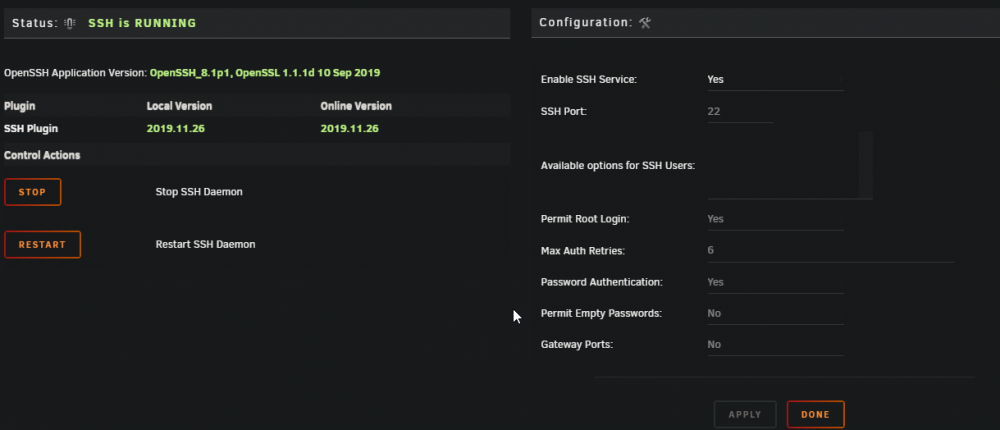
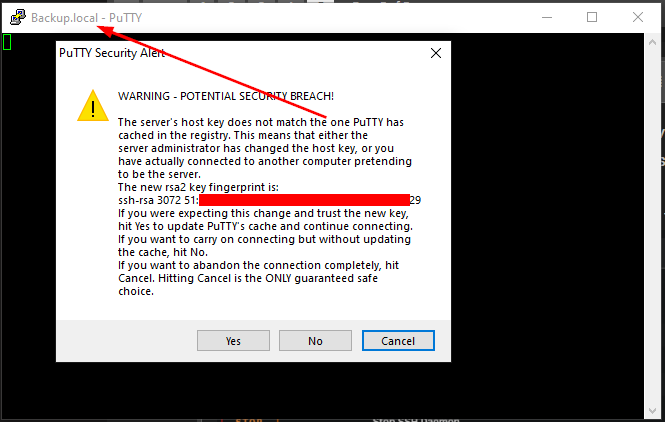
As noted in my rogue General Support form post, I'm having issues accessing my Backup server via SSH now that I've rebuilt the USB stick for the server. I started with a clean install and added all plugins/dockers 1 by 1 until everything was reinstalled. I can log into the WebGUI, but I cannot SSH in. I do have the plugin installed and SSH is enabled, allowing root logins: This is what I get when I try to login via SSH: I click "No" to continue without saving the fingerprint (for now), then login with "root" and my password and get a simple "Access denied" response. I would expect the fingerprint to have change after a rebuild of the flash drive, so that doesn't surprise me. What does surprise me is that the server name is now "Backup.local" - it's always reported just "Backup" in the past. I opened this PuTTY session by clicking on the same old saved session that I'd used before the rebuild. I've also tried connecting via IP and get the same response Diagnostics are from my OP in the wrong forum - I've installed the preclear docker since then and currently have a drive preclearing. I wouldn't think that would impact the data in the diagnostics significantly since I had the issue both before and after installing the docker, but I can post new diagnostics if that would be preferred. I'm sure there's something in the plugin that I have misconfigured. I put this server together as a backup 9-12 months ago, though, so I don't recall what configuration changed I may have made, and, of course, I failed to screen shot everything before starting from scratch... backup-diagnostics-20200104-1517.zip
-
Ah! Thank you. I didn't realize the difference. I will most definitely change my thinking on this. Not that I had any concerns, I just thought the Unraid integration was still considered somewhat beta. Sent from my moto g(7) using Tapatalk


