





FreeMan
Members
-
Joined
-
Last visited
Everything posted by FreeMan
-
Wow! I knew that my backup set (200k photos = 1TB, plus other stuff) was going to require additional memory - it did when it was running on my Win7 machine, but I figured that I had some time to figure out how to do that while CP got started. Changing this a few minutes ago has made a world of difference in performance!
-
Wow, excellent work! Thanks for doing the testing! I agree, 0.2 seconds isn't very long for a program to do some encryption, however, as fast as CPUs are these days, that still allows for the possibility of some damage, but I'd think not much. As far as the directories where the bait files are written, I certainly get your point. My concern with that, though, is that the research presentation RobJ mentions in this post: https://lime-technology.com/forum/index.php?topic=52462.msg503956#msg503956 they found that there are several different classes of ransomware software, and they don't all do a top-down, or even bottom-up approach to their encryption processing. Actually, the one that seems to be least used is the only one that does go top-down. With that in mind, if you're really worried about getting hit, I'd think the bait files would be best everywhere. Your suggestion, with an option to limit directory depth would probably satisfy everyone. One thing to note, Squid, is that in the more prevalent classes of ransomware, there's a tendency to start with the smallest files first. I note from ljm42's directory listing that your files are pretty large. You may want to make one of the bait files 512 bytes or smaller to increase reaction time to that particular class of scum. Yes, it was a very slow day at the office and I read the whole presentation, why do you ask?
-
Problem with FTP is that there are multiple ways of running a server (built-in, plugins, numerous dockers) How do you detect and stop them all? FTP will remain on the backburner for a while. By default, FTP runs on port 21 and sFTP on port 22. Would it be possible to block those ports as part of the defenses? It wouldn't be 100%, but it would stop FTP no matter how it was set up. You can add the port limitation as a disclaimer, or, possibly, add in an option to specify the FTP ports if the user is not using defaults. Security through obscurity FTW! All in all, this sounds like a fantastic plug-in, and I'm definitely monitoring this for future use!
-
Yup, Latest update fixed the issue for me also Does this mean that there haw been an additional CrashPlan update since and that the 2nd fix took care of whatever the issue was in the first fix, or does it mean that it took 2 installs of the first (and only recent) fix to make it work? Also, what's been fixed/updated? I'm only 48GB into a 1TB photo backup, and it took several days for CP to settle itself down and actually start making progress. I don't want to kill off the backup if it's for something minor that won't really impact me. Many, many thanks to gfjardim for getting this docker working in the first place! There is an update to the CP docker and the update to the docker should not affect what you have already uploaded. when CP starts it should scan what has already been uploaded and start where it left off I've been running CP from my Win7 client for a couple of years, I know it will pick up where it left off (though I realize that wasn't obvious from what I posted). Unfortunately, when I went from Win7 to Win10, it didn't want to pick up the hard-links to unRAID... Anyway, for the first 4-5 days once I got CP running via this docker, it kept restarting the backup. i.e. I would look at it at the end of the day and it would say it had backed up 1234 files @ 1.2GB. The next morning, it would report 324 files @ 458MB (numbers for illustrative purposes only. I was confused, so I started making screen shots and it was definitely going backwards in its completion numbers). That's what I meant by "settle itself down". I know I've got a massive number of photos for it to backup, and that it's going to take a while, I'm just a little gun-shy about having it rescan and attempt to pick up where it left off again - I don't want to go through another week of restarts while it figures itself out. I've got a lot of other stuff that I want to get added into the backup set, but the photos are the most important. Once that share has completely backed up, I'll add the other stuff in. Thanks for the info, Leifgg. At this point, I'll probably let it run on v4.7 for a while longer due to the reasons listed above. Does anyone know if there would be a real issue with running with the older client? I know that it would auto update itself on Windows, and that it did run pretty smoothly.
-
Yup, Latest update fixed the issue for me also Does this mean that there haw been an additional CrashPlan update since and that the 2nd fix took care of whatever the issue was in the first fix, or does it mean that it took 2 installs of the first (and only recent) fix to make it work? Also, what's been fixed/updated? I'm only 48GB into a 1TB photo backup, and it took several days for CP to settle itself down and actually start making progress. I don't want to kill off the backup if it's for something minor that won't really impact me. Many, many thanks to gfjardim for getting this docker working in the first place!
-
I'm going to go out on a limb and say the reinstall fixed things right up, since it all seems to be working now. I did not attempt to fix any permissions in MariaDB, and that may, actually, have been contributing to the Piwigo issues I was having. Don't rightly know... Thanks for asking, though!
-
By the time I'd seen that you posted the video, I had it working. I'll have to take a look to see if there's anything critical I may have missed. I really appreciate all your help CHBMB! My new daughter-in-law is now able to start perusing the wedding pictures as I start adding them to albums here. She's very, very excited!
-
I will keep that in mind. (Next project, figure out the best way to do that. I saw your reference to CA, but I'll have to do some rummaging in there...) And now for something completely different... Uninstalled piwigo uninstalled mariaDB reinstalled mariaDB reinstalled piwigo and... IT WORKS!!!!!! I think it may be because I didn't have a separate user created within maria to use for piwigo. Now that I think about it, I'm about 100% certain that was the issue. I thought the piwigo setup would create that user for me, this time I created it in maria prior to reinstalling piwigo & used that one.
-
Ah, I can see that now that you mention it. OK. Looks like I've got 200+GB free on cache, so that's what I'll do. Might be a good excuse to buy a larger SSD for cache in the not to distant future...
-
Show off. OK, I'll give that a shot. Is there any potential issue in mariaDB since I mapped /config <-> /mnt/user/appdata/mariadb instead of mapping it to /mnt/cache/appdata/mariadb ? I didn't want to put the entire database on my unprotected, single, 250GB cache drive instead of loading the thing into the array.
-
I am using HeidiSQL. If you'll note, my original post said "I got HeidiSQL installed" - i.e. I'm not 100% certain what I'm doing in there, but I am using it! I checked the user settings, and it was set to "%" as you showed it. However, it says that my root user has an empty password despite there being a hashed value of some sort in the Password field - is that a concern? I set "From Host:" to "localhost", saved it, then reset it to "Access from everywhere", and I'm still getting the same error. I granted root access to the piwigo database (after I took the screen shot - realized what was different between yours and mine) - still couldn't get access. Without any changes at HeidiSQL, I uninstalled piwigo, deleting the container, deleted the entire piwigo directory tree from the mapped /config location, then reinstalled. Still getting the same error.
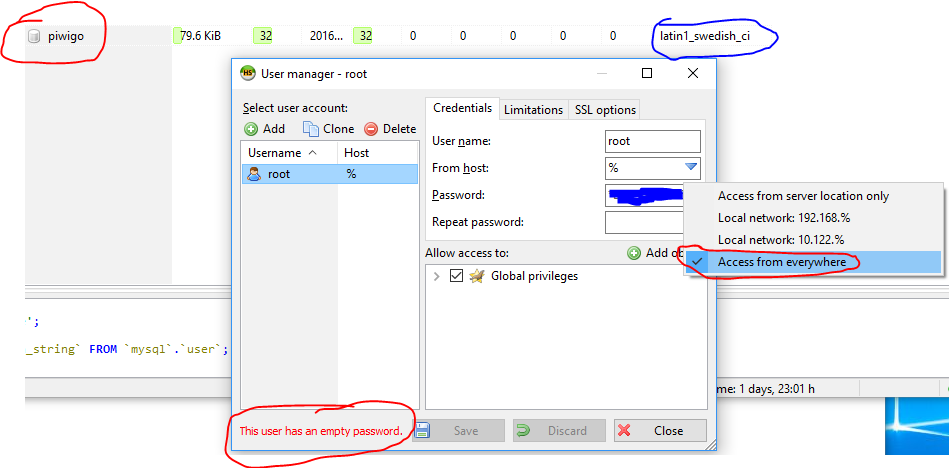
-
Like this? root@NAS:~# docker exec -t -i 46aa7177f8fa /bin/bash root@46aa7177f8fa:/# mysql -u root -p Enter password: Welcome to the MariaDB monitor. Commands end with ; or \g. Your MariaDB connection id is 16 Server version: 10.1.17-MariaDB-1~trusty mariadb.org binary distribution Copyright (c) 2000, 2016, Oracle, MariaDB Corporation Ab and others. Type 'help;' or '\h' for help. Type '\c' to clear the current input statement. MariaDB [(none)]>
-
So internally the dockers communicate on a VLAN in the 172.* range? Essentially... Awesome! How do I do that? It's been a mighty long time since I've done DBA type work - like Oracle 7.x was current... I've been doing some MSSQL work more recently, but not administering the server or dealing with permissions.
-
OK, I decided to give piwigo a try since PhotoShow seemed quite unhappy with 200k pictures. I got the LS.io mariaDB installed. I got HeidiSQL installed HeidiSQL can connect to mariaDB I used HeidiSQL to create database 'piwigo' after some fiddling, I got everything correctly configured in the piwigo first install screen. I then got this: Warning: mysqli::mysqli(): (28000/1045): Access denied for user 'root'@'172.17.0.1' (using password: NO) in /config/www/gallery/include/dblayer/functions_mysqli.inc.php on line 67 Warning: my_error(): Couldn't fetch mysqli in /config/www/gallery/include/dblayer/functions_mysqli.inc.php on line 824 Warning: my_error(): Couldn't fetch mysqli in /config/www/gallery/include/dblayer/functions_mysqli.inc.php on line 824 Piwigo encountered a non recoverable error [mysql error ] Can't connect to server #1 my_error /config/www/gallery/include/common.inc.php(121) #2 include_once /config/www/gallery/index.php(26) Any suggestions on what to look for? I'm not sure where the 172.17.0.1 IP address came from. I use 192.168.* for my internal network (unRAID has a static IP), and my external IP address is 73.* Also, here are my piwigo settings:
-
I seem to have the same ownership as ridge. Do I need to perform the same fix he did? At this point, I'm not having any issues at all as I've just installed (within the last 30 minutes) for the very first time the LS.io mariaDB docker. I'd just like to get this squared away before doing anything else. Here's mine: drwxr-xr-x 1 abc users 344 Sep 26 19:23 . drwxrwxrwx 1 abc users 136 Sep 26 19:23 .. -rw-r----- 1 abc users 2121 Sep 26 19:23 46aa7177f8fa.err -rw-rw---- 1 abc users 16384 Sep 26 19:23 aria_log.00000001 -rw-rw---- 1 abc users 52 Sep 26 19:23 aria_log_control -rw-rw---- 1 abc users 50331648 Sep 26 19:23 ib_logfile0 -rw-rw---- 1 abc users 50331648 Sep 26 19:23 ib_logfile1 -rw-rw---- 1 abc users 12582912 Sep 26 19:23 ibdata1 -rw-rw---- 1 abc users 0 Sep 26 19:23 multi-master.info drwx------ 1 abc users 2976 Sep 26 19:23 mysql drwx------ 1 abc users 72 Sep 26 19:23 performance_schema Here's the fix I'm referring to: http://lime-technology.com/forum/index.php?topic=42422.msg420112#msg420112
-
Thanks for the feedback, Ashe & jonathanm. Considering the fact that I've got nearly 1TB of photos (yes, TB, not GB, no I don't have pack-rat tendencies, why do you ask?), having to import & duplicate every single photo doesn't seem like the best option. PhotoShow seems to do what I want: http://lime-technology.com/forum/index.php?topic=42424.msg472444#msg472444 However, it doesn't seem like it works well with mass quantities of pictures: http://lime-technology.com/forum/index.php?topic=42424.msg488984#msg488984 I guess I'll check out Sparklyballs' Lychee container.
-
hmmm... I'm backing up my unRAID to CP's cloud, but I do have other backups incoming to my machine. I hadn't checked on the destination for those, I was focused on the more important "get my server backed up" issue. I did read the OP, but that part didn't register as far as location for incoming backups. Thanks for pointing that out. However, I did have /backup <-> /mnt/user/Backup which is NOT in my docker.img file. I just changed that to /mnt/user/Backups, which is where I actually had the previous backups. When I saved the mapping change I got this: Hopefully "Error: Error Code" means more to you than me. Should I just uninstall and reinstall the container?
-
Dockers just really aren't liking me... I got the Version "Not Available" notification at some point today. When I clicked on "Update" option for your CouchPotato docker, it went through the download routine, then gave me an error message (which I didn't bother to capture, of course). When I closed out the notification window, this is what I saw: Notice the greyed out binhex/arch-couchpotato.latest there at the bottom. I presume at this point, I remove the container, then reinstall it, and, since my ..\appdata\couchpotato directory is still there, it should have all my config info, correct? Also, what's causing the "not available" for all my dockers? If they were only yours, I could see that something may have broken at your end causing them to not display, or that you'd updated them but it wasn't properly picking up the new version, but it's happened to them all and the last 2 aren't from your collection.
-
And... that didn't seem to have helped. I'm obviously setting something up incorrectly, but for the life of me, I'm not seeing the issue. I reinstalled CP, got it started and it filled up my docker.img file within minutes. Here is a screen shot of how I've got the drives mapped. where have I gone wrong?
-
Two questions: 1) The Piwigo page says things like a web server, MySQL and an FTP client are required. I presume that the docker installs all of those things 2) Since it says an FTP client is necessary, do I need to transfer my files from my unRAID server where they're already stored to a new location on the same server so that Piwigo knows about them, or can I just point Piwigo at them and have it scan an existing directory structure to find them? I don't want to have to store everything twice just to be able to display them.
-
Thanks. Took a minute to figure out which post "a few up" referred to, but I've got it. 20GB docker.img created, all other dockers reinstalled. I'm about to get CrashPlan reinstalled. Thanks for the help!
-
Another disk precleared with no issues. Big thanks to JoeL for the script and gfjardim for the plugin!
-
That does seem to be your issue, as it was mine. Learn from my mistake - uninstall the docker & reinstall it, don't try to change the cache mapping while it's running. Doesn't seem to work all that well.
-
You can do this on 6.2 What I suggest you do: Update to 6.2 when you can Then delete docker.img and recreate it. Then add all of your previous app via CA "previous apps" tab. OK, pre-clear finished, and 6.2 installed! So far, so good. Do I uninstall the dockers first, or just blow away the docker.img file? Also, I went with the default 10GB .img file, but it seems that 15-20GB is recommended. Can I create the new .img in a larger size & still get everything to install properly? It seems that I should be able to, but I just want to double check. Also - just noticed that there's an update to CA (9/17/2016) should I update that before reinstalling, or leave it on the current version (9/15/2016) for the fix, then update it? Does this mean that I should delete "docker.img" from disk, or does it mean I should go into Settings | Docker, disable docker, save it, then reenable it?
-
Clearly, I've made a mistake, and I only seem to have made it worse by trying to fix it. I installed the CP docker and everything worked great. I adopted my old backup (that was running on my Win machine for about 2 years) with about 1.4TB of data backed up to Code42's cloud. I followed their instructions to select my new locations and it was happily scanning along until I received 'Docker.img full' errors. Re-reading the OP and looking at the details of my install, I realized I had installed /config <-> /mnt/user/appdata/CrashPlan instead of /mnt/cache/appdata/CrashPlan. I stopped the docker, changed the mapping of /config and restarted the docker, confident that I had everything fixed. After a minute or two, I got a nice green pop-up telling me that my docker.img file use was back below 75% (it's at 30ish% right now). I'm on it, I've got this, no problem! I returned to the CrashPlan tab in Firefox, hit F5, and nothing. The No VPN page came up, but it wouldn't connect. I went to the docker tab in my unRAID management window, and I saw this: Great. What have I broken... Wait, that makes sense, there's a docker image on /mnt/user/appdata, and nothing's pointed at it - how do I delete the sucker? I clicked the disk icon, and got the 'Remove' option and clicked that, hit 'Just do it' I got the confirmation message: Fantastic, job done! I closed out the pop up, and there was that pesky orphaned image icon. OK, we'll go to the 'Dashboard' view, then back to 'Docker', and it'll be gone. Nope, no such luck. OK, maybe this will actually take a couple of minutes, let's go reinstall the docker in the mean time and everything will be great. I wandered off to the Community Applications tab, selected the 'Backups' department, clicked on the CrashPlan icon again, made sure to specify /config <-> /mnt/cache/appdata/CrashPlan, and hit Done. It went through its install routine, I headed over to the 'Docker' tab, and... yup, the orphan image icon is still there and there's no sign of the CrashPlan docker to be found. After several attempts to Remove the orphan, all with the same result, I attempted to install the docker to the original /config <-> /mnt/user/appdata/CrashPlan location in the hopes that unRAID would somehow reattach the docker to that orphan image so I could uninstall the docker correctly & get rid of it. That hasn't worked either. TL;DR - how the heck do I remove this orphan image and get your lovely CrashPlan docker to reinstall itself? I have the feeling I'll have to restart my backups, since it was at the very beginning of the process of reconciling things, but who knows, maybe CP will happily pick up where it left off. Either way, I don't care, I can wait a bit for all 1.4TB to push back to their servers, I just want to get this thing running again. As a side note, it might be nice to change the docker install config to default to having /config <-> /mnt/cache/... instead of /mnt/user/... since /mnt/cache is the recommended location for docker installs, and goobers like me tend to make mistakes and assume things when they're playing on the server late at night... A couple of additional points: [*]I'm at 85% of the pre-read of pass 2 of 2 on a preclear of a new drive, so rebooting the server (if necessary) will be postponed for a couple of days [*]As I was typing this up, unRAID 6.2 was released. See point 1. [*]My 975 GB of family photos are being copied to my solitary 1TB external drive, just in case, so until that finishes, see point 1.

