





ullibelgie
Members
-
Joined
-
Last visited
Everything posted by ullibelgie
-
Ja - die links sind hilfreich... Wie ich mit schon dachte gehen die Dinge nicht von selbst...😁😂 Also werde ich wieder was lernen und mich damit befassen - die Stichworte sind ja genannt in den Links und ein guter Beginn....
-
Ausgezeichnet - das scheint mein Problem genauer zu erklären und damit auch hoffentlich zu lösen... erstmal lesen und verstehen....
-
Es wird hier das "official Nextcloud docker image" verwendet bei dem Docker von "knex666" Ich glaube aber, das beschriebene Verhalten hat nix mit dem Docker, sondern eher was mit Netzwerkeinstellungen zu tun. Wobei ich nicht sicher bin, ob ich wirklich einen eigenen DNS server im LAN konfigurieren muss, um z.B. ein riesiges 1.8GB Videofile ohne Internetverbindung (Bandbreite!) direkt vom LAN Client "lokal" in die Nextcloud schieben zu können. Jedenfalls wird für den Nextcloud AIO Docker (den ich aber momentan noch nicht nutze), für die interne LAN Verwendung von Nextcloud empfohlen um pihole als eigenen DNS server zu nutzen ... Ich wollte aber grosse Klimmzüge vermeiden - pihole kenn ich (noch) nicht und daher verkompliziert das kurzfristig die Sache... oder ist das doch eine empfehlenswerte Software und das Einarbeiten wert ? Ich halte die Dinge auch gerne so einfach wie möglich.... Danke
-
Bisher habe ich mich immer über meine eigene Domein bei der Nextcloud angemeldet. Erst jetzt, wo ich ein sehr grosses File hochladen wollte, kam ich auf die Idee, über das LAN und die interne IP-adresse des Unraid servers mit angehängtem Nextcloudport (hier ist das 192.168.1.40:8666) mit anzumelden. Aber aus irgendeinem Grunde funktioniert das nicht - nach dem dritten Fehlversuch bekam ich sogar das: Mein Router scheint mich wegen aktiviertem NAT Hairpinning/Loopback auch nicht nach draussen ins Internet zu schicken, sondern landet direkt am Inlogschirm Für Anfragen aus dem Internet setze ich den NPM Proxymanager ein (Unraid Docker mit Let's Encript) - in dem Falle wird https erzwungen, aber natürlich nicht im eigenen LAN Was habe ich vergessen richtig einzustellen, wodurch user, die über das Internet einloggen können über das LAN nicht bekannt sind/ oder aus anderen Gründen abgewiesen werden ? Das interne LAN muss ich doch nicht noch erst als 'trusted site' in der config Datei eintragen, oder ? Vielen Dank für den hilfreichen Tip...

-
upgraded 7.01 --> 7.1 no problem - like the responsive GUI, as I often use laptop for admin tasks... 👍
-
Many thanks for info and the link...
-
Thank you for pointing out RaidZ expansion with the release of OpenZFS 2.3 early 2025 Will that feature be implemented already with the release of Unraid 7.1 ?
-
I am a casual home user of Unraid. I started with it, because I was looking for a way to digitize my many paper documents and store them at a safe place - a typical application case for a NAS. In addition, I found running applications from the server (as VM or even more efficient with a docker container) is a nice addition and let's me starting using Nextcloud, etc... Then there came the introduction of Unraid 7 and the possibility to use ZFS as a file system and I became searching for information about it. I am not a IT-specialist by profession, perhaps (at max) an ordinary user interested in t0echnology. As such, I like to know as much as possible about the technology, before I would actually use such "new technology" like ZFS... Well, I decided not to use it currently, because I do not need it's features at this moment, but I found an article, which I found very interesting. Searching for ZFS (as a search word) in the Unraid forum showed me, that seem to be not many Unraid users which favor mirror vdevs, like it is advised in this article - my forum post is therefore mainly to bring this article to your attention. Perhaps some real IT professionals with ZFS experience can comment on this issue - as the article is rather old already (2015) but it advises and explains usage with ZFS on whatever system, not Unraid specific: https://jrs-s.net/2015/02/06/zfs-you-should-use-mirror-vdevs-not-raidz/ I found this information rather useful
-
Danke für die schnelle Antwort - das bestätigt ja auch, was ich IT-Idiot so recherchiert habe....🤐 Also nochmal gut überlegen, welcher Workflow für mich/uns meist akzeptabel ist und ob und wie wir das Zwischenspeichern der Fotos auf einem PC im Netzwerk vermeiden können.
-
Hier mein Wissensstand was zu meiner obigen Frage führt: - Scheinbar gibt es keine Möglichkeit auf gewöhnlichen (unmodifizierten) Android Smartphones einen Samba Server einzurichten, sodass unassigned devices Android Geräte mounten kann, wie externe remote shares - Offenbar ist es nur möglich mittels Samba Client auf Android Geräten direkt auf den Unraid server zu schreiben. Ich will aber von Unraid die Fotos vom Smartphone LESEN und keine Schreibrechte vergeben .... Ist es irgendwie praktisch und unkompliziert anders realisierbar die Fotos vom Smartphone ohne Umwege direkt einzulesen ? Ohne die Schreibrechte auf dem Unraid Server zu vergeben muss ich immer Smartphone Fotos erst auf einen anderen PC im Netzwerk einlesen, dann den PC via unassigned devices plug-in mounten im Unraid Server, um schliesslich die Fotos dann vom Server übernehmen zu lassen..... viel zu kompliziert, finde ich... Hat jemand eine Idee ? Photoverwaltung passiert auf dem Unraid Server mit Digikam Docker.
-
Danke für die vielen Hinweise.... werde die Alternative 2 dann nehmen..
-
Sorry - habe mich vertan - es ist die Nextcloud Docker Version von knex666 - da gibt es in der Tat ein support Forum - werd ich da mal fragen...
-
Ich nutze die Nextcloud Dockerversion von Linuxserver.io... Aber da es wohl nix mit Unraid zu tun hat, werd ich mal anderswo suchen/fragen ... Danke erstmal für die Aufmerksamkeit...
-
Bei Nextcloud wollte ich jetzt einmal die APP "external storage" configurieren. Dabei bekomme ich jedoch den folgenden Hinweis: Wie kann ich im Nextcloud container das php modul smbclient nachinstallieren ? Habe in den Anleitungen dazu nix gefunden... Danke

-
your advice solved my problem... excellent support!
-
Additional Info: The harddisk is a bare harddisk Exos 8TB - for backup purposes, I quickly insert the HDD in a USB docking station from Sharkoon. It has the advantage, that after the backup I can take the HDD out of the docking station and store it at a different place outside of my home at a save location. The HDD has no smart errors Perhaps the UAS driver needs to be disabled - but I do not know, how to do this with the Unraid server to work correctly. Thanks for info
-
Thanks for quick answer, @JorgeB - great support with so many people asking many things... Yes, it is a bare Exos harddisk but not a Seagate enclosure/product which contain the harddisk. So lsusb -t returns: ---- root@Tower:~# lsusb -t /: Bus 001.Port 001: Dev 001, Class=root_hub, Driver=xhci_hcd/16p, 480M |__ Port 003: Dev 009, If 0, Class=Hub, Driver=hub/4p, 480M |__ Port 007: Dev 003, If 0, Class=Hub, Driver=hub/4p, 480M |__ Port 002: Dev 005, If 0, Class=Mass Storage, Driver=usb-storage, 480M |__ Port 011: Dev 004, If 0, Class=Human Interface Device, Driver=usbhid, 12M /: Bus 002.Port 001: Dev 001, Class=root_hub, Driver=xhci_hcd/10p, 20000M/x2 |__ Port 003: Dev 008, If 0, Class=Hub, Driver=hub/4p, 5000M |__ Port 001: Dev 009, If 0, Class=Mass Storage, Driver=uas, 5000M |__ Port 002: Dev 010, If 0, Class=Mass Storage, Driver=usb-storage, 5000M root@Tower:~# -----
-
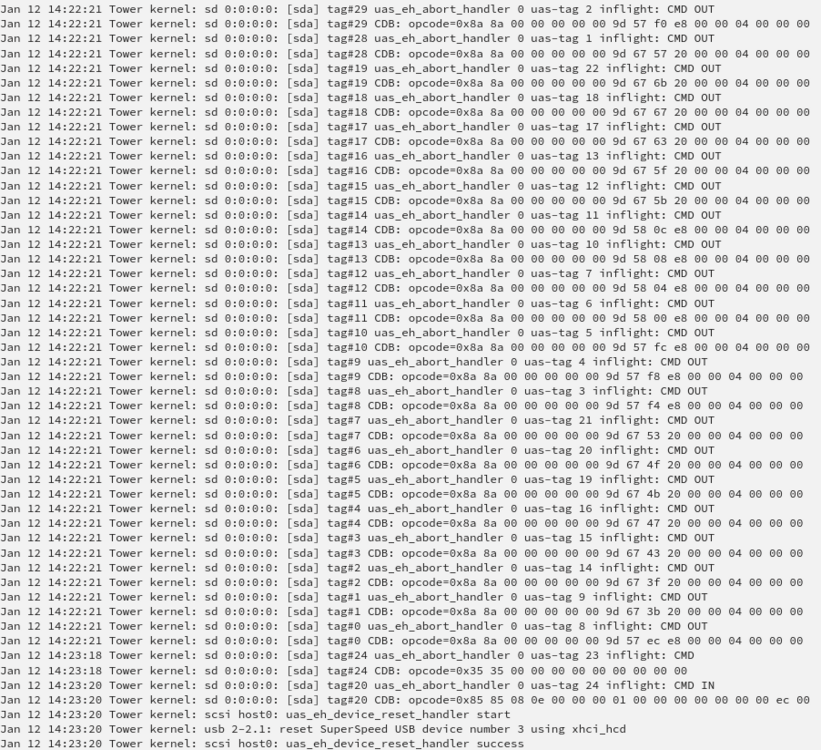
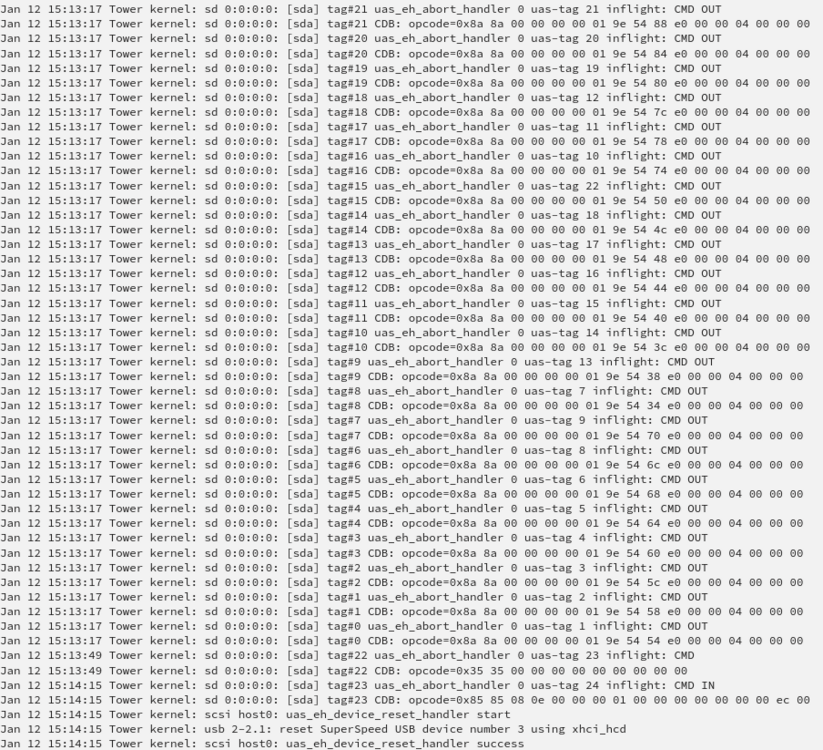
Unraid upgrade from 6.12.14 to 7.0.0 seemed to be flawless in the first moment. B U T ! After 7.0.0 was installed, I wanted to make a new backup of the important parts of the server to my external USB 8TB backup HDD (rather new Seagate Exos type) as usual... (using famous rsync script of @mgutt) However with the new system it doesn't work any more or is so slow, that the it is useless... Here is a typical message of syslog... it goes like this over thousands of lines in the syslog: I have read in the release notes of Unraid 7.0.0, that there is a change with Linux Kernel about external Usb storage devices (like my external USB HDD is): "...Other changes: ... Linux kernel: force all buggy Seagate external USB enclosures to bind to usb-storage instead of UAS driver ..." Question: Could the fault with my external USB drive have to do with some Linux Kernel change causing incompatibilty problem between my USB hardware and new Linux Kernel ?? What should I do, in order to be able to take back-ups to that USB drive as with 6.12.14, which never had that problem ? Perhaps there is some settings problem or anything else, I can do Many thanks for support and greetings P.S. diagnostics file attached... tower-diagnostics-20250112-1653.zip
-
Unraid upgrade from 6.12.14 to 7.0.0 seemed to be flawless in the first moment. B U T ! After 7.0.0 was installed, I wanted to make a new backup of the important parts of the server to my external USB 8TB backup HDD (rather new Seagate Exos type) as usual... (using famous rsync script of @mgutt) However with the new system it doesn't work any more or is so slow, that the it is useless... Here is a typical message of syslog... it goes like this over thousands of lines in the syslog: I have read in the release notes of Unraid 7.0.0, that there is a change with Linux Kernel about external Usb storage devices (like my external USB HDD is): "...Other changes: ... Linux kernel: force all buggy Seagate external USB enclosures to bind to usb-storage instead of UAS driver ..." Question: Could the fault with my external USB drive have to do with some Linux Kernel change causing incompatibilty problem between my USB hardware and new Linux Kernel ?? What should I do, in order to be able to take back-ups to that USB drive as with 6.12.14, which never had that problem ? Perhaps there is some settings problem or anything else, I can do Many thanks for support and greetings
-
Tach Revan335, Ich bin zwar ein IT-Greenhorn, aber vielleicht gibt das Hinweise aus den Release Notes zu Unraid 7: Zitat: "...Add support for overlay2 storage driver If you are using Docker data-root=directory on a ZFS volume, we recommend that you navigate to Settings → Docker and switch the Docker storage driver to overlay2, then delete the directory contents and let Docker re-download the image layers. The legacy native setting causes significant stability issues on ZFS volumes. If retaining the ability to downgrade to earlier releases is important, then switch to Docker data-root=xfs vDisk instead. ..." Zitat Ende
-
Danke - hat funktioniert... Alles wieder normal
-
Sieht hier so aus...
-
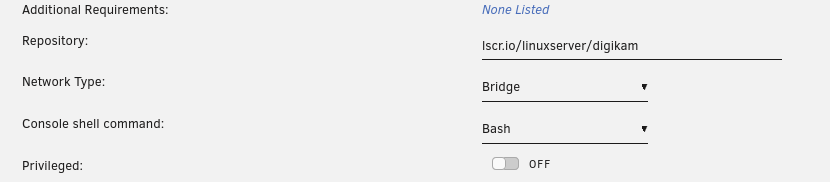
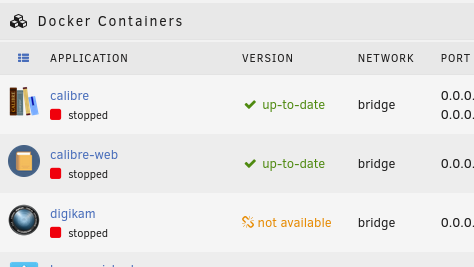
Hallo, was bedeutet es, wenn in der Docker Übersicht das so aussieht wie in der Beilage Digikam läuft problemlos (wenn der Docker gestartet ist natürlich) aber der Update pfad scheint "ausser Betrieb" Ich habe mal geschaut in der Unraid Apps - dort ist Digikam niet rausgeflogen.... Liegt das an Linuxserver.io die dort irgendwas verändert haben, oder an meinem Unraid system... Hatte kürzlich von 6.12.13 auf 6.12.14 gewechselt Danke für Info... Ulli
-
@alturismo Super - damit kann ich schonmal anfangen und schauen ob ich die VM sichern und wieder herstellen kann... Ja, das Plug-in habe ich auch gesehen, aber mehr als eine Beta version scheint es nicht zu geben - kann ich ja mal wenigstens testen...
-
Ich habe leider noch keine praktikabele Methode gefunden um VMs regelmässig zu sichern (Backup) Meine Konfiguration: Array aus 2 disks - 1x parity, 1x Data (xfs) Pool von 2x NVME in btrfs (Mirror) - Auf dem Pool befinden sich die Dockerdaten (regelmässige Backups mit appdata backup plug-in) aber im domein ordner auch die vdisks einer VM - die vdisk der VM is 50Gb Wie kann ich diese 50Gb am besten regelmässig sichern ? Genügt es die 50GB weg zu kopieren, oder brauche ich zum vollständigen Restore der VM auch noch andere Daten ? btrfs kann auch snapshot und Replikation - nur habe ich leider keine weitere Platte, die auch btrfs formatiert ist, damit snapshot und Replikation auchfunktioniert. Ausserdem ist mir der ganze snapshot und Replikationsvorgang bei btrfs etwas suspekt und viel zu kompliziert, da es kein fertiges Skript gibt. Mir ist die Gefahr das ich irgendwas falsch im Terminal eingebe einfach zu gross... bin ja kein Vollblut-IT'er.... Und realistisch sollte dann eben meine Backupmethode auch idiotensicher sein... gut wenn man sich selbst kennt...🤪 Meine normalen Array backups mache ich mit @mgutt script (rsync basiert) auf externe HDDs die auch XFS formatiert sind. Was schlagen mir die Experten vor... (ich habe im Unraid Manual gelesen, aber hier habe ich keine Methode gefunden, die mein Problem löst) Vielleicht doch einfach vdisk kopieren ? Hatte aber auch schon mal den Fall bei einem Restore test, dass eine vdisk von vor 2Tagen nicht funktionierte... (warum weiss ich nicht) Danke für Ratschläge




