wildfire305
Members
-
Joined
-
Last visited
Everything posted by wildfire305
-
I deleted it (krusader on disk 1). Shut down all dockers and all vm's. Turned off file integrity automatic. Still all the disks pop awake about a minute after being spun down. Shfs is the thing that shows up in iotop. Where else can I look at to try to find the culprit? I used to have the file caching plugin a while back, but I noticed that it was spending too much time scanning my directories and ironically it too was keeping the disks awake. The disks used to sleep a while ago. Would the esata enclosures have anything to do with the issue? I did move the other half of the disks into them a while ago around the time I noticed it wasn't staying spun down anymore.
-
I ran a diff on the two folders and it appears that the newer data is in cache. And disk 1 doesn't contain anything that cache doesn't already have.
-
root@CVG02:~# du -h -d 1 /mnt/cache/appdata 5.0G /mnt/cache/appdata/Plex-Media-Server 13M /mnt/cache/appdata/krusader 0 /mnt/cache/appdata/jsdos 0 /mnt/cache/appdata/Shinobi 5.2M /mnt/cache/appdata/DiskSpeed 464K /mnt/cache/appdata/QDirStat 0 /mnt/cache/appdata/MotionEye 2.7M /mnt/cache/appdata/HandBrake 0 /mnt/cache/appdata/photostructure 7.1G /mnt/cache/appdata/duplicati 12K /mnt/cache/appdata/transmission 812K /mnt/cache/appdata/luckybackup 60K /mnt/cache/appdata/filebrowser 111M /mnt/cache/appdata/crushftp 17M /mnt/cache/appdata/ripper 41G /mnt/cache/appdata/photoprism 98M /mnt/cache/appdata/JDownloader2 1.8G /mnt/cache/appdata/mariadb-official 63M /mnt/cache/appdata/sabnzbd 228K /mnt/cache/appdata/MakeMKV 100M /mnt/cache/appdata/firefox 3.8M /mnt/cache/appdata/nzbhydra2 6.3G /mnt/cache/appdata/binhex-urbackup 51M /mnt/cache/appdata/LibreELEC 348M /mnt/cache/appdata/digikam 208M /mnt/cache/appdata/tdarr 596K /mnt/cache/appdata/beets 595M /mnt/cache/appdata/FoldingAtHome 16K /mnt/cache/appdata/NoIp 333M /mnt/cache/appdata/clamav 18G /mnt/cache/appdata/jellyfin 0 /mnt/cache/appdata/PlexMediaServer 184M /mnt/cache/appdata/mysql 13M /mnt/cache/appdata/vm_custom_icons 81G /mnt/cache/appdata
-
Should I move that somehow? I don't typically run krusader unless i'm feeling in a gui mood.
-
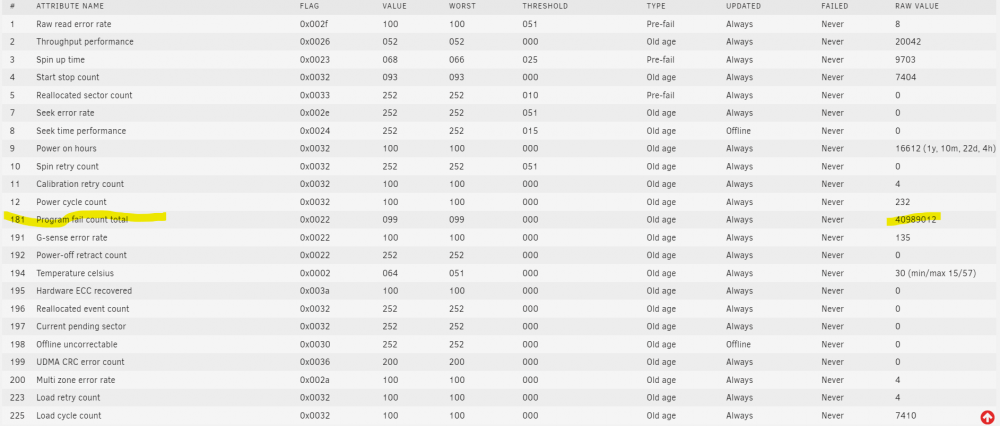
I see this one a lot: shfs /mnt/user -disks 63 -o noatime,allow_other -o remember=330 But i think that is just normal array writing activity. I do have the urbackup docker, I know that keeps it awake. But even putting that one on a schedule or turning it off completely doesn't fix the problem. cvg02-diagnostics-20211209-1200.zipI'll double check, but I'm pretty sure I put all of those on the ssd cache pool with my setup. I think the installation instructions told me to do so.I have this exact same problem. Did you figure out the cause? I've been watching iotop, but I can't seem to see it.urbackup-fuse.log2021-12-04 17:08:28,933 DEBG 'urbackup' stdout output: ERROR: Image mounting failed: Loading FUSE kernel module... modprobe: FATAL: Module fuse not found in directory /lib/modules/5.10.28-Unraid Starting VHD background process... Waiting for background process to become available... Timeout while waiting for background process. Please see logfile (/var/log/urbackup-fuse.log) for error details. UrBackup mount process returned non-zero return codeAll of the four mac os installation versions method 1 results in monterey being installed. Method 2 doesn't seem to download a complete file - 2GB img.Urbackup has a mount ability for the images built-in to the web gui. However, because I get "TEST FAILED: guestmount is missing (libguestfs-tools)" that feature doesn't work. Is it safe to manually install the libguestfs-tools manually from the dockers' console, or is this something Binhex can add to the image? I also don't currently know how to install libguestfs-tools, but I'm sure it's something simple like sudo apt get libguest blah blah blah.You could set the mount point of the external disk as a path in the container and map that in settings backup storage path.I have file integrity set to generate automatically. It seems to keep up on a daily basis. The hashes are stored in the metadata in the filesystem (If I understand the process correctly). Check export, if done after build and export, should verify the hashes. Mine performs with thousands of checks when I do it. I also maintain separate hash catalogs and par2 for the really really important data. You could be safe with par2 as it generates hashes. I'm really surprised to see that not more people are using par2 as an action plan for corruption when restoring from backup. Obviously this is only practical for archival data and not constantly modified data.Thanks! Those instructions worked perfect. The older ssd had drug it down to 125 MB/s. Now its over 500 MB/s with the offending disk gone.I would greatly appreciate it. I'm a noob, but not scared of the command line, I just grew up on the other side of the tracks with commodore and dos. I had played with the btrfs command line tools with some spare disks in a usb enclosure a little while ago, but I don't remember much. I really like that filesystem.Hopefully, this will be a quick one. I have a four drive SSD cache pool in raid 0 btrfs. I want to remove one because it overheats and performs poorly compared to the other three. The pool is only 25% full. Using using Unraid 6.9.2. Not sure if this is a super easy GUI task or if I need to run a btrfs command from terminal first. I read the post from 2020 about this, but I think that was for an older unraid version and the documentation needed to be updated. Is the procedure correct as follows: 1. Disable docker and vm (runs from said pool) 2. stop array 3. Disable disk desired to be removed in gui 4. start array 5. allow balance to complete (moving the data from the removed disk automagically) 6. stop array 7. remove fourth disk slot from pool. 8. start array 9. reenable docker and vm My fear is that the programming may or may not be there to handle the automated removal for the raid 0 situation. If not, then my procedure would lead to data loss/corruption. I have a backup of all data on cache so I'm not worried about that.Open but not running anything.... Will that do it? That could be the answer to all of my unclean shutdowns if so. I see the message that the server is shutting down, and then I just let it fail the putty session. I'm a bit of a noob, If I comb the logs, what would be a good search term for finding the reason for the unclean? I set up the syslog server last week so I should have it all.No rush, my day job is building a school so I'll be busy for a bit.Card is working great. I got it to work in foldingathome by modifying the config.xml file. I really wanted to try something that I knew would blast the thermals into this card for testing since it is used. However, out of two more tries, if I change the driver it results in a dirty array reboot both times. But regular rebooting works fine. Could just be my configuration or card. I have an MSI Geforce GTX 1050 2GB. I can live with the problem, but if you want to know more or diagnose I'm willing to provide as much information and testing as needed. Otherwise, everything is awesome.Looks like it's working perfect in jellyfin. I appreciate all the help. I was just giving it a bad test (dockers I didn't know didn't support it). It appears to be working fine. Cpu load is low and gpu is about 8% transcoding a 265 playback over the internet to my android tablet. I'm a happy camper. Now I get to play with more power. Got room in this old tank for a second gpu...Changed it and handbrake worked perfect! 700fps on a 264 encode! Only 45% loaded probably means it can do two or more encodes at a time! Typo, I meant worker node not client. I'll try adding the three parameters to the node docker and see if it works. Tdarr is used to do massive multiple node (or single) transcoding. I've used it for two weeks and gained 2tb switching some things to h265 from h264 and avi. You can use the server docker and nodes (win/mac/Linux/docker) to distribute the process across your network. We now have three gtx class cards in the network that can make the process go even faster. The beauty of tdarr is that it fully manages the workload and any failures and retries, and tests the output to confirm it did a complete job. That's a lot of work that I do not have to manage. Understood, thanks for the clarification. I don't think I did the smi command in the console for the container. I did it from the main terminal. If it doesn't work in the container console, does it mean that the container probably doesn't support it (or I don't have the container configured properly). Good to know. My card came from a uefi system, maybe it was just grumpy on first startup in a new system. I'll try some more reboots and hook up a screen and see if I am missing something.Well that explains that, I am using the default from ca. How do I change that? What is recommended? I've also used tdarr on this server, but haven't tried the nvidia part yet on that docker. Do I just need to add the commands to the client? The default folding at home in CA. Maybe it doesn't support it either. The smi command yields results and adding the extra parameters line does still allow the docker to start. It seems like perhaps my tests may have been invalid. It seems like I need to try different dockers. I have plex and jellyfin running I may try those or tdarr node, or handbrake again if anyone can point me to how to choose a different docker for it. Thanks for your help and taking the time to be thorough. Not sure why the array was coming up dirty. The server is headless and I wasn't watching what was actually happening on a screen, I could just tell that it was getting half started and then rebooting. Do you know if I need to enable uefi for these cards? I currently have it set up as legacy. It is a Dell t5810 workstation.Not sure how to troubleshoot. Previously I had an nvidia nvs 300 installed, tried the plugin, realized it didn't work with that card and uninstalled the plug in. Then much later I installed a GTX 1050. The plugin recognized the card, the dashboard plugin works, I added the three things to a couple of dockers (handbrake and folding at home), but neither one are using the card. I get no errors in the docker logs. I did disable and re-enable docker and rebooted a few times. I changed the driver to production. Now some of my reboots come up dirty with the array. when I installed the card first it rebooted while first boot up (resulted in a parity check). When I changed the driver to production from latest, it did the same thing. What is my next step in diagnosis? I'm not sure if step 7 (from 1st post about the daemon has been completed, but I don't know how to check it). cvg02-diagnostics-20211103-0604.zipIt has taken more time, but ultimately the hard drive has become bad with VERY slow write speeds slowing down the whole array to kilobytes per second. This program fail count was in the thousands a few weeks ago. The error log in my case was reporting the activity early. Interestingly, SMART still says the drive is okay. I have a few full metal jacketed Mauser rounds waiting for me to get this disk out. I like taking my bad disks to the shooting range = stress relief. It's also a lot faster than running a secure erase before trashing.