





CameraRick
Members
-
Joined
-
Last visited
Everything posted by CameraRick
-
soooooo.... me again. I recently had some issues with CoreFreq crashing my machine (see here: https://forums.unraid.net/topic/123171-solved-unraid-crashes-randomly-cant-find-cause/), so I uninstalled it. Today my server crashed again, I had a look at the log and it was the same entry - May 9 20:43:51 LuNAS kernel: ? Sys_DumpTask+0xe9/0xf1 [corefreqk] May 9 20:43:51 LuNAS kernel: Cycle_AMD_Family_17h+0x31b/0xb37 [corefreqk] Only that CoreFreq is not installed anymore. Under "plugins", I can't find anything regarding CoreFreq. Is it hiding somewhere? And where do I look for it? As it's said on the download page that it crashes in rare instaces, I also want to supply the hardware info, in case it's interesting. ASUS ROG STRIX B550-A GAMING AMD Ryzen 5 PRO 5650GE Mushkin Redline 16 GB DDR4-3200 ECC memory (two modules) no GPU one LSI 9201-8i HBA Best, Rick
-
Hi Jorge, thank you, I did it at once. What exactly does the data from the syslog mean? best, Rick
-
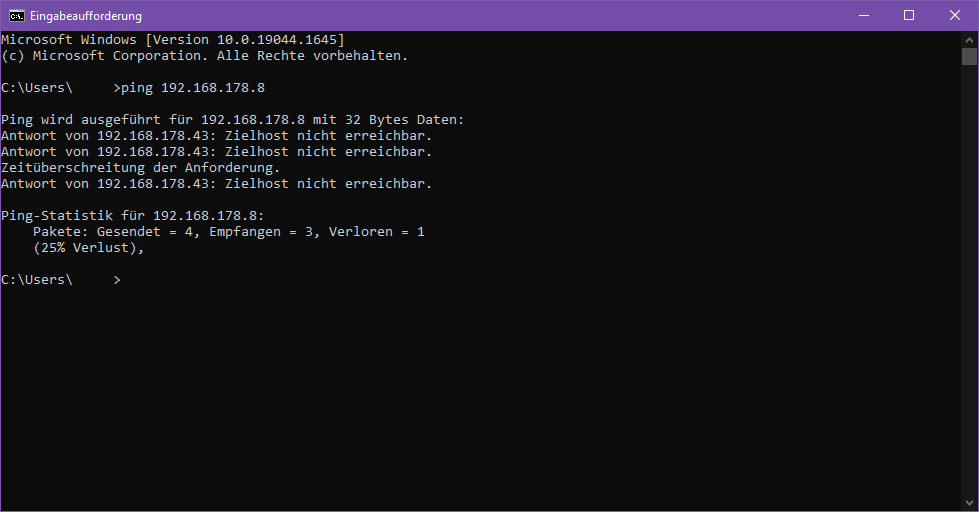
Hi there, yesterday my unRAID crashed on me, while I was at work. I noticed because my DAV services gave an error on my phone. I thought nothing of it, things can happen, and rebooted the machine soon after. This morning, it crashed again, and now I'm curious. It's also for no appereant reason, there was no load on the machine. I run some dockers (usually 8-9 are active, 17 are installed) and one Win 10 VM (which exclusively is there so I can TeamViewer on there to do things on remote). Only docker that usually pulls some heavier load is Plex, but no one was using it at the time. Crash times were yesterday, 4th May around 16:00h and today, 5th May around 09:30h. When I came home now, I tried to connect locally to see if it was accessible (could've been that just all Dockers and VMs acted up or whatever), no dice. I pinged it, you can see the result attached; 8 is the ending of the IP of unRAID, 43 from my desktop PC. I had a look into my router menu, there it was still listed as active connection (screenshot also attached) I can't really see what happens, but I'm also not good with logs I attached the syslog (mirror to flash) and the diagnostic file which I just created after the reboot. Anyone might know what to look for? I didn't do a memtest yet (because time), I use a desktop mainboard but have ECC memory (ECC is enabled in BIOS) Best, Rick syslog.zip lunas-diagnostics-20220505-1856.zip

-
Hm I see, exactly what I don't want because of possible user error.... yeah I have to think about this. This whole situation is not very satisfying Best, Rick
-
Hi there itimpi, the issue is that all other benefits of the array would vanish as well, and that's what I want to avoid. Or is there a way I didn't think of yet? The question is, how to do that? The share is split onto six or so other drives that are in the array, not on a single disk Best, Rick
-
Hi there, first - I know, I know. Copying from a share to a disk is bound to lose my data, that much I gathered by googling. That's why I make this post, to do it right. So, the situation - I have one share where I unzip things quite often, this slows down everything else down quite a bit, so I thought to move that share to an SSD entirely. It's under 2TB, so not an immense amount of data. I installed the SSD and added it to my array (disk8). In every other share, I excluded this disk. For the share I want to live on it, I set every other disk to "excluded disks" and the new SSD to "included disks". At this point, I thought starting the Mover would do the trick, but that one only copies from and to the pool devices it seems. Every new data I write onto this share now uses my SSD, but I also want to get all data that's already on the share to move there, as this is the kinda data I access more often. And no, I don't want to add this disk to my pool (as it wouldn't be protected by parity anymore; sure, I could backup it to the array as well, having all the data doubled and so on... nah) How would I do that? I could possibly follow this guide: https://wiki.unraid.net/Transferring_Files_Within_the_unRAID_Server#Moving_files But then I'd have to do this for every single disk seperately, which is bound to human error. Best, Rick
-
I didn't know you could skip the "done" button, I always wait for that one, haha However I did as you say, uninstall-restart-install, and now it works fine. Thanks man!
-
Hi there, I wanted to use CoreFreq again after a hardware upgrade, but I can't start it. Terminal returns bash: corefreq-cli: command not found When I go to Plugins->CoreFreq->Test, the only note I get is "---Something went horribly wrong, can't load moduel for Corefreq!---" Diagnostics are attached. Maybe the CPU is too obscure or something? Best, Rick camerarick-diagnostics-20220406-2259.zip
-
Thank you so much. I somehow missed that one because I didn't saw anything regarding VMs. Now it's like before, thank you :)
-
Hi there, a rather silly question I bet. In the past I didn't use VMs, but now I want to utilize them more. I can't recall how, but I somehow got rid of the VM "area" on my dashboard. The menu tab is still there, but not on the dashboard. And I'd love to have the VMs back on there as well. I walked through lots of menus to find where I might have disabled this in the past, but I can't find it. Just to make sure what I mean - I mean the (movable) "Virtual Machines"-tile like in the first screenshot on this site: https://www.elefacts.de/test-123-unraid__das_vielleicht_beste_nas_betriebssystem_im_test I simply don't have that one anymore Best, Rick
-
Hey guys, thank you so much for all the infos, sorry I get back so late. I will check all of this back in the office. You guys rock!
-
Hi there Jorge, hm I see. Well, when I copy a project with multiple Terabytes I'm well aware that the Cache won't hold it, haha however the issue I encountered doesn't seem to root from one large file flooding the cache, but the cache not switching to array like it would when I would do the copy over SMB. Ok I see - but if the VM runs on the unRAID, there's no network inbetween to slow it down greatly, no? Also, do you have an idea if "Explorer" in this case is interchangable with any software that copies files? I'm not a big fan to move large amounts of data with Explorer or Finder, I rather use e.g. FreeFileSync or so Best, Rick
-
Hi Jorge, it's really hard to tell because if there's a Master-File for a 90min film, which is not often but can happen, it's easily 400GB. Setting that to 800GB/1TB, which is larger than the Cache actually is atm, I'm not sure if that's helpful? Or do I get this function wrong? I'm also not sure if macOS lets you do this, but as I don't want a 2nd machine for this anyway and a VM is a viable solution, I will totally use just that benefit is that other collegues which are even less server-savvy than I am can copy data much easier than using Krusader (which quickly becomes intimidating with all the filesystem-folder-structure). Probably a small Linux distro will work just fine for this endevour, or something lightweight like Windows 7 Best, Rick
-
Haha no worries thanks for getting back to me! The Minimum Free Space for the share is at default(?) of 0KB, and according to the tooltip should be equal or greater than the biggest file I think of using. As we do work with video data, files can easily be 70GB or more at a piece, should I use that then? As far as I understand the Cache-usage, it "dynamically" shifts from Cache to array when cache is full, while (over SMB) making it seem like it's all in one place. So, Krusader making the folders first somehow circumvents that? Over SMB, inside Explorer (or rather FInder, we are on macOS) it works just fine, but I really don't want to use that because it's seemingly slower (could be wrong here) and more importantly blocks the machine. I can't fully utilize it while copying data, no restart etc. Ideally, I really want to keep it all on THAT machine, so no other machine has to run (and "waste" network traffic or whatever). Just a thought as I have no experience with VMs yet - could I run a VM and do the copy there? Then it would be "self-contained" on the server, no? Best, Rick
-
I'm aware, but "prefer" would be the exact opposite of what I want? It's "the same" as "Yes", but when Mover is invoked it copies from Array to Cache, not Cache to Array Hi itimpi, I'm not so Linux-structure-savvy, so I hope I answer correct. I go to /mnt/user/disks/HDD_NAME for the HDD mounted in Unassigned Devices and then copy it to /mnt/user/user/SHARE_NAME So from my understanding, I do not use Cache specifically? When I changed the Setting from "yes" to "no", I didn't change anything inside Krusader and it worked right away (not sure if that is an indication) Best, Rick
-
Hi there, I ran into an issue earlier and can't quite figure it out. For initial ingesting of a project I connected a USB Harddrive, HFS+ filesystem. I mount it with the Unassigned Devices plugin. Then I use Krusader to copy the files over, as the Share I copy to is set to "Cache: Yes", it copies to cache first. However, seemingly this just floods the cache, claims that I can't copy to this share anymore because it's full. So, it doesn't "dynamically" switch to the array once cache is full, like if I would copy via SMB. When I set the share to "Cache: No", I can copy further just fine. Now with the Cache deactivated some data still sits on the Cache, but I can't use the Mover till I enable it again, which is kind of a bummer. It's some terabytes of data and the cache isn't that big, also because the copy takes some time I don't want to block a 2nd machine (+unRAID ressources) and copy through SMB over many hours. Also, ideally only one machine adds to the power bill, not two, haha Any way I can get around that? Best, Rick
-
Hi there ashman, that's the conclusion I got to in the addendum that pushed the topic, haha I now read about HBAs and I'm keen to work with them. However, my issue of finding even a list with suitable mainboards so I can search for specific models is in vein so far best, Rick
-
By now, one mystery is lifted: instead of SATA cards, it seems one should use SCSI HBA cards, as suggested here: https://unraid-guides.com/2020/12/07/dont-ever-use-cheap-pci-e-sata-expansion-cards-with-unraid/ So that is one thing out of my head, good to know for sure. On the mainboard-front, I did not make any progress though, still same old
-
Hi there, I'm sorry for this title. My head is on fire and I have trouble wrapping my head around all this. I'm in the middle of building a rather small unRAID Server for company use. It's going to be a file server only, people won't work from it but will copy data from and to it. Parallel access will happen, but with few (say 3-4 at most) people, not with 10+ There's not going to be a Plex server on there, maybe a sparsly used Windows VM. Few to no Dockers. Unassigned Devices and Krusader will be needed. Ideally I wanna be able to use more than 12 drives, 16 maybe? I have quite a bit of hardware sitting around here that I would love to re-use for this endevour. - I have at least 256GB DDR3 registered DDR3 RAM in various DIMM sizes (mainly 16GB, some 32GB) - 2x Intel Xeon X5690 (socket FCLGA1366) are available - I also have at least one, maybe even two Intel Xeon E5-1680 v2 (socket FCLGA2011) at hand I am aware that this is old tech, but I do believe it should be enough for such a server? I also love the idea of re-using this stuff instead of throwing it out (and my superiors do enjoy that, too) Now, ECC registered RAM is good for server use, all the CPUs can work with it (and either still do or did at this point in time). My issue is, I don't understand the rest of the setup all too much. I have a terrible time finding proper server mainboards to support ECC memory but also lots of SATA slots. How does it work? I see the huge unRAID Servers all the time, sometimes with 16 or even 48 HDD bays, how do you even connect them? I had not many good experiences with SATA PCI express cards, or are there really good ones? Are there any lists/websites that properly list Server Mainboards, where I can sort stuff? Most server stores I find have their boards not even filtered by CPU socket or RAM type (DDR3 vs DDR4 for example), so it's a bit frustrating to try to find anything there. I build computers for my private needs for some decades and also have my own unRAID server, but this really became a challenge for me. Any pointers? Best Regards
-
Hi guys, the single one I checked over night had a single error after some passes. Then I put in the fourth one to check while I'm at work, that one had ten errors before I put my pants on. I got both of them out and will only use the two seemingly okay DIMM. For my usecase, 16GB should be enough anyway Unfortunately I can't setup unRAID properly with the new mainboard because I have no ethernet at my bench and the signal the GUI sends out seems to be incompatible with my 7" screen, so I will have to check everything else tomorrow after work. Thanks again for all your help Best, Rick
-
Hi trurl, thanks again! The new mainboard arrived and I already checked two of the four DIMM; three passes, no errors, so far. I hooked up the thrid and will go to bed now. Hopefully I can check all four till tomorrow evening, if every single one is fine I will test all four again on this new mainboard Best, Rick
-
Hi there Jonathan, so what would you suggest I do next? Best, Rick
-
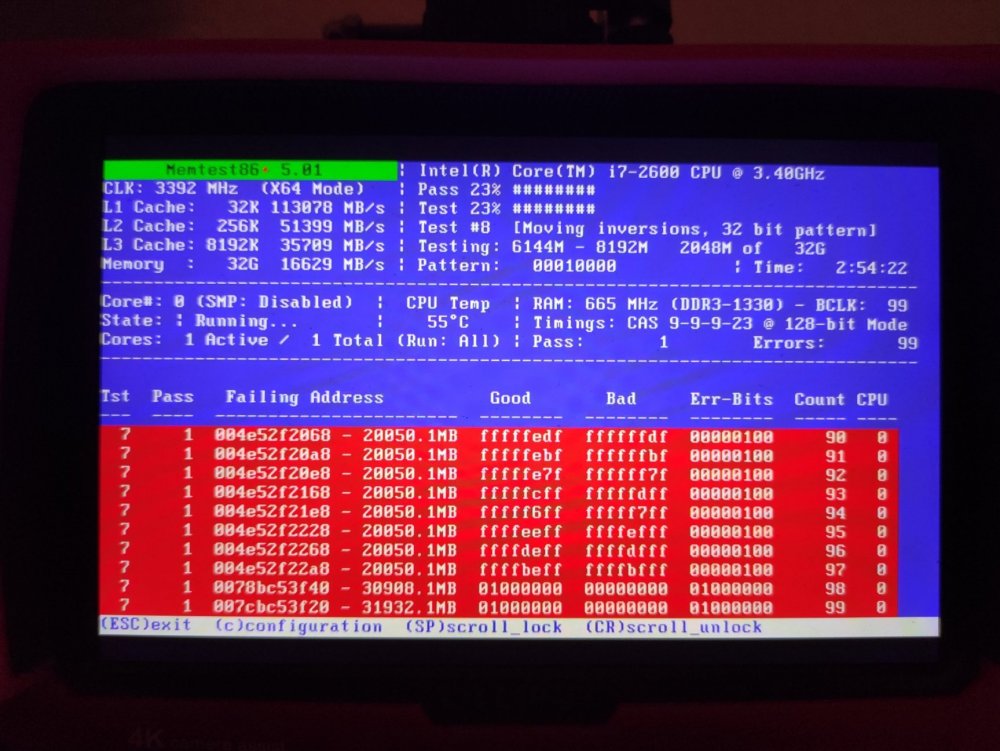
So the new mainboard didn't come in, so I did Memtest on the old one. It has some errors - in the beginning it rand without any, then a low number, then around 20 and next time I looked it was 99. So I assume that is bad? Now I have to check every unit seperately to narrow down what's wrong, right? Best, Rick
-
Hi trurl, ah, I see, makes sense! I think my new mainboard will arrive tomorrow. The machine unRAID is currently running on sat for some years in a corner, yet the mainboard is the only thing that bothers me. So aside of bad RAM (it's 32GB in four sticks), I could assume it could also be the mainboard or that it needs a clean - so I guess I will move hardware once it arrives and do the memtest right then, hopefully everything tomorrow evening Best, Rick
-
Hi trurl, I ran prime95 a week ago to test stability a bit, but memtest I didn't run for now at all. I saw it's available from the boot screen. I assume I should run it to see if the RAM is okay? Makes me wonder how that could send the CPU to go "all in", haha Best, Rick


