





CameraRick
Members
-
Joined
-
Last visited
Everything posted by CameraRick
-
Hi Jorge, thanks for your extended help on my issue. For now I kicked the drive out of my unRAID. All data on it was not that important, everything of real value was saved somewhere else. The cache SSD is still not used, I do think I will switch it from XFS to BRTFS. I re-installed my original docker.img that I backuped earlier, starting the Docker engine again (for now running from the array) everything worked as expected. I wanted to get running again, I want to treat the SSDs when I have some time. It's obvious now this drive was the culprit, I actually did a SMART analysis before but it was "healthy". Will do it again and keep you posted Best, Rick
-
Hi Jorge, the scrub was so slow, targeted finishing date was july next year. Even after a day it didn't even make 1%, still it already found 12 uncorrectable errors. I still attached the diagnostics I figured that this drive might just be broken, so I aborted the operation and wanted to copy all data on the array. But something doesn't work. I wanted to just freshly format both, my XFS cache SSD as well as the other BTRFS which acts up. For all the shares that sit on the XFS cache I switched "use cache pool" to "YES", the mover went into action and copied the data. However, 4,8GB remains on the cache SSD. For the 2nd one it's a mess. It only has one share on it, I also switched that one to "YES", but it's still 77% full. The mover starts to work, but doesn't move anything it seems. Actually I setup a "backup" of this 2nd share, in case it ever broke; every two days it does an incremental copy to the array. With the DirSyncPro docker. Unfortunately it didn't do anything since July; great container, huh. Anyway, I guess I will remove the NVMe, it seems obvious that it's the culprit here. Would just be good if I could the other SSD empty before formatting it again Best, Rick lunas-diagnostics-20221205-2142.zip
-
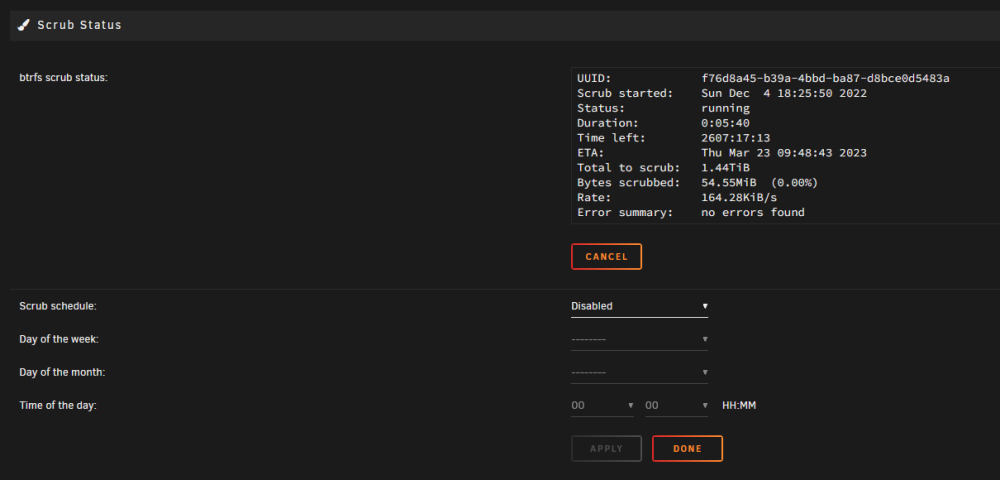
hmmmm, I had a look at the status and after 1:45h it was "aborted". But I didn't abort anything. Now I restartet it again, checking the "correct errors" box, now it gives me the status visible in the screenshot attached. Is this expected behaviour? Is my drive broken? Best, Rick
-
Hm, it seems the xfs_repair was done long ago, the window didn't really make this clear. I started the array again and do the scrub now, it's aimed to take 3h. Best, Rick
-
Ok I will; right now I can't, because xfs_repair wants the array in Maintenance mode and BRTFS scrub wants the array to be started. So I will have to wait for the check, however it's taking quite long already (only around 130GB are used, SSD is 512GB) Just so I understand it, what exactly does the scrubbing help with the initial issue? Dockers not working proper, not being able to start or stop, when they are not sitting on the BTRFS share SSD? Best, Rick
-
Hi there Jorge, my Cache pool (a single SSD) can't be scrubbed, because of XFS. I have a 2nd SSD installed which is BTRFS, but that one I don't use as Cache for unRAID but only for Shares. I started the xfs_repair with -n which seems to be just checking, unfortunately there's not much output from that. The help-dialogue says it can take long (even hours), but doesn't clarify if I can see when it's actually done, haha Best, Rick
-
Hi there itimpi, at this point I guess it's good to ask if it was clever to backup my cache drive entirely before doing so? And, if I'm doing that anyway, it makes sense to backup the Cache, format the disk to BTRFS and use that from now on? Best, Rick
-
Hi itimpi, it seems I made the pool XFS. I think I did this because when I started the unRAID a year ago, I read a few posts recommending this for single disk caches Best, RIck
-
Hi there Jorge, I ran memtest for 5½h, it made it through 2½ passes without any errors. I rebooted to unRAID to do the scrub operation, but somehow my cache pool (a single SATA3 SSD) does not offer this option. However, my 2nd NVMe SSD (not used as cache) I do have this option. What could be the matter here? Best, Rick
-
Hi Jorge, I started memtest (the one unRAID ships with) 90mins ago, one pass and zero errors so far. I will continue to run it for a bit. I'm not sure what scrubbing the pool means. Is this it? https://wiki.unraid.net/Manual/Storage_Management#Scrub Best, Rick
-
Hi there Jorge, didn't touch unRAID since I made this post, right now the CPU is down again and RAM also at a normal level. I do use ECC memory (not registered though), shouldn't that correct potential errors? I will start a memtest now, just have to setup some monitor
-
Hi there, I'm stuck again. This morning, one my jDownloader Docker behaved a bit strange; super long load times and such. I also had abnormal high CPU usage, half the cores were at full load, netdata only shows "iowait" as high usage. I tried to restart it, but anytime I tried I got this error: https://i.imgur.com/Y0bczk8.png I googled around a bit and found the recommendation to renew the docker image, so I followed this guide: https://wiki.unraid.net/Manual/Docker_Management#Re-Create_the_Docker_image_file I made a backup of the original docker.img before I deleted it. I then started to reinstall my dockers; jDownloader started fine and seemed alright, but shortly after had the same issues again. Also, again high CPU load. Some other issues occured also, like Nginx getting the wrong ports assigned. I couldn't change this though, because I can't stop any Docker, I get the same "server error" as above. So I started from scratch, deleted the docker.img and made a new one, but this time increased size (from 20 to 60GB). Installed the Dockers again. Nginx now had the right ports assigned, but didn't autostart like the others and, you guessed it, I can't start it because of the same "server error". I also can't stop other Dockers. Now for a test I disabled the Docker services entirely, stopped my VM, and I still have this abnormal CPU usage without anything running. All drives are healthy according to unRAID. I attached my diagnostics, I'm not sure what to do. Best, Rick lunas-diagnostics-20221203-1203.zip
-
Hi BRiT, thanks so much, I didn't even notice I still had that installed. I wanted to let the unRAID go to sleep in the past when not in use, but that never really worked right. ... and now it doesn't either, given it won't wakeup anymore, haha I deleted it and will see if the unRAID still works in the evening, fingers crossed! Best, Rick
-
Hi there, I have a somewhat strange issue and can't understand what happens exactly. Yesterday, I updated my unRAID version to 6.11.1, I was on 6.9.x before (can't recall the exact version). Upgrade was fast and smooth, then I went to bed. This morning I noticed the server isn't accessible anymore, but still "running". So it makes noises, but the power LED is blinking. When I press the power button, the machine behaves like it gets out of hibernation and is just there again. Everything works like it should, but shortly after it gets into the same state again. I guess I don't have to mention that I a) this didn't happen before the update and b) didn't change any hibernation-style setting after, haha The upgrade was done yesterday, a bit later. This morning around 9h I noticed the fake-hibernation, pressed the button and very shortly after this it went "off" again. I started it the same way, shut it down completely and went to work. Now I rebooted the machine and it did the same thing again (around 21h I think) I attached the diagnostics, I'm not smart enough to get any info out there Best, Rick //edit Some new findings: it doesn't switch off like this at any moment. So for example, I'm watching something through Plex, and it won't shutdown during an episode. But once it's done, the next won't play because unRAID is gone. That's strange, huh lunas-diagnostics-20221116-2125.zip
-
Sorry to get back onto this again, but I just can't figure out a thing. Been more than a week that Nextcloud stopped working on me. Anytime I try to get to the webinterface, I get a time-out. I tried changing the repo to 24.0.5 or 24.0.6, no avail (by now, I changed it back to latest). I did not install Nextcloud 25, as I didn't even have a chance. I use MariaDB and NginxProxyManager, I restartet and updated all of the dockers, the logs show no error. If I try to reach Nextcloud through the local IP, it switches to the dedicated URL set in Nginx. I can't even tell which version of Nextcloud I run, I have no read-rights on the files in appdata I have no idea where it fails, but it would be tremendous if anyone could help me out here, as I simply have no idea where to even look for errors
-
Hm, it seems my setup is a bit different. I have no swag docker, mine is called NginxProxyManager, and in its log the only thing deprecated is a method called "QueryBuilder#allowEager" and "QueryBuilder#eager", which seems to not be any kinda file. I tried to shut down the nginx service to see if I can then launch the webinterface, but no dice, without nginx active I get an error 400 Bad Request, on the bottom mentioning nginx, which I don't really get as it is off. This is really frustrating because I still have no idea what's actually broken and effectively the cloud is offline for nearly a week. I should have all passwords etc to make a migration to a different docker but I'm just not sure if I can blindly follow the Nextcloud manual on the backup, I have no idea about consoles and Linux, so I don't know if the Ubuntu examples work for this
-
Hi Spiderben, how would one update those files? Any pointers? Best, Rick
-
Hi there blaine, when my Docker stopped working I didn't upgrade anything, neither Nextcloud the Docker nor through Nextcloud the Webinterface. I only updated the Docker later to fix this (didn't work), changed from latest to 24.0.5 (didn't work) and now I just look forward to a solution
-
Phew, now that you say it I'm not sure if I marked down all passwords... there's a chance I saved them in a browser or something, but the database username... huh. Passwords can be guessed, usernames is harder. I will wait a bit to see how it turns out. The data is least concern, I mean in the end I could reach it in any moment by adjusting the folder rights. The bigger issue is to setup the working condition (with logins for all users etc) again. I hope it gets resolved soon
-
Yes, excatly like that. When I hit WebUI, a new window appears, first through the IP:Port, then switching to my custom URL, ultimately timing out. Hm, it looks like moving the Nextcloud is indeed a big pain. I'm not completely IT-illeterate but I'm not good with this sorta stuff. Also, how to put something in maintenance mode that won't open? Maybe I wait for a day or two and then see further. It's already a pain, I use it a lot to sync files from machines, my phone and so on, haha :)
-
Hi there allinvain, I can guarantee you that I didn't update the Docker earlier before it stopped working, I noticed this morning only because the auto-upload from my phone camera didn't work, haha I don't update that regularly and didn't do anything over the weekend (but used the cloud a lot), but what gives, but I guess it doesn't matter all too much I tried your fix, however it didn't work unfortunately I still get the timeout. Is there anyway I can check what actually doesn't work? Or should I installt the official Nextcloud Docker and somehow migrate all data and setup there? Best, Rick
-
Hi there, with the beginning of today I can't reach my Nextcloud anymore. It seems a few people here have issues, but I know to little about all of this to know if it's the same as mine? I run Linuxserver Nextcloud with a MariaDB and nginx forwarding. Not sure when it stopped working, but around 9am I noticed. I restarted all Dockers, I updated all Dockers, but still no avail. I always get a connection timeout, when I try to access Nextcloud through unRAID (IP+Port), it will still use the domain-forwarding I use to reach the Nextcloud from outside. I have no idea how to debug this, because I can't access it at all (neither through webinterface, nor desktop/mobile apps). Is there some kinda known issues right now, or how could I potentially find out what's wrong? Could be only the nginx forwarding for all I know. I didn't install any updates since it stopped working this morning, I only updated the Dockers to see if that helped in any way. Best Regards
-
Good to hear it's nothing left (not on the sake of the plugin that I liked to use, but regarding the crashes). I'm pretty sure I rebooted after the removal, if it's now gone it's fine though, nothing was lost during this crash. Thanks again!
-
sure, there you go lunas-diagnostics-20220509-2201.zip
-
I did. If the crash from earlier counts as a reboot as well, I did it twice

