





CameraRick
Members
-
Joined
-
Last visited
Everything posted by CameraRick
-
A little update on this matter. To catch up a little: I started to experiment with BIOS settings left and right, to get the most stable etc, some of them seemed to make it worse. Sometimes the Server crashed after mere hours then. Disabling C-States didn't help, not using powertop --auto-tune didn't do anything, deactivating ASPM-fixes (for SATA controllers) didn't do a thing. Or say, only more crashes, not less. So as mentioned, I ordered the i5-12600K, installed it beginning of this week. I started with moderate BIOS settings, but since yesterday I also re-enabled all C-State stuff and use powertop --auto-tune. ASPM is still not in (one at a time). What I want to get at: I didn't had a single crash or instability since the CPU swap. It seems to just work. So thanks @JorgeB , I do think this was the culprit (even tho I am not 100% trusting the peace, but for the time beeing, I think this is fixed)
-
[this Docker is still in the process of being added to CA] onAir_fanControlThis project sends HDD temperatures of your unRAID server over MQTT, to feed an external ESP to drive your PWM fans. It uses smartctl to read temperatures (even when disks are in standby) and lets you conveniently set up a fan curve in its WebUI. (as "only" MQTT data is transmitted, you can also use any other device to drive your fans - this project was built around an ESP node, though) FeaturesIntelligent Hysteresis: Keeps fan speeds (and noise!) stable during minor temperature fluctuations. Standby Support: Reads temperatures without waking up sleeping drives. Soft Spinning: Fans are not set to change instantly, this is gentle to the bearings as well as your ears. Semi-Live Monitoring: Trend graph for temperature vs fan speed. Spundown Support: Let the speed go down when all disks are spun down - or switch them off completely. Fail-Safe Logic: The ESP node continues to run even if the network or server connection is lost. Manual Override: Use a rotary encoder, WebUI, or any HA-remote to add a bias to the fan curve Straightforward UI: A simple dashboard for easy setup and monitoring. what it doesn't do This setup is meant to run a PWM signal to multiple PWM fans at once; you can't create individual groups of fans vs HDDs or send individual signals to each fan. for full installation guide (Docker and ESP node), please refer to the GitHub Repository :)
-
Hi there @Michael_P , the issue I face now is that I can return the i5-13500, but only within two weeks. I contacted the seller because of the official Intel-issues, and they allowed the return, but now I am on a deadline. So I will order a new CPU now anyway (but still contemplating which one, as prices are... strange). Right now I have spare vacation days, so I have actually time arranging all this, but these constant crashes are stressing me out a lot :( all the parity checks as well; one crash always costs two days that I can't do a thing. I will still try to find the older PSU, and see if I can use it anyway - it might have too few power connectors for this setup by now :( Best Regards //edit @JorgeB I ordered a 12600K now, because it was effectively the same price as the 12400. I read a lot, and the K's are apparently no issue in 12th gen. Will likely cripple the TDP, but I don't like paying same for less. Hopefully arrives soon! Thanks again you two !
-
Hi @JorgeB , thanks for confirming this. I also found a Reddit post where disabling C-States seem to have added stability, which is something I also thought about already. Can't try because of Parity Check tho (I have to disable reboot after crash, huh). So, I will probably try to switch against a 12400, and try to cut my losses.
-
Okay. I shutdown the server, installed the newest BIOS. I also made the BIOS settings less aggressive in terms of power saving/C-states etc. I messed something up while booting, so I shut the machine down again, only to realize it was already too far booted and it triggered an unclean shutdown. That parity check went through some hours ago. Now, almost one hour ago, the server crashed again. In the meantime, I installed an external SyslogServer just in case it doesn't write everything properly or so, but no avail: no valuable info either. Third parity check is the charm I hope (god my HDDs will hate me) So, back at square 1. I looked into that Intel thing, it seems my CPU was never affected by that bug (at least not "officially", no idea what else might have been reported in this forum). Because the times are as shitty as they are, an i5-12400 costs more than I paid for this i5-13500 a year ago. 12500 and 12600 being even more expensive (they all lack E-cores, but I have feeling that unRAID doesn't use them anyway?) If you really think this could solve this @JorgeB , I'd definitely consider this switch, as I am somewhat out of ideas. I also have to see if I have that older PSU I used before the current one somewhere (at least I don't recall that I sold it) Best Regards //edit I just noticed that the crash last monday was at a similar (but not the same) time as today, around 01:40h. Today is also Friday, so same day it crashed when I originally made this post (but much earlier, that was 22:55h). Probably just coincidences, but yeah, grasping straws here
-
sigh... the parity check went through, 0 errors, all fair enough. I forgot my regular parity check starts sometime after midnight first monday of the month, but I now just left it. Was just going to go to bed .... and I hear that suspicious sound of fans and HDDs, followed by the piezo speaker. 3% into the new parity check, if I may trust the last UI refresh. BIOS will be updated in two days or so then. Maybe I already have a look for Intel 12th series models or so. Best Regards
-
Hi @JorgeB , thanks as always for getting back at this. A BIOS update is a very good idea; I am currently on F10 if I may trust the UI (will have to wait for the Parity Check that started till I can enter the BIOS). At least F12 was already out when I got the mainboard, and now we are at F16. Some change logs speak about "general improvements and stability", not just a new CPU or so, so... fingers crossed :) getting some different CPU is likely not easy, but I can probably try. So I understood I shouldn't look for 13/14 K models, is there an issue with 12K or 15K models? Just so I know what to look out for. Hi @Michael_P , thanks for the suggestion! The PSU is also quite new, bought it last year with this Mainboard and CPU, on the quest for higher efficiency. This is not to say "it can't be that because it's new", I think I have the old PSU from before still around somewhere (or I ask IT if they also have one just sitting in the shelves). One of the big gripes I have is that it's not linked to a clear case/action. This way, testing a new config can take just two days (as last post) or a month (like now), haha
-
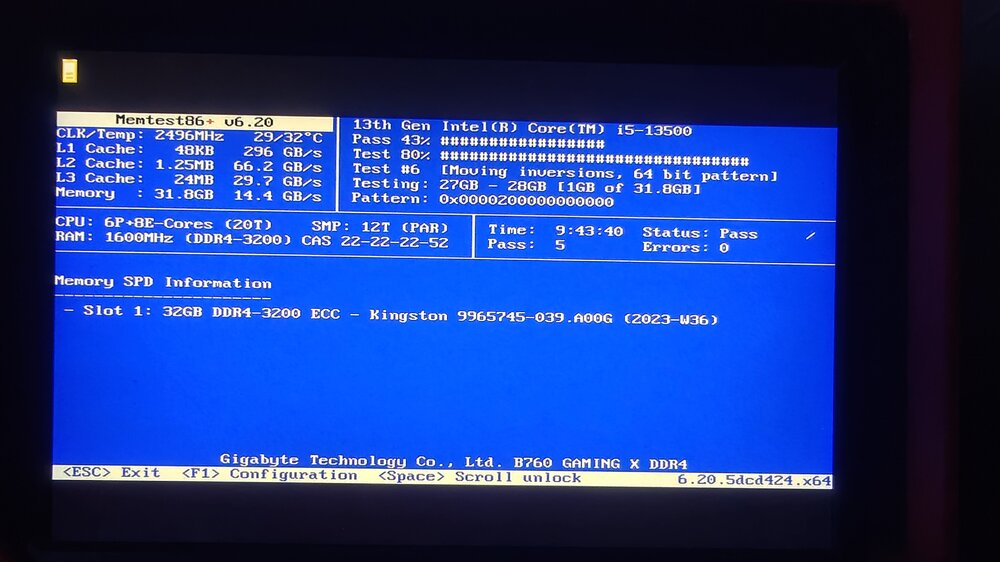
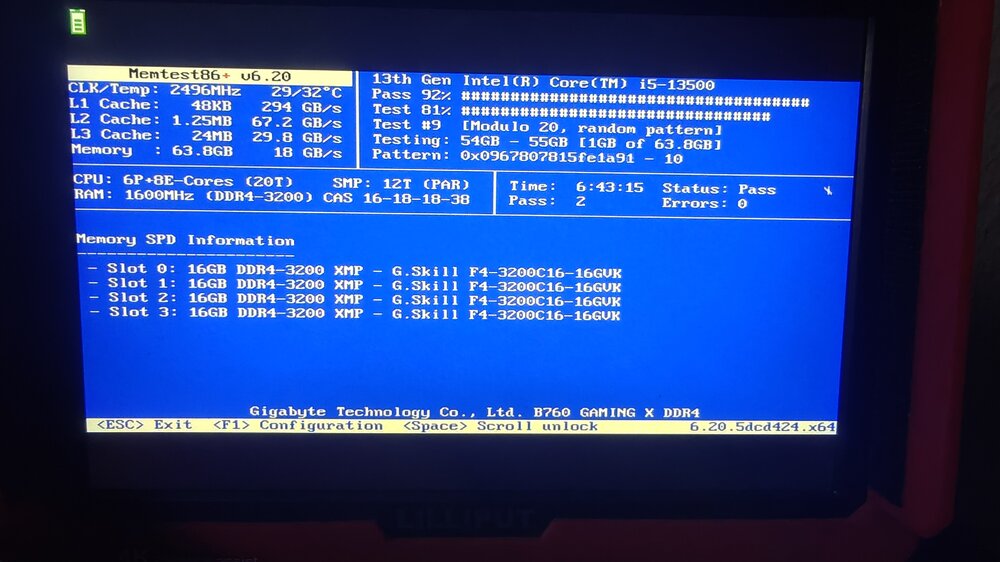
Hi there, it's been some time since I last posted about a crash, but it now happened again. It also happened before, but I didn't post then. What happened in the meantime: server crashed again I removed the two 8GB DIMM from my system I memtest'ed only the one 32GB DIMM: pass I memtest'ed only the 2x 8GB Kit: pass left the 32GB Kit inside server crashed switched to the 32GB DIMM (time passed, and for some reason I thought the 2x 8GB must be bad, because they are the oldest, so I sold them - they are gone) because of a random talk I had with a co-worker about the crash, our IT guy gave me a 4x 16GB Kit, because all our machines are maxed out anyway and it just sits on the shelf... I installed this 64GB kit, memtest'ed it: pass time went on and it felt kinda good, as if this whole thing is over Now I am sitting here, the server not even doing anything really (maybe one person watching Plex, and except for that just "being"), suddenly the fans blow and the piezo speaker goes off. Oh well. I attached two logs, for crashes that happened; I guess there's nothing of value in there. I attached Diagnositics from just now, and two photos of the memtest (which also only kinda add frustration as I'd love find a hard reason why it happens, haha) Given the log data, my guess is that a hardware failure is still the most likely reason this happens.But I don't know how much different memory I can get and test without selling a kidney; the CPU rarely gets hot, is cooled quited well, and both the Mainboard and CPU are only roughly one year old. It somehow never happens when any "heavy" tasks are done on the machine; two days ago I had 7 parallel Plex streams (which is very high for me), no issue. Can it have something to do with powertop --auto-tune? As it happens in "mostly idle" (even though in the "near complete idle" at night it doesn't happen either). I am out of ideas :( syslog-192.168.178.8_crash260201-2255.log syslog-192.168.178.8_crash251213-1548.log lunas-diagnostics-20260102-2320.zip
-
will do! And please, no need to apologize, you do a tremendous and great job. I didn't expect to get an answer to my little issue this fast, let alone from you the author at all. I hope you can get enough spare time for only youself these days, or at least soon :)
-
Okay, shame, because in Binhex (the only other I saw) I also didn't get it to work. Binhex lacks in other regards as well (like no gedit, or a simple image viewer), which is why this container is so great :( oh well, then I will just live with it. Thanks guys!
-
I just changed to german because that is my language, I just adjusted this in case it "overrides" the date-format. Basically, the only issue I have is the date format, I'd love to have it in a non-US way, not too concerned if YY comes first or last :) I am not sure how to change the user - I just used the commands you posted some years back, was that wrong? :o
-
I'm afraid not :( I went into the console of the docker and pasted the box (I changed country code to DE and language to de_DE, but what gives). It accepted this instantly, I restarted the Docker. Thing is, I can't even find the file, I have no ~/.kde folder it seems. I can see .config; shall kdeglobals go directly inside of that?
-
I am aware this is a hundred years old, but it doesn't seem to work anymore. Is there any new way? I heard it works in binhex-krusader, but that one misses a bit too much for me :o
-
Hi there Jorge, before I switched to this Intel system in January, I had an AMD system which is where the ECC memory comes from. DDR4 was/is kinda expensive, so I just kept that one. I'm never sure how much memory I actually need, by now I am not using VMs much so 32GB is probably fine. I will try to carve them out in the next few days to get an idea. It's a shame I don't have a 2nd system where I could run memtest for 24h+ for the DIMM individually while the server still runs, that would be really handy. Best, Rick
-
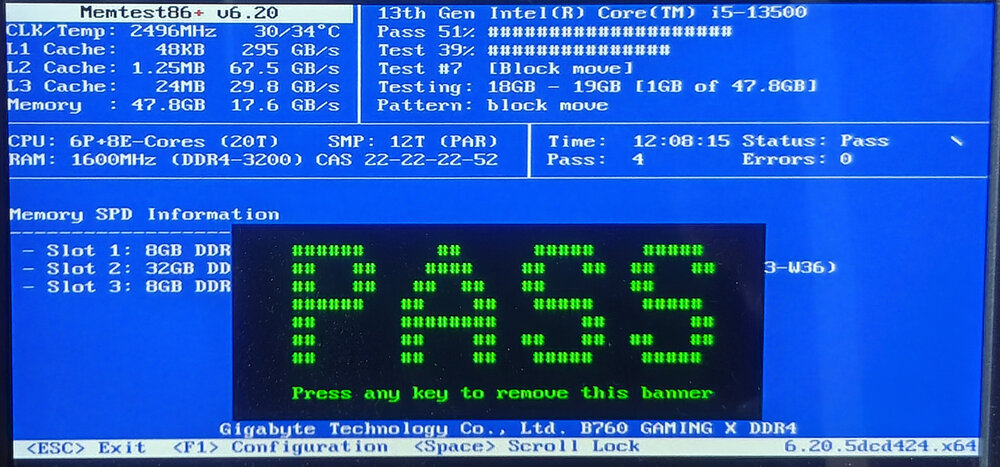
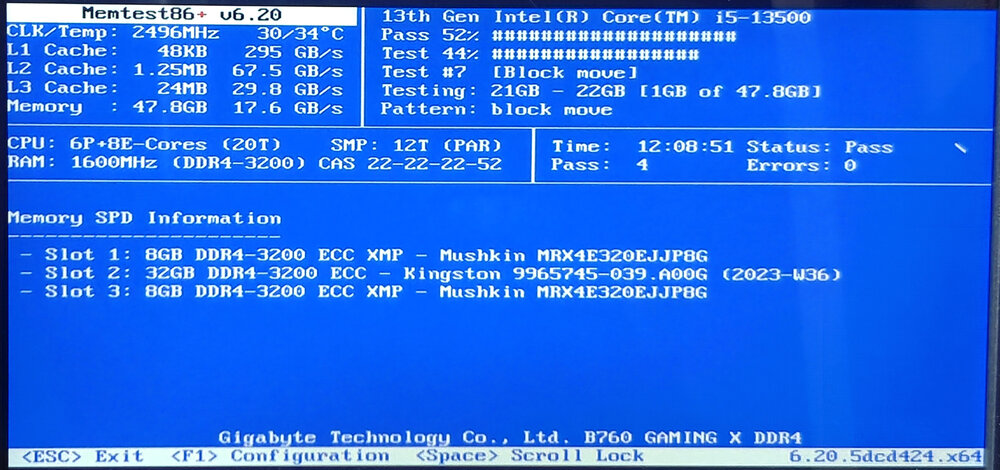
Hi there, last week my server crashed, it happens, so I didn't think much of it. But just two days later it crashed again, and this shouldn't happen :( Both times it rebooted, did the parity check, and it was fine (first crash gave an XFS error, but it could be fixed easily, thanks again JorgeB). I can't recall to have done anything special during those crash times, I only noticed from the notification+parity check. The 2nd crash happened on the 17th October, 15:00 h. I wanted to make this post earlier, but was away for the weekend so I wouldn've had a chance to react to any responses :( I had a look at the syslog I am writing constantly, but it looks like it's not at all helpful for that timeframe. I attached the syslog from beginning of the day to short after the crash; to me, it looks like nothing is logged for the exact moment, just the reboot-sequence. I am aware the usual culprit is RAM, so I did a memtest (the one I can boot from the unRAID Stick). I let it run 12hours, and got the big "pass" screen (see attached images). Note that this is ECC (unbuffered) RAM, but the mainboard is not capable of ECC. Also I attached the diagnostics I downloaded shortly after the crash (the moment I noticed it actually did crash), so around 16:22h on the 17th of October. Any ideas what it could have been? Is disk7, that had the XFS error after the 1st crash, maybe broken somehow (even through it shows fine)? Best Regards lunas-diagnostics-20251017-1622.zip syslog_251017_till1515.txt
-
Hi there Jorge, I did as mentioned in the link. It indeed found a corruption, I hit "fix" afterwards, and it fixed it. Checked again, all good Now the burning question is if this happened because of the crash, or if the crash happened because of the corruption. Will definitely keep an eye on disk7. Thank you so much!
-
Hi there, two days ago my server crashed for unknown reasons. Restartet, parity check went through (5 errors, seems reasonable for a crash). In the "fix common problems" plugin I got the error "Unable to write to disk7 - Drive mounted read-only or completely full.", with a link to more information. That info seems to be mainly about caches; it's an array disk tho. If I google the error, I didn't found much info, but restarting seemingly fixed it. So I did a clean restart yesterday, the message was gone - and now, it re-appeared. As you can see in the screenshot, the disk is not full, and had reads+writes since the restart yesterday, and not considerably less than some other disks. The Main Page also shows 0 errors. What to do now? Should I probably throw it out and rebuild? I added diagnostics in case they are useful Best Regards lunas-diagnostics-20251016-1607.zip


-
Ah, I see. Oh well, then I have a great week of testing ahead huh :) You know, I rebuild this server to Intel to save power, and was talked into the idea that ECC is overrated and I shouldn't worry about that. And still: anytime there's a hardware issue with this machine, it's the RAM. Sigh :)
-
Hi there JorgeB, I wasn't home, but yes, the server crashed and then restarted on its own; all while I was still at the office. I did notice it went offline because I couldn't connect. I have three sticks installed, 2x 8GB and 1x 32GB. All ECC, but the Mainboard doesn't support that. I can try removing the two 8GB for starters, but maybe I should rather run a MemTest over night (only one stick at a time, of course) Best Regards
-
Hi there, recently my server crashed, as reported here. Now that I have a log, I can attach that one as well; the Timestamp the Server restartet Jun 2 17:39:32 - not sure what to look out for before that, looks "normal" I guess? :/ I deleted a whole lot from before yesterday morning, I figured that's not needed (can provide if necessary!) To add insult to injury, the monthly Parity check was operating while the server crashed. It started the check again bow, but yeah. Best Regards lunas-diagnostics-20250602-1900.zip syslog-192.168.178.8.log
-
Ah, now a log-file started appearing there :) really confusing, haha :) but then I'm hopefully settled for the next crash, if it happens. Thanks! :)
-
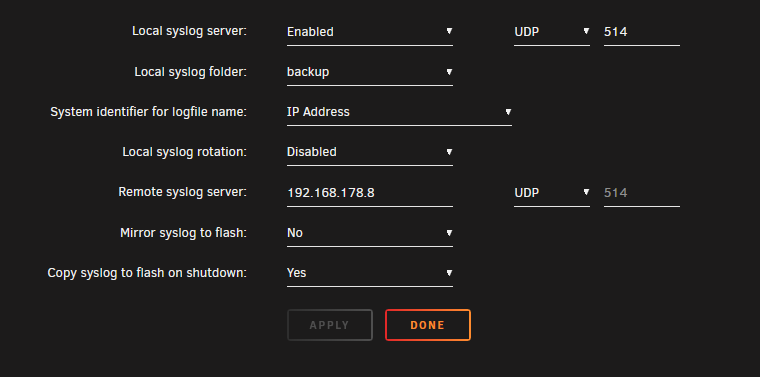
Ok, I have it now setup like this (IP is the local one for the server). Anything else? And where do they get saved then?
-
Hm I see, but I don't have a 2nd server to write logs to consistantly. So local logging is not an option? In the end it's just about having logs from before a crash, that should work locally, no? Or would I need to "mirror to flash" then? It's a bit unintuitive that the local logging is logging nothing :/
-
Hm, it seems that one is already enabled (at least it looks like it in the screenshot?) In the share "backup", which is set as syslog folder, I don't see anything that resembles Logs tho :(

-
Hi there, a few days (weeks?) back my Server crashed - things happen, I didn't really look into it. Today, the Server crashed again, and I have no idea why because I was absent and not really doing anything with it. According to the Parity Check that runs now, the Server restartet 3:25h ago. I'm always a bit at a loss how I could check what may have caused this, I don't understand Logs and the Diagnostics (attached) seem to only have the data from after the reboot? Either way, what is a good general cause to look out for to find the culprit in such a situation? Best Regards lunas-diagnostics-20250523-1958.zip



