





CameraRick
Members
-
Joined
-
Last visited
Everything posted by CameraRick
-
Hi there, I lately have some trouble with the plugin. It was scheduled to run from monday, and while it stopped during the designated times, it also paused because of overheating (which it should) but never returned to work. Sure, could be that the threshold isn't reached, but I doubt that within four hours it wouldn't lower again? Anyway, that is an issue I have to figure out myself. To get the check through, I wanted to manually resume the check. I opened the unRAID console and typed parity.check resume, however nothing happens, also no feedback from the console. Suddenly the "elapsed" timer goes up again, but it doesn't resume the parity check. To manually resume, I now adjusted the pause-times, but this is somehow not the intended way I believe. Did I do something wrong here, do I have to type the command somewhere else? Best Regards
-
hi there, I setup FileBrowser today, and after some trouble with NGINX it's running very fine! One thing is strange however; I created a new user for myself (so I don't use the Admin all the time). Under the Logout-Button, I have a little bar and the info 15.9 GiB of 30 GiB used. And this is very confusing, because I didn't saw any notion of how I could limit the available space, but these 30GB are vaguely the size of my docker.img, the filling is also quite close. Does this mean that the user folder (which doesn't exist) gets written into the docker image? The Admin user doesn't get this bar and info

-
Hi there, peculiar issue: I have a Windows 10 VM that I is usually off but is started individually for various tasks. Now I encounter the issue that I can't access the array at all over SMB. Obligatory: it used to work before. I access the VM through my workstation PC, VNC through my browser. My PC can, without any issues, access the array through SMB as usual. I didn't change passwords or anything since I last used the VM. Inside the VM, I can access the unRaid UI through a browser just fine, but not any of the shares. Internet is also working, so the network isn't completely broken I guess? I tried to set inidividual shares to Security: Public, but no dice either. Windows on the VM gives a generic error that it couldn't access (it's german so no idea if the exact words help). I tried the Diagnose-button, but it just tells me everything is setup proper and the issue persists. The VM was restartet numerous times by now. I'm a bit baffled where to start debugging this, as the VM sits literally right next to the share I need to access (same SSD at least, haha). Any pointers? 😮
-
Apparently it's not possible, so I will take the opportunity to replace with a larger drive
-
Hi there, today I had my first disk error. I looked in the log and apparently it was some sorta cache error, so the first thing I did was rebooting the server. After the reboot, the disk was listed as missing completely. So I opened up the server, only to see that the SATA cable came lose - I didn't insert the connector properly and it didn't clip (I re-arranged the disks some days ago). After connecting it properly again, the disk shows up but not as part of the array. When I stop the array and re-assign it into place, it wants to format and re-build the disk from ground up. How can I save my disks from all the stress of rebuilding and just insert it back into the array (followed by a parity check, of course)? Best Regards
-
Thanks for the clarification! And sorry for my late reply. As this is a work-issue, I can only check this during business hours, and only while machines aren't in use. By now, everything went through, so it's either the free-space thing (shouldn't be with the original issue though) or the rights-thing, which I will mark as solution for now. Thanks again to both of you, especially Frank, for guiding me through this! Best, Rick
-
Hi there Frank, thank you so much for your continued support. The copy on the colleague didn't went through, so back to the drawing board, haha Maybe I misunderstand the Cache and the Minimum free space entirely - the sync that stops working is around 300GB, but files are only around 10GB max in this scenario. Does this mean the Cache runs full (because it's set to 0GB I just saw)? I thought when this happens, it will just copy to the Array directly. It's recommended to have at least as much "minimum free space" set to the max file size I expect - but to my understanding the minimum free wouldn't be touched, so it shouldn't matter if a 10GB or 50GB goes over that limit? I'm a bit challenged by this, haha I just invoked the Mover, and will set the cache to 80GB as well; mostly we don't sync 300GB at once, mostly it's 10-30GB but then more often (like twice a day), with the Mover working every hour or so. If that doesn't work, I will try to bypass the cache completely. Maybe this is a different issue from the one I had earlier, after all Best, Rick
-
Hi there Frank, yes, all of company is Mac-based. We just "see" the server inside our network area in the finder, click on it, and connect with username/login. Looking at the Shares tab, all shares are either Private, Private in italics or have a dash (see screenshot)- The unRAID runs here for close to two years, so I think if that public-login-issue was given, we'd have already ran into it? It's not a general issue I encounter, as it was visible before it was only about a certain folder, not the whole server, hence my utter confusion, haha The share is not accessed as a drive, I also don't think that macOS can do it like that? I mean, in the sidebar of the Finder any network-adress is visually close how external media is mounted, but it's not like it's a drive-letter as you can do in Windows. I am not even sure you can connect to network drives any other way in macOS. I can't access any settings from my workmachine, the preferences window only shows info on the server, nothing to edit I will study the sticky-thread in the link you provided, thanks for bringing this up, maybe it's one of these occasions where macOS "just works"; I encountered those quite often lately, haha On another note: the permission-thing ran through (only took 3mins), yet I wasn't able to delete/copy things a new. HOWEVER, I had to update some new shots in the same location (I can't tell if the culprit was the "root" for my rendered files or just the subfolders) and that just copied through like it should. A colleague just came up to me and told me he wasn't able to copy stuff in the last few days either; so maybe here is indeed a larger problem. He just started another sync, we will see if it runs through, and if the rights-thing was already it On another note: at least to my personal feeling, more and more issues arose since I recently updated the server software to 6.12.4; I also recently updated my personal machine and installed 6.12.6, since then I also had some issues there. Seemingly some things were changed how you setup shares, and at least at home the settings were also a bit messed with. No idea if there's just a tiny thing that got adjusted for the worse during the upgrade, but so far it feels connected, not sure if it is though Best, Rick

-
Yes, I am using SMB. I recall we decided against NFS as it's a bit of a pain to setup, or something like that. I just started the permission-fixing. Yesterday, I was able to copy the files by hooking them up to the server directly, through Unassigned Devices. When the rights-thing is done, I will try to delete the files and copy them again through my machine Best, Rick
-
Hi there Frank, thank you so much for your answer! In this case, we only steadily use the Projekte share, where this setting was already set to 80GB. As we work in a film production, it's hard to tell what the max size of a file will ever be, but 80 seems reasonable. The fullest Disk is Disk 1, which still has 1,36TB of available space - my files are less than 10GB combined, each file is around 1 to 2GB. So I assume this can't be the issue, as it's setup and the individual disks all have enough space? (I wanted to balance out the disks a bit over night, but unBalance seems to just make one drive less and another one full, at least that's when I hit "plan", so I won't do that for now) For a quick test, I set it to 100GB but also set the array as the primary storage, just in case the Cache acts up. But no avail either, it's the same as before - copy to 100%, halting, error, rinse and repeat. But only with those files. Best Regards //edit - something I also noticed: when I copy through the finder and it "breaks", the unRaid server gets "soft disconnected" from my computer. Soft in the sense that it is still connected, but I can't access any share, until I reconnect to it //edit2 - just to rule it out, I tried to copy from another machine. Doesn't work either
-
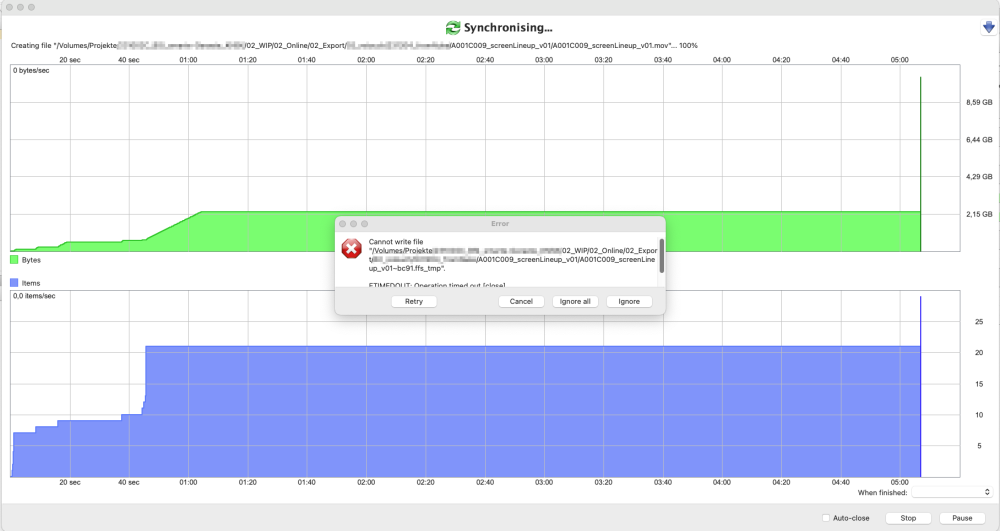
Hi there, I have a, from my perspective, really bizarre problem. I run a project backup to the unRAID Server daily; there's a folder structure on my work-machine (macOS Monterey 12.6.7), and the same on the unRAID server. I usually use FreeFileSync, but the Finder shows the same behaviour. I can't copy contents of a folder, no matter from where I copy it. I attached a screenshot from FreeFileSync. As you might be able to tell from the green graph, some files went through completely fine and when I reach that folder it starts to copy a file, around 99/100% it just holds, times out and gives that error. If I hit ignore the next file gets copied and the same happens again. I tried to copy that folder to my desktop and copy from there, no avail. I tried to copy by finder, nothing. I synced the entire folder structure to an external harddrive (the backup of that project) which worked fine, and then synced/copied from there, the same happens. I also tried to copy the contents somewhere else on unRAID to then move it with Krusader, but that also doesn't work. I thought the data might be corrupt, but it's just a few Quicktime MOV which work fine (in QT as well as video editors), the entire folder is no 10GB large, unRAID has more than 7TB of available space. It's really something, I can't even think on where to tackle this. As the files always copy but won't be finished, I figured it's some rights-management maybe, as FreeFileSync writes tmp files first. But as the Finder does the same, it doesn't seem like it? I restartet the unRAID server, I restartet my work machine, but just no avail. What the heck is up here? Diagnostics are also attached. Thanks for any pointers Best Regards postamt-diagnostics-20231206-1231.zip
-
huh, that easy. Thank you so much Archonw!
-
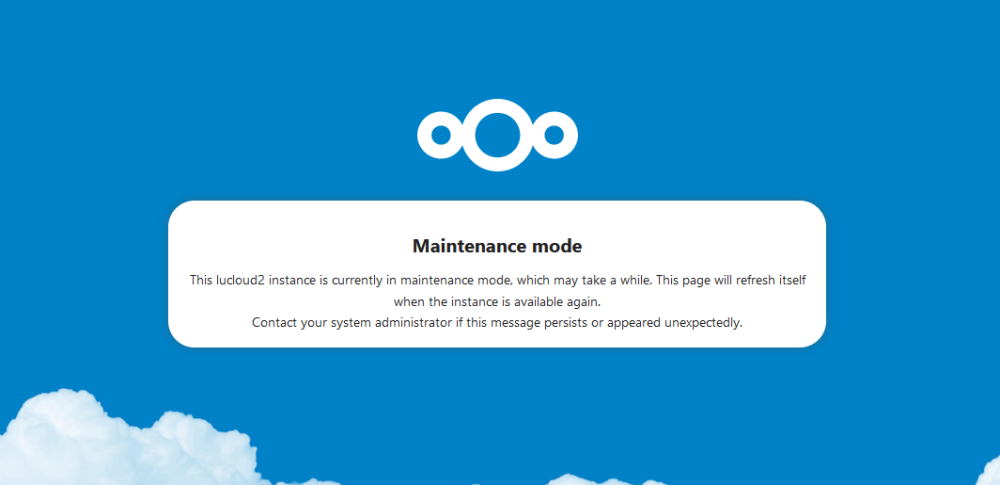
Hi there, I recently updated the Nextcloud docker as well as restartet the whole server; I am not sure which exactly lead to my issue, I only noticed it after both. My Nextcloud is in maintenance and won't come out of it. I didn't set it manually. I waited around 48h, no avail. I tried googling for a solution and while I found people with the same issues, I somehow found no solution. I attached the log of the Docker, anyone has an idea? Best Regards nextcloudLog.txt
-
I think I somewhat explained it wrong. unRAID works completely fine. One drive, or better said its data, had the issue now. The reason why I'm anxious is because it happened before (different physical drive of course, but same usecase/share). When I unplug it, nothing improves, it's just me that can't properly work then anymore. Sure, I can replace it. But I'm kind of afraid that there's something off, and that this was not just some funny coincidence
-
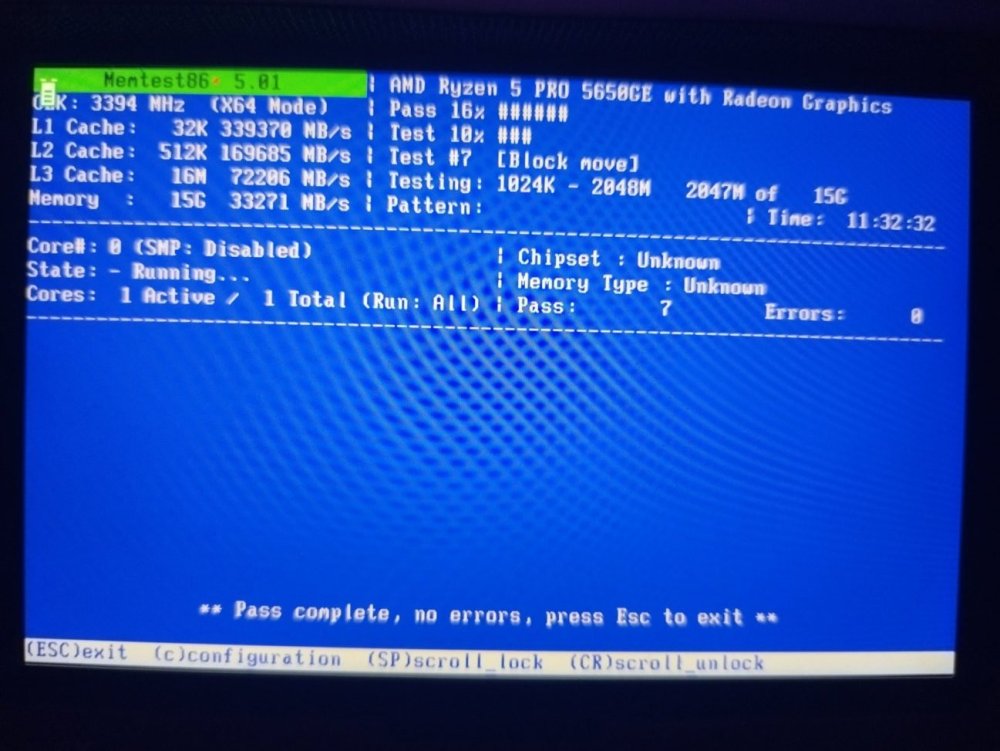
Good morning @philliphartmanjr First, I attached a photo of the Memtest result. Looks not so bad for now Drive sdc is exactly the transfer HDD I have trouble with. Actually, this RAR archive is the one where I noticed the errors with I didn't try to un-rar it on unRAID though, I wanted to copy it to my PC over SMB, but I tried to copy it quite a bit (I thought there was some random failure and it might work on a 2nd or 3rd attempt) I think I uninstalled Nerdpacks because they were EOL or something? At least I don't have them on anymore. I just tried to backup some data (as I said, there's nothing inherently important on there). Funny enough there's some old data that I can't delete. I mean, I can, and Windows shows me the common delete-dialogue, showing all the files etc, but the folder doesn't vanish and all files inside are still intact. If I try with the Krusader Docker, it doesn't do anything when I hit Ok. Very strange. Anyway, I'm still unsure where to go from here. It seems like RAM is fine. I will format the disk once the copy is done and see if some extensive SMART tests show something Best, Rick
-
Hm, I'm not sure the BIOS can log anything, but seemingly the article only talks about how Linux and Windows log them, and how Memtest shows them? I now disabled the function that was mentioned for AMD on the bottom of the page, also I updated the BIOS to the newest version. I only have two bars installed, but as far as I understand the data on my drive is corrupt already so not really a chance to get a reaction out of unraid? Would it make sense to deactivate ECC altogether and run Memtest, as this would clearly show errors? I just started Memtest now (ECC enabled, that one function disabled) and will go to bed. Just to see how it turns out after 10h or so. Best, Rick
-
Maybe I get it wrong, taken from @philliphartmanjrs Link: "Can I use MemTest86 inject ECC errors? MemTest86 Pro Edition supports ECC injection if the CPU/memory controller chipset supports error injection and the feature is not locked by BIOS. See the current list of chipsets with ECC injection capability supported by MemTest86." It's possibly a "special" thing it does? I usually use the Memtest that got installed to my unRAID Flash drive Best, Rick
-
the issue is that this is not really a repeatable error. It's nearly two months since I replaced the drive, and just now issues came through. If I understand the link properly, I should have a look if the "Platform First Error Handling (PFEH)" option is enabled, right? I mean disablind ECC altogether probably makes not much sense, right? I don't have the funds right now to download Memtest Pro for the ECC injection thing they mention Best, Rick
-
Hi there, at least the BIOS let me activate ECC and unRAID reports it as well on the dashboard @JorgeB I get no errors in Memtest with both installed, that's the main issue here @philliphartmanjr huh, is that so? my general cache (for Dockers etc) is a 500GB SATA SSD, while this cache is a 4TB HDD. Both btrfs. They are not in the same pool, they are individual caches; basically I just want it outside my array for the reasons given above (mainly un-zipping actually). Is that an "unsupported" setup? Best, Rick
-
I'm using ECC RAM, but not registered. What are comprehensive tests I could do to find the error, though? I mean if the defect can corrupt my system in this measure, it shouldn't be too hard to find it I imagine? I can run Memtest for the whole night if that helps. I have no spare RAM to put into the system, and if I did it would take some weeks till an error would possibly arise again Best, Rick
-
As mentioned, I ran memtest and that went absolutely fine without errors for hours
-
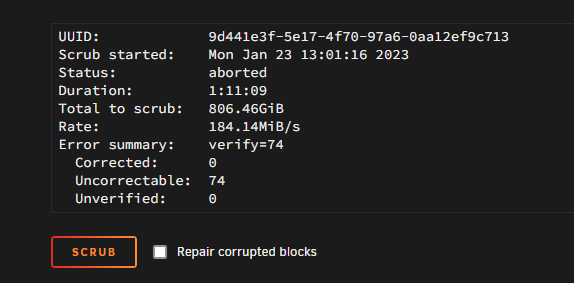
Hi there, some time past I had issues with two of my cache drives: My common cache, a SATA SSD, was reformatted and works great. The other cache I used as disk for transfers (downloads etc), it was an NVME which seemingly broke; it was not usable anymore after this incident. No SMART errors, but incredibly slow and basically bricked. I exchanged it with a 4TB HDD (btrfs), which worked great till today. I had some I/O errors while renaming files, and suddenly everything acted up. Small things like three parts of a 20-part-archive were broken, but in another instance one folder lost all its files, even some that were weeks old. Some files, even newer ones, are totally fine. I followed the old procedure and scrubbed the drive, I instantly got 74 uncorrectable errors, but then none along the way (I attached a screenshot, it reads "aborted" but it went through, no idea). SMART valus seem fine, as it did in the past. I'm not sure if I can even find out what exactly the issue is. So, what do I do now? I can format the drive no problem, there's no big loss with that. I don't include it into the array because that slows down downloads and un-zip operations a lot, the array runs flawless. As mentioned, the old SSD was NVME, the new HDD is SATA (attached to an HBA). So I doubt it's some hardware defect. I ran Memtest as well, works fine as intended. Any ideas what to do, and how to avoid? lunas-diagnostics-20230123-1440.zip
-
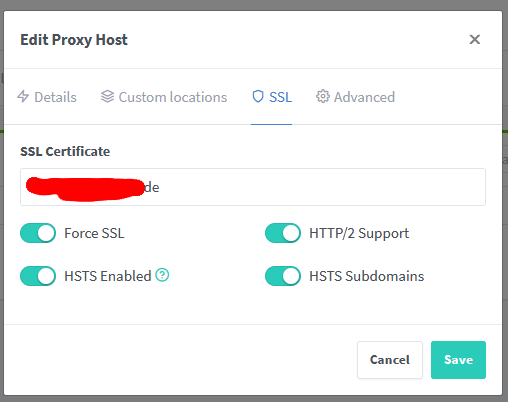
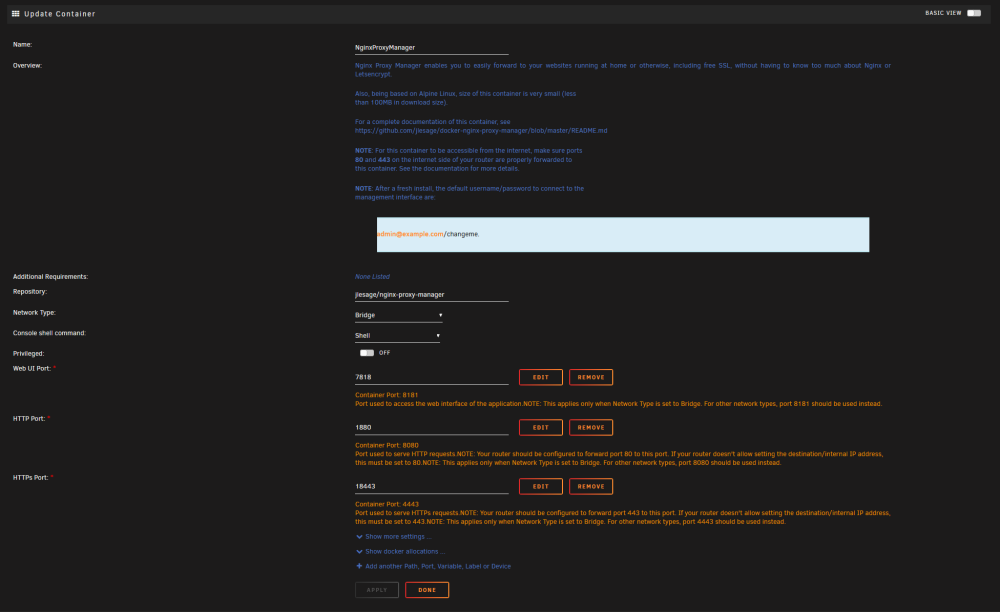
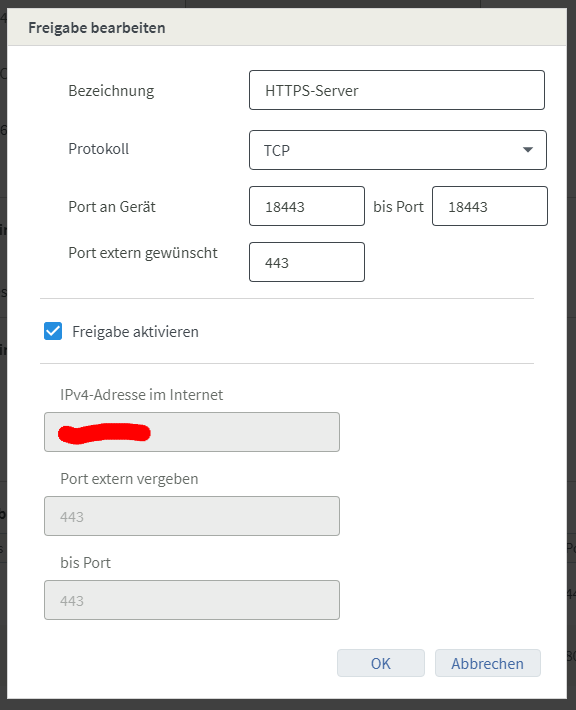
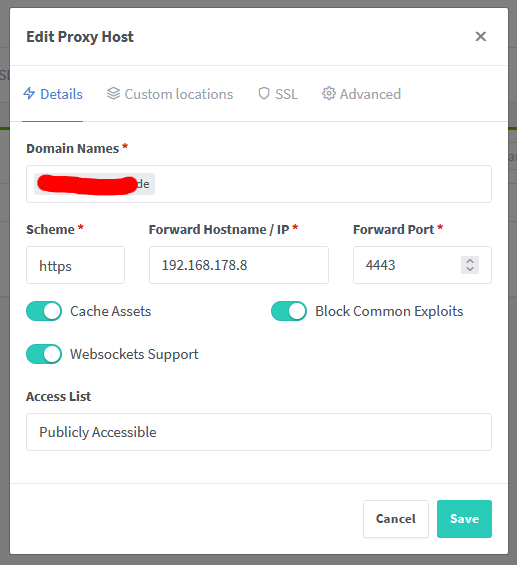
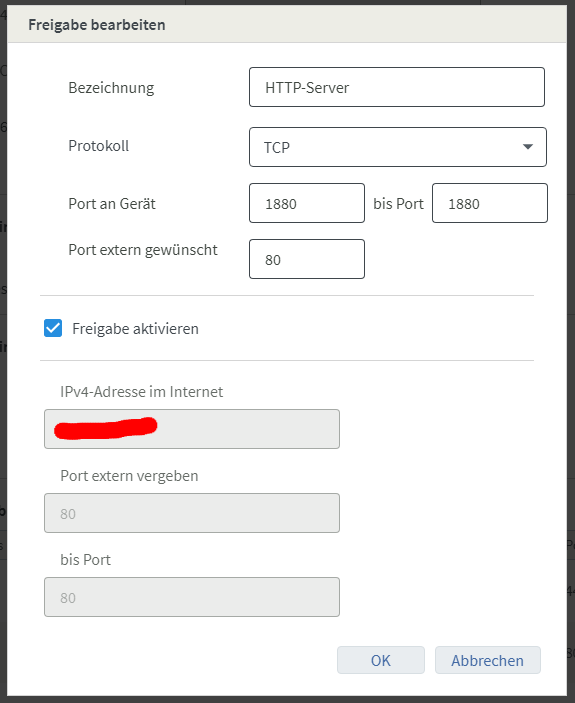
Hi there, I have an issue with my NGINX forwarding, once again I must say, but I'm not able to fix it on my own One or two days ago, not quite sure, the forwarding to my Nextcloud (also an unRAID Docker) failed. Anytime I try to reach it, I get a timeout ("ERR_CONNECTION_TIMED_OUT" in Chrome). I tried to raise the limit to 300 in the nginx.conf, but no dice; however, it's appereant that the timeout comes sooner than 300s. I didn't change anything in the config, nor did I update any docker. MariaDB is the database for my Nextcloud. I attached a few files. Fritzbox is my router, I screenshot the setup for the forwarding (fritboxHTTP and -HTTPS); when I type the given, open IP into my browser (the one I cancelled out with red), I get the screen nginxResult; so appereantly it works in general, but seemingly it needs to be setup? The setup of nginx is displayed in the nginxDockerConfig as well as nginxConfig0, nginxConfig1 and nginxConfig2. I also added the logs to the dockers of nginx and Nextcloud, appereantly no errors in there. So what to make of it? Anytime I install nginx, I can't access Nextcloud through the WebUI as it directly re-directs through my DynDNS, resulting in the timeout. So I can't even tell if nginx is really the culprit here, I just assume it because in the past this was the case in a similar error Best, Rick nextcloud_dockerLog.txt nginx_dockerLog.txt


-
Hi there Jorge, believe it or not, I figured it out. So somehow the ports on the nginx container got messed up. After fixing that, it started but was't accessible through the WebUI. Checking the logs, Nginx wasn't able to find the LetsEncrypt Certs and therefore wouldn't run. Seems like they were not properly transfered by the mover before I reformatted the SSD. I bit the bullet, installed Nginx from scratch and it does work again now. Thank you so much for putting up with me for so long. May I ask you one last thing: now that the SSD is formatted to BRTFS, would you recommend to schedule an automatic scrub every week or so? Best, Rick
-
Hi there Jorge, I removed the faulty NVMe and tested it in another computer; every SMART Value is fine, all software (including unRAID) claims it is healthy, but it is definitely broken. Super slow, unresponsive, but no errors so far. What gives, I have to replace it. Anyway, of course the problems don't stop, huh. I re-formatted my Cache to BRTFS to get better error correction and such, I enabled it again and used the Mover, so far so good. And most Dockers work, but Nginx (which is essential for my Nextcloud to work) just won't start. Same "Server Error" as before. I restarted the machine, but no dice. It seems there is some trouble with its port, when I switch it from 80 to 81 I can start Nginx, but I can't get into the WebGUI. Switching back to 80 gives an error, "already in use", but there's no other docker using Port 80. I attached some new diagnostics Best, Rick lunas-diagnostics-20221206-2017.zip


