





Nodiaque
Members
-
Joined
-
Last visited
Everything posted by Nodiaque
-
I really can't say, I have nothing that write to that folder, only read. All the rest are up to steam and the game. Unless you have something externally that change the permission of the folder and the game can't write anymore. I did read somewhere that proton has network library that isn't present in wine that could help in specific condition. There's also other library which could help. Just a hunch, I'm no way knowledgeable in proton.
-
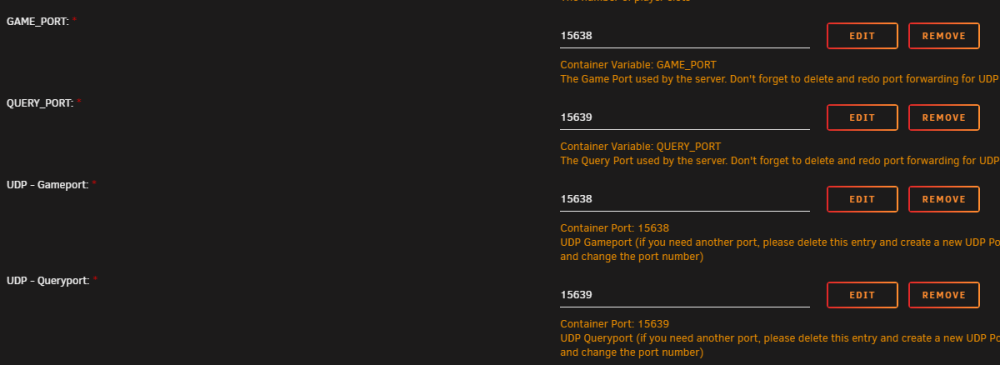
It's because you create 4 port forward. You are deleting 2 that you must NOT delete that are variables and crucial for it to work. Restart from the template
-
Weird didn't get that
-
Just checked and there's 2, 1 for gameport and 1 for query port. There's 2 of each entry, 1 is for the config file, the other is for the port forwarding. Where did you see dual port allocation? I'm using 2 container hence the different ports

-
Yes the steam browser use the query port to query the server and get the information about the server like what port it's using
-
Little headsup, pterodactyl dev aren't unraid friendly. I've had many back and forth with them and everytime I say I'm using unraid, I get in the "unsupported" lane and they stop trying to help.
-
I only have 2 active users right now and I never had any problem. I do have a big server (Xeon W-2275 24 cores @ 3.3ghz with 128GB RAM). I've done a quick test to see if someone could logon and it worked. It's just fresh out of the oven, why it's very experimental.
-
I just created a new docker for enshrouded running on proton. PLEASE DO NOT USE THE SAME PATH AS THE OTHER DOCKER. This new docker will use variables from the unraid template to create the config file. Do not modify the config file as it will be overwriten. It should appear in the CA as Enshrouded_Proton. It is very experimental. I've taken information from another docker that is running it under Proton and adapt to make it work like my other docker. I'm not knowledgeable with Proton at all. Use at your own risk. If you want to transfer your savegame, just wait for the server to properly start, stop then copy file in savegame over.
-
The backup script only copy the file, it doesn't even touch it sleep ${BACKUP_INTERVAL}m cd ${SERVER_DIR}/savegame tar --warning=no-file-changed -czf ${SERVER_DIR}/Backups/$(date '+%Y-%m-%d_%H.%M.%S').tar.gz . cd ${SERVER_DIR}/Backups ls -1tr ${SERVER_DIR}/Backups | sort | head -n -${BACKUPS_TO_KEEP} | xargs -d '\n' rm -f -- chmod -R ${DATA_PERM} ${SERVER_DIR}/Backups You can try removing the backup function to see if it's helping. Haven't had any problem with it yet and I rebooted 4 times my server today (had unraid update to do) and I asked player if something got revert, they said no.
-
I'm working on a proton image to see how it goes. It won't be based on the same image since my source is someone else, keep posted. I'll be a new item in CA so we can have 2 different build
-
I'm unsure what you mean. Do you mean the backup is reseting the game? Cause I've been running it since I made it and haven't any of this. The backup feature is just a copy of the file with tar command. I have no command that copy over stuff except if the config file doesn't exist.
-
For a second world, you would need to mostly do what you said. Click add a container in the bottom of the docker screen and select enshrouded in the drop down list at the top. I think you can also click on it in the CA and install a new one. Name the docker another name, change data folder, change port (need to change also in config) and pick another name (also in config file). Also, for port change, you will need to delete the port configuration in the template and create new. Don't just edit and change the port, seen issue with that in the past. That's why it says to recreate the port in the comment if you need other port.
-
Something I did on my end, because targeting directly a disk could make your backup failed someday. I created a share so I target it in /mnt/user instead. And if your cache is big enough, I made it so it use the cache. With mover tuner, I scheduled the mover to run an hour after the backup (I could also trigger it with a post run backup script). This way, the backup is done very fast on the ssd and then moved to the safe HDD.
-
App data work with direct path not share. So you must put the destination like /mnt/.... And the folder must exist
-
I think I saw through rcon, might be mistaken with another game though.
-
Don't forget it's ea so bug and lag are expected. And it'd also not Linux native. E they plan on releasing a Linux native so I might just wait on that instead of maybe breaking something with proton. Did you see if it happen at the same time the server make a save?
-
I'm gonna check later. Proton is on top of wine and is for graphics, thus I don't get why it should help with anything. I currently have 8 players on my server simultaneously without any problem.
-
Check your port forwarding. Query port isn't the same as game port.
-
I see there's some pull request to fix some >500 driver issue. Unsure if it will be merged, don't see any new built since september 2023. Owner must be busy.
-
Oh yeah, did found one that was boot looping. But, this is due to something I did yesterday. I know I had the problem before that so I'll keep monitoring to see if the log get flooded again. THanks
-
Hello everyone, For as long as I can remember, my syslog is always filled with error saying ports are entering blocked state, then disabled, then forwarding, etc... I was wondering if that's normal or if there's a problem and what I can do to fix it? I'm on 6.12.4 but had this problem I think forever. Thank you syslog-192.168.0.4.log
-
It probably doesn't matter, was just a hunch I read somewhere
-
There is a way to have it update, I don't remember how though. Just did that with my own container, it pulled down the new one and I didn't delete the old config. I think I pressed "add container" and selected enshrouded. I don't remember...
-
Safest way would be: 1) take a backup of the docker and files (appdata backup/restore is a good idea) 2) Delete the docker 3) Copy savegame and config file then delete appdata 4) Install from CA 5) start the server, when running stop 6) Restore config file and save You could keep the old docker and simply change the mount point for the serverfile if you already used enshrouded name and just copy the savegame and config after first run (and stopping both container) if you want to keep it in case. Another faster way would be to stop the docker, delete, install the new one with same path. I would suggest always take a backup of savegame and config file in case. In theory, this should work no problem as long as you keep the same path. If you don't see stuff like BACKUPS_TO_KEEP, you have old XML and need to redownload (should be done automatically).
-
Do you take daily backup? I would suggest try restoring a working backup. All my docker are daily restarted and backup with appdata backup and restore. Might want to try that. Also, if it's working, try restarting and see if the problem come back. It's not normal, but not something the script touch itself, it's wine that does all of that itself.



