





Nodiaque
Members
-
Joined
-
Last visited
Everything posted by Nodiaque
-
Sorry, I don't see the typo? Looking at the log, nothing says it has touched the file. Maybe the game itself did it because something was wrong. In the old docker, when it was touching the file, it was writing information about what it's touching. Now, the only thing it does is download the file if it doesn't exist (something that could be removed since the game create it itself anyway). Unless you are running an outdated version of the docker file, nothing is touching (from my own code) the file anymore.
-
Hello, is the way to add a new app still to message Squid or there's a new way? I have my first app to be published, I followed the old guide that the top link to. thank you
-
Hello everyone, I don't see where to post this topic so I hope I'm not doing something to wrong by posting here. I created a new community app to be publish in the CA. Since it's my first, I followed both link regarding to creating the templace in a github, create a ca_profile.xml, publish in github and docker hub, send a message to squid with all the details and even create a support thread. But the app is still not publish after many days. I know Squid need to do something manually and when I look at my message, it's still unread on his side. I'm sure he's pretty busy with life and other business (and he's probably also spammed a lot in the forum). So I was wondering, if there someone else that can do it? I feel it's weird that something as big as community app catalog have only one person that can do everything. What happen if he get into an accident? Thank you
-
Oh yeah if you want more then a daily backup, I totally agree with that.
-
Thanks. Squid also have a life and he's pretty busy. I think there should be a group and not just one person doing the CA approbation stuff.
-
you guys don't use CA appdata backup and restore? This take care of that
-
Hello, the latest version of the docker doesn't touch the server file anymore (unless it doesn't exist then it create it). All variable in the template does nothing. You must change the file only when the server is offline. Once the server is down, you can change it and put your password, save and load.
-
Well once you will update, it won't work anymore. I removed the code that was using the variable. Stick to simple, just edit the config file. Less chance of something automated ruining something. edit: I just saw about the Docker in the template. I'm still wondering how that happened since it'S a copy/paste of the template in unraid and mine does have SERVERPASS at that place. Again, sorry everyone, rookie mistake. I'll be more robust on next containers.
-
I've reverted my change. Very sorry for that. I won't touch a working container anymore unless it's something needed and stick to "edit the config file" to prevent anything like that to ever happen again. Lesson learned.
-
oh wow, I did check before doing it to see if that was happening and on my end it didn't yield an unprotected server. I'm going to disable that right now and go back to edit the file
-
I've updated the image and the template. You can either recreate the template, update it or leave it as is. It will still work fine if you don't make the modification. The modifications are all variables that you can simply add to the template. If a variable isn't set/present or is empty, the config file value will be used (so no impact if you already have a custom config file). If you set a variable with a value, it will overwrite the value in the config file. All variables are optional so you can set only the one you want and leave the rest for config file default. SERVERNAME - Name of the server SERVERPASS - Password of the server UDPGAMEPORT - Change the UDP game port used for the server. If you change this from the default (15636), you have to redo the port mapping in the template. QUERYPORT - Change the UDP query port used for the server. If you change this from the default (15637), you have to redo the port mapping in the template. Variables name are case sensitive. If variables are properly set, you will see something like this just before the line "---Server Ready---" depending on which variable you set: Password will never appear in the log edit: THIS IS NOT TRUE ANYMORE, EVERYTHING IS SET MANUALLY IN THE CONFIG FILE BY THE USER

-
Can't say for what you did, but it's a couple of Gb. Check your path. I suggest looking on this post on how to use the XML directly instead. It's not hard. It's a file to create somewhere on /boot. I'm on mobile so having difficulty with link. But you should find in the first page the person linking directly to the template and where/how to use it.
-
Hello, There is a post in the first page from someone who said where to import the file and how to use it. Hopefully, squid will soon accept my CA addition and this will be past history.
-
Yeah it's not very optimize. I saw in my test docker the ram going to 16 gb usage with no one on it. Dev says to daily restart to prevent problem as much as possible.
-
Yeah, we are waiting for Squid to add the repo to the community app.
-
With the help of ich777, a new template and docker image has been built. It's more "cleaning" that was added, nothing changing how everything work. We did add back the "game parameters" option in the template but for now there's nothing since the game doesn't have any. I'll check more today to add parameter for the server name and game password from var.
-
Oh yeah I forgot about the steam server browser. It's often better. But using the favorites doesn't mean it show in the browser for other player (I used to do that locally). There's also the Lan tab (I think that's the name) where it scan your local network to find servers of all the game.
-
no you should be good with steamcmd. wine should install in the enshrouded folder.
-
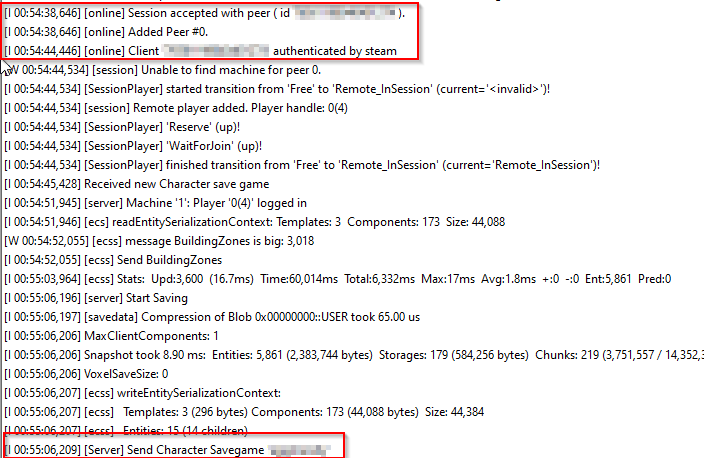
Look something like that There's a kernel error in the log too, it seems wine isn't running properly. Maybe try removing the docker + image, erase the base folder and restart from scratch. Something is weird here and not even something I made. Wine is built-in into the image I'm based on. edit: I reuploaded the template xml in case something was badly pasted.
-
you don't have to put your username and password (in fact leave it empty). edit: what do you have in your logs folder? It seems the server never start.
-
can you paste the log?
-
Did you check the path in the template? It seems download doesn't work
-
I don't know why it's not in the community app. Squid might be occupied (he's the one doing the approval).
-
You have to, like anything behind a firewall. But I think you're not replying to the right person I tend to never mess with "ip" when it's in a config file, specially with non-static ip.
-
Yeah, there might be too many server adding and we can't see them all. I don't own the game myself but my friend said they see my server, but it was about 30 minutes to an hour after I started it. Now that we are in the evening (at least where I am), there might be many more server popping and the game browser can't keep up. Other then verifying that the query port and game port are properly port forward, I cannot really say. Maybe check the network you used? By default it's bridge since putting a custom network in a template is a very bad idea, but on my end, i'm using a custom network.




