





Nodiaque
Members
-
Joined
-
Last visited
Everything posted by Nodiaque
-
It might take a while before it shows like other game. Also, be sure to have port forward properly set in your firewall
-
You have to edit the config file as per the documentation. Right now, I didn't do anything that automatically put var in the config file. The game itself doesn't support any command line to configure stuff. I might in the futur check other ich777 container and see how to edit the file on the fly before the launch of the server. But for now, just edit the json while server is offline (file is created on first launch with default config as per Enshrouded doc) and you'll be good to go. I myself prefer editing the file then editing var because var require docker recompile while file just need a restart. Just a personal preference here. I've updated my template to show explicitly that the json file need to be edited to change the name and password.
-
yeah I don't know why it's not there. I might have done something wrong
-
Just take the xml from my github repo and import it.
-
normally about 2 hours. But since it's my first time submission, I'm not sure if there's an added time
-
For those wanting to have Enshrouded, I've just created the container following ich777 footstep. I'm waiting for it to be publish in the community app. To prevent cross discussion between devs, the support thread is here: Note that I'm still waiting on port confirmation from the dev about UDP and TCP. the doc doesn't specify and looking on various website, it varies. Presently, the template open both to be sure.
-
Dockers Available SteamCMD DedicatedServers: Enshrouded Enshrouded_Proton (2 tag available, prompt at installation) Windrose + Windrose-xvfb (extra setup required after first run). Windrose-beta exist for Wine 11 instead of wine 10 (no xvfb) FAQ Game says server version doesn't match and I already restarted the container This happen often because steamcmd doesn't see the change. You can either save the configuration and savegame of the game, delete everything else and start again or delete the file appmanifest_*.json under /steamapps in the appdata folder. You can also try to add a VALIDATE Env to the template and set it to true. This will force the validate statement and sometime it solve that problem. WINDROSE Setup Guide reference https://playwindrose.com/dedicated-server-guide/ Migrating from upnp to direct port and first run configuration As of April 22 2026, the template is configured as direct port. For those that used the template before that and want to migrate to direct port, follow these information. There is still manual configuration needed in the serverdescription.json to be done after the first run (see bellow). You can use either dynamic port with invite code or Direct Connection. When using Direct Connection, invite code are no longer used. If you want to change the port, you must change it everywhere, Game_Params, serverdescription.json and port mapping. Add a new variable "GAME_PARAMS" with value: -MULTIHOME=0.0.0.0 -PORT=7777 -QUERYPORT=7778 u After, you must add 3 port binding, UDP 7777, TCP 7777 and 7778 In ServerDescription.json, you must configure the following: "IsPasswordProtected": true, "Password": "yourpassword", "UseDirectConnection": true, "DirectConnectionServerPort": 7777, You can then switch your network configuration to bridge instead of Host. Don't forget to open the port on your router
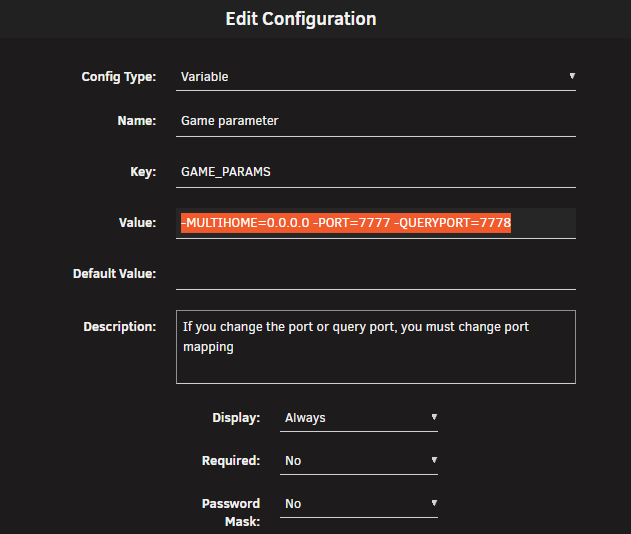
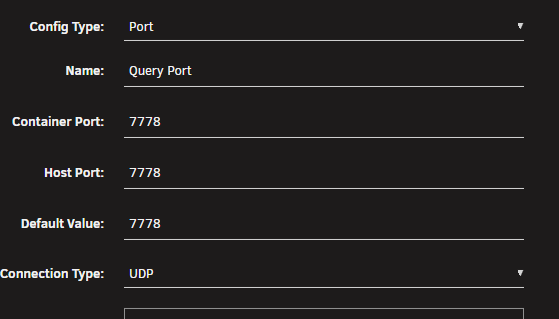
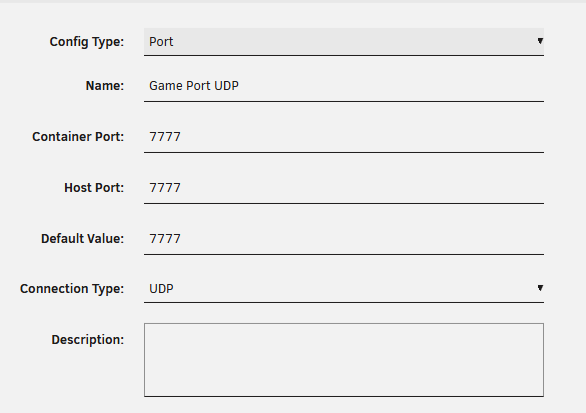
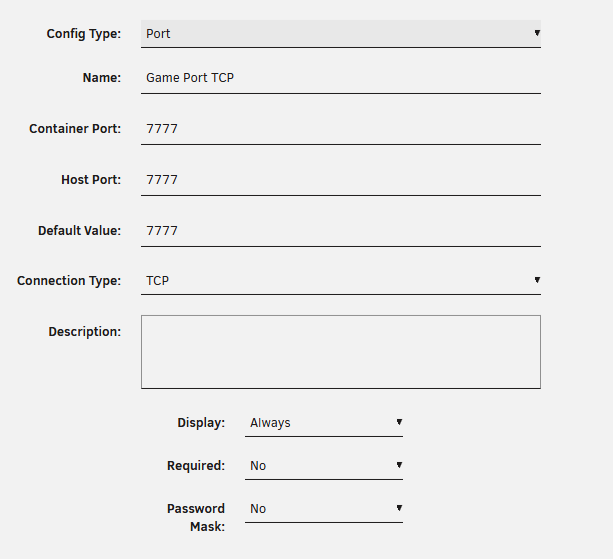
-
Summary: Support Thread for Nodiaque Gameserver Dockers Application: SteamCMD DockerHub: https://hub.docker.com/r/nodiaque/steamcmd All dockers are easy to set up and are highly customizable, all dockers are tested with the standard configuration (port forwarding,...) if the are reachable and show up in the server list form the "outside". The default password for the gameservers if enabled is: Docker It there is a admin password the default password is: adminDocker Please read the discription of each docker and the variables that you install (some dockers need special variables to run). The Steam Username and Password is only needed in templates where the two fields are marked as required with the red * Special thanks to @ich777 that created the original docker and supported them for many years. Updating the server These docker doesn't contain any steam file or any game file. When a new update is release, the docker container is not updated since that only thing it contain is a script that download the steam client and launch it. Restarting the docker normally update the game just like the steam client does on your computer. BUT, it does happen that the client doesn't see the update for many reason. A quick fix in those time is to backup your config and save file, start a new container from scratch with empty appdata and then migrate your data back. New version of a game server doesn't require a new version of the docker container.
-
Yes but you can run it in windows emulator like other game does. They did say that a linux version will become available later. A tutorial is currently out of scope. How to create a container for unraid, there's already many post on that. Now the specific of the steam container ich777 created is a trial and error at each new container because each game is different. He helped me understand how the container work specially since I never really worked with Docker to begin with (outside of using already available docker). I'm nearly done with the creation of the one I'm doing right now and well be ready to test with my friend who own the game.
-
Please see this post
-
Hello, I'm currently learning how to do servers like ich777 do. He made a wonderful job of doing all of this and it's something I wanted to learn for myself a long time ago but never took the time for it. I cannot vouch I'll do something as good or not, it will be my first dockers. Once I got something working, I'll ping back. Specially since it's currently Windows Only, that's another pain to do. I also saw the game says owneronly, where I don't own the game. This will make it even more harder to do. Before someone jump to the gun, my goal is not to compete with him, on the contrary, I'm communicating with him to learn. The goal is to give him more spare time and allow the community to have more server in the same way he is doing.
-
Quick question. It's really not the first time I see the error in steam container, in fact I think all of them as it and it never bothered anything. I'm just wondering, they are offering a fix for it in their faq (https://tech.palworldgame.com/dedicated-server-guide#qa)
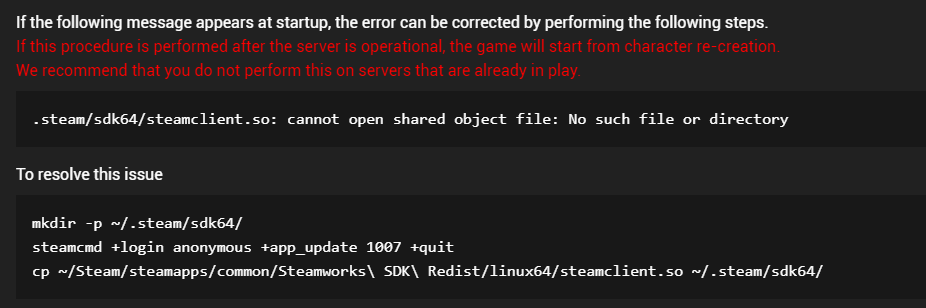
-
I guess you mean port forwarding?? First check if you don't have conflicting port with another docker listening to 8211. Verify your docker is on the right network. Check your config to be sure you enable to check the publicip to autoupdate if you don't use any cloudfare and such.
-
well it all depend how you do. Palworld will require port forwarding. If you do port forwarding on your router, then people need your real ip (the one you would normally get by going to whatismyip.com which is probably what the game get since there's a config for publicip). If you don't do that cause you use cloudfare as some sort of vpn (I don't know how cloudfare work but heard they offer some sort of vpn), then it's cloudfare ip you need. In both case, disable the settings that validate the publicip. And I would put the cloudfare ip in it (if it change well......... don't use cloudfare?)
-
Hello, I see for Palworld this extra parameters: -No-useperfthreads -NoAsyncLoadingThread -UseMultithreadForDS According to this (https://tech.palworldgame.com/dedicated-server-guide), using these parameters increase performance: -useperfthreads -NoAsyncLoadingThread -UseMultithreadForDS Difference is the first param. Is there a reason to use "-No-useperfthreads"?
-
Don't know why, when I put CAD, it's says 1 USD = 1 CAD. I wish that was true... edit: nevermind, had redis bug
-
I cannot say. It moved from SDH to SDJ and wasn't liking me assigning the drive to disk 3 where it was before.
-
hmmm that's not what happened earlier when I tried it. I'm afraid to get another "disconnect drive" again. I'll wait for the rebuild even if I have multiple days because of the disconnection on the read drives... safer this way
-
To remove the HDD from the cage and connect them directly, I need to reassign them. Since I have a rebuild in progress, I cannot stop the rebuild, reassign all drive before the rebuld is finish right?
-
oh nice thanks, I'll keep an eye on that!
-
quick question, where can I see that in the log?
-
ah, yeah it's in the cage. I guess I have to wait for the rebuild to end before moving another drive
-
Oh I though there was a command or something I could easily check. Here's the diag servraid-diagnostics-20231211-1228.zip
-
Yes I'm pretty sure it's one drive inside the cage, but I don't know who is ATA3? Before that I had also ata5 error so the drive I removed from the cage is probably ata5 (the one I'm rebuilding)
-
ok, well in fact, the cage is the problem. I've removed the drive out of it but the rebuild need 2 of the other drive in the cage. It non stop spam syslog with Dec 11 10:54:12 ServRaid kernel: ata3.00: exception Emask 0x50 SAct 0xff0000 SErr 0x4890800 action 0xe frozen Dec 11 10:54:12 ServRaid kernel: ata3.00: irq_stat 0x0d400040, interface fatal error, connection status changed Dec 11 10:54:12 ServRaid kernel: ata3: SError: { HostInt PHYRdyChg 10B8B LinkSeq DevExch } Dec 11 10:54:12 ServRaid kernel: ata3.00: failed command: READ FPDMA QUEUED Dec 11 10:54:12 ServRaid kernel: ata3.00: cmd 60/40:80:e0:5e:86/05:00:13:00:00/40 tag 16 ncq dma 688128 in Dec 11 10:54:12 ServRaid kernel: res 40/00:a8:20:79:86/00:00:13:00:00/40 Emask 0x50 (ATA bus error) Dec 11 10:54:12 ServRaid kernel: ata3.00: status: { DRDY } Dec 11 10:54:12 ServRaid kernel: ata3.00: failed command: READ FPDMA QUEUED Dec 11 10:54:12 ServRaid kernel: ata3.00: cmd 60/40:88:20:64:86/05:00:13:00:00/40 tag 17 ncq dma 688128 in Dec 11 10:54:12 ServRaid kernel: res 40/00:a8:20:79:86/00:00:13:00:00/40 Emask 0x50 (ATA bus error) Dec 11 10:54:12 ServRaid kernel: ata3.00: status: { DRDY } Dec 11 10:54:12 ServRaid kernel: ata3.00: failed command: READ FPDMA QUEUED Dec 11 10:54:12 ServRaid kernel: ata3.00: cmd 60/40:90:60:69:86/05:00:13:00:00/40 tag 18 ncq dma 688128 in Dec 11 10:54:12 ServRaid kernel: res 40/00:a8:20:79:86/00:00:13:00:00/40 Emask 0x50 (ATA bus error) Dec 11 10:54:12 ServRaid kernel: ata3.00: status: { DRDY } Dec 11 10:54:12 ServRaid kernel: ata3.00: failed command: READ FPDMA QUEUED Dec 11 10:54:12 ServRaid kernel: ata3.00: cmd 60/40:98:a0:6e:86/05:00:13:00:00/40 tag 19 ncq dma 688128 in Dec 11 10:54:12 ServRaid kernel: res 40/00:a8:20:79:86/00:00:13:00:00/40 Emask 0x50 (ATA bus error) Dec 11 10:54:12 ServRaid kernel: ata3.00: status: { DRDY } Dec 11 10:54:12 ServRaid kernel: ata3.00: failed command: READ FPDMA QUEUED Dec 11 10:54:12 ServRaid kernel: ata3.00: cmd 60/40:a0:e0:73:86/05:00:13:00:00/40 tag 20 ncq dma 688128 in Dec 11 10:54:12 ServRaid kernel: res 40/00:a8:20:79:86/00:00:13:00:00/40 Emask 0x50 (ATA bus error) Dec 11 10:54:12 ServRaid kernel: ata3.00: status: { DRDY } Dec 11 10:54:12 ServRaid kernel: ata3.00: failed command: READ FPDMA QUEUED Dec 11 10:54:12 ServRaid kernel: ata3.00: cmd 60/78:a8:20:79:86/00:00:13:00:00/40 tag 21 ncq dma 61440 in Dec 11 10:54:12 ServRaid kernel: res 40/00:a8:20:79:86/00:00:13:00:00/40 Emask 0x50 (ATA bus error) Dec 11 10:54:12 ServRaid kernel: ata3.00: status: { DRDY } Dec 11 10:54:12 ServRaid kernel: ata3.00: failed command: READ FPDMA QUEUED Dec 11 10:54:12 ServRaid kernel: ata3.00: cmd 60/40:b0:98:79:86/05:00:13:00:00/40 tag 22 ncq dma 688128 in Dec 11 10:54:12 ServRaid kernel: res 40/00:a8:20:79:86/00:00:13:00:00/40 Emask 0x50 (ATA bus error) Dec 11 10:54:12 ServRaid kernel: ata3.00: status: { DRDY } Dec 11 10:54:12 ServRaid kernel: ata3.00: failed command: READ FPDMA QUEUED Dec 11 10:54:12 ServRaid kernel: ata3.00: cmd 60/08:b8:d8:7e:86/00:00:13:00:00/40 tag 23 ncq dma 4096 in Dec 11 10:54:12 ServRaid kernel: res 40/00:a8:20:79:86/00:00:13:00:00/40 Emask 0x50 (ATA bus error) Dec 11 10:54:12 ServRaid kernel: ata3.00: status: { DRDY } Dec 11 10:54:12 ServRaid kernel: ata3: hard resetting link Dec 11 10:54:18 ServRaid kernel: ata3: link is slow to respond, please be patient (ready=0) Dec 11 10:54:22 ServRaid kernel: ata3: COMRESET failed (errno=-16) Dec 11 10:54:22 ServRaid kernel: ata3: hard resetting link Dec 11 10:54:28 ServRaid kernel: ata3: link is slow to respond, please be patient (ready=0) Dec 11 10:54:31 ServRaid kernel: ata3: SATA link up 1.5 Gbps (SStatus 113 SControl 310) Dec 11 10:54:31 ServRaid kernel: ata3.00: configured for UDMA/33 Dec 11 10:54:31 ServRaid kernel: ata3: EH complete Is there something I can do to ID who is ata3? If I only I could remove all HDD from the cage and then begin the rebuild on that one drive... right now it's saying 6 days for the rebuilt at 16mbps



