





Nodiaque
Members
-
Joined
-
Last visited
Everything posted by Nodiaque
-
I don't know what happened, I now have a red X on a drive edit: I did an xfs_repair and I can manually mount the drive in shell no problem. servraid-diagnostics-20231211-0940.zip new edit: Ok so I followed what I found here: Stop the array, remove device, start the array, stop the array, add device, start array. I see a rebuild has started. My parity was checked 2 weeks ago so I'm not too concerned with it. I just hope the external enclosure won't cause any problem while it's rebuilding so I can then put all those drive outside of the dammed enclosure next edit: Dam, I'm getting again the same error I had about link down..... Can I stop the rebuild process, put the hard drive out of the cage and assign it back for the new rebuilt or since a rebuild already started, I'm doomed?

-
I'm pretty sure it's that external box I bought. Located all drive that are having issue on this thing. Now if I want to take them out and put them back directly on sata, do I just do reassign while array down? Those are hot swappable so I can swap them 1 by 1. Since they change dev id when I moved them, I'll change them 1 by 1 so I don't mix them.
-
2 connected but it's Y splitter from another connector. Stupid Dell Motherboard that only give 4 plugs for a 12 sata motherboard... Right now I didn't see anymore error, but I do see that 2 of the ata are 3.0gps while 1 is 6gbps. Somewhere next week, I'll swap all of the sata cable. I had new one in the box that I didn't used. It's true though that problem started since I have this box. Before that, I had all of the hard drive (well only 3) all connected to separate power cable in an old hdd cage that I salvage from another pc. I though this box was "better" but I might be wrong.
-
Yeah, after a restart it seems fixed but it just started happening again. I'm wondering if it's my backplane that is dead. All drive with this behavior are into one of this https://www.amazon.ca/dp/B00OUSU8MI?ref=ppx_yo2ov_dt_b_product_details&th=1
-
ok, that's what I'm doing right now. I got one disk that had more error. Shutdown was initiated because I woke up with read error this morning on two drive and I wasn't able to run the smart on one of them. I then saw syslog daemon wasn't logging anything for like a week (this happen randomly) so I restarte the daemon and started having weird error. When I triggered a shutdown from GUI, nothing happened. So I shutdown all dockers and vm and pressed power (just press). This initiated a shutdown and it "properly" shutdown. The disk unmountable aren't (well, 1 is) the one with the read error. I'm gonna scan the other drives while I'm in maintenance just for good measure. the error I had this morning in log was thid: Dec 10 09:03:40 ServRaid kernel: sd 7:0:0:0: [sdh] tag#17 CDB: opcode=0x88 88 00 00 00 00 01 80 43 18 20 00 00 01 00 00 00 Dec 10 09:03:40 ServRaid kernel: I/O error, dev sdh, sector 6446848032 op 0x0:(READ) flags 0x80700 phys_seg 32 prio class 2 Dec 10 09:03:40 ServRaid kernel: ata6: EH complete Dec 10 09:03:40 ServRaid kernel: ata3.00: exception Emask 0x50 SAct 0x2062000 SErr 0x4090800 action 0xe frozen Dec 10 09:03:40 ServRaid kernel: ata3.00: irq_stat 0x00400040, connection status changed Dec 10 09:03:40 ServRaid kernel: ata3: SError: { HostInt PHYRdyChg 10B8B DevExch } Dec 10 09:03:40 ServRaid kernel: ata3.00: failed command: READ FPDMA QUEUED Dec 10 09:03:40 ServRaid kernel: ata3.00: cmd 60/00:68:e8:c5:ad/01:00:27:05:00/40 tag 13 ncq dma 131072 in Dec 10 09:03:40 ServRaid kernel: res 40/00:90:60:bf:13/00:00:af:05:00/40 Emask 0x50 (ATA bus error) Dec 10 09:03:40 ServRaid kernel: ata3.00: status: { DRDY } Dec 10 09:03:40 ServRaid kernel: ata3.00: failed command: READ FPDMA QUEUED Dec 10 09:03:40 ServRaid kernel: ata3.00: cmd 60/00:88:60:be:13/01:00:af:05:00/40 tag 17 ncq dma 131072 in Dec 10 09:03:40 ServRaid kernel: res 40/00:90:60:bf:13/00:00:af:05:00/40 Emask 0x50 (ATA bus error) Dec 10 09:03:40 ServRaid kernel: ata3.00: status: { DRDY } Dec 10 09:03:40 ServRaid kernel: ata3.00: failed command: READ FPDMA QUEUED Dec 10 09:03:40 ServRaid kernel: ata3.00: cmd 60/00:90:60:bf:13/01:00:af:05:00/40 tag 18 ncq dma 131072 in Dec 10 09:03:40 ServRaid kernel: res 40/00:90:60:bf:13/00:00:af:05:00/40 Emask 0x50 (ATA bus error) Dec 10 09:03:40 ServRaid kernel: ata3.00: status: { DRDY } Dec 10 09:03:40 ServRaid kernel: ata3.00: failed command: READ FPDMA QUEUED Dec 10 09:03:40 ServRaid kernel: ata3.00: cmd 60/00:c8:e8:c6:ad/01:00:27:05:00/40 tag 25 ncq dma 131072 in Dec 10 09:03:40 ServRaid kernel: res 40/00:90:60:bf:13/00:00:af:05:00/40 Emask 0x50 (ATA bus error) Dec 10 09:03:40 ServRaid kernel: ata3.00: status: { DRDY } Dec 10 09:03:40 ServRaid kernel: ata3: hard resetting link Dec 10 09:03:41 ServRaid kernel: ata5: COMRESET failed (errno=-16) Dec 10 09:03:41 ServRaid kernel: ata5: hard resetting link Dec 10 09:03:46 ServRaid kernel: ata3: link is slow to respond, please be patient (ready=0) Dec 10 09:03:46 ServRaid kernel: ata5: link is slow to respond, please be patient (ready=0) Dec 10 09:03:48 ServRaid kernel: ata5: SATA link up 1.5 Gbps (SStatus 113 SControl 310) Dec 10 09:03:49 ServRaid kernel: ata5.00: configured for UDMA/33 Dec 10 09:03:49 ServRaid kernel: ata5: EH complete Dec 10 09:03:49 ServRaid kernel: ata6.00: exception Emask 0x50 SAct 0x20000 SErr 0x4090800 action 0xe frozen Dec 10 09:03:49 ServRaid kernel: ata6.00: irq_stat 0x00400040, connection status changed Dec 10 09:03:49 ServRaid kernel: ata6: SError: { HostInt PHYRdyChg 10B8B DevExch } Dec 10 09:03:49 ServRaid kernel: ata6.00: failed command: READ FPDMA QUEUED Dec 10 09:03:49 ServRaid kernel: ata6.00: cmd 60/00:88:78:1d:91/01:00:2a:00:00/40 tag 17 ncq dma 131072 in Dec 10 09:03:49 ServRaid kernel: res 40/00:88:78:1d:91/00:00:2a:00:00/40 Emask 0x50 (ATA bus error) Dec 10 09:03:49 ServRaid kernel: ata6.00: status: { DRDY } Dec 10 09:03:49 ServRaid kernel: ata6: hard resetting link Dec 10 09:03:50 ServRaid kernel: ata3: COMRESET failed (errno=-16) Dec 10 09:03:50 ServRaid kernel: ata3: hard resetting link Dec 10 09:03:55 ServRaid kernel: ata6: link is slow to respond, please be patient (ready=0) Dec 10 09:03:56 ServRaid kernel: ata3: link is slow to respond, please be patient (ready=0) Dec 10 09:03:58 ServRaid kernel: ata5.00: exception Emask 0x50 SAct 0xc00 SErr 0x4090800 action 0xe frozen Dec 10 09:03:58 ServRaid kernel: ata5.00: irq_stat 0x00400040, connection status changed Dec 10 09:03:58 ServRaid kernel: ata5: SError: { HostInt PHYRdyChg 10B8B DevExch } Dec 10 09:03:58 ServRaid kernel: ata5.00: failed command: READ FPDMA QUEUED Dec 10 09:03:58 ServRaid kernel: ata5.00: cmd 60/00:50:c0:94:af/01:00:a3:06:00/40 tag 10 ncq dma 131072 in Dec 10 09:03:58 ServRaid kernel: res 40/00:58:c0:95:af/00:00:a3:06:00/40 Emask 0x50 (ATA bus error) Dec 10 09:03:58 ServRaid kernel: ata5.00: status: { DRDY } Dec 10 09:03:58 ServRaid kernel: ata5.00: failed command: READ FPDMA QUEUED Dec 10 09:03:58 ServRaid kernel: ata5.00: cmd 60/00:58:c0:95:af/01:00:a3:06:00/40 tag 11 ncq dma 131072 in Dec 10 09:03:58 ServRaid kernel: res 40/00:58:c0:95:af/00:00:a3:06:00/40 Emask 0x50 (ATA bus error) Dec 10 09:03:58 ServRaid kernel: ata5.00: status: { DRDY } Dec 10 09:03:58 ServRaid kernel: ata5: hard resetting link Dec 10 09:03:59 ServRaid kernel: ata3: SATA link up 1.5 Gbps (SStatus 113 SControl 310) Dec 10 09:03:59 ServRaid kernel: ata3.00: configured for UDMA/33 Dec 10 09:03:59 ServRaid kernel: ata3: EH complete Dec 10 09:03:59 ServRaid kernel: ata6: COMRESET failed (errno=-16) Dec 10 09:03:59 ServRaid kernel: ata6: hard resetting link
-
Hello, I did attached the diagnostic file. Maybe we crossed path between my multiple edit on attempting to fix it using another thread. I'll check the manual you linked. I just ran a xfs repair option from the gui in maintenance mode with -n, gave me that Phase 1 - find and verify superblock... Phase 2 - using internal log - zero log... ALERT: The filesystem has valuable metadata changes in a log which is being ignored because the -n option was used. Expect spurious inconsistencies which may be resolved by first mounting the filesystem to replay the log. - scan filesystem freespace and inode maps... - found root inode chunk Phase 3 - for each AG... - scan (but don't clear) agi unlinked lists... - process known inodes and perform inode discovery... - agno = 0 - agno = 1 - agno = 2 - agno = 3 - agno = 4 - agno = 5 - agno = 6 - agno = 7 - agno = 8 - agno = 9 - agno = 10 - agno = 11 - agno = 12 - agno = 13 - agno = 14 - process newly discovered inodes... Phase 4 - check for duplicate blocks... - setting up duplicate extent list... - check for inodes claiming duplicate blocks... - agno = 0 - agno = 2 - agno = 7 - agno = 3 - agno = 8 - agno = 6 - agno = 5 - agno = 9 - agno = 11 - agno = 13 - agno = 12 - agno = 10 - agno = 14 - agno = 1 - agno = 4 No modify flag set, skipping phase 5 Phase 6 - check inode connectivity... - traversing filesystem ... - traversal finished ... - moving disconnected inodes to lost+found ... Phase 7 - verify link counts... Maximum metadata LSN (3:2197135) is ahead of log (3:2193676). Would format log to cycle 6. No modify flag set, skipping filesystem flush and exiting.
-
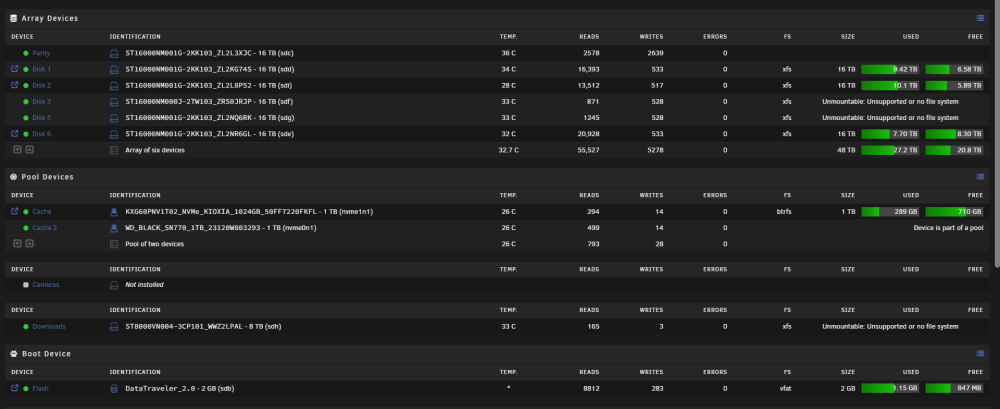
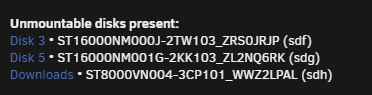
Hello everyone, I'm on unraid 6.12.5 and had to shutdown my server. After restart, I'm met with this: Did I just lost 3 drives full of data (and then all data from these array)? I had read error on other drive (not even these) before shutdown. edit: I tried this and get bad superblock mount -o rescue=all,ro /dev/sdf /temp mount: /temp: wrong fs type, bad option, bad superblock on /dev/sdf, missing codepage or helper program, or other error. dmesg(1) may have more information after failed mount system call. servraid-diagnostics-20231210-0933.zip dmesg show: 679.417315] squashfs: Unknown parameter 'rescue' [ 679.417367] fuseblk: Unknown parameter 'rescue' [ 679.417376] UDF-fs: bad mount option "rescue=all" or missing value [ 679.417483] xfs: Unknown parameter 'rescue' I tried to follow these step
-
I didn't update yet, I'm on 6.12.5 for now and since it's random, I could wait as far as many months before it occur back. I honestly though it was past issue until I stumble upon other docker that showed weird behavior
-
Something is weird on my end, every plugin are crashing
-
Hello everyone, I have an issue that isn't new. I had this issue on 6.11 and even other version before that and I think it's about time I start talking about it so we can find how to solve it. Randomly, my docker will stop being able to access device across network. Here's my exemple: I have a mongodb set on my custom network "my-bridge". It's a normal custom network, nothing fancy. Mostly all my docker are on that network. Then, I have another docker, for exemple unifi and pihole, set on br0/eth0 macvlan. This one have an ip that is the same range as my server. In normal operation, I can go into my unifi docker shell and ping my unraid server ip, other docker and computer on the same network (docker pihole, router, etc) and I can also reach dockers on other network like mongodb (which in the end sit at my server ip). Now, when host access to custom network fail, 2 things happen. First, my unifi and pihole container cannot talk anymore to my unraid server (and at the sametime all docker in my custom network my-bridge). If I try to ping my unraid server, it fail. At the sametime, all my dockers not on the macvlan also cannot communicate with these docker. Found out the hard way this was the problem with many container that were having weird problem in DNS resolution (everyone was pointing to my pihole and I had firewall redirection to pihole) was because of that. The fix is simple by have impact. I must turn off docker, disable host access network, apply, enable host access, apply, then start docker and everything start working again. Problem is, it will eventually fail. So my big question, when it will happen, what you guys need me to get out of there? I won't be right in front of it when it happen so I won't be able to say "it happen at 2:15am", but I'll at least know when. I do have syslog on a share and I can get diagnostic. I know this is the normal procedure for bug report, my goal here is since it's a random bug, I want to maximize my change to give all the information that could be needed. If I need to enable something right now while it's working to see it fail, I'll do it. Thank you
-
So I "fixed it" but I'm not sure what break it. What I did is turn off docker, disable host access to custom network, enable it, then start docker and bam, they can now communicate properly.
-
Hello everyone, I have a problem with all my docker that are on the network eth0 macvlan. If i try to ping/reach the host ip, it will fail. I do have enabled "Host access to custom networks:". I have bridging and bonding disabled. Thank you
-
I'm still trying to understand how I upload my png. Someone said put it on the usb then link it, but what would be the url then?
-
Out of nowhere, my refresh now fail. It try to reach various sonarr website and it cannot reach. I tried to ping the website from anywhere and it reply except on this docker, and I can ping google from this docker. and when trying to run import list task, I get this error
-
Hello, I've got 2 questions. Where on the flash drive and how did you link to them afterward? Thank you
-
Maybe update the description in the CA and remove it entirely? Or make it flagged in common error. I didn't knew it was dead until I visit this thread like 3 months later.
-
Hello, I just installed this in hope I could check if both my cache drive have similar speed (I think one of them is very slow). They are both SSD and detected by the apps but it says it cannot be benchmark because it cannot found the mount point. I did attach /mnt to the docker in /mnt/unraid but still having the same error. Is it because they are cache drive in mirror? Thank you
-
ok. So there's no way to know what are the 538 errors?
-
Hello, I had a file corruption on one of my disk yesterday. I finally have it fixed running xfs_check -L. After that, I start a parity check without the "write correction". It founded 538 errors. Is there a way to see these error? Is there a way to run the fix without running the entire parity check again? Thank you

-
Ah nice. About parity and rebuild, can something be done with that? I guess I should run a parity check after? Edit: IT worked! Only about 4 files with content in them. One seems to be a docker config file, another seems to be linux boot files (weird since it's on the usb). I think it's backup files since everything is now running without any error.
-
Ok, this is the output. Do I manually mount or start the array not in maintenance mode? Phase 1 - find and verify superblock... Phase 2 - using internal log - zero log... ALERT: The filesystem has valuable metadata changes in a log which is being destroyed because the -L option was used. - scan filesystem freespace and inode maps... clearing needsrepair flag and regenerating metadata agi unlinked bucket 30 is 102889438 in ag 5 (inode=10840307678) agi unlinked bucket 46 is 102889454 in ag 5 (inode=10840307694) agi unlinked bucket 61 is 102889469 in ag 5 (inode=10840307709) agi unlinked bucket 47 is 1071805807 in ag 7 (inode=16104191343) agi unlinked bucket 17 is 13602577 in ag 4 (inode=8603537169) agi unlinked bucket 19 is 13602579 in ag 4 (inode=8603537171) agi unlinked bucket 20 is 13602580 in ag 4 (inode=8603537172) agi unlinked bucket 23 is 13602583 in ag 4 (inode=8603537175) ir_freecount/free mismatch, inode chunk 11/346247680, freecount 2 nfree 1 finobt ir_freecount/free mismatch, inode chunk 11/346247680, freecount 2 nfree 1 agi unlinked bucket 40 is 346247720 in ag 11 (inode=23968567848) agi unlinked bucket 8 is 306951432 in ag 9 (inode=19634304264) agi unlinked bucket 41 is 306923689 in ag 9 (inode=19634276521) agi unlinked bucket 10 is 361219338 in ag 8 (inode=17541088522) agi unlinked bucket 11 is 361219339 in ag 8 (inode=17541088523) sb_ifree 2411, counted 2418 sb_fdblocks 1978355686, counted 2005596978 - found root inode chunk Phase 3 - for each AG... - scan and clear agi unlinked lists... - process known inodes and perform inode discovery... - agno = 0 - agno = 1 - agno = 2 - agno = 3 - agno = 4 - agno = 5 - agno = 6 - agno = 7 - agno = 8 - agno = 9 - agno = 10 - agno = 11 - agno = 12 - agno = 13 - agno = 14 - process newly discovered inodes... Phase 4 - check for duplicate blocks... - setting up duplicate extent list... - check for inodes claiming duplicate blocks... - agno = 0 - agno = 2 - agno = 8 - agno = 4 - agno = 7 - agno = 1 - agno = 9 - agno = 5 - agno = 6 - agno = 10 - agno = 11 - agno = 12 - agno = 13 - agno = 3 - agno = 14 Phase 5 - rebuild AG headers and trees... - reset superblock... Phase 6 - check inode connectivity... - resetting contents of realtime bitmap and summary inodes - traversing filesystem ... - traversal finished ... - moving disconnected inodes to lost+found ... disconnected inode 8603537169, moving to lost+found disconnected inode 8603537171, moving to lost+found disconnected inode 8603537172, moving to lost+found disconnected inode 8603537175, moving to lost+found disconnected inode 10840307678, moving to lost+found disconnected inode 10840307694, moving to lost+found disconnected inode 10840307709, moving to lost+found disconnected inode 16104191343, moving to lost+found disconnected inode 17541088522, moving to lost+found disconnected inode 17541088523, moving to lost+found disconnected inode 19634276521, moving to lost+found disconnected inode 19634304264, moving to lost+found disconnected inode 23968567848, moving to lost+found Phase 7 - verify and correct link counts... Maximum metadata LSN (1:3681890) is ahead of log (1:2). Format log to cycle 4. done
-
Tried without -n Phase 1 - find and verify superblock... Phase 2 - using internal log - zero log... ERROR: The filesystem has valuable metadata changes in a log which needs to be replayed. Mount the filesystem to replay the log, and unmount it before re-running xfs_repair. If you are unable to mount the filesystem, then use the -L option to destroy the log and attempt a repair. Note that destroying the log may cause corruption -- please attempt a mount of the filesystem before doing this. tried mounting

-
Hello, I had a power failure this week end which my UPS took over and made a gracefull shutdown. I found out today that the drive was mounted read only with no disk access and once I shutdown the server, checked all connection and start it back, I was greeted with this: Now, I don't know what happen to the disk. It had no smart error and was working fine. If I "reformat" the drive, will the array rebuild itself and put the data back? At the sametime, a parity check started yesterday (parity ran each 1st of the month). Could that lead to problem (I cancelled the parity check)? I installed a new drive about 2 weeks ago so I know the parity should be good. Thank you edit: I've started the array in maintenance mode and ran xfs_repair -n that I saw under disk 6 option. This is the output Phase 1 - find and verify superblock... Phase 2 - using internal log - zero log... ALERT: The filesystem has valuable metadata changes in a log which is being ignored because the -n option was used. Expect spurious inconsistencies which may be resolved by first mounting the filesystem to replay the log. - scan filesystem freespace and inode maps... ir_freecount/free mismatch, inode chunk 11/346247680, freecount 2 nfree 1 finobt ir_freecount/free mismatch, inode chunk 11/346247680, freecount 2 nfree 1 agi unlinked bucket 40 is 346247720 in ag 11 (inode=23968567848) agi unlinked bucket 8 is 306951432 in ag 9 (inode=19634304264) agi unlinked bucket 41 is 306923689 in ag 9 (inode=19634276521) agi unlinked bucket 30 is 102889438 in ag 5 (inode=10840307678) agi unlinked bucket 46 is 102889454 in ag 5 (inode=10840307694) agi unlinked bucket 61 is 102889469 in ag 5 (inode=10840307709) agi unlinked bucket 17 is 13602577 in ag 4 (inode=8603537169) agi unlinked bucket 19 is 13602579 in ag 4 (inode=8603537171) agi unlinked bucket 20 is 13602580 in ag 4 (inode=8603537172) agi unlinked bucket 47 is 1071805807 in ag 7 (inode=16104191343) agi unlinked bucket 23 is 13602583 in ag 4 (inode=8603537175) agi unlinked bucket 10 is 361219338 in ag 8 (inode=17541088522) agi unlinked bucket 11 is 361219339 in ag 8 (inode=17541088523) sb_ifree 2411, counted 2418 sb_fdblocks 1978355686, counted 2005596972 - found root inode chunk Phase 3 - for each AG... - scan (but don't clear) agi unlinked lists... - process known inodes and perform inode discovery... - agno = 0 - agno = 1 - agno = 2 - agno = 3 - agno = 4 - agno = 5 - agno = 6 - agno = 7 - agno = 8 - agno = 9 - agno = 10 - agno = 11 - agno = 12 - agno = 13 - agno = 14 - process newly discovered inodes... Phase 4 - check for duplicate blocks... - setting up duplicate extent list... - check for inodes claiming duplicate blocks... - agno = 0 - agno = 5 - agno = 9 - agno = 14 - agno = 6 - agno = 7 - agno = 12 - agno = 3 - agno = 8 - agno = 1 - agno = 10 - agno = 11 - agno = 13 - agno = 4 - agno = 2 No modify flag set, skipping phase 5 Phase 6 - check inode connectivity... - traversing filesystem ... - traversal finished ... - moving disconnected inodes to lost+found ... disconnected inode 8603537169, would move to lost+found disconnected inode 8603537171, would move to lost+found disconnected inode 8603537172, would move to lost+found disconnected inode 8603537175, would move to lost+found disconnected inode 10840307678, would move to lost+found disconnected inode 10840307694, would move to lost+found disconnected inode 10840307709, would move to lost+found disconnected inode 16104191343, would move to lost+found disconnected inode 17541088522, would move to lost+found disconnected inode 17541088523, would move to lost+found disconnected inode 19634276521, would move to lost+found disconnected inode 19634304264, would move to lost+found disconnected inode 23968567848, would move to lost+found Phase 7 - verify link counts... would have reset inode 8603537169 nlinks from 0 to 1 would have reset inode 23968567848 nlinks from 0 to 1 would have reset inode 8603537171 nlinks from 0 to 1 would have reset inode 8603537172 nlinks from 0 to 1 would have reset inode 8603537175 nlinks from 0 to 1 would have reset inode 17541088522 nlinks from 0 to 1 would have reset inode 17541088523 nlinks from 0 to 1 would have reset inode 19634276521 nlinks from 0 to 1 would have reset inode 16104191343 nlinks from 0 to 1 would have reset inode 19634304264 nlinks from 0 to 1 would have reset inode 10840307678 nlinks from 0 to 1 would have reset inode 10840307694 nlinks from 0 to 1 would have reset inode 10840307709 nlinks from 0 to 1 No modify flag set, skipping filesystem flush and exiting. I tried manual mount in a temp folder, greeted with these error


-
Hello everyone, I'm currently on unraid 6.11.5 and I notice today that if I click on the log icon, it show an empty screen. If I go into /var/log, I can see syslog and syslog.1. The date on syslog is june 9 and syslog.1 is june 10. syslog.1 is 2.7mb and syslog is empty I feel something went wrong when syslog decided to do a log rotation and now I don't have any login anymore. I have ran /etc/rc.d/rc.rsyslogd restart and login started back, and looking at the message, it seems syslog was simply not running anymore


-
I found out I need to manually install WinFSP first. Followed this guide here: https://github.com/virtio-win/kvm-guest-drivers-windows/wiki/Virtiofs:-Shared-file-system Could be marked somewhere in the template gui that something is missing and must be installed for it to work





