





Nodiaque
Members
-
Joined
-
Last visited
Everything posted by Nodiaque
-
Hello, is it stable now? I'm on 6.11.5 trying to mount a share in my windows 10 vm and when I try to start virtio-fs, the service says it cannot be started.
-
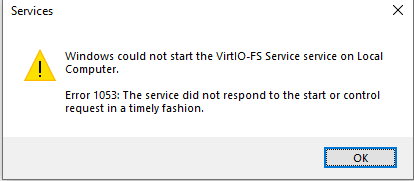
Hello everyone, Just installed a brand new Windows 10 22H2 Enterprise virtual machine on unraid 6.11.5. I tried starting the virtio-fs service and I get this error Here is the VM xml <?xml version='1.0' encoding='UTF-8'?> <domain type='kvm' id='11'> <name>BlueIris</name> <uuid>acef9b99-d2c9-1058-c1a9-7eb999703333</uuid> <description>BlueIris</description> <metadata> <vmtemplate xmlns="unraid" name="Windows 10" icon="windows.png" os="windows10"/> </metadata> <memory unit='KiB'>33554432</memory> <currentMemory unit='KiB'>8388608</currentMemory> <memoryBacking> <source type='memfd'/> <access mode='shared'/> </memoryBacking> <vcpu placement='static'>27</vcpu> <cputune> <vcpupin vcpu='0' cpuset='0'/> <vcpupin vcpu='1' cpuset='14'/> <vcpupin vcpu='2' cpuset='15'/> <vcpupin vcpu='3' cpuset='2'/> <vcpupin vcpu='4' cpuset='16'/> <vcpupin vcpu='5' cpuset='3'/> <vcpupin vcpu='6' cpuset='17'/> <vcpupin vcpu='7' cpuset='4'/> <vcpupin vcpu='8' cpuset='18'/> <vcpupin vcpu='9' cpuset='5'/> <vcpupin vcpu='10' cpuset='19'/> <vcpupin vcpu='11' cpuset='6'/> <vcpupin vcpu='12' cpuset='20'/> <vcpupin vcpu='13' cpuset='7'/> <vcpupin vcpu='14' cpuset='21'/> <vcpupin vcpu='15' cpuset='8'/> <vcpupin vcpu='16' cpuset='22'/> <vcpupin vcpu='17' cpuset='9'/> <vcpupin vcpu='18' cpuset='23'/> <vcpupin vcpu='19' cpuset='10'/> <vcpupin vcpu='20' cpuset='24'/> <vcpupin vcpu='21' cpuset='11'/> <vcpupin vcpu='22' cpuset='25'/> <vcpupin vcpu='23' cpuset='12'/> <vcpupin vcpu='24' cpuset='26'/> <vcpupin vcpu='25' cpuset='13'/> <vcpupin vcpu='26' cpuset='27'/> </cputune> <resource> <partition>/machine</partition> </resource> <os> <type arch='x86_64' machine='pc-i440fx-7.1'>hvm</type> <loader readonly='yes' type='pflash'>/usr/share/qemu/ovmf-x64/OVMF_CODE-pure-efi.fd</loader> <nvram>/etc/libvirt/qemu/nvram/acef9b99-d2c9-1058-c1a9-7eb999703333_VARS-pure-efi.fd</nvram> </os> <features> <acpi/> <apic/> <hyperv mode='custom'> <relaxed state='on'/> <vapic state='on'/> <spinlocks state='on' retries='8191'/> <vendor_id state='on' value='none'/> </hyperv> </features> <cpu mode='host-passthrough' check='none' migratable='on'> <topology sockets='1' dies='1' cores='27' threads='1'/> <cache mode='passthrough'/> </cpu> <clock offset='localtime'> <timer name='hypervclock' present='yes'/> <timer name='hpet' present='no'/> </clock> <on_poweroff>destroy</on_poweroff> <on_reboot>restart</on_reboot> <on_crash>restart</on_crash> <devices> <emulator>/usr/local/sbin/qemu</emulator> <disk type='file' device='disk'> <driver name='qemu' type='raw' cache='writeback'/> <source file='/mnt/user/domains/BlueIris/vdisk1.img' index='3'/> <backingStore/> <target dev='hdc' bus='virtio'/> <boot order='1'/> <alias name='virtio-disk2'/> <address type='pci' domain='0x0000' bus='0x00' slot='0x06' function='0x0'/> </disk> <disk type='file' device='cdrom'> <driver name='qemu' type='raw'/> <source file='/mnt/user/isos/SW_DVD9_Win_Pro_10_22H2.7_64BIT_English_Pro_Ent_EDU_N_MLF_X23-46904.ISO' index='2'/> <backingStore/> <target dev='hda' bus='ide'/> <readonly/> <alias name='ide0-0-0'/> <address type='drive' controller='0' bus='0' target='0' unit='0'/> </disk> <disk type='file' device='cdrom'> <driver name='qemu' type='raw'/> <source file='/mnt/user/isos/virtio-win-0.1.229-1.iso' index='1'/> <backingStore/> <target dev='hdb' bus='ide'/> <readonly/> <alias name='ide0-0-1'/> <address type='drive' controller='0' bus='0' target='0' unit='1'/> </disk> <controller type='pci' index='0' model='pci-root'> <alias name='pci.0'/> </controller> <controller type='ide' index='0'> <alias name='ide'/> <address type='pci' domain='0x0000' bus='0x00' slot='0x01' function='0x1'/> </controller> <controller type='virtio-serial' index='0'> <alias name='virtio-serial0'/> <address type='pci' domain='0x0000' bus='0x00' slot='0x05' function='0x0'/> </controller> <controller type='usb' index='0' model='ich9-ehci1'> <alias name='usb'/> <address type='pci' domain='0x0000' bus='0x00' slot='0x07' function='0x7'/> </controller> <controller type='usb' index='0' model='ich9-uhci1'> <alias name='usb'/> <master startport='0'/> <address type='pci' domain='0x0000' bus='0x00' slot='0x07' function='0x0' multifunction='on'/> </controller> <controller type='usb' index='0' model='ich9-uhci2'> <alias name='usb'/> <master startport='2'/> <address type='pci' domain='0x0000' bus='0x00' slot='0x07' function='0x1'/> </controller> <controller type='usb' index='0' model='ich9-uhci3'> <alias name='usb'/> <master startport='4'/> <address type='pci' domain='0x0000' bus='0x00' slot='0x07' function='0x2'/> </controller> <filesystem type='mount' accessmode='passthrough'> <driver type='virtiofs' queue='1024'/> <binary path='/usr/libexec/virtiofsd' xattr='on'> <cache mode='always'/> <sandbox mode='chroot'/> <lock posix='on' flock='on'/> </binary> <source dir='/mnt/user/Camera'/> <target dir='Camera'/> <alias name='fs0'/> <address type='pci' domain='0x0000' bus='0x00' slot='0x03' function='0x0'/> </filesystem> <interface type='bridge'> <mac address='52:54:00:d6:26:f0'/> <source bridge='br0'/> <target dev='vnet10'/> <model type='virtio-net'/> <alias name='net0'/> <address type='pci' domain='0x0000' bus='0x00' slot='0x04' function='0x0'/> </interface> <serial type='pty'> <source path='/dev/pts/1'/> <target type='isa-serial' port='0'> <model name='isa-serial'/> </target> <alias name='serial0'/> </serial> <console type='pty' tty='/dev/pts/1'> <source path='/dev/pts/1'/> <target type='serial' port='0'/> <alias name='serial0'/> </console> <channel type='unix'> <source mode='bind' path='/var/lib/libvirt/qemu/channel/target/domain-11-BlueIris/org.qemu.guest_agent.0'/> <target type='virtio' name='org.qemu.guest_agent.0' state='disconnected'/> <alias name='channel0'/> <address type='virtio-serial' controller='0' bus='0' port='1'/> </channel> <input type='tablet' bus='usb'> <alias name='input0'/> <address type='usb' bus='0' port='1'/> </input> <input type='mouse' bus='ps2'> <alias name='input1'/> </input> <input type='keyboard' bus='ps2'> <alias name='input2'/> </input> <graphics type='vnc' port='5900' autoport='yes' websocket='5700' listen='0.0.0.0' keymap='fr-ca'> <listen type='address' address='0.0.0.0'/> </graphics> <audio id='1' type='none'/> <video> <model type='qxl' ram='65536' vram='65536' vgamem='16384' heads='1' primary='yes'/> <alias name='video0'/> <address type='pci' domain='0x0000' bus='0x00' slot='0x02' function='0x0'/> </video> <memballoon model='virtio'> <alias name='balloon0'/> <address type='pci' domain='0x0000' bus='0x00' slot='0x08' function='0x0'/> </memballoon> </devices> <seclabel type='dynamic' model='dac' relabel='yes'> <label>+0:+100</label> <imagelabel>+0:+100</imagelabel> </seclabel> </domain> Thank you
-
I found out some game settings have changed, specifically in the gamehost file. They are default false This one doesn't seems to be used anymore but I kept it anyway Also have this new I had problem until I update my gamehost file under save-data to include listonsteam and listoneos. I also enabled the API. Before that, gamedig would show offline and it wouldn't show anywhere. I think on missing item, it default to the settings in the other location.
-
That's great, I put that in the go file and so far so good. Thank you!
-
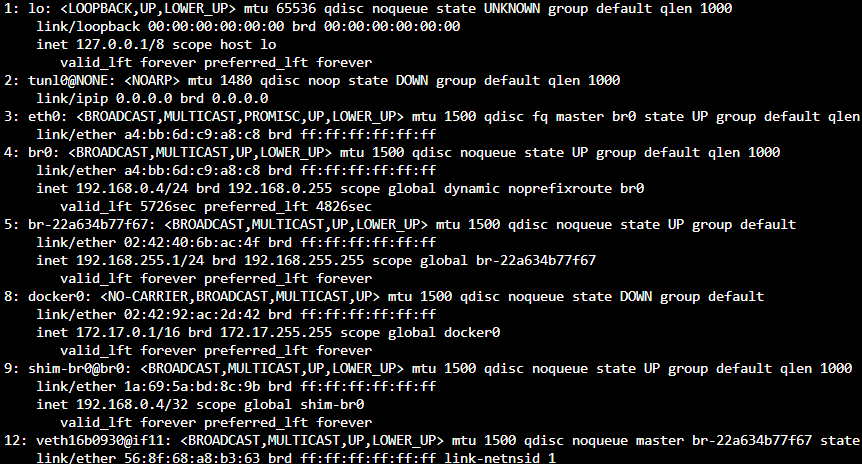
It worked when I put all disable_ipv6 = 1. Even loopback doesn't have inet6 anymore and I started the vm that "spawned" the inet6 on the br-2 earlier and nothing Might be a 6.11.5 bug? Would be good when someone select ipv4 only to really disable it everywhere like in all.
-
yeah I understand with 6.12, I'm on 6.11. Might be something different in 6.12? Because as you can see, mine doesn't work. When I start docker and put shim 1, it still has a ipv6 edit: I put it in all and it worked, shim doesn't have ipv6. Now the problem is how I make this permanent accross reboot because even user script won't be fast enough also, I must test booting these vm and see if it get one
-
Ok, problem is when I run it before docker, it says path not found cause shim-br0 doesn,t exist. If I create it after docker is ran, it's too late. Then when I turn off docker, it's gone. Also, all other interface (including default and all) have 0 in disable_ipv6. Shouldn't they all have 1 since I disabled ipv6?
-
hmmm... I turned off docker and decided to go look in the shim place. Shim isn't there but found br-2.... and: There's also a all folder, can I simply change this one to 1 (because it's also at 0)?

-
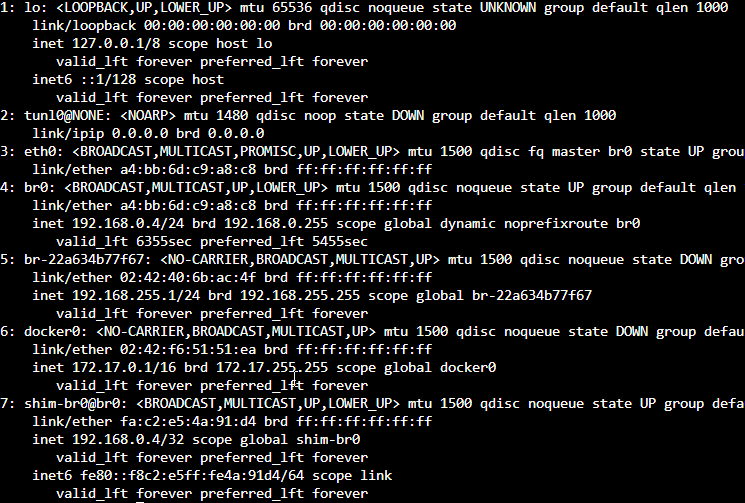
Hmmm... do I need to put the command you gave me un a script for each reboot? Because I still have ipv6 on shim. I also see ipv6 on loopback This is after restart and starting docker daemon, but no docker. We can see the custom bridge doesn't have IPv6 yet
-
I don't have any ipv6 address until a docker start on it, that's the weird thing. I'll see with shim disabled, I'm currently rebooting to erase all trace of it
-
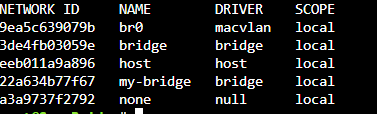
but it already have enableipv6: false "Name": "my-bridge", "Id": "22a634b77f67e5e8415aecbd20ff05b0c784f4ff29d740bc2b365068745c3eda", "Created": "2023-02-10T18:42:56.546787388-05:00", "Scope": "local", "Driver": "bridge", "EnableIPv6": false, "IPAM": { "Driver": "default", "Options": {}, "Config": [ { "Subnet": "192.168.255.0/24", "Gateway": "192.168.255.1" } ] }, "Internal": false, "Attachable": false, "Ingress": false, "ConfigFrom": { "Network": "" }, "ConfigOnly": false, "Containers": {}, "Options": {}, "Labels": {}
-
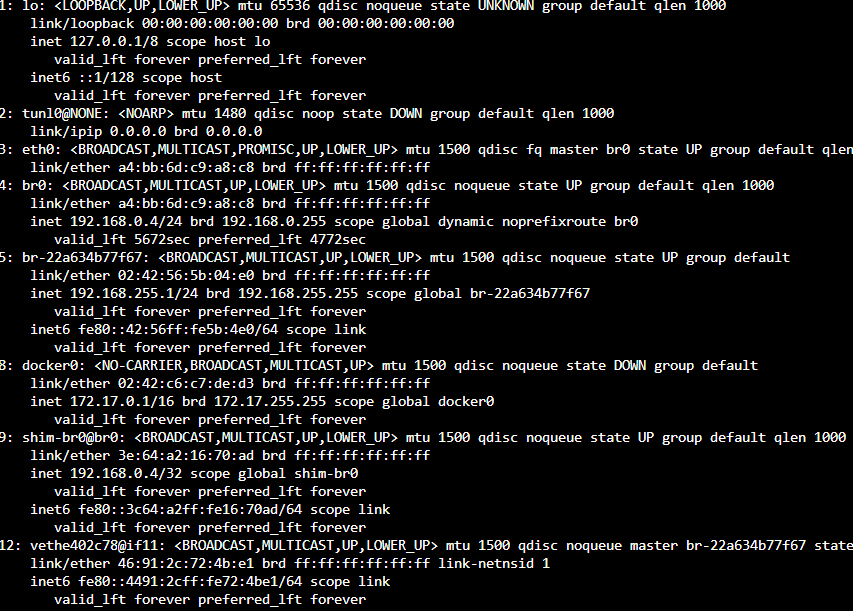
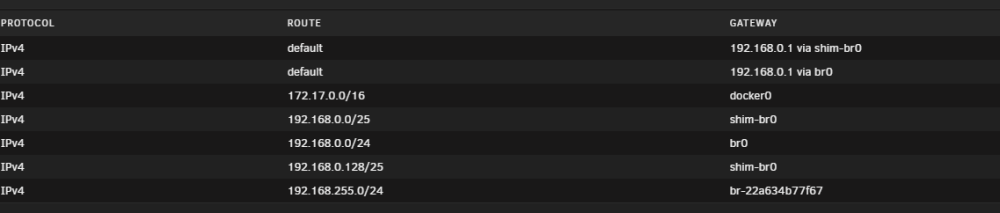
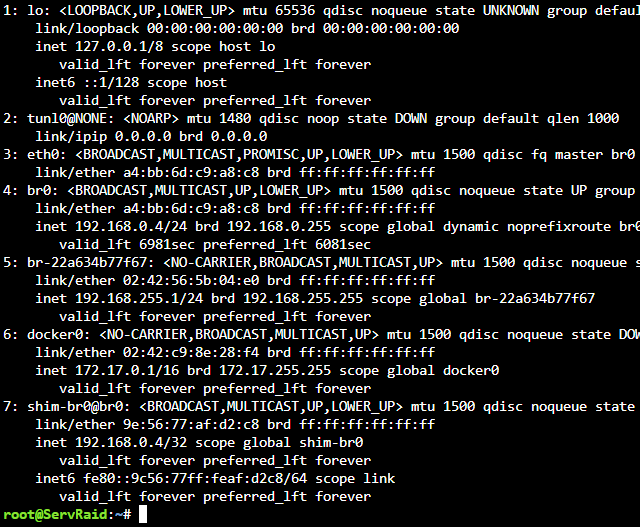
Ah, no I need it, specially since my DNS run on docker (and many db and stuff). When I disable that, it crash many stuff. I tried starting 1 by 1 docker, 2 started and already found a problem. 1rst docker that started was on br0, which changed nothing in the output of the command. The 2nd docker is on my-bridge, which is the br-22a.... It added a new entry (#12) with ipv6 and it forced br-22... to get ipv6. I'll try with the shim ipv6 off see if it fix
-
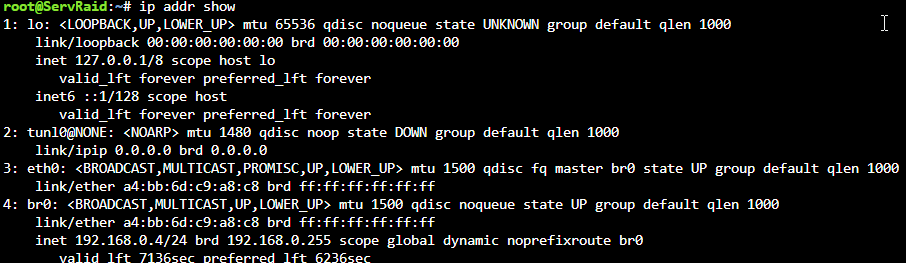
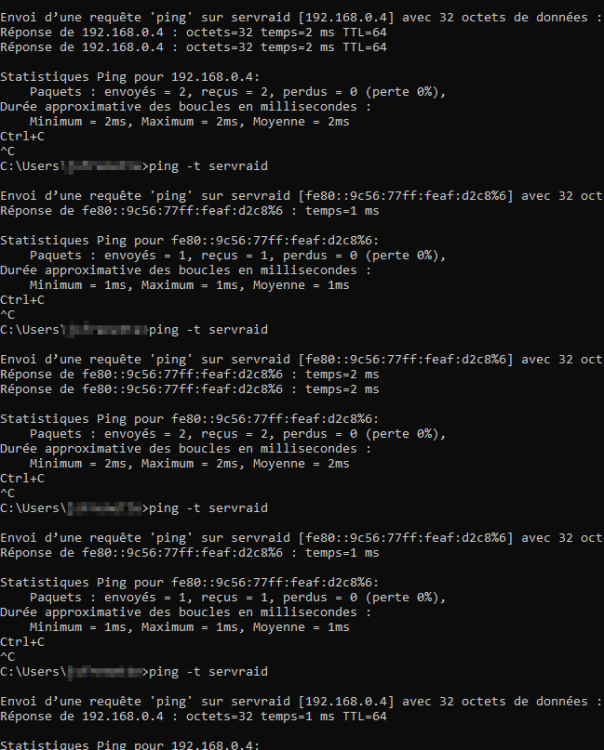
ok, so right after restart, I'm like this with docker daemon down I start the docker daemon, no docker is running Here the docker network ls now ping randomly reply either ipv4 or ipv6, but the ipv6 work the only one that have ipv6 right now is the shim-br0 Edit: I've ran docker network inspect on all docker network, they all have enableipv6: false I didn't start any docker yet

-
ok, if I restart unraid and prevent all container from starting up?
-
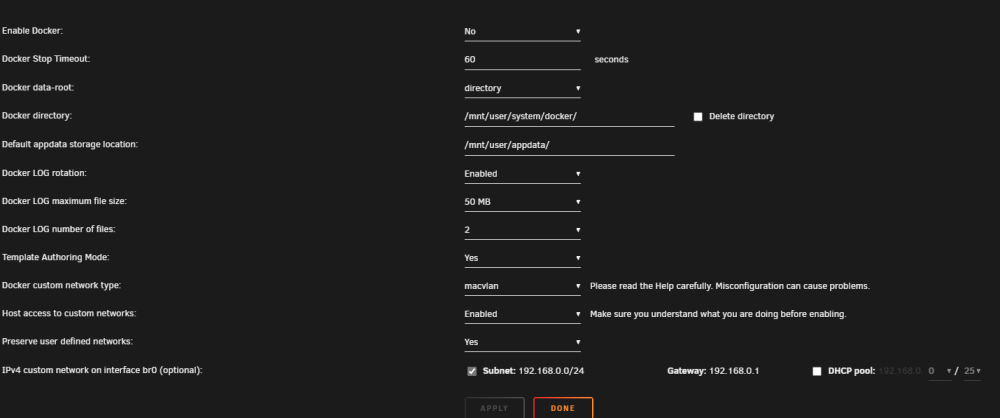
but docker is disabled edit: Oh! could it be my custom ducker network? But docker is stopped so it shouldn't be there like we see in the network tab?
-
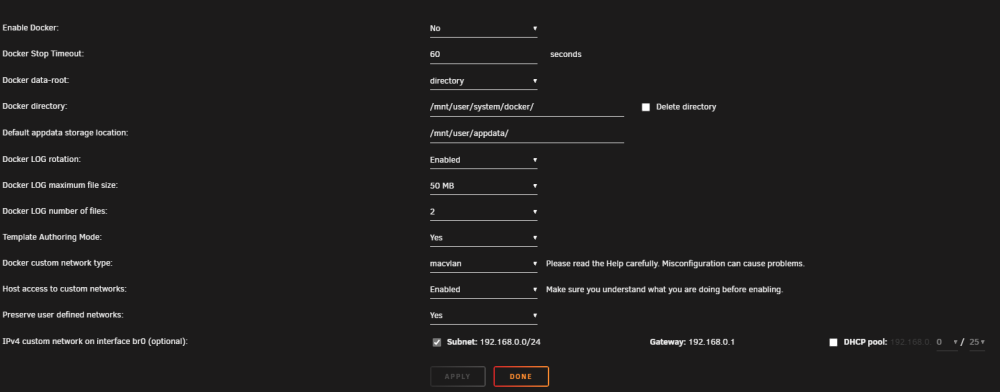
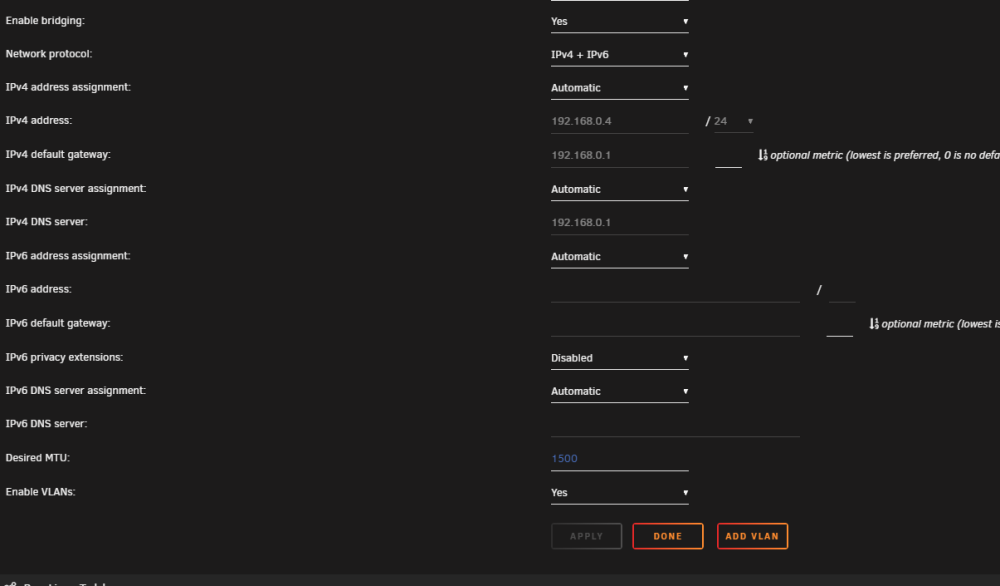
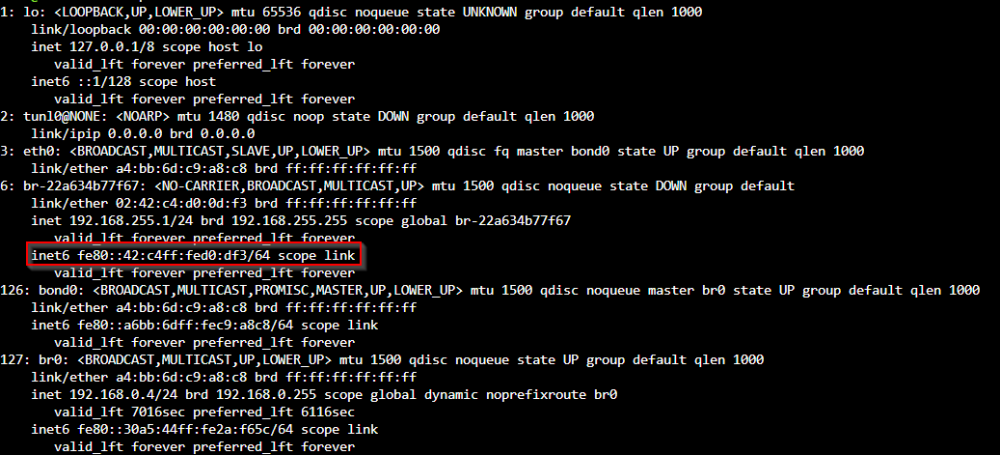
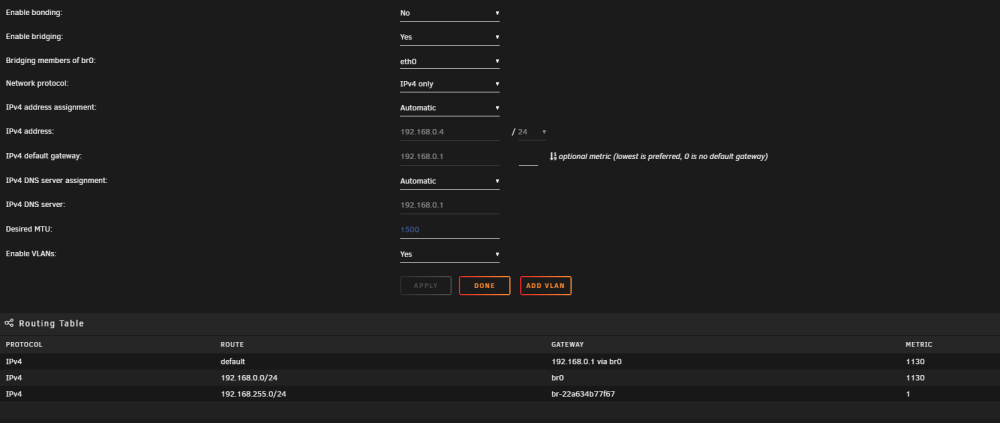
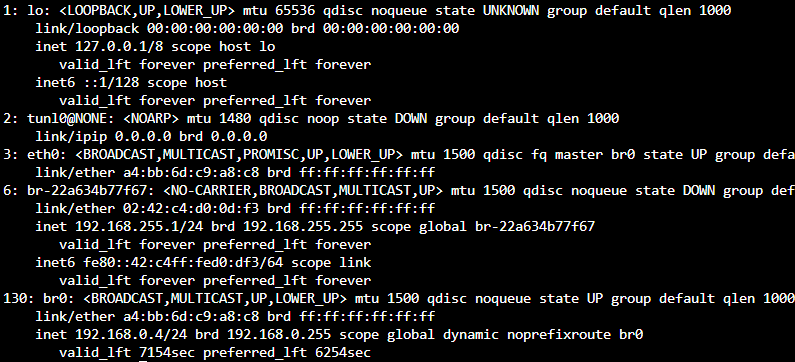
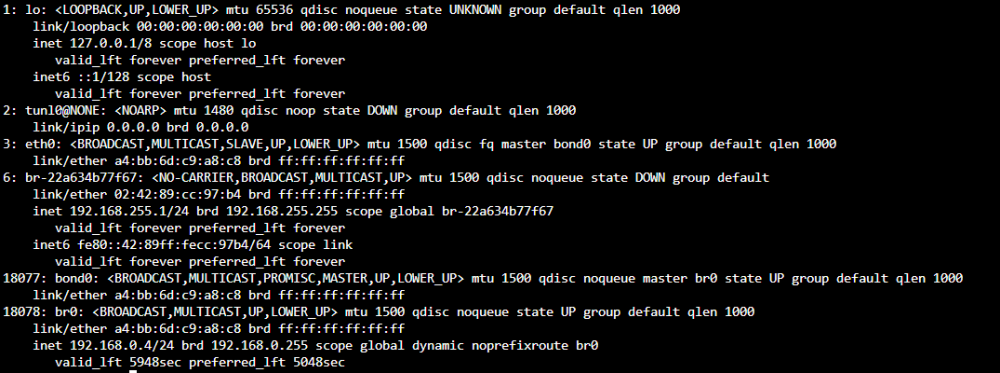
No ipv6 in docker: and network setting has ipv4 + 6 enabled if I try to ping my server, something I get ipv4 other time ipv6 fe80 I seems to get ip from br-22a.... If I turn back ipv4 only (I also disabled bonding cause I don't use it anyway) still have some int6 ip, docker isn't running nor vm edit: but when I ping, I always get ipv4 now. So, could it be a specific docker guest that's doing that?


-
I don't see anything related to ipv6 in this. Could it be because I've put ipv6 once, it's now stuck with it? I'm also seeing ipv6 on other interface after docker is down
-
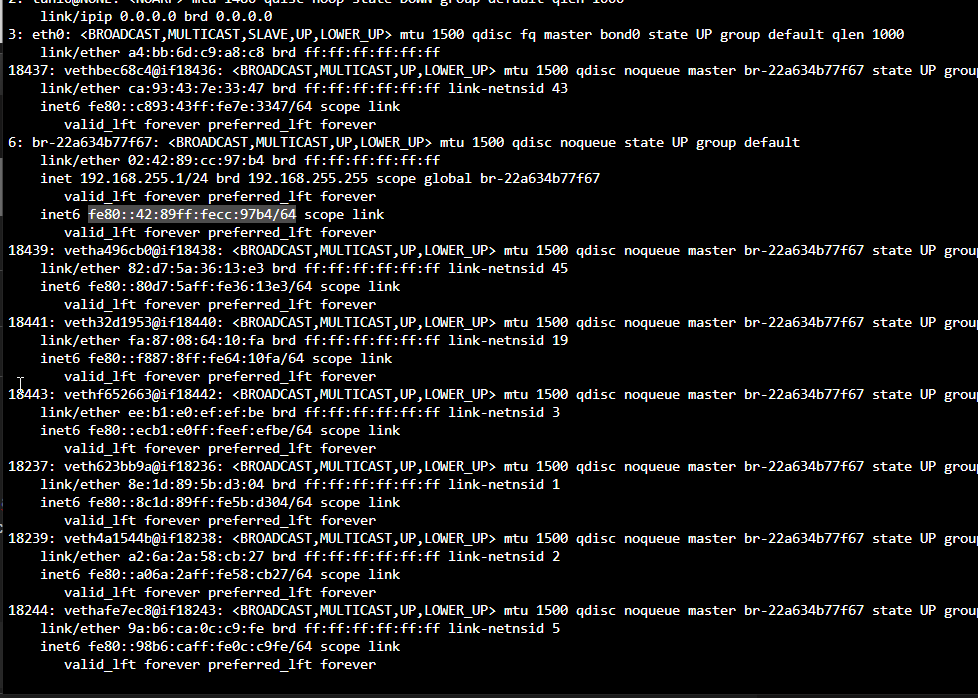
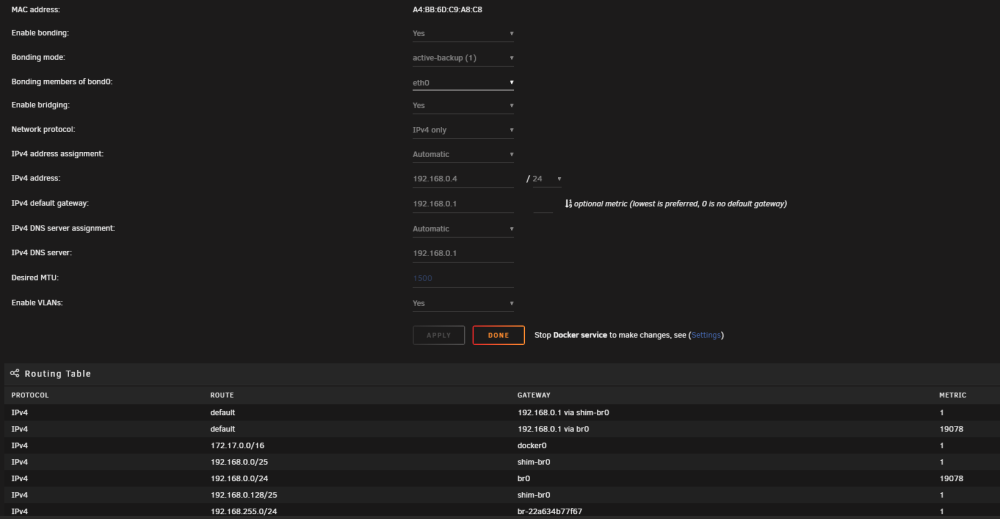
Hello everyone, I'm on unraid 6.11.5. I have ipv6 disabled in my network configuration, but when I do ip addr show, I see multiple ipv6 in local-link. Problem is when I want to access samba share \\servername, it return a fe80 addr that I can't access (even when on same switch). ip addr show (part of it) network configuration is there a way to not have ipv6? I tried enabling ipv6, the server received and address but I still receive the fe80 addr when I ping (and I can't find where this address is because I don't have any ipv6 dns). Is there a way to completely disable ipv6? Thank you
-
Is the new plugin 6.11 compatible? My unraid installation tell me I'm up to date on 6.11.5
-
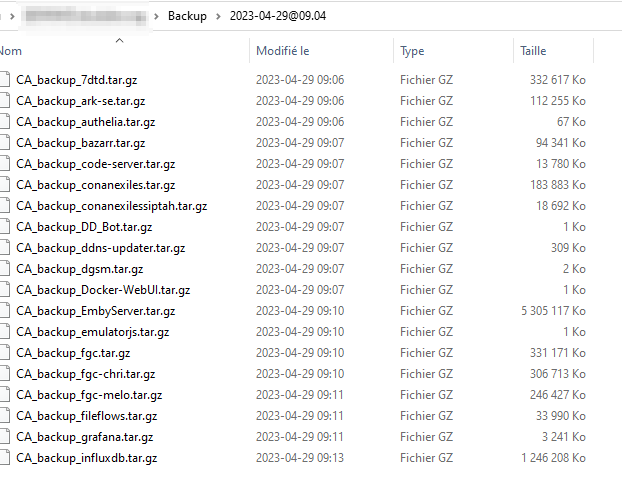
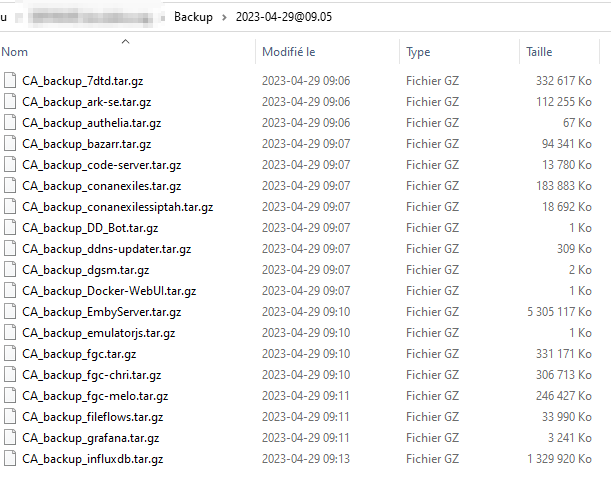
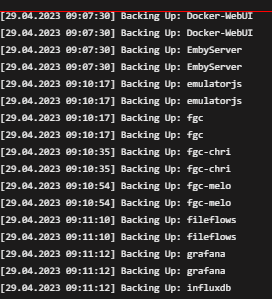
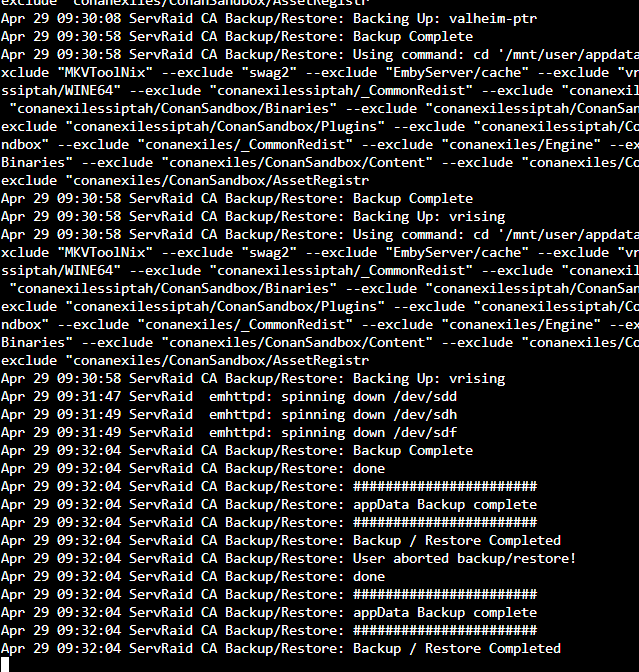
Hello, I think I hit a bug. I turned off docker and the array. Did some stuff then started the array. I decided while the docker service is down, let's take a full backup (I normally have stuff I don't close that fail to backup properly). But during the backup sequence (maybe 1 minute after starting it), I though of something I should do first and hit the abort button. Then, I moved by docker folder (found out it was nested way too far) without starting docker (in the setting page). I start the backup again. The log on screen show it's backing up everything twice. When I check on my backup folder, I see 2 backup dated for today at 1 min interval and both are getting filled with new backup. edit: At the end, the log says it has both finished and aborted. Both folder have exactly same files and log at the end

-
Yes bridge vlan doesn't allow communication between them. That's why you create your own custom bridge network.
-
normally, openhab is on the Host network. You should put your node-red in a custom docker network. Seems like you have a network connectivity issue. Also heck your port mapping in openhab. If you copied from your rasp, make sure that port 8080 is what was used and be sure it's properly mapped in the docker configuration.
-
Hello everyone, I have a weird unraid SMB problem, I think it's related to ipv6 but unsure. Let's say my server name is unraid. If I ping unraid, it answer an ipv6. If I ping with -4 I get the ipv4. In Local Master plugin, it says unraid is the local master browser. In PiHole, I have a entry for unraid and unraid.duckdns.org pointing to it's internal and a cname for unraid => unraid.duckdns.org and unraid.unraid.duckdns.org => unraid.duckdns.org. All ping work properly (even ipv6 although I don't route anything in pfsense). Now, sometime, I can access my samba share using \\unraid. But sometime, this doesn't work and I must use \\unraid.duckdns.org even if both show same ip. I tried rebooting, trying from another computer, checking credential (it's the same as my windows account thus it never ask for user/pass). I'm unsure why it stop using the smbios name and then it force me to use the fqdn. Thank you
-
Thank you, I'll have a look at this
-
Yes the parity check does run




