





Nodiaque
Members
-
Joined
-
Last visited
Everything posted by Nodiaque
-
Hello, I'm on unraid 6.9.2 with an array of 5 drives. I've bought 2 new drives that I pre-clear and now I added to my array (extending to 7 drives). But it keep saying Unmountable: Unsupported partition layout. When I check Format, it says formatting and goes back to the same unmountable state. What am I doing wrong? Partition type was at auto, I tried with xfs selected and didn't change. Thank you
-
Just tried to install the this container and.... it says server error when I try to start it...
-
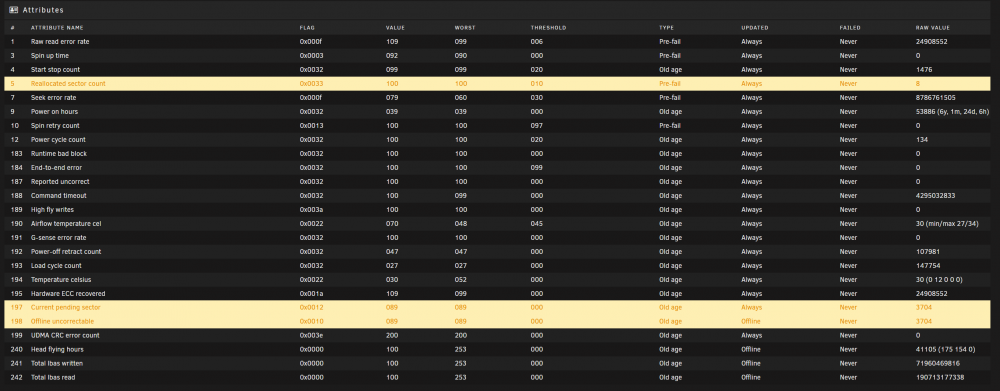
Smart finished and it's not pretty. New HDD arriving tomorrow. servraid-diagnostics-20220619-0847.zip
-
Yeah I found out about the ?PORT later. I'm used to have these things in the config file. I don't get why recreate the port entry though, I can simply click edit and change the port, which yield the same result in the end. I manage to have it working when I'm on lan, but I still don't see it in the gamebrowser. edit: OK I manage to see in the command line what happen when the port aren't recreated. Weird thing is the interface when creating a port doesn't show me the container port. I had to start it, edit again and then the container port showed. Nothing to do with the template, unraid bug I guess
-
Hello, I'm unable to have ark SE server working. I install from scratch, I see it in the game browser but when I click join, it fail with connection timeout. If I try to join from console, I get: Lost/Timedout connection to host In the log file, I have this line: [S_API FAIL] SteamAPI_Init() failed; SteamAPI_IsSteamRunning() failed. Also, I can only find the server in the lan section. edit: I found out the problem is when I need to change the port. Looking at the log file, the new port aren't passed to the commandline. Is there a way to change the queryport and gameport? Changing them in the docker interface doesn't work
-
Is that the remaining time for the smart scan?

-
I cannot remove it entirely, there's no onboard gpu and the board won't boot without one. But I did use it without the gpu driver and the gpu not loaded in any docker, had same problem. I switched card recently to see if it help.
-
It happen randomly. rootfs when I checked the last time was at the same % as right now, so not full. First time it took about 3 months, then it happen in 24 hour. It then run fine for a while before another problem appear, then about a month later got the last bug I had with ini file. We though maybe it was backup plugin since it seems to start when it ended, but the problem reproduce 12 hours after the last crash which was far from the backup schedule. Because of that, I haven't tried to upgrade to 6.10.x, want to be sure my base is stable before. I was just wondering, how can the flash drive be a problematic if it's not used once it's booted (since everything is in ram)?
-
here's the requested diagnostic servraid-diagnostics-20220618-0855.zip
-
I have done memtest. You can check in my post history, I have 3 other thread with investigation that lead to nothing. Ram was tested with memtest86+ latest version as of last week, no error. GPU was also swapped Problem I have, yes a reboot fixed it but when you're away, it's not the best thing: - ini file in /usr/local/emhttp/state disapear out of nowhere, making the webgui unworking - docker tab not working, dashboard loading without docker info. Had to force shutdown with power button cause even in putty, couldn't make a reboot - Unraid stop working, webgui not responsive, all docker not working, cannot reboot from shell (have to force shutdown from power) smart health is still only at 10% after more then 12 hours.... I guess it will fail
-
I'm ordering 2 new 16tb. I have 2x 8tb in the array that are 4 years old (at least) seagate archive drive that where on 24/7 before it was put in that server. These are slow drive that are suppose to be used as cold storage. I'll probably put them in mirror and have them as cold backup, once a month sync. It may explain the weird thing that are happening with my unraid server that nobody ever found the cause, although it should be from ram since it's in the OS, but I don't know. Just need to find a sata external enclosure now so they can be better cooled.
-
HOLY! ok, I'll check in 2 days... Thanks!
-
do you know how much time it can take for an 8tb hdd? It's been running for the past hour and it's still at 10%
-
Ok. I've already started the extended test, waiting for the result. Thanks for the input
-
Hello everyone, I just received a smart health check error on one of my disk < Does it mean my disk is imminent failure and I must change it asap? Thank you

-
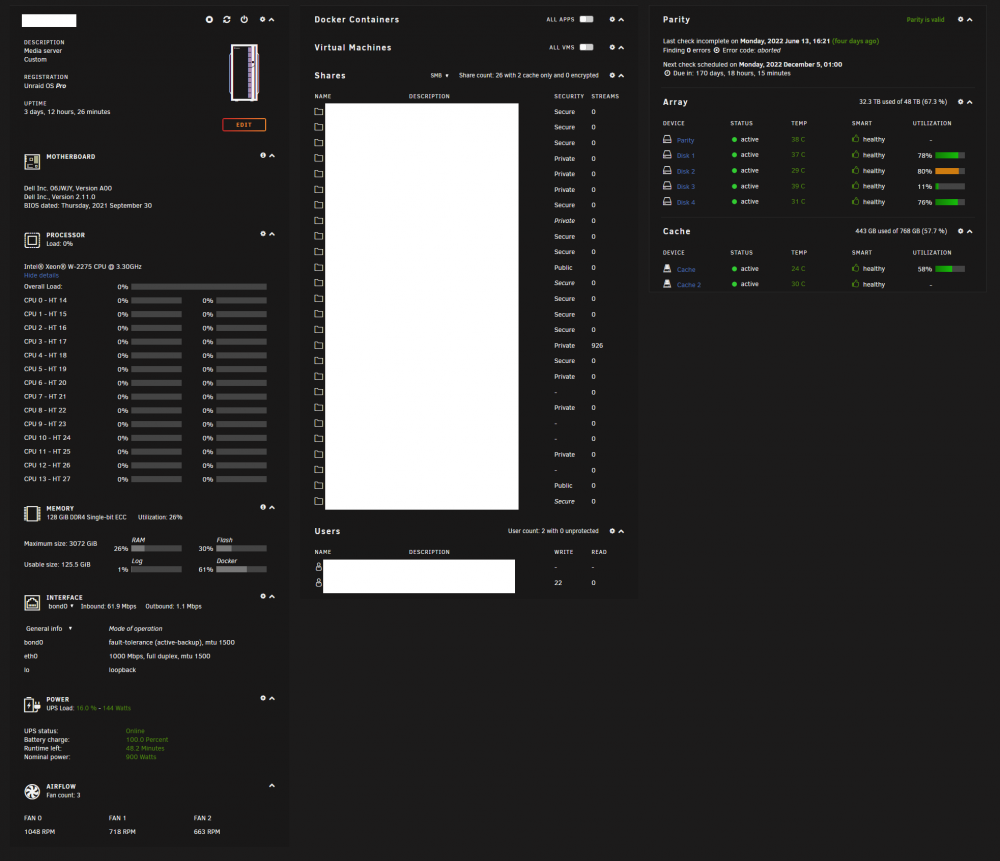
Hello everyone. I seem to have bad luck with my server lately. This morning, I can reach all my docker except one (that is running) but when I go into my docker page, nothing show. It stay there like if it was trying to load something. Same goes for the dashboard view. Looking at my grafana dashboard, I'm missing data from my gpu but that's about. I don't even use my gpu. Thank you! edit: the dashboard load after maybe 2 minutes, but it's missing all information about dockers, vm (it's just blank) and gpu. All of the remaining are present. edit again: So I tried to turn off the docker service, which worked. But when I tried to put it on again, I got this in the "docker" tab Looking at /var/run, there is no docker.sock... syslog-192.168.0.4.log servraid-diagnostics-20220617-0721.zip
-
Memtest completed without any error.
-
What do you mean by "problem with deleting anything". You mean if you are currently deleting something and you call a shutdown? A shutdown will halt whatever is going on. so if you are copying or deleting stuff, the process will stop whatever where it is currently.
-
I'm currently trying to run a memtest, we never know...
-
yeah I can't find them on the usb so I'm sure it's not there. Just weird that out of nowhere, I lose these file and syslog or diagnostic doesn't seems to find anything. Very weird...
-
could it be a flash drive issue?
-
There is a way to achieve what you want. For the autoshutdown, you could use the CA Plugin "user script". In that script, you put the shutdown command (I think it's shutdown now) and on the schedule, you put whatever the schedule you want (can be daily at x hour). For the autostart, you need to go in your bios. Mostly all bios have wake capability. Some can be woken up when there's network activity, power, etc. What you want is a clock wake (the name vary on each bios) and in there, you put when you want your computer to be startup by the bios For the remaning of everything that startup automatically, that's how unraid work (unless you configure otherwise).
-
OK I'm affraid. Just got to my server and same thing happen, the folder is empty of all ini file! CA Backup didn'T run yet, it'S schedule to run way later in the night... I've attached a new syslog file and a new diagnostic file.servraid-diagnostics-20220612-2225.zip syslog-192.168.0.4.log servraid-diagnostics-20220612-2225.zip emhttp2.txt
-
For reference, here's the emhttp entry after reboot. Everything is back to normal now. Weird... emhttp.txt
-
ok, so rebooting will recreate all those file. That's a relief, I was affraid to be stuck with a dead configuration. I'll do some tweaking on the ca backup, like not stopping container anymore and not using verify, just to see if things get better. Thanks for your help




