





Everything posted by Veah
-
Could disable that vm and make it again and pointing it to the vdisk. Might catch an unraid vm setting discrepancy that way. Somebody else passing by will have better ideas.
-
In the vm settings, is the graphics card correctly selected? I think it defaults to Virtual. Does it work on any other display? Could it be an input setting on the TV or the cable.
-
Had something similar. I had to disable vm and docker. Then enable vm first and docker second in that order. Then it worked.
-
Try binding 29.00.1 also. The built in audio on the gpu needs to be put to the same place as the video.
-
Dunno, dunno and great news.
-
If your settings match my screenshots and still not working, I do not know what else.
-
set the share to public to ensure its not a write permission thing
-
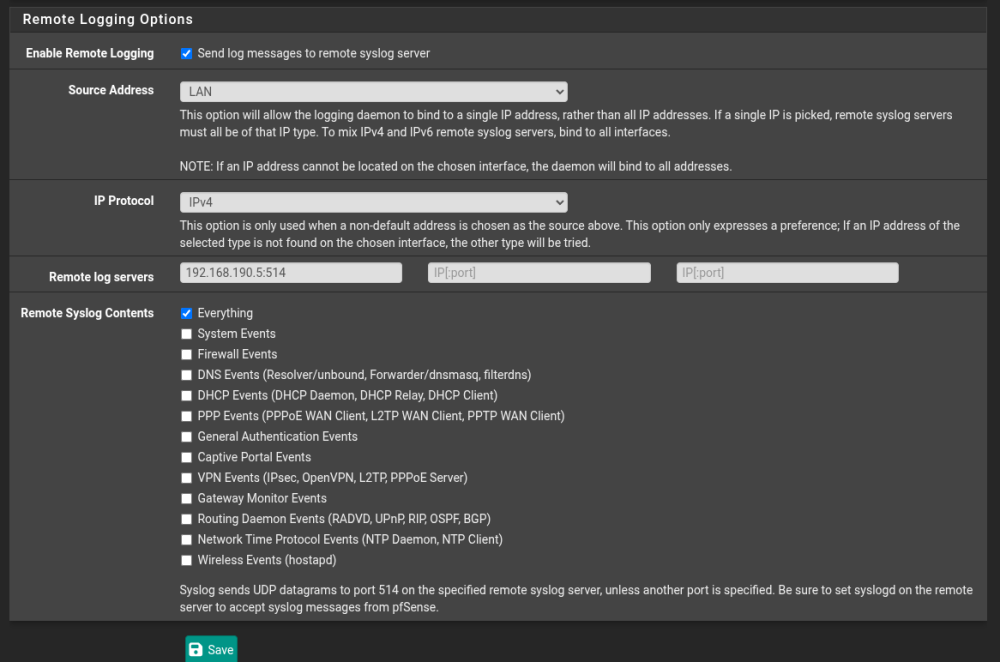
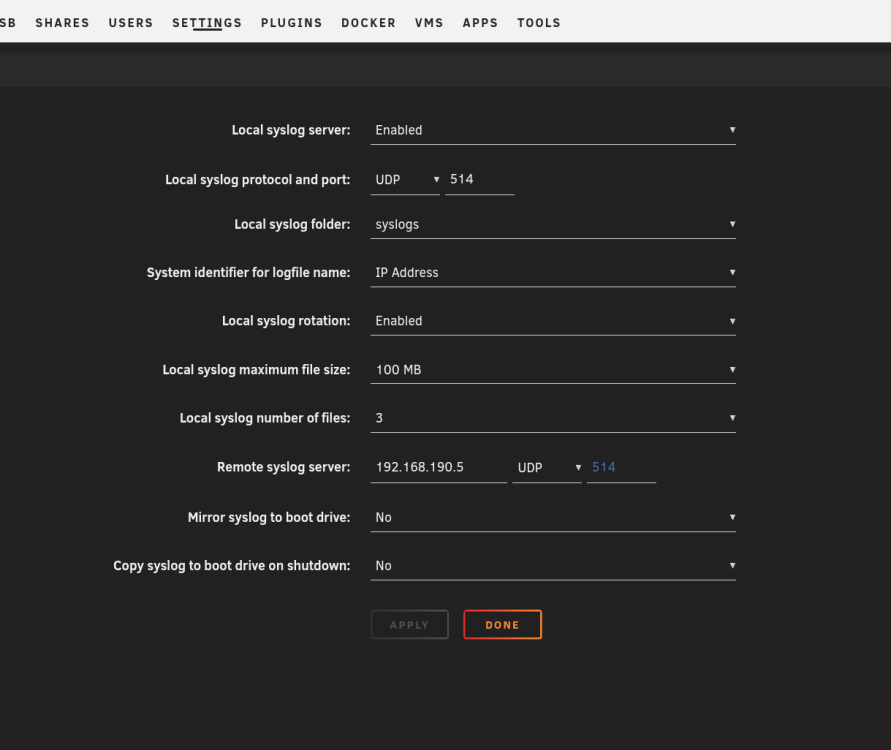
Just tested some stuff I found for this. What I have is not using the pfsense package. I created a share in Unraid called syslogs for this. It is writing logs to my syslogs share now. You will have to tinker with the setting in pfsense to get the filesize and rotation to a spot that you need, shouldn't be too tough. GL ******copied slop from www******** On pfSenseGo to Status → System Logs → Settings tab. Under Remote Logging Options, check "Send log messages to remote syslog server". Fill in: Source Address – usually "Default (any)" unless you're using a specific interface (e.g., a VPN tunnel). IP Protocol – IPv4 (or IPv6). Remote Log Servers – enter up to 3 servers in ip:port format (default port 514). Under Remote Syslog Contents, check the categories you want forwarded (Firewall, System, DNS, DHCP, VPN, etc.). Click Save. Logs will immediately start flowing to the remote server. ****My PFS Status>System Logs>Settings******** *********more copied slop******** On Unraid (receiving server)Unraid has a built-in syslog server — no extra packages needed. Go to Settings → Syslog Server in the Unraid web GUI. Set Local syslog server to Enabled (opens a UDP listener on port 514). Under Local syslog folder, select a share — ideally one that writes to an SSD/NVMe (cache drive) to avoid wear on spinning disks. Configure rotation (e.g., 50 MB max file size, 4–10 files). (Optional) Set Remote syslog server to the Unraid server's own IP — this "loopback trick" ensures Unraid's own system logs also get written to that share. Click Apply. Logs from remote devices will appear in the selected share, one file per remote host (named by hostname or IP depending on the System identifier setting). **********
-
Do a trial with a different usb. Fresh start right there. Assign your array disks the same as you have now. That's VERY important. If you like where things go while adding plugins, containers and vms, transfer your license to the new usb.
-
Oh no, that is not what I am looking at here, mine does not have a display like that. I am so sorry.
-
You will want to attach diagnostics.
-
If the usb cable does not work, i found a thread here that has good information that may help.
-
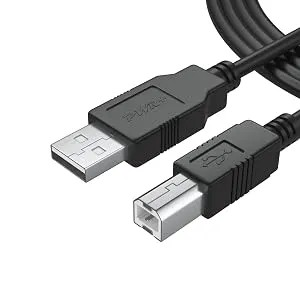
I use a plain A to B usb cable like you might have from a printer.
-
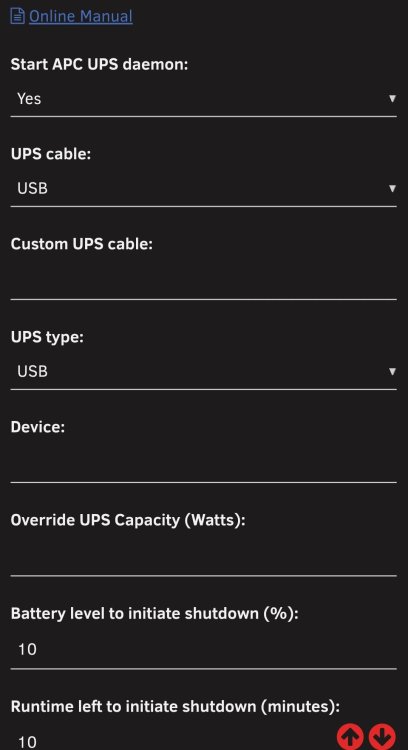
yes. I set my ups settings like these and it worked. edit: also, don't use the serial cable. use a usb cable.
-
Yes, you need to purchase it. Once you have a copy of the game, you can use one of the containers in apps to host maps and play on. I have Ark Ascended on Steam and use the Mavrag container. It works easy enough. edit grammar
-
Side quest @MowMdown , what idle power consumption fo you see on that a310? I have the full size single slot Sparkle version and best idle I can seem to get is ~11w.
-
It connects right up connecting with usb. Check the apc that modbus us enabled. If that doesnt do it, check the apc firmware is up to date.
-
Maybe that ups alert ... Serious words used. Could be the ups protecting your equipment from it's failed batteries by doing immediate shutdown. I suspect when that alarm clears it will do what you want.
-
cache is a reserved name for unraid. you named a pool ir maybe a share 'cache' and its causing problems. Find what you named 'cache' and change it to another name. might involve recreating it. For the appdata thing... at some point it was writing to the array. You will need to move the files manually. This means you need to shut off docker and vm under settings and locate the files in the array disk directory and move them to your cache drive designated drive. After that, turn back on the docker and vm setting.
-
Jellyfin should cover it regarding docker containers. Dont see a need for vpn for meta data but it would not hurt if you already have something available. Sorry no guide handy for reference
-
Neat video. Will part 2 be about the subsect of users that run unraid on top of truenas? Fries not chips btw.
-
hard to say. blacklist a 915 driver, maybe a rebar setting. could go through forum and look for some SimonF replies who seems to be the battlemage/xe expert. posting diagnostics will likely get more replies here.
-
Could be a browser issue. Have you tried clearing the browser cache and even a different browser?
-
any device that you login to your tailnet with will be able to see each other via the 100.x.x.x ip address it gets
-
Agreed. This should probably be a red line for the build. I do not see an available pcie port to add a small discreet intel gpu which could fix this deficiency.




