





Everything posted by Unraider_
-
UPDATE: Habe das im Log gefunden: root: Warning: preg_grep() expects parameter 2 to be array, string given in /usr/local/emhttp/plugins/NerdPack/scripts/packagemanager on line 79 What to do? -------------------------------------------------------------------------------------------------------------------------------------- Hi, ich benutze die letzte Unraid Version und würde gerne Python über das Nerd Pack (aus den Settings heraus) installieren, aber im Nerd Pack wird mir gar nichts angezeigt (es lädt ewig mit "Please wait, retrieving plugin information ..."). Was kann ich tun? Danke towervie-diagnostics-20221117-1212.zip Edit: Reset filter im Nerd Pack, Server Reboot usw hilft leider nichts, bei "Check for Updates" passiert auch nichts, es wird nichts angezeigt und lädt ewig 😕 Edit2: Andere Plugins/Docker kann ich updaten und sonst funktioniert auch alles normal soweit ich das sehe.
-
thanks, will try
-
hi, my usb stick seems to be dying, i already tried it on another computer, no writing possible... what can i do? i have some other sticks, that i used for 30 day trial 1 year ago or something. can they be used? are they not blacklisted or sth? thanks! towervie-diagnostics-20221012-1444.zip
-
Guest Agent was not installed. Now it's working, thanks! BTW - it would be even nicer to see the IP without clicking on the VM, maybe configureable as a fixed column? Edit: OK with all that different network interfaces it would not look that nice maybe...
-
mmh i dont see that column "capacity" in RC7 vm overview. would love to see the IP adresses of the vms there like on that screenshot..
-
I had the issue, that on a R9 3900x + RTX 3070 a few games were really slow (30fps) on a W10/W11 machine (passthrough). This fixed it: "fixed by disable HyperV / Sandbox / Subsystem for Linux in windows features. If enabled -> gpu limited by ~ 50% and windows feels laggy. disabeld sandbox + hyperv (windows features!) + subsystem for linux - i let the unraid hyper-v on template enabled) and all runs flawless! and dont passtrough NVME via VFIO, pass it via unassigned device + adjust XML" --> configure VM as HyperV, rest was not the case in my VMs, also upgraded VM to i440fx-6.2 + set to PCIe ACS override and bound GPU+Audio. Now i have really good performance for example in Cyberpunk 2077 and Gears 2 (before around 30fps in Full HD) and outstanding performance in benchmarks, I think it's similar to baremetal now.
-
@Dmitry Spikhalskiy Hi, thanks for this container. I love Zerotier, it works perfect and is exactly that lightweight VPN P2P solution I was looking for! Thumbs up
-
yep, that's what i meaned. ok. thx 4 info JorgeB, will do more backups from now on but how can that happen? looks like a bug to me tbh...
-
i found the vm config files in /etc/libvirt/qemu, but they are empty :-/
-
what can i do now? only re-create the vms?
-
ok found it: system\libvirt\libvirt.img Dont have a backup of that file (yet). So all VM settings are lost now? What else is/could be damaged?
-
libvirt.img - where? img file (?) - can it be edited?
-
i had some complex settings in vms, so it would be nice to know, where this stuff is stored on the flash drive (?) i still have a backup.
-
Hi, after a reboot all of my VMs disappeared in unraid. What happened?? Files in domains still seem to be there. Where are the configs for the VMs stored? Thanks P.S.: i had to stop the mover before and reboot, because my cache drive went full and i could not start vms/docker with a full cache drive - now there is some space again on cache drive, but after a reboot VMs disappeared. next bug in unraid - i nearly find daily bugs from my point of view :-/ towervie-diagnostics-20220202-1048.zip
-
OK after creating share.cfg on flash drive and reboot the mover is moving now. this is by 100% a bug.
-
Share "Games"
-
New build is not brandnew, it's 2 weeks old or something and was x-time restarted since creating of shares, etc. Why is config/share.cfg missing?
-
hi, on a new build the mover does not work - and from my point of view it never worked. in syslog i can find: mover: cache not enabled but the share, that needs to be moved, is set to "use cache pool = yes". thanks towervie-diagnostics-20220131-1706.zip
-
i would bring up at least 1 message at initial setup of the array, i think many of new unraid users will make this kind of "error"...
-
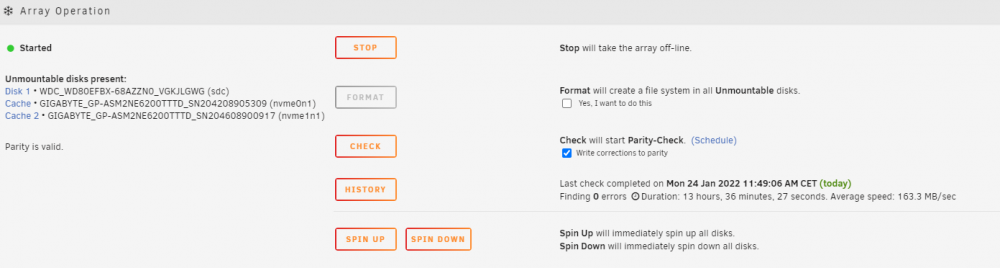
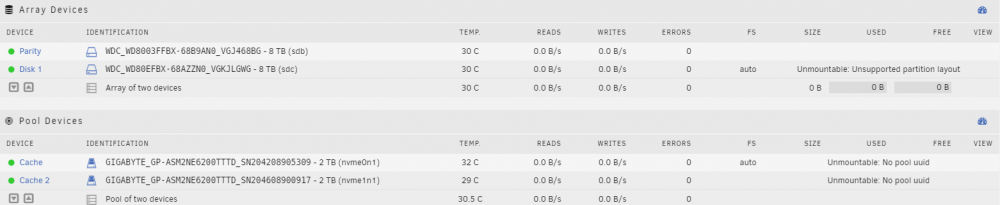
another strange thing is, that my disks (from array) are shown as "Unmountable disks present": something wrong with format of the drives (i thought unraid formats them automatically to XFS? at creation of the array? what does "auto" mean?
-
hi, did a new build yesterday (6.10.0.rc2) and created the array, it finished today. after a reboot i have several problems: - docker not working - error "docker failed to start service" in docker settings i see: /mnt/user/system/docker/docker.img "Path does not exist" /mnt/user/appdata/ "Path does not exist" - vm tab shows "Libvirt Service failed to start." - in shares i can't create shares - when i try to do - after saving the share is not shown (without an error) did i miss something in setting up the machine? thanks towervie-diagnostics-20220124-1335.zip
-
UPDATE/SOLUTION: After a bit of research it's resolved. Maybe it helps for other not so experienced people like me, i'm quite new to unraid/linux. 1. find out ID from drive: ls -l /dev/disk/by-id --> in GUI the ID was different - in console i saw, that an "ata-" is kind of missing in GUI. 2. edit VM in xml mode and replace "/dev/sd*" with "/dev/disk/by-id/ID" - saving works now 3. start vm
-
don't know what you mean and issue is not resolved yet. 1 use case: i try to start the vm from an unassigned device/ssd - and want to switch from /dev/sd* to /dev/disk/by-id/? (still don't know which id should i add here - "Intenso_SSD_Sata_III_AUSAT0608OUT******" for example?), but GUI is stuck @ updating anyway, so i can't change it. i don't have a vdisk, i have the whole ssd with windows 10 on it. how can i transform it to a vdisk - if that is the solution? don't want to set it up completely new now... another one: - pass through several disks (USB/SATA) to 2 different vms - same issue here (changing sd* after reboots and can't update vms (stuck @ updating)). edit: could now save VM in XML view, but when i want to start vm - i get the error message " Execution error Cannot access storage file '/dev/disk/by-id/Intenso_SSD_Sata_III_AUSAT0608O..........': No such file or directory"
-
When i change settings in vm from /dev/sd* to /dev/disk/by-id/*ID* (e.g. "/dev/disk/by-id/TOSHIBA_**********") - VM isn't saved - it's stuck @ "Updating" :-/ Same also for different VM. Tried a reboot - same. Unraid version 6.10.0-rc2 tower-diagnostics-20220123-1458.zip
-
Thanks Squid, will try that tomorrow. edit: i use "/dev/sd*" now...


