





PPH
Members
-
Joined
-
Last visited
Everything posted by PPH
-
Would love to be able to run unRAID on my RaspberryPi's - mainly for the Docker management plus familiarity with using and managing unRAID.
-
Welcoming both Alex and Scott to the unRAID Team! 🥳
-
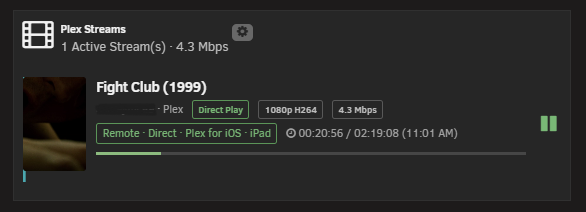
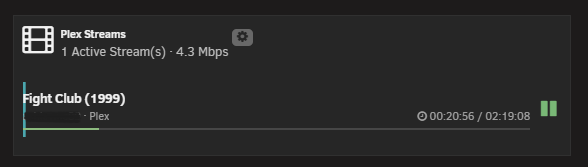
Looks like it only seems to be affecting "remote streaming" Users/sessions. The extra coloured bar to the left is not displayed for local/LAN playback sessions.
-
Hi @dorgan , I have updated to the latest version of the Plex Streams plugin (I'm a long time user and already had the very old version installed and was then prompted to upgrade). There seems to be a visual/GUI bug where a light cyan line appears on the Dashboard when using the Dashboard widget (both standard and compact view). I am using Brave Browser but have "shields" switched off when accessing unRAID. I have attached screenshots showing the light cyan line on both of the Dashboard widget views. Thanks.
-
Thanks Jorge, Just thought I would highlight as it doesn't display this on version 7.3.2.
-
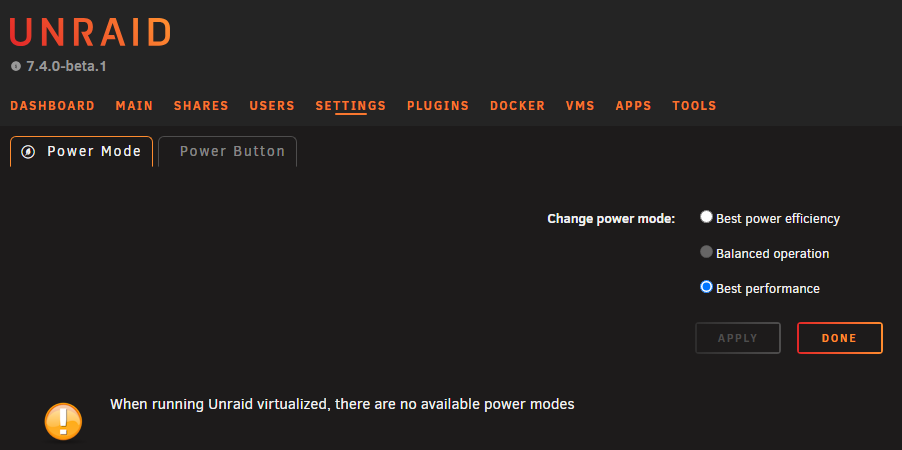
Updated my non-production "Backup" box to 7.40-beta.1 (no issues encountered during the upgrade). One minor issue present, when I click on "Settings" -> "Power Options", a warning to say "When running Unraid virtualized, there are no available power modes" is displayed. This Server is 100% physical (Intel i5-14500T, 16GB DDR5, Asrock ASRock B760M Steel Legend WiFi with its latest BIOS release - 14.02, mixture of HDDs and SSDs). (I have set the new "Power Button" setting to "Do Nothing" and can confirm this works.) I've also attached diagnostics. backup-diagnostics-20260815-1031.zip
-
Three systems successfully upgraded (two from 7.3.0-rc.2 and one from 7.2.6) - no issues encountered and all working as expected. Thanks team!
-
Bug report raised. I configured the Array disks as BTRFS as the overhead of this File System is low and I want to maximise the available storage space within my SSD Disks. 😊
-
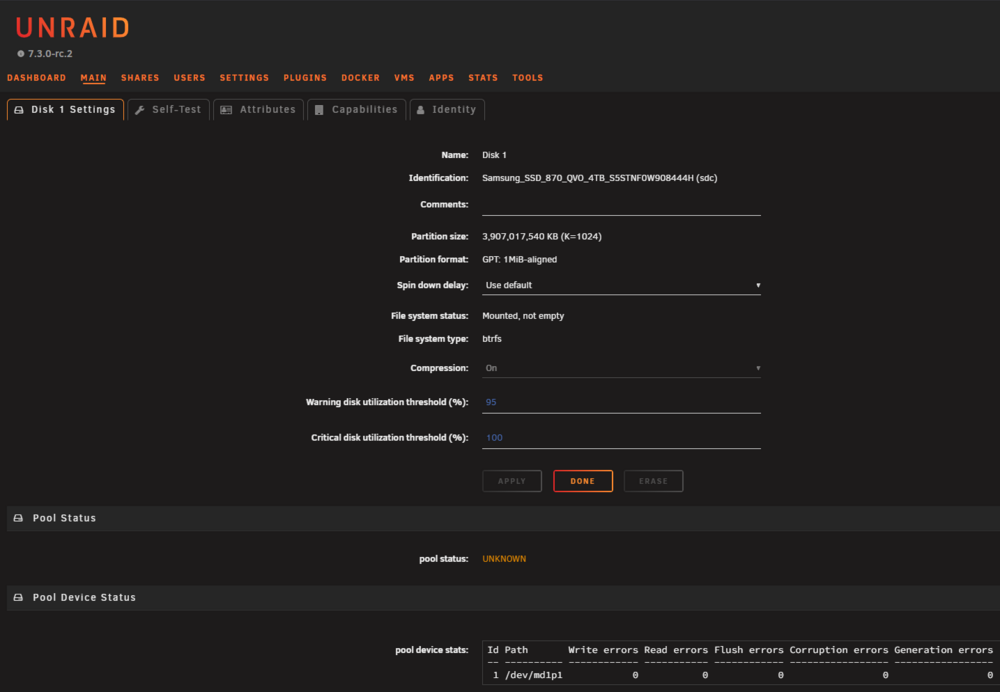
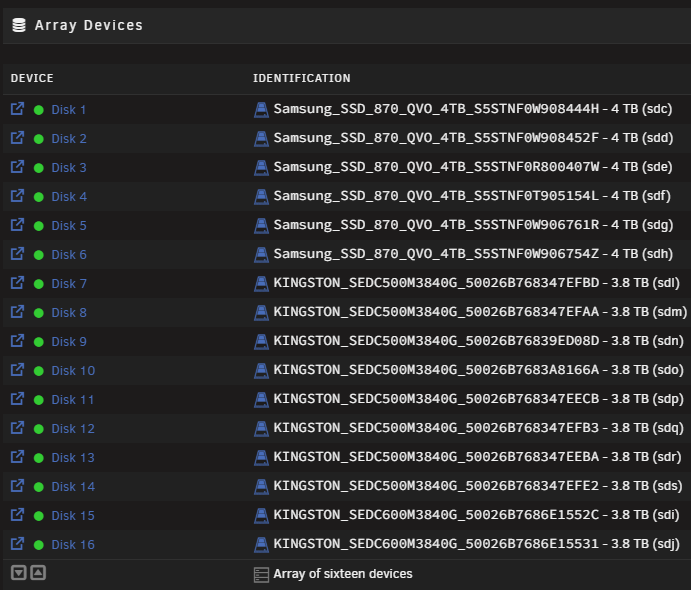
7.3.0-rc.1 & 7.3.0-rc.2 "Pool Status" observation. I have an all flash (SSD) Array (WITHOUT Parity) configured within 7.3.0-rc.2, when I view the status of any Array Device (e.g. "Disk 1") the status display shows "pool status: UNKNOWN" (see attached screen shot). Should 'Pool Status' & 'Pool Device Status' details be displayed for Array devices? Thanks.
-
Upgraded "main" unRAID Server from 7.2.4 to 7.2.5 - no issues so far (only have Intel CPU/GPU for transcoding). Thanks to all of the unRAID Team!
-
Bug report raised. 👍
-
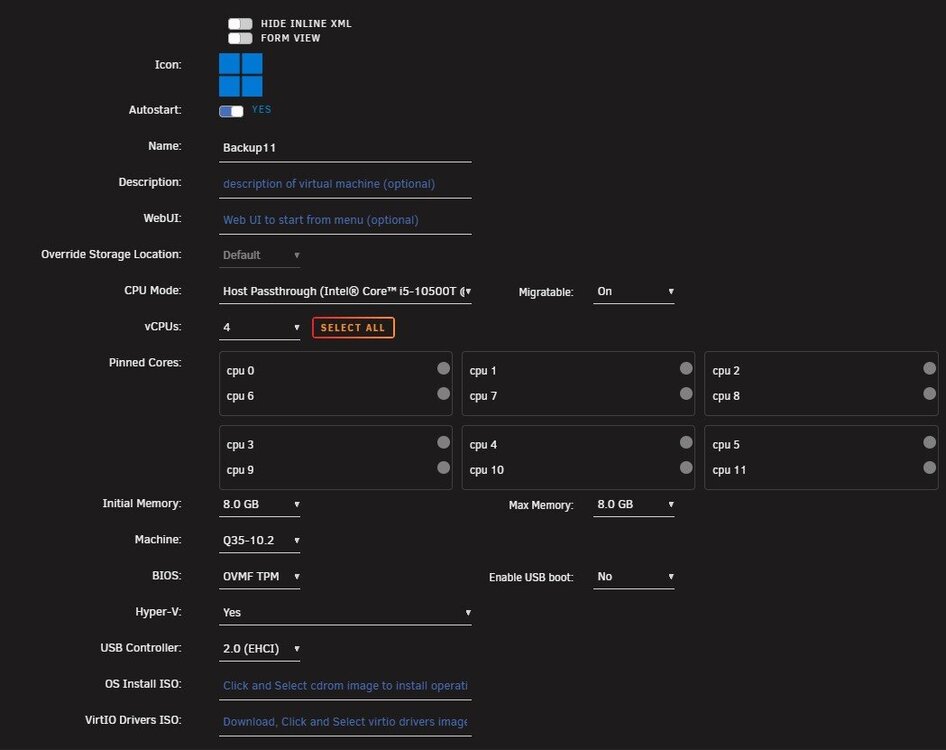
Hello, Was running 7.3.0-beta.2 (upgraded from a fresh 7.3.0-beta.1 installation), then upgraded to 7.3.0-rc.1. Unable to launch Windows 11 VM - displays the following error: "Execution error - unsupported configuration: Emulator '/usr/local/sbin/qemu' does not support machine type 'pc-q35-4.2'" Edited Windows 11 VM configuration - "Machine" type showing as "Q35-10.2" (see screenshot) but XML file showing value as: <type arch='x86_64' machine='pc-q35-4.2'>hvm</type> Clicked on "Update" (without making any changes) - VM then successfully started (XML file showed entry updated to <type arch='x86_64' machine='pc-q35-10.2'>hvm</type> ). Just thought I would highlight in case this is an issue or maybe just a blip that affected my installation.
-
Thanks Jorge, I will investigate stopping the Array, manually mounting then TRIMing. 👍
-
Hello, I am part way through building my next unRAID 'Media' Server where I plan to use only SSDs. I have a mixture of 960 GB, 2 TB, 3.84 TB and 4 TB SATA SSDs (the 960 GB and 3.84 TB SSDs are Enterprise SSDs) - 22 SSDs at present. With the prices of SSDs now being silly prices, I would like to maximise the amount of storage space available, minimise File System overhead whilst making things easy to manage. My original plan was to configure an unRAID SSD only Array WITHOUT parity disks (and no plans to ever add these) using BTRFS (with compression configured) for each disk. Then create a 'media' Share using the 'Fill-up' Allocation method. Utilising a Array allows each (SSD) disk to be individually 'spun up/spun down' (even with low power SSDs) and I can easily create an exact list of files and folders present on each disk that could be used to restore contents if a disk failed. I understand that an all SSD unRAID Array WITH Parity is unsupported as TRIM can invalidate Parity and that unRAID has disabled TRIM support on Array SSDs. I have attempted to manually run TRIM (e.g. fstrim -v /mnt/disk1) on an Array SSD and it returns "the discard operation is not supported". I can also see that other BTRFS based Pools/Disks have the discard=async enabled which enables "automatic" TRIM. Is it possible to: Manually run TRIM on an Array SSD(s)? Amend the default mount-ing process for the BTRFS-based Array SSDs so that they have discard=enabled on each Array SSD? Use an alternative approach (stop Array, manually mount each Array SSD run TRIM then dismount each Array SSD)? I know I can configure multiple Pools (using ZFS Stripes to maximise storage space) but would lose out on having a single Share for management plus would need to restore a whole (ZFS) Pool if a single disk failed. Another idea would be to use individual single disk Pools, create a 'media' Share and then manually create a 'media' top-level folder on each single-pool disk and let FUSE 'merge' these together. This is far from ideal as I would then need to manually manage filling up each disk (although 95%+ of the media files present are write once, read many). Suggestions and ideas welcome! Thanks.
-
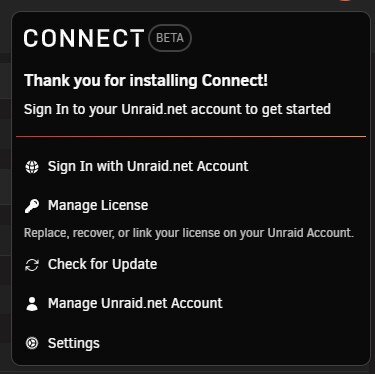
Self "fixed": Click on the "Unraid Connect" icon -> Sign In with Unraid.net Account Once logged into the "Manage Server" web page, click on the "Register your server for Unraid Connect" Then click on the "Register" button Job done!


-
Hello, Is "Unraid Connect" supported with 7.3.0-beta2 ? I have just performed a clean installation of 7.3.0-beta1 (yesterday) and then upgraded to 7.3.0-beta2 today (without issue). I then installed "Unraid Connect" but the 'Unraid Connect' icon was not present in the top-right hand corner of the unRAID GUI. After rebooting the Server, the 'Unraid Connect' icon appeared as expected, I then attempted to configure and followed the prompts to 'Sign In with unraid.net Account' (see attached screen shot). After successfully logging in with my unraid.net account, "Unraid Connect" still presents the same prompts and does not display the 'new' Server within my Unraid Connect Dashboard (my existing/registered Servers are displayed). Are there additional steps I need to follow to register my 'new' Server with Unraid Connect? Thanks.
-
Updated my three unRAID boxes from 7.2.3 to 7.2.4 - no issues encountered.
-
I have two m.2-to-6-port sata adapters in my current unRAID "media" Server and two in my "backup unRAID Server. Both have worked flawlessly for years. Care does need to be taken with the sata cables as the cards are quite delicate. I have also used the pcie x16 card with the nvme switch chip. This also worked without issue. A bit of an expensive card though - I purchased a LinkReal card (LRNV9547L-4). Wasn't particularly impressed with the speed using four m.2 gen3 nvme 4TB disks but this was a while ago and may have been before ZFS was an option.
-
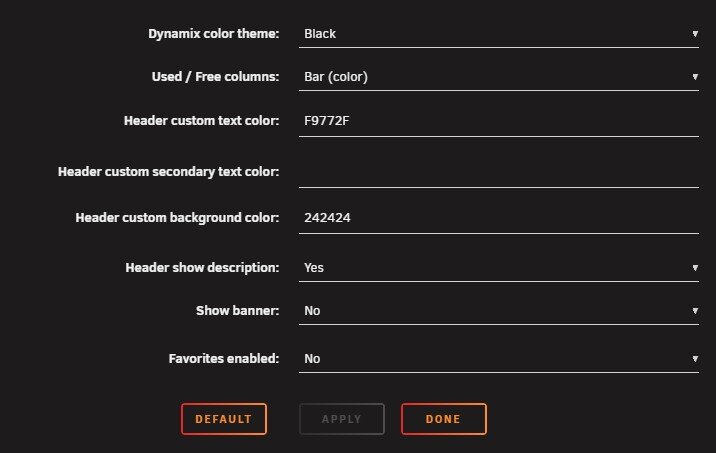
Updated from 7.1.4 to 7.2.1 - all Docker Applications and Plugins working as expected. Same issue as others with the Banner flashing from white to dark grey (custom colour) when switching between tabs.
-
Hi @elibosley , I had also noticed that I had multiple API keys listed within the "Settings -> Management Access" details page. I have deleted all API keys present and then restarted the API (unraid-api restart) but it still lists multiple API keys for the same purpose (2 "CliInternal" and 3 "ConnectInternal"). Is this expected behaviour? Should I post diags? Thanks. [Running unRAID 7.1.4]
-
Primarily a Media Server plus a couple of VMs and a set of Docker Apps to support Media and Home automation. Also used as a File Server for home use.
-
"LittleBox" - ASRock Z690M-ITX/ax - CPU: i5-12500T - RAM:64GB - LAN: 2.5G - Pool1: 2x1TB SATA SSD ZFS Mirror - Pool2: 6x4TB SATA SSD ZFS RaidZ1 - Array: 4x18TB + 4x14TB HDDs (Dual Parity) "MiniBox1" - TerraMaster F8 Plus - CPU: i3-N305 - RAM:16GB - LAN: 10G - Pool1: 8x4TB NVMe SSD ZFS Raidz1 "MiniBox2" - TerraMaster F8 Plus - CPU: i3-N305 - RAM:16GB - LAN: 10G - Pool1: 4x4TB NVMe SSD ZFS Raidz1 - Pool2: 4x1TB NVMe ZFS Raidz1
-
3 x unRAID 7.1.3 -> 7.1.4 - "no problemo". 👍
-
Hi @SpencerJ , Would be nice to know how you identify and prioritise the items that will be added to the unRAID roadmap? Also, from my perspective, would be great to know if the following "feature requests" are already on the roadmap or might be future candidates: 1. Custom ZFS Configurations For example, a checkbox on the ZFS configuration page to override the default suggestions and be able to explicitly configure a "custom" ZFS Pool configuration (e.g. multiple different 'sized' vdevs with special vdevs too). 2. Tiered Storage The ability for unRAID to automatically move "hot" and "cold" files between SSD and HDD based storage. For example, move between NVMe SSD <-> SATA SSD <-> HDD and/or SATA SSD <-> HDD. 3. Multiple Arrays 4. Add an option to move away from the USB flash device to support booting from NVMe/SSD/HDD media (ideally from a ZFS Mirror). I understand the need to ensure/maintain the current licensing model (based on the USB flash device GUID) for existing Users (me included!) but maybe an additional option (V2 Licensing?) to remove the need to use a USB flash device OR just use the USB flash device for licensing (and still boot from NVMe/SSD/HDD/ZFS Mirror). Keep up the great work!
-
Upgraded my main "media" Server plus two additional unRAID Servers from 7.0.1 to 7.1.0 - no issues encountered up to now. 👍






