





Revan335
Members
-
Joined
Everything posted by Revan335
-
Any News about this?
-
Template Errors Plugin Support thread not present on forum https://github.com/drohack/UptimeKumaPlugin/issues Can you add a Folder/File select Structure to the Plugin Settings so we can select the Folder and DB? Can you add working or selecting with the Recommended Build-In PostgreSQL DB?
-
Wenn du ZFS nutzt ist overlay2 der empfohlene Storage Driver da es bei native Probleme geben kann. Vor allem bei Folder statt Image. https://product.unraid.net/p/clarify-docker-path-guidance-for-zfs-directory-mode-vs-default-docker-img Da sind auch weitere Doku Links und Erklärungen von u. a. JorgeB dazu.
-
Whats when the IP from the Docker Socket changed? I don't see an Option to set a fixed IP for that? For example actually 172.17.0.100 on the next Docker Container Restart or Server Reboot its the IP 172.17.0.50. The IP in the Guardian Config Template are the old one and no more working because of that.
-
Any News about that?
-
Can you added it to CA for all?
-
Can you update the Docker Container Template in the CA with the latest Changes like Version 2 and others? So have new Installations directly the newest Version and Changes and not Version 1 with the manually Upgrade.
-
Hab es gefunden und im Backup Script ergänzt, was ab 7.3.x wegen der boot, Internal Boot, ... statt flash Änderungen einer Anpassung Bedarf da es sonst nicht mehr korrekt funktioniert und das rootfs voll schreiben kann.
-
The Detection and ... are include! Many Thanks for the Help!
-
The expanded and corrected versions for V7.3.x and the changes to ‘boot’, ‘Internal Boot’, … instead of ‘flash’. Older operating system versions should also work, but have not really been tested as there are currently no older versions, such as V6.x available. The enhanced, extended and improved Script with more Documentation: New Script Old Script
-
That was an Option. It the boot device always the same path/name ...? So we can find this with the same command on any system. Or have the Boot device a one command to identify it? Than list partitions with for example lsblk or fdisk -l?
-
How I can find this characters per Terminal or a Script or is that an Entry on a Config File? And how I can check flash or the new internal Boot Mode on the same Ways?
-
Hello, how I can identify the Boot and License Type through Terminal or Script like flash, internal boot, TPM, flash licensed, ... It's that a Config File Entry? From German: https://forums.unraid.net/topic/199455-identifizierung-von-flash-oder-internal-boot-sowie-lizenzierung/ Many Thanks! Many Greetings Revan335
-
Hallo, gibt es eine Möglichkeit per Terminal/Script auszugeben bzw. prüfen zu können ob man flash als Boot Device unter 7.3.x nutzt oder ob internal boot genutzt wird? Vor 7.3 gab es noch kein internal boot, nur flash als Boot Device. Das gleiche gilt für die Lizenzierung per TPM oder USB Stick. Steht das ggf. in einer der Konfig Dateien? Vielen Dank! Viele Liebe Grüße Revan335
-
Whats Script Version working on 7.3.1+?
-
It this working on 7.3.x include Backup the Internal Boot, Docker/AppData, ...?
-
The Maintainer Answer: https://forums.unraid.net/topic/100511-plugin-usb_manager/page/24/#findComment-1627484 And the Discussion about this.
-
Than its that the Issue and need a CA Release or Update of the FCP Plugin and his Exclusions?
-
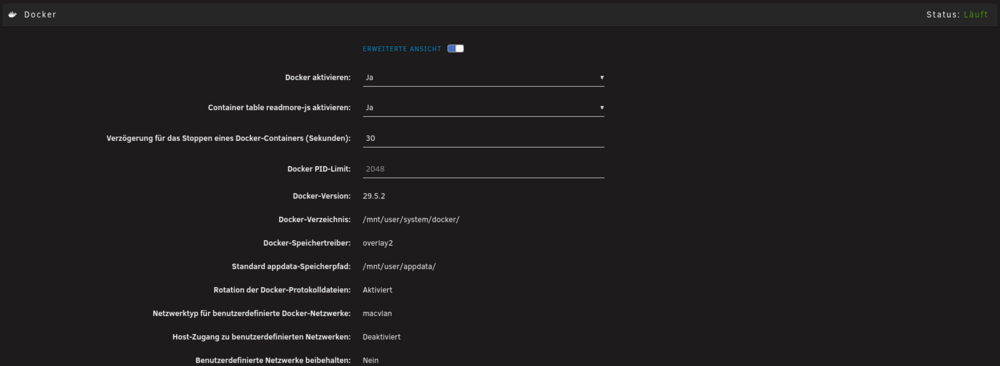
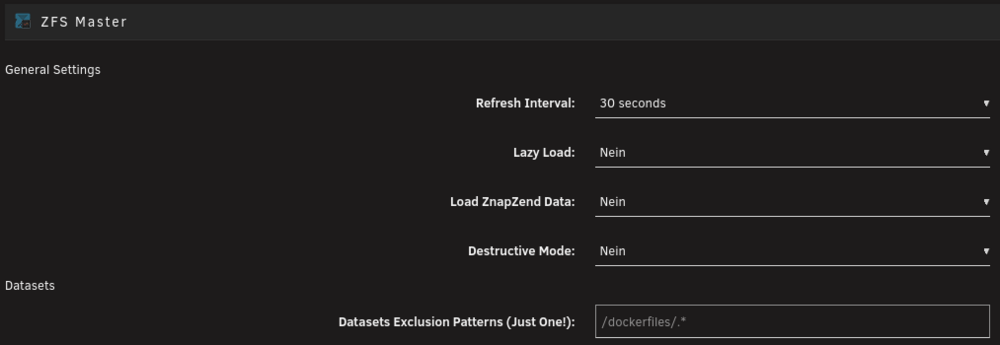
Description: Investigate at Settings / User Utilities / Fix Common Problems Importance: warning * The plugin usb_manager_usbip_addon.plg is not known to Community Applications and is possibly incompatible with your server Is that correct or a Bug again?You can used the Update Check Tool under Tools to Check Common Issues for the Update.What is this Plugin?Kommt drauf an was bei dir konfiguriert ist. Bspw. wenn du ZFS mit Folder nutzt und kein overlay2 sondern nativ als Storage Driver, dann wäre eine Anpassung sinnvoll. Laut JorgeB: The default path would be /mnt/user/system/docker, but you can use a different one. Just make sure you recreate it with the overlay2 storage driver https://product.unraid.net/p/clarify-docker-path-guidance-for-zfs-directory-mode-vs-default-docker-imgUnter neueren OS Versionen wie 7.3.x gibt es die Empfehlung bzgl. des separaten Docker Shares nicht mehr. Dort, insbesondere im Bezug auf ZFS gibt es noch weitere Änderungen und Empfehlungen. Somit landet der Docker Folder wie in der aktuellen Doku genannt wieder in dem alten Default Pfad wie auch das Docker Image unter /mnt/user/system/docker: Wichtig ist vor allem bei ZFS allerdings das man overlay2 als Storage Driver verwendet: Eine Exclusion ist in diesem Fall somit nicht mehr unbedingt notwendig:

 Any Problems with Unraid 7.3.x or Supporting this Versions?



