






gyto6
Members
-
Joined
-
Last visited
Everything posted by gyto6
-
I've got a similar issue, but with the Nvidia Driver plugin however. Whatever, the missing plugin has been automatically downloaded right after reboot.
-
With an image MYDOMAIN.COM -----> WAN ROUTER IP -----> PORT 80/443 FORWARDED TO NGINX -----> PRIVATE HOST FOR MYDOMAIN.COM -----> PRIVATE HOST FOR MYDOMAIN2.COM
-
If you want to host several websites behind one WAN IP, you must forward the dedicated port to a reverse proxy like Nginx, then proceed to assign different domain name to each reachable host. Once the hosts named with a public domain name, set them into Nginx that will redirect the requests according to the desired domain name.
-
If I can help you concerning the full dataset snapshots deletion: zfs destroy tank/docker@% The % in ZFS is like the most common * character to include any value. So any snapshot from the docker dataset shall be removed.
-
Add User Script plugin and create a script with the relative command : zpool scrub tank Twice a month for public drives and once a month for professional drives.
-
Indeed, ZFS is a "bit" more complex and I don't see it perfectly included within Unraid as they did with BTRFS/XFS. Using a plugin as it's the case with "My Servers" is not something that I expected, but it might do the work indeed. Only authorising its integration with the disk management GUI would be the least, and we won't finally require a dead usb-key or disk to start the array anymore. Indeed, words have a meaning. What do you mean saying "that's happened in a few places already" ? That other functionalities has been annonced but not released, or at least in another upgrade?
-
ZFS support is official now for Unraid 6.11 : This release includes some bug fixes and update of base packages. Sorry no major new feature in this release, but instead we are paying some "technical debt" and laying the groundwork necessary to add better third-party driver and ZFS support. We anticipate a relatively short -rc series. @ich777 You'll finally have some rest with this thread in an aproximate future. ICE : Actual ZFS beginners users should audit their configuration in order to be able to recreate their zpool with the incoming Unraid 6.11. Save your "zpool create" command in a txt file as for your datasets in order to keep a trace from all the parameters you've used when creating your pool. BACKUP ALL YOUR DATA ON AN EXTERNAL SUPPORT. SNAPSHOT IS NOT A BACKUP. A COPY IS. ZnapZend or Sanoid plugins will help, or a simple copy from your data on a backup storage with the cp or rclone commands. Don't expect the update to happens with no trouble
-
Please, provide your HDD references and your zpool properties for better support.
-
@Jack8COke Please, if your using ZnapZend or Sanoid, DO NOT USE the script to remove your empty snapshots. These solutions manages Snapshots Retention for Archive purpose and would keep some snapshots longer. If your using this script, a snapshot managed to be kept a month can get simply removed...
-
Sure, select yourpool/yourdataset instead of yourpool to apply specific commands and snapshots to this dataset Some scripts seems to exists, but for security matters, "We don't that here" as they take no space when empty (nearly). This script does the job but stay cautious, it can be break with an upgrade : https://gist.github.com/SkyWriter/58e36bfaa9eea1d36460 Did your heard about Sanoid ?
-
Thanks guys, ✌️
-
Well, doing an update is not this much annoying, mostly an habit.. 😄 Do you mean that we need to reboot our server if we want to apply the update?
-
Well that's honest indeed. I'm not providing all the work you're providing with Unraid plugins and Docker containers, however I share your point of view about it. We're profiting about your free time already, and I'm grateful about ZFS and Nvidia support by now. Thanks a lot. 😉 Thanks for the answers!
-
ZFS is not especially recommended for your use case; nor not recommended. What "we" use mostly, is an iscsi connection to connect a dedicated space area to several host. That's possible with ZFS with ZVOL, don't know for BTRFS. If your not interested more than that by ZFS, try the XFS or BTRFS solution to support ISCSI.
-
I might I've a bad english. I was asking if Limetech has warned you about official ZFS support in Unraid. I've only thought that the Unraid's team would warn you if they're planning to support ZFS in order to not reproduce what happened with @CHBMB who discovered that @limetech deprecated its works (and more, but that's not the subject) without warning him/her.
-
Well thanks then. 😉 You've not been advised about the ZFS plugin depreciation by the LimeTech Team due to its integration in Unraid so far?
-
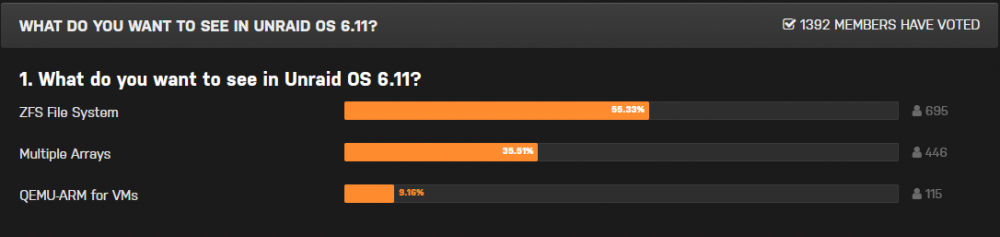
@steini84 Hi, I saw that you Uudated the ZFS plugin today. Can you be more explicit about what the update implied ? Looking forward if the 6.11 poll shall be granted :
-
In your case, I'll uninstall ZFS, reboot the machine and stop the array, docker and VM to umount. PS: I switched back to my XFS ZVOL as I couldn't access the docker tab this morning with the img running from my ZFS partition.
-
I copied my img file and it's working now on my ZFS partition. @asopala If you already have an img file, try to simply copy it to your dedicated dataset and run docker.
-
At the time, I couldn't start with my docker.img if the file was set onto a ZFS partition. I switched to a XFS ZVOL since. I'll try to run it back onto a ZFS partition.
-
Are you sure you've "written" the modification when you created the partition? It's the final step to create the partition.
-
You can simply read the documentation : https://github.com/bubuntux/nordvpn
-
@NytoxRex Did a test, and the "Previous Versions" is less dumb and display a result only if a modification is detected, else, there would be no result. Please, share your actual config, for the others to help you proceed to diagnostic. My own config is quite simple, but might probably help: [Documents] path = /mnt/fastraid/Documents/ browseable = yes guest ok = no writeable = yes read only = no create mask = 0775 directory mask = 0775 write list = margaux valid users = margaux strict sync = yes vfs objects = shadow_copy2 shadow: basedir = /mnt/fastraid/Documents/ shadow: snapdir = .zfs/snapshot shadow: sort = desc shadow: format = %Y-%m-%d-%H%M%S shadow: localtime = yes
-
Indeed, your ZFS snapshots can't be directly used on a file instead of passing through the Folder GUI. I'm not stating that it's impossible, I'm looking what can be done.
-
Small warning, I've lost access to my server. I detected it when DNS queries were no more solve by my DNS server container. I've tried connecting to GUI, but it freezed then were no more reachable (ping answer however). I initiated a reboot through IPMI but after 3H, the diagnostic file wasn't generated yet, due to graceful stop unsuccesful. So I proceded to a forced shutdown. This happened onto my SuperMicro server, linked on the 2 host's ethernet port by 802.3ad. No troubleshoot when I checked this link on the Mikrotik router... Next time it occurs, i'll try to wait enough for the server to generate the diagnostic files to be posted on the General Support channel, but 3h is not normal and already long enough..



