





rgreen83
Members
-
Joined
-
Last visited
Everything posted by rgreen83
-
working now, thanks!
-
Tried installing in unraid but getting error Unable to find image 'ghcr.io/sworcery/mem-zero:latest' locally docker: Error response from daemon: Head "https://ghcr.io/v2/sworcery/mem-zero/manifests/latest": unauthorized. Also the template option for dashboard username says "Username for web dashboard login (leave empty to disable auth)" but the field is required so leaving empty isn't an option.
-
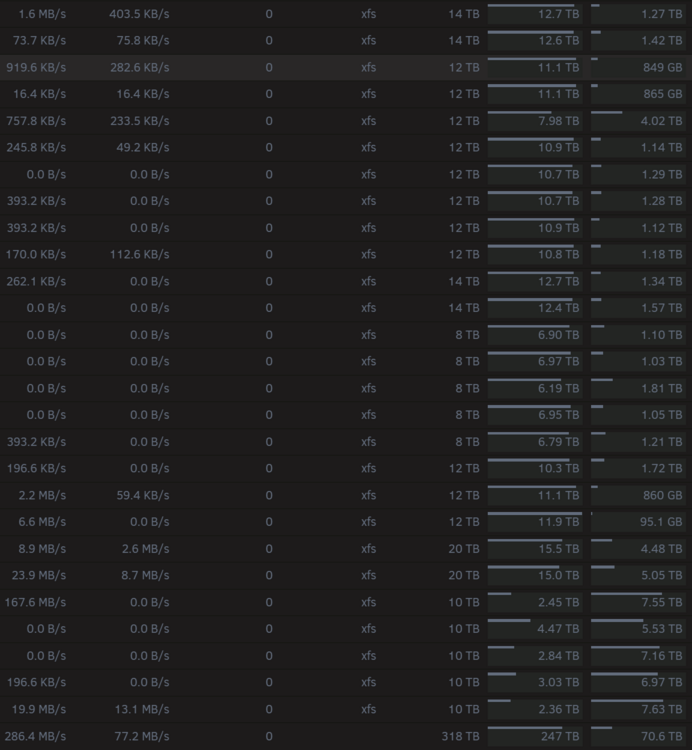
Use case is simply drives get full and I am trying to let this tool move stuff to more recently added drives to spread the "load" out across more empty drives. Many of the media sets/folders I have run 1-2TB (ripped bluray) in size but generally individual files would be 10GB or less. I run unraid because I like whole files per disk instead of striped so they can be easily recovered/moved/etc without rebuilding a raid array, but I have no need for the whole media set to be on a single drive since media should be interacted with via shares/logical structure not via direct disk. I think performance is likely better if files are actually stored on multiple drives wouldn't it? I think that is what I had in mind for a largest first sorting order, take the largest folders and spread them out more evenly. I'm not sure why it would be important to keep all files for a show on a single disk, but of course I understand many have different priorities and I'm just not familiar with that use case. Image attached of my current drive status for example. I just noticed when I have a drive with say 500GB free the plugin (set to 1TB free goal) would go to work on the largest folder which might be 1TB and it will just toil away on that for 2 days trying to move the entire 1TB folder to a new disk so when it is complete that source drive now has 1.5TB free. That's fine to have extra free space, just wanted to make sure that what I was seeing is expected. My server is highly utilized for many things and my disks never idle so I care a lot more about performance than power savings. All of my shared run high water allocation and automatically split any level directory. Most of my array storage is for ripping bluray, then I use tools to mux those to mkv to watch via plex, for TV shows I usually up reencoding to AV1 because the production quality just doesn't justify the huge storage, so there is a lot going on. Primarily I just wanted to make sure I was understanding how the script is supposed to work and that it matches what I was seeing. I am not expecting you to change its functionality to fit only my use case, it seems I might be the minority anyway, but I wanted to share how I use my server and your tool since you asked. In any case, again thank you for the tool, it is greatly helpful already!
-
@strike Trying to understand a little better how the script works. So the free space of the disk as a whole is used to determine if files need moved, that seems pretty straight forward. Next lets assume the sorting order is largest first, does it select a folder with the largest FILE within and move that whole folder, or does it select the largest FOLDER e.g. the folder with the largest collection of any size files? Then next regardless how it selects the folder, it seems the script moves that whole folder start to finish? That part has surprised me, I assumed it was moving the largest files one at a time not entire folders start to finish, and I honestly wish it was file by file instead of doing the whole folder - could that be configurable? Please correct my misunderstandings.
-
Just FYI a couple security issues were disclosed for 10.1.85 and earlier, addressed in 10.1.89. 11notes has 10.1.89 builds out and I upgraded to from 10.1.85 to 10.1.89 without issue with just a tag change. https://www.bleepingcomputer.com/news/security/ubiquiti-warns-of-unifi-flaw-that-may-enable-account-takeover/
-
I understand why you would want to end support for this eventually as unifi is obviously soon as well, but as long as you want to keep it up I will continue using it. I don't have a preference between controller vs OS and have changed my system at work over to OS, but for personal use I do prefer containers over VMs simply because they are easier to deploy, auto update, more secure, etc.
-
Just FYI for others, I was dumb/brave and had my image tag set to 10-unraid so mine auto-upgraded from 10.0.162 to 10.1.185 and was broken as I have since learned would be expected. I am sharing though because I wanted to let others know I was able to just change my image tag to 10.0.162-unraid and that fixed it so I was able to to then export a recent backup. I was then able to delete and re-get the image from community apps and restore that backup on 10.1.185-unraid tag.
-
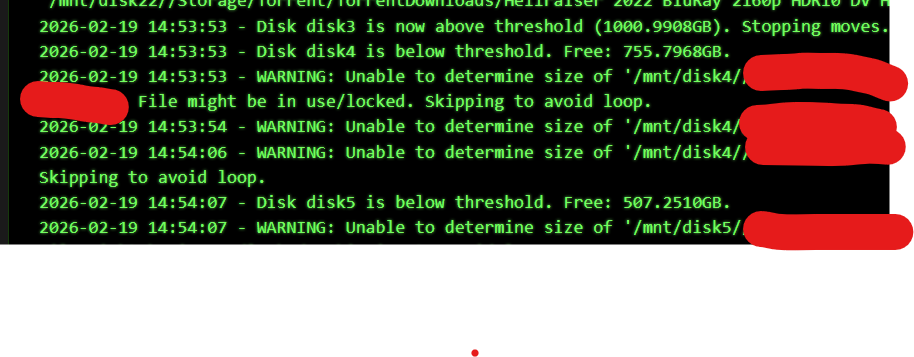
wow thank you for the quick update! and yes i meant like a buy you a beer link! I know there are other options like unBalanced plugin but iirc that is a manual option and not ongoing regular space floor maintenance? I just prefer this plugin honestly. As for the disk skipping issue, i have checked and there are some tiny files in those specific paths i mentioned. I have all of my automated processes set to cleanup empty folders so those shouldn't really be around. I took a log screenshot that shows the behavior im seeing that seems incorrect, if you notice there is no "Disk 4 is above threshold" message before it moves on to Disk 5 despite Disk 4 being nearly 250GB below the threshold.
-
I just noticed there is a smallest first option but no largest first, while the other options have each counterpart. I think I would actually like to use largest first if you could add that at some point please. Also I am noticing something that might be an issue. So if I have a disk with 500gb free and I have set the plugin to free up to 1tb, it will see that the disk needs some files moved, but then it seems like it runs into a lot of files that it has to skip for whatever reason and then it just continues on and leaves that disk under the free space goal. I assume it is deciding on the files it wants to move, sees it can't, and never goes back to choose other files. That of course should take care of itself long term but it seems to return to the same files every run so the problem actually is building up and getting worse with each run as it can move less and less files each run. This plugin continues to be awesome! I haven't found a support link anywhere, could you add one or at least share one here? edit So I may have while typing up this comment just found why that is happening specifically for me as well which might also be something correctable. I have "smallest first" set on my torrent downloads folder, and im seeing that most of the folders that it is trying to move and skipping are placeholders for downloads in queue. I do not have pre-allocate enabled so there is no actual file but the folder is there and a 0kb empty .nfo. Also just noticed another set of files doing the same thing except this one is actually very large over the share, but the disk that it wants to move the file from has only a very tiny 3kb sfv file. It seems that even though the whole huge file over the share has completed downloaded, it being shared keeps any of the files from being movable by this plugin. That is likely fine, but it does make me wish for a "largest first" option even more and to ensure that it doesn't skip the rest of the disk when it's planned files are inaccessible.
-
oh wow i totally missed that. its a little less than ideal that you have to lose your cron schedule to turn scheduled runs off perhaps temporarily but thats a very minor thing. the plugin continues to run well. I've been trying to survive with an extremely full array due to the high prices of hard drives recently and your script has made that much easier!
-
Everything has been working great for me the past couple days with the latest dev version. I would only request one tiny change/addition, could we get a way to turn the cron schedule on or off, or a note what to put in the field, if we just want to run manually?
-
updated to 10 with method 1, no issues at all
-
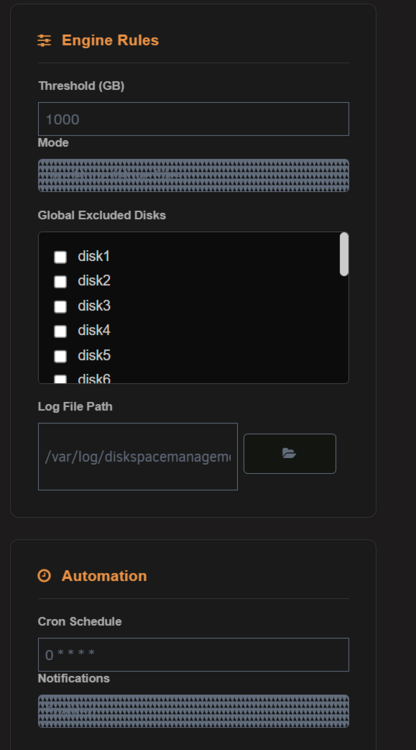
Ignore the grump, the new UI is fantastic! I do have 1 issue with the UI though, my drop down items show weird as pictured. Also, how do I stop a running job?
-
Tried updating my image to the latest stable per the OP, 9.2.87-unraid but I kept getting an error that the image was not available. For some reason unraid was appending :latest to the end of the image tag string even though that wasn't listed in my repository string (I tried it again after double checking). Was coming from 9.1.120-unraid. In any case, I updated to 9.3.43-unraid instead just fine. No complaint just an FYI in case someone else runs into it.
-
Would love to see this drop in alternative to flaresolverr in unraid apps. https://github.com/ThePhaseless/Byparr
-
Thank you for this, i was a bit stuck working out how to get the files to load. Your solution helped me but i ended up finding a simpler one. It seems according to this page https://github.com/kiwix/kiwix-tools/tree/main/docker/server that the xml file and manually loading is unnecessary with the *.zim like how the template has for post arguments. However it is slightly off in the template and if you change it to just like in that documentation to '*.zim' with the single quotes it works as expected and loads all zim files at container start. A lot less work than loading them all in one by one.
-
I agree since bing api is dead, mapquest and google require payment option on file for even free account now in case something happens and you go over they can charge you. manual time entry, UTC offset, or maybe a different geocoding provider like the opensource QGIS would be nice. but this plugin is a small nice to have and i could understand if the dev doesn't want to invest more time into it.
-
Schedules, Date Time, and File Manager all blacklisted now as well. It would be nice to get some heads up and explanation why these are being blacklisted ahead of time. I assume their functionality is being integrated in future versions but it would be nice to know for sure because we don't all yet have those future versions. *edit* hmm after going back to that tab it forced me to refresh the apps page and these aren't showing blacklisted any longer, not sure what is going on lol
-
Came for the same question, I think it updated to a new version built for v7 (changelog shows 2024.07.10 bugfix for Unraid version 7.0.0) and isn't meant for pre-v7 but I could be wrong
-
I have been working through getting GPU passthrough working for a VM and found this post. I believe I know what OPs issue was because I experienced the same thing and wanted to share in case it might help someone else. I have learned that to give a VM a GPU it has to be entirely exclusive to that VM, so if the GPU is used in any docker then starting the VM will cause major unraid issues. That part is pretty well documented and I had taken care of that from the start. What I didn't find until much later after I continued to have problems was that you cannot use GUI mode in unraid either, because it engages the GPU. In my case I think I have always booted to GUI mode because I keep a local monitor attached in case I lose network access to the server. After changing my boot config to no GUI mode I haven't had any more issues with GPU passthrough. Not being able to partition/share the GPU kinda sucks in a system like unraid, and it would be great if it could be improved but I don't know if that is within the control of the unraid devs.
-
Is there an advantage to using the site export? I just did a database backup and restore to migrate and it went off without a hitch, but I do this kind of thing for work a lot too so I'm curious what the difference is.
-
if your port 8080 is occupied, as mine is by unifi controller, then just change the 8080 variable to an unused port
-
The small and low power specs that makes a mac mini interesting is already available in x86 land, https://www.bee-link.com/beelink-gaming-pc-ser7840-19943849-clone-1 this is just one of many examples. It uses 6-10w idle and has upgradeable and user replaceable ram and drives. It's faster than the m2 mac mini, prob about the same as m2 pro. I use these for media servers, desktops, backup servers, application servers etc. The AMD ones are good enough for light gaming and the Intel ones have QuickSync which is great for de/encoding fast and low power. The problem with asking devs to port unraid to the mac mini is less about porting the kernel to ARM and more the issue that the mac mini is not a standard pc that just happens to have an ARM cpu, its a mac and nearly everything in the thing is custom hardware proprietary to apple and unraid being an OS needs to support all of that and apple would not support them if not even be antagonistic to it. There is barely linux ports running on mac mini hardware and those distros are dedicated to specifically that purpose. I agree with ich777 that Risc-V is a lot more interesting than ARM in the next few years as ARM tends to only be found in custom proprietary designs at the consumer level, while Risc-V should be a much more open and standardized platform similar to x86 - it's not because anyone is specifically beholden to the x86 ISA or anti Mac imho.
-
Been watching this for a couple months. Switched off linuxserver.io image after backup, followed directions and started this one up and restored image, had to manually reboot once more and then everything was and has been good since. Thanks!!




