





ajgoyt
Members
-
Joined
-
Last visited
Everything posted by ajgoyt
-
WOW checked into Backblaze 50tb =3k year - I dont think so :(
-
Quick question - is Crashplan Pro still a good deal for the $10 month - $120 year? Not really other options with docker for Unraid? Thanks in advance!
-
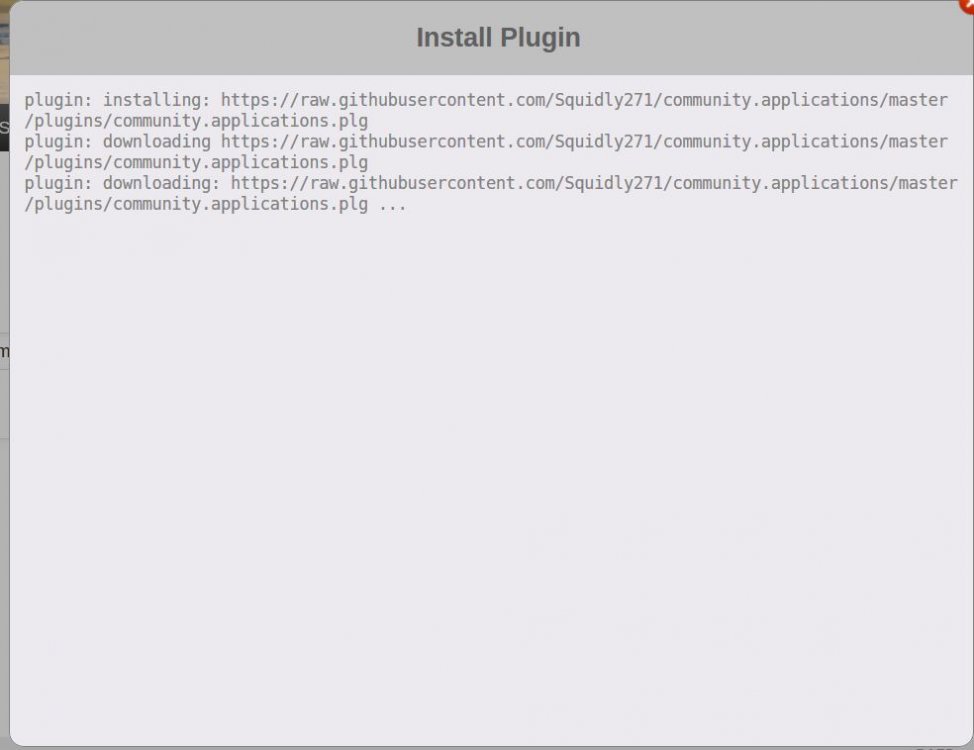
Hi new install of Unraid 6.4.0_rc10b - I cannot seem to download the CA , I pasted the url from page 1, and it just sits there... I am on my win10 machine trying to install from the gui .. see the picture , please advise what i am doing wrong. just tried the fix common problems plugin and it does the same thing as the picture below. it's like i am not connected to the net....
-
Frank will the Turbo write eliminate the network error issue while copying large or slightly amounts of data from a win pc using teracopy or just win 10 transfer? I specifically upgraded both my Unraid machine and windows machine to I5's with 32gb of ram on very good MB's and still get the network error issues on transfers typically to an unraid share that's close to being full. It's irritating at times to come home and find out that teracopy crapped out with the network error on the 5th file. I have since been using MC to move files once their on the unraid machine and it seems to be stable. I am on unraid 6.1.9 pro. If i copy from windows to the Cache drive (only 240gb SSD) the network errors are basically gone, but it seems that i have moved a 25gb iso before to the cache and it also gave the network error. but most of the time the transfers to the Cache were fine, keep in mind these transfers are smaller in size .... then once on the cache drive to a shared drive on the array the transfers appear to be somewhat stable on smaller files - ie 8gb-12gb... thanks AJ
-
Question - sorry didnt read all of the 40 pages of threads, , Cant i just map the shares that i want crashplan to backup on my Windows 10 machine and then run the crashplan app off Windows 10 / not a VM just another Win 10 machine on the network? I know it wouldn't be automatic like the docker would be... 95% of the time the Win10 machine is turned on and files are 100% copied over from the Win10 machine to Unraid. Maybe this has been discussed but this approach seemed easy to me! AJ
-
Settings - Disk Settings - Enable auto start: No Then when you boot up the array will be stopped and you can change your Global Share Settings. Thank you that worked perfect...
-
Hi I have a question - I turned off USER shares not DISK shares under global settings per i could see all my folders for shares mixed in with the disk shares, this was pretty annoying. Now plex docker is not working etc, I tried to enable the USER shares by stopping the array but it just scrolls across the bottom looking for USER shares to stop, after hard booting off the machine twice am not stuck (kind of) doing a parity check. it did this twice from the tower webpage. I better let the parity check run through and can anyone recommend a better way to stop the array and enable the user shares without it just hanging up? I can see all the disk shares no problem, I am on 6 rc1 - Running only (1) Plex docker 0.9.12.8 regards in advance AJ
-
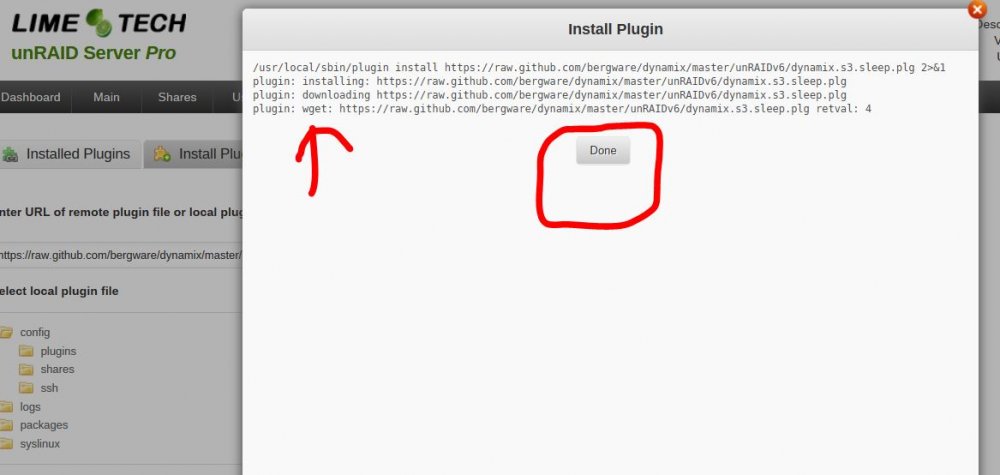
First thing, did you make a backup of your Flash drive BEFORE you installed ver 6b14b? A backup will allow to recover anything that you MIGHT need for ver 6. But it is highly unlikely, you will need anything from ver 4.7 or ver 5.0.X plugins folder in ver 6! Most of those plugins either don't work or cause problems when used with ver 6! Second thing, if your answer was "No", make the backup NOW. Third thing, Ver 6 appears to the outside world exactly the same as ver 5.0.X. as far as access goes (I don't know about ver 4.7 as I never used it). If you copy over the config files and 'shares' folder, everything will appear normal on your PC. As I stated in the thread, the basic setup that had to be set up when you first install unRAID back when you first started with unRAID (Server name, password, IP address determination method, etc.) are all in those files. Even your share share settings should be working. Fourth thing, IF you should happen to have a problem. you can always reformat the Flash again, restore that BACKUP that you were told to make and you will be right back to where you were before you reformatted your Flash drive to install ver 6. Fifth thing, I see an 'ssh' folder in your 'config' folder. I know what ssh is but I have never seen the need for it so I am totally unfamiliar with its implementation requirements and software that has to be installed to run it. You will have to look elsewhere for an answer to questions about ssh if it absolutely necessary that it be installed whenever your server is on line. Frank I made a backup on every upgrade because of paranoia while upgrading, Made another one last night and tried a test 1. backed up flash drive 2. reformatted flash drive 3. copied over all from the backup 4. Deleted all the plugins in the plugin folder 5. run the make bootable 6. install flash drive and boot up server Boots fine and all parity etc shares all fine, went to the flash drive and it added the dynamix folder per V6 B14 uses it now.. went to install one the plugins and it still will not install... I have included a screen shot of whats happening.... could it be that the server DNS settings are wrong? see the screen shot its like it downloads i guess ... I click done and nothing , I check the plugins nothing in there for the required plugin, I click the update button 1- 2 times nothing happens... I am confused....
 Hi Frank - I know whats on the flash drive and what files are in every folder on the drive.... My question is this - 1. Can I delete all of the items in the Plugins folder or will it hurt Dynamix for V6 B14 (which is built into V6 B14) 2. Then i SHOULD be able to install plugins and get Dockers working etc - In theory! 3. I looked at your guide and # 4 says - 4. Now copy the contents of the 'config' directory from your back up of version 5 that you made earlier to the version 6 Flash Drive. (You will have to grant permission to overwrite some of the files that are on the Flash drive!) Delete the 'plugins' and 'SimpleFeatures' folders if they exist. 4. Do i delete the plugins folder or whats in the plugins folder?- I believe just whats in the plugins folder - Again just dont want to hurt Dynamix thats built into V6B14 (Question 1) then i will not be able to see the server from my Win7 machine... thanks AJ Assuming you have a VIRGIN ver 6 'config' folder, the only things that I copied over were the files in the root of the 'config' folder and the 'shares' folder. When I boot up the Flash drive, all of the basic server services were running with proper server name, IP address, user shares, all SMB and NFS settings. Everything! What wasn't there were some of the functions that had been added by the plugins that I had installed. Many of those are available in the two links in steps 8 and 9. Many other functions that used to be provided by plugins are now provided by Docker containers. (I don't (and have never) used any of these types of plugins so I had no need to install any Docker containers at this point.) In retrospect, I believe I will go back and revise the instructions to more fully explain exactly what I did. I was attempting to follow closely what Limetech had proposed and I can now see where that is going to present a problem! Frank its not Virgin - I came from 4.7 Pro - 5.xx and Now 6 B14, So I have included a couple screen shots of my flash drive... 1. Inside the config folder 2. Inside the config/plugins folder I would like to start over so i can get some plugins or dockers working but dont want to delete something in the plugins folder that might keep me from accessing the server from my windows pc..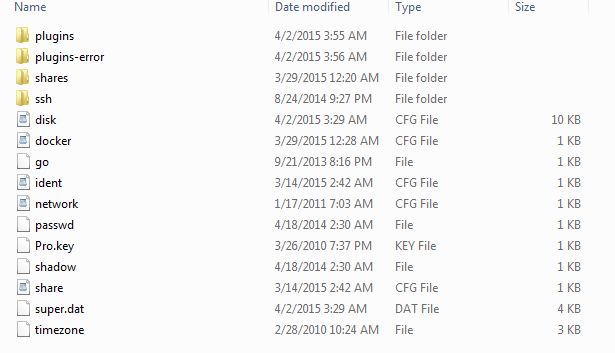
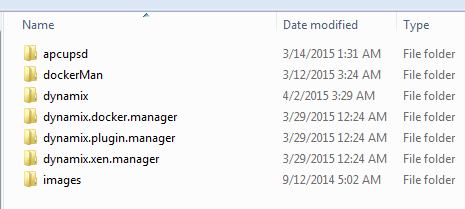 Hi Frank - I know whats on the flash drive and what files are in every folder on the drive.... My question is this - 1. Can I delete all of the items in the Plugins folder or will it hurt Dynamix for V6 B14 (which is built into V6 B14) 2. Then i SHOULD be able to install plugins and get Dockers working etc - In theory! 3. I looked at your guide and # 4 says - 4. Now copy the contents of the 'config' directory from your back up of version 5 that you made earlier to the version 6 Flash Drive. (You will have to grant permission to overwrite some of the files that are on the Flash drive!) Delete the 'plugins' and 'SimpleFeatures' folders if they exist. 4. Do i delete the plugins folder or whats in the plugins folder?- I believe just whats in the plugins folder - Again just dont want to hurt Dynamix thats built into V6B14 (Question 1) then i will not be able to see the server from my Win7 machine... thanks AJI need some help these wont install and I believe I have remnants of V5 stuff in my plugins folders I have been running V6 14B for awhile and it works fine other than trying to get plugins or docker stuff running which I cannot get either or working. Basically I am an all stock setup and want to straighten out my plugins folder to stock can someone point me in the right direction of what files and folders need to be in the boot/config/plugins so when i start over / delete stuff I can still get to the web gui / dynamix in 14B and install a plugin.. thanks for your help in advance ajnot the greatest for being reviewed by other websites..... but i have seen this in person at Frys and i do like the room it has .... your thoughts on this big case? can be had on Newegg for 159 http://www.antec.com/product.php?id=706725&fid=4&lan=us


