





couzin2000
Members
-
Joined
Everything posted by couzin2000
-
Using the latest binhex Minecraft Docker image. This runs Java 1.19.4. I'd like to use Java 1.19.2 instead. Is there any way to get the server to revert back? Of do I need to find the older binhex Minecraft image?
-
So I have this bug in the logs. Mar 13 22:24:46 sebunraid1 kernel: ACPI: Early table checksum verification disabled Mar 13 22:24:46 sebunraid1 kernel: pci 0000:02:00.0: BAR 9: failed to assign [mem size 0x00400000 64bit] Mar 13 22:24:46 sebunraid1 kernel: pci 0000:02:00.0: BAR 7: failed to assign [mem size 0x00040000 64bit] Mar 13 22:24:46 sebunraid1 kernel: floppy0: no floppy controllers found Mar 13 22:24:46 sebunraid1 kernel: ACPI BIOS Error (bug): Could not resolve symbol [\_SB.PCI0.SAT0.SPT3._GTF.DSSP], AE_NOT_FOUND (20220331/psargs-330) Mar 13 22:24:46 sebunraid1 kernel: ACPI Error: Aborting method \_SB.PCI0.SAT0.SPT3._GTF due to previous error (AE_NOT_FOUND) (20220331/psparse-529) Mar 13 22:24:46 sebunraid1 kernel: ACPI BIOS Error (bug): Could not resolve symbol [\_SB.PCI0.SAT0.SPT4._GTF.DSSP], AE_NOT_FOUND (20220331/psargs-330) Mar 13 22:24:46 sebunraid1 kernel: ACPI Error: Aborting method \_SB.PCI0.SAT0.SPT4._GTF due to previous error (AE_NOT_FOUND) (20220331/psparse-529) Mar 13 22:24:46 sebunraid1 kernel: ACPI BIOS Error (bug): Could not resolve symbol [\_SB.PCI0.SAT0.SPT0._GTF.DSSP], AE_NOT_FOUND (20220331/psargs-330) Mar 13 22:24:46 sebunraid1 kernel: ACPI Error: Aborting method \_SB.PCI0.SAT0.SPT0._GTF due to previous error (AE_NOT_FOUND) (20220331/psparse-529) Mar 13 22:24:46 sebunraid1 kernel: ACPI BIOS Error (bug): Could not resolve symbol [\_SB.PCI0.SAT0.SPT1._GTF.DSSP], AE_NOT_FOUND (20220331/psargs-330) Mar 13 22:24:46 sebunraid1 kernel: ACPI Error: Aborting method \_SB.PCI0.SAT0.SPT1._GTF due to previous error (AE_NOT_FOUND) (20220331/psparse-529) Mar 13 22:24:46 sebunraid1 kernel: ACPI BIOS Error (bug): Could not resolve symbol [\_SB.PCI0.SAT0.SPT2._GTF.DSSP], AE_NOT_FOUND (20220331/psargs-330) Mar 13 22:24:46 sebunraid1 kernel: ACPI Error: Aborting method \_SB.PCI0.SAT0.SPT2._GTF due to previous error (AE_NOT_FOUND) (20220331/psparse-529) Mar 13 22:24:46 sebunraid1 kernel: ACPI BIOS Error (bug): Could not resolve symbol [\_SB.PCI0.SAT0.SPT1._GTF.DSSP], AE_NOT_FOUND (20220331/psargs-330) Mar 13 22:24:46 sebunraid1 kernel: ACPI Error: Aborting method \_SB.PCI0.SAT0.SPT1._GTF due to previous error (AE_NOT_FOUND) (20220331/psparse-529) Mar 13 22:24:46 sebunraid1 kernel: ACPI BIOS Error (bug): Could not resolve symbol [\_SB.PCI0.SAT0.SPT0._GTF.DSSP], AE_NOT_FOUND (20220331/psargs-330) Mar 13 22:24:46 sebunraid1 kernel: ACPI Error: Aborting method \_SB.PCI0.SAT0.SPT0._GTF due to previous error (AE_NOT_FOUND) (20220331/psparse-529) Mar 13 22:24:46 sebunraid1 kernel: ACPI BIOS Error (bug): Could not resolve symbol [\_SB.PCI0.SAT0.SPT2._GTF.DSSP], AE_NOT_FOUND (20220331/psargs-330) Mar 13 22:24:46 sebunraid1 kernel: ACPI Error: Aborting method \_SB.PCI0.SAT0.SPT2._GTF due to previous error (AE_NOT_FOUND) (20220331/psparse-529) Mar 13 22:24:46 sebunraid1 kernel: ACPI BIOS Error (bug): Could not resolve symbol [\_SB.PCI0.SAT0.SPT4._GTF.DSSP], AE_NOT_FOUND (20220331/psargs-330) Mar 13 22:24:46 sebunraid1 kernel: ACPI Error: Aborting method \_SB.PCI0.SAT0.SPT4._GTF due to previous error (AE_NOT_FOUND) (20220331/psparse-529) Mar 13 22:24:46 sebunraid1 kernel: ACPI BIOS Error (bug): Could not resolve symbol [\_SB.PCI0.SAT0.SPT3._GTF.DSSP], AE_NOT_FOUND (20220331/psargs-330) Mar 13 22:24:46 sebunraid1 kernel: ACPI Error: Aborting method \_SB.PCI0.SAT0.SPT3._GTF due to previous error (AE_NOT_FOUND) (20220331/psparse-529) Mar 13 22:24:50 sebunraid1 mcelog: failed to prefill DIMM database from DMI data I can't figure out the specifics but I am reading https://blog.le-vert.net/?p=24 explaining that this has to do with ACPI 5.0 being implemented, yet my board (Asus P8Z77-V LE) only supports ACPI 2.0. BIOS has been updated since 2016, last version available is dated 2014. From the author's post, "The proper fix is simply to boot your kernel with libata.noacpi=1 and resume works again". Great. How do I do this?
-
I'm having the same issue. I will post after my crash as well. Brand new install, never been used, array hasn't started yet. Only thing I was doing was preclearing drives and runniong extended SMART tests on these drives.
-
Mar 01 17:12:27 preclear_disk_W300DV27_15534: Zeroing: dd output: 128636+0 records out Mar 01 17:12:27 preclear_disk_W300DV27_15534: Zeroing: dd output: 269769244672 bytes (270 GB, 251 GiB) copied, 1638.25 s, 165 MB/s Mar 01 17:12:27 preclear_disk_W300DV27_15534: Zeroing: dd output: 128637+0 records in Mar 01 17:12:27 preclear_disk_W300DV27_15534: Zeroing: dd output: 128637+0 records out Mar 01 17:12:27 preclear_disk_W300DV27_15534: Zeroing: dd output: 269771341824 bytes (270 GB, 251 GiB) copied, 1744.74 s, 155 MB/s Mar 01 17:12:27 preclear_disk_W300DV27_15534: dd process hung at 269769244672, killing ... Mar 01 17:12:27 preclear_disk_W300DV27_15534: Zeroing: zeroing the disk started 2 of 5 retries... Mar 01 17:12:27 preclear_disk_W300DV27_15534: Continuing disk write on byte 269767147520 Mar 01 17:16:56 preclear_disk_W300DV27_15534: Zeroing: dd output: Mar 01 17:16:56 preclear_disk_W300DV27_15534: dd process hung at 0, killing ... Mar 01 17:16:56 preclear_disk_W300DV27_15534: Zeroing: zeroing the disk started 3 of 5 retries... Mar 01 17:16:56 preclear_disk_W300DV27_15534: Zeroing: emptying the MBR. Here's the end of my preclear log. As you can see, the process does seem to work, until it tries to zero the data. For some reason the dd ouput hangs on 0, and it is timed out and killed by the drive. I'm doing the whole process, the pre-read was completed, I'm not sure what's going on here. Anything I can do to fix this? I'M kind of in a hurry to use this drive and I have been using it in a Linux box for years, I just thought this was a requirement so I did it. I just wanna get on with my file copying. Anyone?
-
Just received an email from LimeTech (within 24 hrs) with an activation code in it. Took 17 seconds to activate. Thank you LimeTech!
-
I did.
-
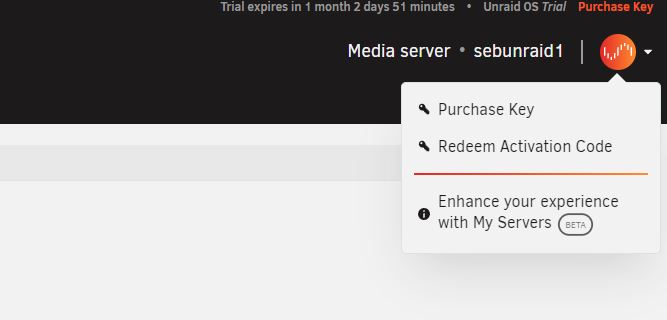
The "Enhance..." option only allows for a plugin download, which doesn't end in success because my array isn't started yet so it has nowhere to save. No login possible. Any other ideas? EDIT: My bad, the network options didn't have the proper DNS server setup. The plugin did download and install. HOWEVER, after logging in, no way to redeem my key - it does not download.
-
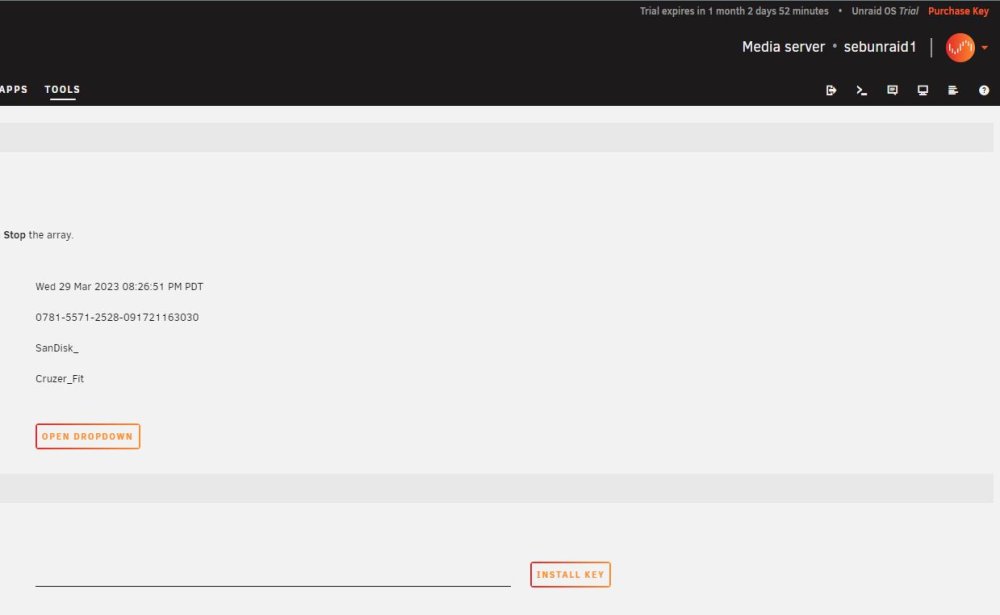
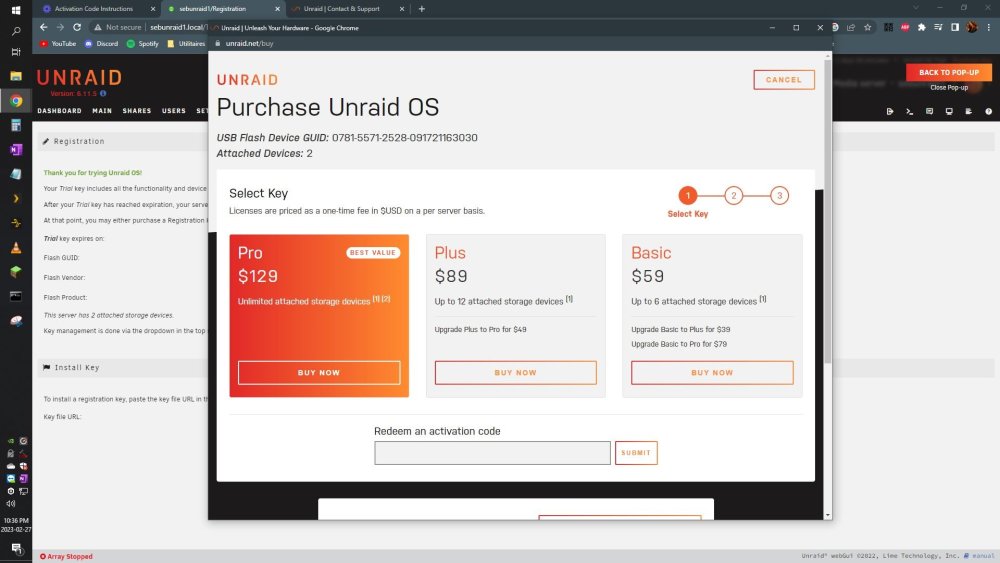
Hi, sorry this has to be my first post. I purchased a Pro licence on dec 25th 2022. Merry Xmas. I received 3 emails - one that has a PDF invoice, one from Paypal, and one from Unraid saying "Welcome". None of these emails has a usable activation code. As well -- every single piece of instruction I'm able to find online is different from what I see in my webGUI. Please see the attached screencap - I am unable to login as anything but root. There is no page nor popup where I can login to Unraid.net. Because of this, I now have a 4,000$ doorstop. I'm using a brand new 6.11.5 download. I sent an email through the contact form, but if anyone has an idea, please lemme know!
-
I'm not super familiar with Docker or Linux for that matter. The command I ran was like this: docker run \ --name=no-ip \ -d \ -v /etc/localtime:/etc/localtime \ -v /config/dir/path:/config \ -e USERNAME='[email protected]' \ -e PASSWORD='XxxxxYyyyZzzz' \ -e DOMAINS='xyz.serveminecraft.net' \ -e INTERVAL='30m' coppit/no-ip and somehow the error persists. The line "-v /config/dir/path:/config" seems to be the source of the error right now. Running this command gives me the following message: docker: Error response from daemon: Mounts denied: The path /config/dir/path is not shared from the host and is not known to Docker. You can configure shared paths from Docker -> Preferences... -> Resources -> File Sharing. See https://docs.docker.com/ for more info. So I'm back to square one. System seems to pull the image correctly, everythhing should be working. Unless this is a permissions issue -- could it be that this command is used with 'sudo' and that is why the path '/config' is unrecognized? I don't want to run this container as root, so I would not run 'sudo docker run - blablabla'. Anything else I can try here?
-
Hey, I'm a new Unraid user, just wanna know where you got the instructions to set up Telegram in the first place? Is it a plugin, a docker (still not entirely sure what that is), do I have to run it in a VM? Just wanna know where to start. Very interested in where the link to set all this up is located. Thanks!

