bobalot
Members
-
Joined
-
Last visited
Everything posted by bobalot
-
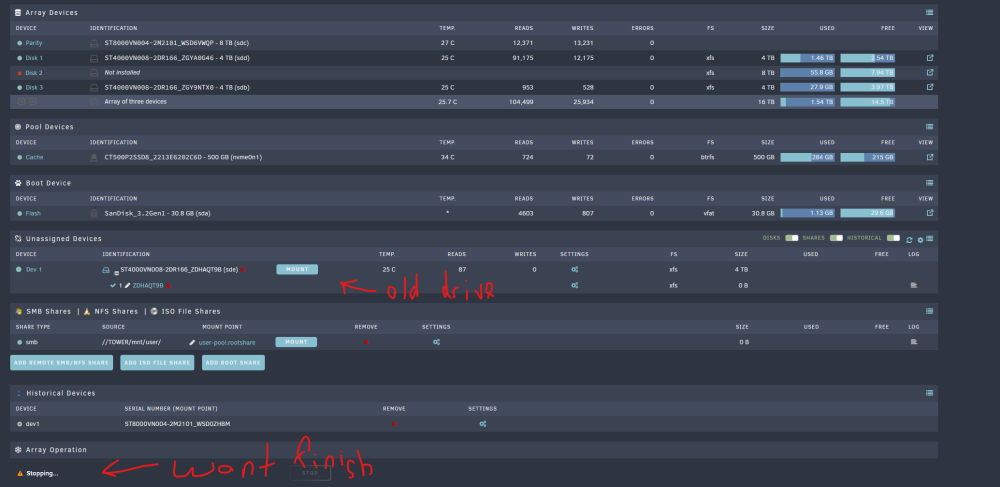
Background: I have an array of: One 8TB parity drives Three 4TB hard drives I was attempting swap out a single 4TB hard (virtually empty) with a 8TB hard drive I obtained. I shutdown the server. I removed one 4TB and connected the 8TB one. There seemed to be issues with the 8TB hard drive. So I shutdown the server and put the 4TB back in (and took the 8TB out). Current problem Unraid won't allow me to stop the array to re-add the 4TB drive. It is in stopping mode forever. Diagnostics attached and screenshot attached. Is there a way to resolve this? Thanks in advance. tower-diagnostics-20221030-2125.zip
-
Yes, it is being used. I do have transcode throttling on. There is a spike of CPU activity which does drop off. However, for whatever reason, the CPU load on jellyfin is higher than plex from what I can tell.
-
I have followed those instructions and by unraid server is using my Nvidia P400 graphics card but I do notice that the CPU is being used. Far more than what would be used if I played the same video with Plex. Not really sure what I have done wrong.
-
You are right. It was an issue with with my wg0.conf file. I replaced it with a new one I created at mullvad.net.
-
I had a similar issue to you. My DelugeVPN docker stopped working (I use Mullvad as well). It wouldn't start at all. I changed the STRICT_PORT_FORWARD to NO which fixed the problem.
-
How do you update the template?
-
Thanks guys! It worked. I unassigned the drive, reformatted it and then reassigned it.
-
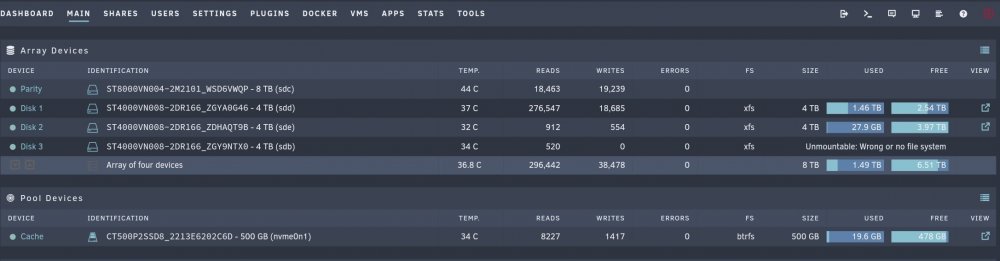
Hi, I recently replaced my 4TB parity drive with a 8TB drive. I followed these steps: 1) stopped the array 2) unassigned the current parity drive 3) assigned the new parity drive in its place 4) start the array and it rebuilt with the new larger parity drive 5) after rebuild, assigned the old parity drive as an additional new data drive in the array (this is where I run into problems). The parity drive replacement seem to go fine but re-adding my original 4TB parity drive as a new data drive (after it was automatically cleared) has resulted in a "Unmountable: Wrong or no file system" error. I tried changing the file system from auto to XFS (like my other two 4TB data drives) and rebooting the server. That didn't fix the problem. Not really sure what to do. I have attached the diagnostic file and a screenshot. tower-diagnostics-20220626-0821.zip
-
Will do! Thanks for all your help!
-
Hi all, I got the "database disk image is malformed" error. No idea how to fix this. I have read people saying they restored a back up. How do you do this?
-
@JorgeBSorry, one last query. When I started Sonarr, I got this error: "database disk image is malformed" I didn't do anything else to my server, so I'm assuming this is related to the SSD swap over. I have restarted the docker and the array, and it didn't seem to fix the problem. Is there a way to fix this?
-
It worked!!! Thanks so much for your help!

-
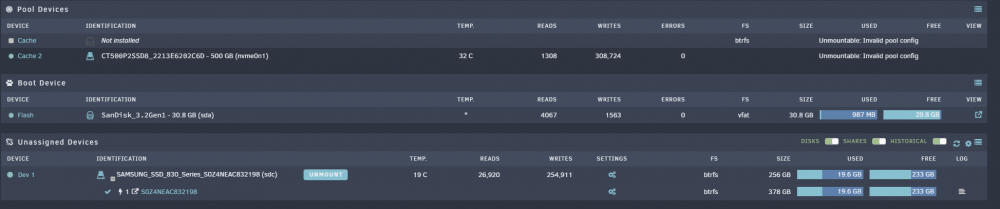
Done. It seems to have fixed the issues in the "Fix Common Problems" settings page. I do get this now (see below). Looks a bit weird, no size or used space is stated.

-
I tried typing the following into the console: wipefs -a /dec/sdc1 And it came up with the following error: wipefs: error: /dev/sdc1: probing initialization failed: Device or resource busy
-
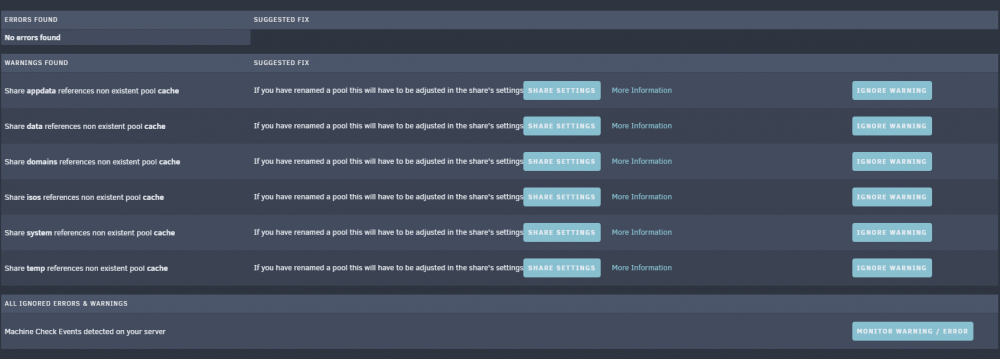
I waited until the stop array button was available. Stopped the array and removed my old SSD and restarted the array. I now have the "Unmountable: Invalid pool config" error. In my Fix Common Problems settings tab, I have these errors (see attached): WARNINGS FOUND: "Share XXXXXX references non existent pool cache" SUGGESTED FIX:"If you have renamed a pool this will have to be adjusted in the share's settings" I have attached a diagnostics download. BTW: Thanks for all your help with this. It is much appreciated. tower-diagnostics-20220615-0743.zip
-
No, you are right. Now the 830 SSD has the "Unmountable: Invalid pool config" error. I have followed your instructions. Both devices are now unassigned. I'm having problems stopping the array. The array never stops. It just says "Array Stopping: Retry unmounting disk share(s)". Ignore the striked out. I rebooted and the array started up again and then I was able to stop it. I mounted my original SSD and added my new SSD to the pool as cache 2. There is now a message saying: "Unraid Cache disk message: 14-06-2022 22:38 Warning [TOWER] - pool BTRFS too many profiles (You can ignore this warning when a pool balance operation is in progress) SAMSUNG_SSD_830_Series_S0Z4NEAC832198 (sdc)" I'm guessing it is pool balancing now? I'll wait until it is over and then try removing the 250GB SSD. When do you when it is over?

-
I had no problems when reassigning my old ssd when I tried to swap the drives the first time. I just stopped the array, reassigned it, restarted the array and everything seemed to work fine. Do I still need to do the first part?
-
I have them both connected. One is in my cache pool and the other is an unassigned device.
-
Please find attached. tower-diagnostics-20220613-2251.zip
-
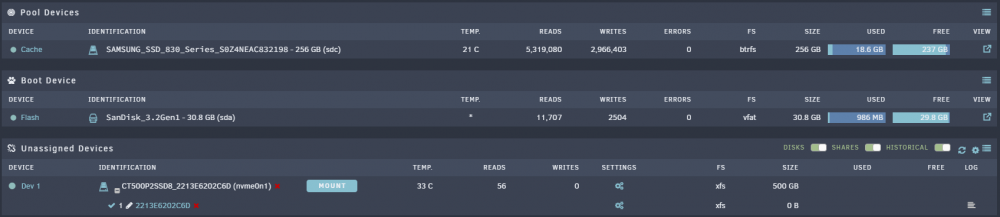
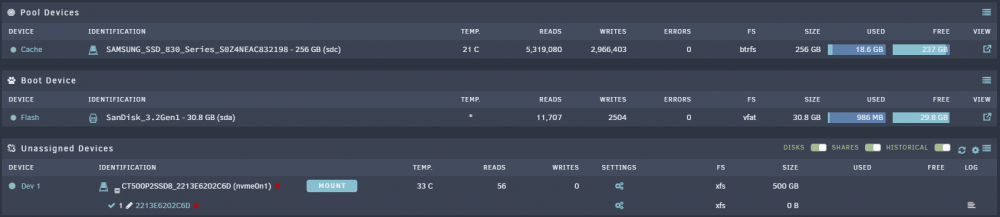
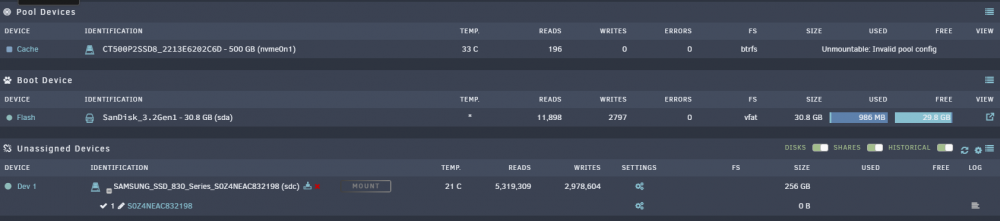
Thanks for the quick response! I do have Unraid V6.10.2. I stopped the array, swapped out the 250GB SSD with my new 500GB one and started up the array and got the error "Unmountable: Invalid pool config" (see attachment #2). I do have 2 slots in my pool. See attachment.

-
I have an existing Samsung 830 SSD that I'm using as a cache drive. I want to replace it with my Crucial P2 500Gb M.2 SSD. It is already in my unassigned devices (see attached image). I found SpaceInvaderOne's video for doing this. It is from 2017. Is it still valid? Should I just follow his instructions or do the more recent versions of Unraid require a different procedure?