m33ts4k0z
Members
-
Joined
-
Last visited
Everything posted by m33ts4k0z
-
The files posted by @ghost82 in this thread no longer work since Microsoft updated the certificates since 2023. I used the same SECBOOT and updated only the VARS to include both 2011 and 2023 certificates. Just use them as instructed and it will work OVMF_VARS_SECBOOT_2023.zip
-
Really greatful if we could have some sort of documentation about how we can customize the WebUI now 😃 I looked around but couldn't find anything useful 🤔
-
I don't know if its related but I can drop it here because I couldn't find anything relevant online. Since the 7.1 update, my solid explorer app on my Android phone would no longer connect using sftp to my Unraid server. It turned out that Unraid changed/updated the accepted ciphers on the recent version. So adding these 2 lines to sshd_config solved the issue: Ciphers aes128-ctr,aes192-ctr,aes256-ctr,[email protected],[email protected],[email protected] KexAlgorithms curve25519-sha256,[email protected],diffie-hellman-group-exchange-sha256,diffie-hellman-group16-sha512,diffie-hellman-group18-sha512,diffie-hellman-group14-sha256 Then restart the SSH service: /etc/rc.d/rc.sshd restart To persist the change on reboot, make a copy of the file and put it inside: /boot/config/ssh
-
In my case, I used to bypass the login form by commenting out the auth-request.php line in /etc/nginx/nginx.conf. Since the update of the Unraid connect plugin, bypassing the auth caused the issue with the API warning. So performing an autologin solves it for me ( and most probably for everyone using a reverse proxy ) This was one problem solved, but I checked today and saw the triangle again so right now i am also on the same boat as you guys 😅 I saw that there are some reports on Discord about this too so it looks like a general issue. ( API working briefly after login but then shows triangle) i will have a look later to see what the problem is and if there is anything we can do to solve it.
-
Sorry the original path and script approach was indeed wrong and didn't work after a server reboot. I have updated the post with a new script and a working file. ( I am also on Unraid 7 )
-
What I ended up doing is very hackish but works for me since I already have an authentication layer at a higher level: #!/bin/bash # Create a PHP script to make the changes cat > /tmp/modify_login.php << 'EOL' <?php $file = '/usr/local/emhttp/plugins/dynamix/include/.login.php'; $content = file_get_contents($file); // Make the replacements $content = preg_replace( '/\$username = \$_POST\[\'username\'\]\?\?\'\';/', '$username = $_POST[\'username\']??\'root\';', $content ); $content = preg_replace( '/\$password = \$_POST\[\'password\'\]\?\?\'\';/', '$password = $_POST[\'password\']??\'mypass\';', $content ); // Write the changes back file_put_contents($file, $content); EOL # Execute the PHP script php /tmp/modify_login.php # Clean up rm -f /tmp/modify_login.php echo "Update completed" This custom script will essentially autologin the WebUI on each visit and if you put it as "First array start only" then will persist on each reboot too. I know it's terrible but until we finally get some other way to properly authenticate that it's not taken from the 90s that will have to do, given of course that you have some kind of reverse proxy protecting the system if you are exposing it to the Internet. Just replace the mypass with your password. I highly suggest not to try to manipulate the frontend directly since you will find this ahead of you later for sure, plus you will have to perform the hacks again on every plugin update. Trying to use the proper auth flow seems like a better and less hackish approach for now.
-
Hello. Having the same issue with version 2025.02.06.2108. No issues before I upgrade. I wonder if you solved somehow? My server is behind traefik and authentik and I wonder if there is an endpoint that needs to go as unauthenticated or something since I dont use the unraid ssl/subdomain. This was actually a solution that "worked" for me. I have commented out the auth-request.php file from unraid and I bypass the login screen completely since Authentik is handling authentication but if I logout then i can still get to the login screen, after I login then the API error is gone for me too.
-
Hello, Just wanted to add myself to the users experiencing this issue. I am using the WAN domain to access the web Unraid UI. Haven't tried accessing it through LAN though.
-
Still works here but I'm still on 6.11.5.
-
Hello, Sorry for the late reply, I just saw your message. Im not that sure how that TV behaves when turned off. If it has an always ready function like the LG C2 does, you could probably turn it on, turn the TV off and still be able to use HDR properly. However if it's completely turned off, Im not that sure if CRU will help you. Maybe you need an HDR USB dongle instead.
-
Just some ideas. A couple of things you could try: Totally remove the image and let Unraid re-acquire it. Try loging in to Unraid from an incognito window.
-
It will be updated when the next core update for Unraid releases. Unraid is currently on version 6.11.5. The next version will most likely include this fix.
-
Thanks for this. You saved me some time. The PR is already accepted and the fix is applied on github.
-
The command you need is as follows: nano /usr/local/emhttp/plugins/dynamix.docker.manager/include/DockerClient.php You can also use WinSCP if you are on Windows. Choose SCP protocol and connect to the same port as SSH.
-
This is for Unraid version 6.11.5. the line looks the same but without the ,application/vnd.oci.image.index.v1+json' Im not sure how this line looks like on 6.10 but if you could find: $header = ['Accept: application/vnd.docker.distribution.manifest.list.v2+json,application/vnd.docker.distribution.manifest.v2+json']; Just append it after: ,application/vnd.docker.distribution.manifest.v2+json
-
This wont affect anything else. I suppose it will also be integrated by the Unraid team.
-
Hello, Please check the thread that I just made about this issue. My solution might help you too.
-
Hello, I came across a small issue regarding the version status of an image that apparently was in OCI format. Unraid wasn't able to get the manifest information file because of wrong headers. As a result, checking for updates showed "Not available" instead. The docker image is the linuxGSM docker container and the fix is really simple. This is for Unraid version 6.11.5 but it will work even for older versions if you find the corresponding line in that file. SSHing into the Unraid server, in file: /usr/local/emhttp/plugins/dynamix.docker.manager/include/DockerClient.php change line 448 to this: $header = ['Accept: application/vnd.docker.distribution.manifest.list.v2+json,application/vnd.docker.distribution.manifest.v2+json,application/vnd.oci.image.index.v1+json']; And the version check worked after that. I suppose this change will be removed upon server restart but it will be nice if you can include it on the next Unraid update 😊 Thanks
-
So after a lot of research, I found out the reason and the way to fix it. I noticed that I was able to do 4K@30Hz HDR but not 4K@60Hz HDR. So what I did was to use the Custom Resolution Utility to inspect things at adapter level. After clicking edit on the Extension Block CTA-861, I noticed that for some reason, the Lindy dongle was reporting support for just HDMI 1.4: So what I did was to click Add... in that menu and add a new HDMI 2.x block and click ok: And that allowed me to do 4K@60Hz HDR. I also think that although the Lindy adapter doesn't support it since it's HDMI 2.0, someone can go even higher at 120Hz with this method by just adding a HDMI 2.1 feature like Maximum FRL Rate @ 48Gbps. That will enable the graphics card to send using HDMI 2.1 so that the software like Moonlight can capture it even if the adapter doesn't support it. Of course, I suppose, someone would need a graphics card that supports HDMI 2.1 like the RTX 30xx series.
-
Actually I tested locally today and indeed the problem is with the VM. When I connected the adapter to my PC, it worked perfectly fine with streaming to it. I have looked a lot online but didn't find any answers. I even tried cloning another TV with HDR, but again it doesnt work with UNRAID VM but works in a real computer.
-
It looks like this is still very unstable. Steam is unable to download games to the drive. I get disk write and read errors without being able to even start the download. I have checked permissions, run new permissions tool, run steam with admin privileges and so on. Steam logs dont say anything more either. Mounting the same share as a network drive works perfectly fine. Running windows 11 Pro 22H2. Any further suggestions are welcome.
-
Hello all, 2 days ago, I received a Lindy 32115 adapter in order to get OS-Level HDR to get streamed over Gamestream/Moonlight from the KVM. It mostly works fine but I have a strange issue. The Lindy support think that its the KVM that is the culprit and they asked me to remove the adapter from the KVM and test it in a real computer but I won't be able to get physical access to the machine until next week so I thought of dropping a question here in the mean time. So Windows do see the dongle as my LG C2 TV that I cloned it with and all the modes/refresh rates/resolutions are available, including HDR. The problem is that if I activate HDR, I can choose up to 1920x1080 on Windows Desktop and everything higher gets me either back to 1920x1080 or drops me to 1024x768... If I disable the HDR, then all resolutions work fine again. Now the interesting part: it works fine with all resolutions from within the games including the OS-Level HDR ones like Forza Horizon 5. So since the adapter seems to do its job, can it really be the VM that is not working correctly? Some more context: Windows 11 pro 22H2 and passthrough RTX 3070 Thanks in advance
-
Great, thank you
-
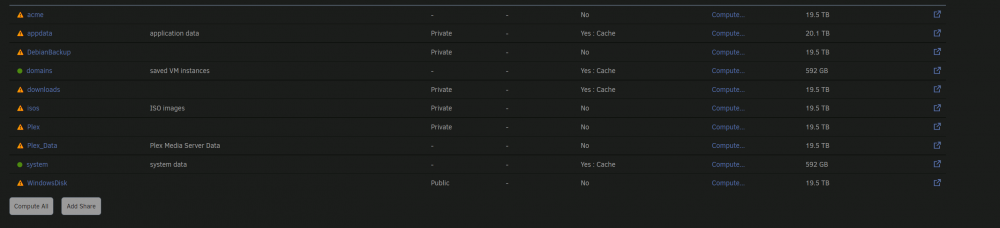
So this is just a visual bug then? The data are not really protected I suppose? I tried to recreate the pool and copied the data back but its the same again for just these 2 directories, not the appdata.
-
Thanks for the answer, As I said, I have already clicked on the first drive and done that. The pool is reporting the total space(about 760GB) as available but they also show that files are protected. I attached some screenshots to display the issue. The appdata, domains and system are now on "yes" because I move the files to array. But they were on Prefer all along.