





Mainfrezzer
Members
-
Joined
-
Last visited
Everything posted by Mainfrezzer
-
20230922_184905.mp4
-
^^ But that one works the same at the end of the day. Im pretty sure its the particular video file. im absolutely certain the hevc samples i linked will work
-
Mhmm. its not even trying to use the hardware decoder. Do you have other video files to test? Otherwise heres a bunch of hevc 10 bit testfiles https://kodi.wiki/view/Samples Edit: On second look, seems like jellyfin is only remuxing the audio, you could try to force 360p to actually transcode the video.
-
what its the log of jellyfin when you try to transcode a video?
-
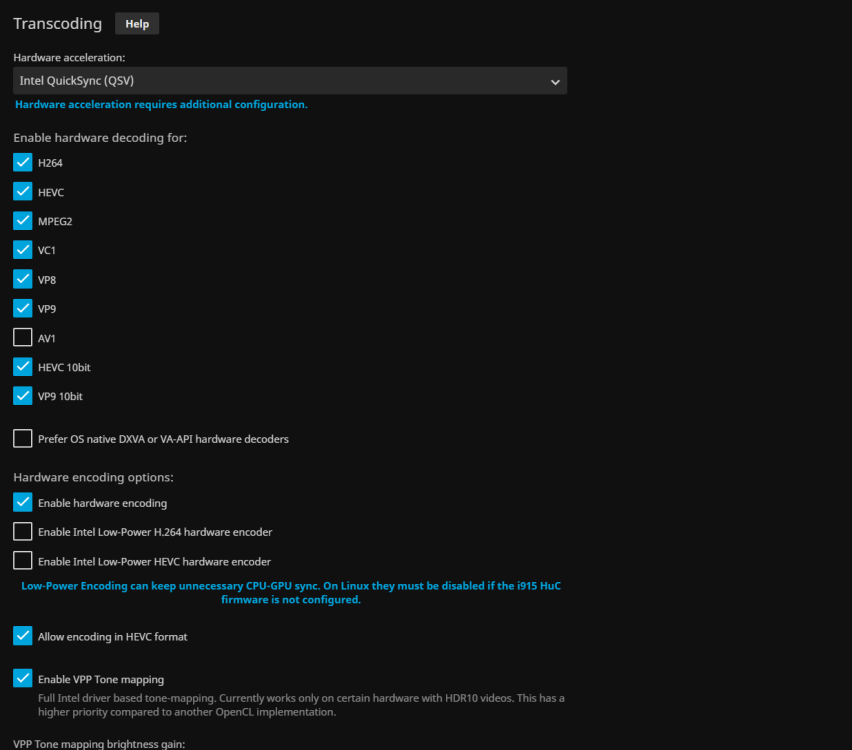
did you disable low power encoding? This works flawlessly on my gen9 igpu
-
Yeah, thats when it started, did the weird thing and ive changed the scaling to serverside and back. the weird 1920x1102 must be from when i "fixed" it. Cause thats the log file of unraid, was already easier to grab from /system/docker/containers/blahblub^^ im pretty certain i did test that at one point and nothing happend but ill try again the next time it happens. I did try to "make it happen" again but i couldnt get it to yet. Edit: Actually, it doesnt. 1920x1102 seems to be the default resolution when ive set it to 1080p. I just deleted the log, started it, stopped it and that odd resolution appears in the logs. Server scaling gives me 2505x1348. mhmm Ive set it to 1920x720 and it sets it to 1922x792 and its supposedly to be "1920x768" bit funky. Now ive recreated the container a couple of times and this time, it shows Request toFront(window is active): jd.gui.swing.jdgui.JDownloaderMainFrame[MAINFRAME,0,0,1920x1080,invalid,layout=java.awt.BorderLayout,title=JDownloader 2,resizable,maximized,defaultCloseOperation=DO_NOTHING_ON_CLOSE,rootPane=javax.swing.JRootPane[,0,0,1920x1080,invalid,layout=javax.swing.JRootPane$RootLayout,alignmentX=0.0,alignmentY=0.0,border=javax.swing.plaf.synth.SynthBorder@49b5adc8,flags=16777673,maximumSize=,minimumSize=,preferredSize=],rootPaneCheckingEnabled=true] Request toFrontFocused(timer,toFront): jd.gui.swing.jdgui.JDownloaderMainFrame[MAINFRAME,0,0,1920x1080,invalid,hidden,layout=java.awt.BorderLayout,title=JDownloader 2,resizable,maximized,defaultCloseOperation=DO_NOTHING_ON_CLOSE,rootPane=javax.swing.JRootPane[,0,0,1920x1080,invalid,layout=javax.swing.JRootPane$RootLayout,alignmentX=0.0,alignmentY=0.0,border=javax.swing.plaf.synth.SynthBorder@49b5adc8,flags=16777673,maximumSize=,minimumSize=,preferredSize=],rootPaneCheckingEnabled=true] very bizarr why it was so stuck on the 1920x1102 for 2 recreates. Edit #2: @ich777 I got it to do the thing again! file3.log and heres the json log from Unraid file3-json.txt Ive also grabbed a video of it. I used the esc button, the esc button from the little menu, smashed enter in the middle of the screen but then, i left clicked on the icon Desktop 2023.09.22 - 14.36.27.01.mp4
-
I think i got the wrong log moment, i had an issue with the update and nuked the jar because it was update looping. Certainly doesnt help that the time is off in the container and ive a quite large logfile. I finally found a log entry(My Stop Mark) that lets me pinpoint the entries plus a mention of resolution thats a bit off. Stop Mark.txt
-
Yes it does. Used to do that before i figured out that changing the scaling mode fixes it. I dont have CA Backup set up to do anything automatically and usually JDL is not running at all until i want to start downloading a bunch of stuff, once in a blue moon. Edit: I did check the logs and it i found a difference between the time it appeared and when i just works This is a snippet from when it works {"log":"---Checking configuration for noVNC---\n","stream":"stdout","time":"2023-09-21T15:35:50.922569281Z"} {"log":"Nothing to do, noVNC resizing set to default\n","stream":"stdout","time":"2023-09-21T15:35:50.92704004Z"} {"log":"Nothing to do, noVNC qaulity set to default\n","stream":"stdout","time":"2023-09-21T15:35:50.930155542Z"} {"log":"Nothing to do, noVNC compression set to default\n","stream":"stdout","time":"2023-09-21T15:35:50.933794905Z"} {"log":"---Taking ownership of data...---\n","stream":"stdout","time":"2023-09-21T15:35:50.934110537Z"} {"log":"---Starting...---\n","stream":"stdout","time":"2023-09-21T15:35:52.47667835Z"} {"log":"---Checking for 'runtime' folder---\n","stream":"stdout","time":"2023-09-21T15:35:52.516488011Z"} {"log":"---'runtime' folder found---\n","stream":"stdout","time":"2023-09-21T15:35:52.516899764Z"} {"log":"---Checking if Runtime is installed---\n","stream":"stdout","time":"2023-09-21T15:35:52.51699206Z"} {"log":"---Runtime found---\n","stream":"stdout","time":"2023-09-21T15:35:52.57342457Z"} {"log":"---Checking for 'jDownloader.jar'---\n","stream":"stdout","time":"2023-09-21T15:35:52.573588217Z"} {"log":"---'jDownloader.jar' not found, copying...---\n","stream":"stdout","time":"2023-09-21T15:35:52.573898957Z"} {"log":"---Preparing Server---\n","stream":"stdout","time":"2023-09-21T15:35:52.587118657Z"} {"log":"---Checking libraries---\n","stream":"stdout","time":"2023-09-21T15:35:52.596949158Z"} {"log":"---Libraries found!---\n","stream":"stdout","time":"2023-09-21T15:35:52.598528333Z"} {"log":"---Checking for old logfiles---\n","stream":"stdout","time":"2023-09-21T15:35:52.598987469Z"} {"log":"---Checking for old display lock files---\n","stream":"stdout","time":"2023-09-21T15:35:53.044424539Z"} {"log":"---Resolution check---\n","stream":"stdout","time":"2023-09-21T15:35:54.750519125Z"} {"log":"---Window resolution: 1920x1080---\n","stream":"stdout","time":"2023-09-21T15:35:54.766152975Z"} {"log":"---Starting TurboVNC server---\n","stream":"stdout","time":"2023-09-21T15:35:54.766194085Z"} {"log":"---Starting Fluxbox---\n","stream":"stdout","time":"2023-09-21T15:35:57.833745116Z"} {"log":"---Starting noVNC server---\n","stream":"stdout","time":"2023-09-21T15:35:59.839119498Z"} {"log":"WebSocket server settings:\n","stream":"stderr","time":"2023-09-21T15:36:00.064069548Z"} {"log":" - Listen on :8080\n","stream":"stderr","time":"2023-09-21T15:36:00.06410683Z"} {"log":" - Web server. Web root: /usr/share/novnc\n","stream":"stderr","time":"2023-09-21T15:36:00.064242035Z"} {"log":" - No SSL/TLS support (no cert file)\n","stream":"stderr","time":"2023-09-21T15:36:00.064254878Z"} {"log":" - Backgrounding (daemon)\n","stream":"stderr","time":"2023-09-21T15:36:00.064333748Z"} {"log":"---Starting jDownloader2---\n","stream":"stdout","time":"2023-09-21T15:36:02.071813822Z"} This is from the one time it showed this weird behavior {"log":"---Checking configuration for noVNC---\n","stream":"stdout","time":"2023-09-21T15:36:33.535063503Z"} {"log":"Nothing to do, noVNC resizing set to default\n","stream":"stdout","time":"2023-09-21T15:36:33.540407134Z"} {"log":"Nothing to do, noVNC qaulity set to default\n","stream":"stdout","time":"2023-09-21T15:36:33.544721161Z"} {"log":"Nothing to do, noVNC compression set to default\n","stream":"stdout","time":"2023-09-21T15:36:33.548919931Z"} {"log":"---Taking ownership of data...---\n","stream":"stdout","time":"2023-09-21T15:36:33.550300644Z"} {"log":"---Starting...---\n","stream":"stdout","time":"2023-09-21T15:36:35.516053319Z"} {"log":"---Checking for 'runtime' folder---\n","stream":"stdout","time":"2023-09-21T15:36:35.539377471Z"} {"log":"---'runtime' folder found---\n","stream":"stdout","time":"2023-09-21T15:36:35.539617214Z"} {"log":"---Checking if Runtime is installed---\n","stream":"stdout","time":"2023-09-21T15:36:35.539626714Z"} {"log":"---Runtime found---\n","stream":"stdout","time":"2023-09-21T15:36:35.610420579Z"} {"log":"---Checking for 'jDownloader.jar'---\n","stream":"stdout","time":"2023-09-21T15:36:35.610514694Z"} {"log":"---'jDownloader.jar' folder found---\n","stream":"stdout","time":"2023-09-21T15:36:35.610700631Z"} {"log":"---Preparing Server---\n","stream":"stdout","time":"2023-09-21T15:36:35.61070884Z"} {"log":"---Checking libraries---\n","stream":"stdout","time":"2023-09-21T15:36:35.614346633Z"} {"log":"---Libraries found!---\n","stream":"stdout","time":"2023-09-21T15:36:35.614765248Z"} {"log":"---Checking for old logfiles---\n","stream":"stdout","time":"2023-09-21T15:36:35.615045728Z"} {"log":"---Checking for old display lock files---\n","stream":"stdout","time":"2023-09-21T15:36:36.082736432Z"} {"log":"\n","stream":"stderr","time":"2023-09-21T15:36:36.972035698Z"} {"log":"Session terminated, killing shell.../opt/scripts/start.sh: line 34: kill: `': not a pid or valid job spec\n","stream":"stderr","time":"2023-09-21T15:36:36.976173149Z"} {"log":"---Ensuring UID: 99 matches user---\n","stream":"stdout","time":"2023-09-21T15:37:00.619219988Z"} {"log":"usermod: no changes\n","stream":"stdout","time":"2023-09-21T15:37:00.624165Z"} {"log":"---Ensuring GID: 100 matches user---\n","stream":"stdout","time":"2023-09-21T15:37:00.624867794Z"} {"log":"usermod: no changes\n","stream":"stdout","time":"2023-09-21T15:37:00.639468734Z"} {"log":"---Setting umask to 000---\n","stream":"stdout","time":"2023-09-21T15:37:00.640260413Z"} {"log":"---Checking for optional scripts---\n","stream":"stdout","time":"2023-09-21T15:37:00.640273666Z"} {"log":"---No optional script found, continuing---\n","stream":"stdout","time":"2023-09-21T15:37:00.645550969Z"} {"log":"---Checking configuration for noVNC---\n","stream":"stdout","time":"2023-09-21T15:37:00.645579324Z"} {"log":"Nothing to do, noVNC resizing set to default\n","stream":"stdout","time":"2023-09-21T15:37:00.649975533Z"} {"log":"Nothing to do, noVNC qaulity set to default\n","stream":"stdout","time":"2023-09-21T15:37:00.654047891Z"} {"log":"Nothing to do, noVNC compression set to default\n","stream":"stdout","time":"2023-09-21T15:37:00.657456136Z"} {"log":"---Taking ownership of data...---\n","stream":"stdout","time":"2023-09-21T15:37:00.657890552Z"} {"log":"---Starting...---\n","stream":"stdout","time":"2023-09-21T15:37:02.596821022Z"} {"log":"---Checking for 'runtime' folder---\n","stream":"stdout","time":"2023-09-21T15:37:02.621023944Z"} {"log":"---'runtime' folder found---\n","stream":"stdout","time":"2023-09-21T15:37:02.621287738Z"} {"log":"---Checking if Runtime is installed---\n","stream":"stdout","time":"2023-09-21T15:37:02.621296839Z"} {"log":"---Runtime found---\n","stream":"stdout","time":"2023-09-21T15:37:02.687265726Z"} {"log":"---Checking for 'jDownloader.jar'---\n","stream":"stdout","time":"2023-09-21T15:37:02.687291425Z"} {"log":"---'jDownloader.jar' not found, copying...---\n","stream":"stdout","time":"2023-09-21T15:37:02.687497882Z"} {"log":"---Preparing Server---\n","stream":"stdout","time":"2023-09-21T15:37:02.703070458Z"} {"log":"---Checking libraries---\n","stream":"stdout","time":"2023-09-21T15:37:02.71091722Z"} {"log":"---Libraries found!---\n","stream":"stdout","time":"2023-09-21T15:37:02.712032731Z"} {"log":"---Checking for old logfiles---\n","stream":"stdout","time":"2023-09-21T15:37:02.712393649Z"} {"log":"---Checking for old display lock files---\n","stream":"stdout","time":"2023-09-21T15:37:03.134027249Z"} {"log":"---Resolution check---\n","stream":"stdout","time":"2023-09-21T15:37:05.339313223Z"} {"log":"---Window resolution: 1920x1080---\n","stream":"stdout","time":"2023-09-21T15:37:05.354780543Z"} {"log":"---Starting TurboVNC server---\n","stream":"stdout","time":"2023-09-21T15:37:05.355112969Z"} {"log":"---Starting Fluxbox---\n","stream":"stdout","time":"2023-09-21T15:37:08.420964603Z"} {"log":"---Starting noVNC server---\n","stream":"stdout","time":"2023-09-21T15:37:10.427649854Z"} {"log":"WebSocket server settings:\n","stream":"stderr","time":"2023-09-21T15:37:10.666635368Z"} {"log":" - Listen on :8080\n","stream":"stderr","time":"2023-09-21T15:37:10.666673798Z"} {"log":" - Web server. Web root: /usr/share/novnc\n","stream":"stderr","time":"2023-09-21T15:37:10.666923766Z"} {"log":" - No SSL/TLS support (no cert file)\n","stream":"stderr","time":"2023-09-21T15:37:10.666941031Z"} {"log":" - Backgrounding (daemon)\n","stream":"stderr","time":"2023-09-21T15:37:10.666949312Z"} {"log":"---Starting jDownloader2---\n","stream":"stdout","time":"2023-09-21T15:37:12.674043699Z"}
-
I just open the left tab for scaling and change it to server scaling and that fixes it. And then I I just resize the browser window to something smaller again, set it back to scaling none. 9 out of 10 times "it just works", just occasionally it does this weird behaviour.
-
Wenn nur eine Netzwerkschnittstelle vorhanden ist und der Anschluss (eth0) die Brücke (br0) ist, dann ja, das ist alles das selbe.
-
Worüber ist denn Unraid verbunden mit der Fritzbox?
-
Hatte Unraid ja auch und das hat funktioniert. Ansonsten die Hammer Methode. NPM auf Bridge Netzwerk setzen. 80 auf 800 mappen, 443 auf 4430, 81 einfach so lassen Fritzbox von 80 extern auf 800 intern, 443 extern auf 4430 intern zu unraid leiten. Vaultwarden auch auf Bridge setzen, von Port 80 auf Port 801 oder so nehmen. In nginx die IP auf 172.17.0.1:801 setzen und dann sollte die Sache erstmal gelöst sein
-
Ich würde Unraid und die Fritzbox mal neustarten. Das ist schon sehr komisch. Ggf. auch die Container Mal neu erstellen. Besonders weil der andere Container ja vorhin funktioniert hatte
-
Jap. Jau, das Problem liegt dort nämlich. Fritzbox oder Docker. Funktioniert es denn den VaultwardenContainer direkt freizugeben?
-
Wenn die über br0 laufen, dann sind das in etwa alles eigenständige PCs, darum auch die eigenen IP Adressen. Das wäre nur bedenkenswert wenn die auf "Host" laufen würden. Bei dem Bridge mode kann man sich das ja so zusammenlegen wie man möchte. 192.168.178.1 ist die Fritzbox 192.168.178.2 ist Unraid 192.168.178.3 ist NPM 192.168.178.4 ist Vaultwarden Unraid, NPM, Vaultwarden können so alle auf port 80 laufen lassen was sie wollen gibt kein Problem.
-
Ich würde mal vorschlagen den NPM Container einfach zu löschen und dann erneut aus dem Appstore herunter zu laden. Die Einstellungen bleiben ja alle erhalten.
-
Das ist ja hier gerade etwas unrelevant. Letsencrypt und das Mobile Internet konnten ja nicht drauf zugreifen. Irgendwo sitzt entweder beim Dockerservice nen Furz quer oder bei der Fritzbox, Unraid öffentlich zu machen hat ja funktioniert. Ich würde jetzt mal einfach nen 0815 Apache Container oder so testen um zu gucken ob die Fritzbox dort die Anfragen durchlässt.
-
Dann kommen wir jetzt in den Bereich der Geister. Intern funktionierts, die Fritzbox kommt zu Unraid aber nicht den NPM Container. Das lässt sich mir nicht erklären.
-
Mhmm, ist denn ipvlan an? Ich glaube mit 11 irgendwas wurde das standardmäßig ausgewählt.
-
oh mein Gott ich bin ein Idiot. Natürlich ist ipvlan an. Das kann mit ner Fritzbox nicht funktionieren. ARRGHHH. Ich gehe mal stark davon aus das 6.12.4 benutzt wird. In den Netzwerkeinstellungen die Brücke ausschalten, in den Dockereinstellungen macvlan auswählen (eventuell, wenn gebraucht wird, host access enabled) und dann bei Docker br0 zu eth0 wechseln, bei Wireguard einmal kurz ne 1 irgendwo eintragen, wieder löschen, dann speichern.
-
Ohhh! Bloß wieder zu machen. Dann bin ich ja schon mal erleichtert. Wunderlich warum der NPM Container nicht funktioniert. Ist ja nicht zufällig IPvlan ausgewählt bei den Dockereinstellungen oder doch?
-
Das erschwert das ganze dann doch schon. Von der Fritzbox bis zum NPM Container sollte alles wunderbar funktionieren. Was die Vodafon Kiste treibt, das ist das Rätsel. Immerhin ist klar das nix von außen reinkommt. Wobei mich das jetzt mit Wireguard wirklich wundern würde, wie wurde denn die Funktionalität getestet?
-
Ja dann wäre es jetzt doch mal wert den TCP Port 80 und 443 von dort aus mal auf die Fritzbox zu leiten. Da kann ich leider nicht ganz behilflich sein da ich das Ding direkt postwendend zurückgeschickt habe^^ (Die Wireguard UDP Regel würde ich da auch mal direkt freigeben, das dürfte ja auch nicht funktionieren)
-
Pingen hat nix mit Ports zu tun. Ein Ping läuft über ICMP, das ist was anderes als TCP. Vor allem wenn man intern auf das Gerät pingt das seine eigene Adresse kennt. Von extern wäre es interessanter aber es ist ne Fritzbox. Die akzeptiert alle ICMP ipv4 anfragen und antwortet. Die Frage ist was fungiert da als Modem?^^
-
Hat das Modem ne eigebaute Firewall? Ich würde da ja jetzt drauf tippen. Der Rest sieht mir nämlich soweit richtig aus.




