





bombz
Members
-
Joined
-
Last visited
Everything posted by bombz
-
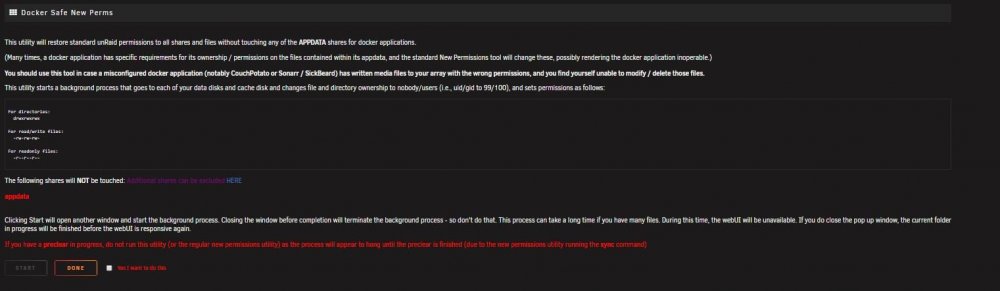
Good day all, This plugin was brought to my attention just today as I am consolidating my existing /user/shares/ to one user share I want to make sure I am going about this correctly so I attempted to move one media folder from /user/share -> /user/share I received the following: There are some permission issues with the folders/files you want to transfer 19 file(s)/folder(s) with an owner other than 'nobody' 0 file(s)/folder(s) with a group other than 'users' 0 folder(s) with a permission other than 'drwxrwxrwx' 0 files(s) with a permission other than '-rw-rw-rw-' or '-r--r--r--' You can find more details about which files have issues in the log file (/boot/logs/unbalance.log) At this point, you can transfer the folders/files if you want, but be advised that it can cause errors in the operation You are STRONGLY suggested to install the Fix Common Problems plugin, then run the Docker Safe New Permissions command So I am going to run the "Docker Safe New Permissions command" Once completed, will I have the ability to move /user/<share name> to /user/<new share name> Also, does unBALANCED have the ability to see 'unknown devices' ? Thanks,
-
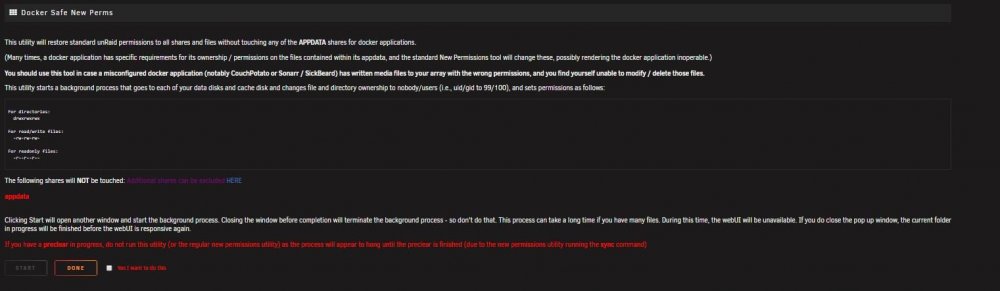
Hello, I have just started to use unBALANCED and had the exact same concern you did from your first post. I received the following: There are some permission issues with the folders/files you want to transfer 19 file(s)/folder(s) with an owner other than 'nobody' 0 file(s)/folder(s) with a group other than 'users' 0 folder(s) with a permission other than 'drwxrwxrwx' 0 files(s) with a permission other than '-rw-rw-rw-' or '-r--r--r--' You can find more details about which files have issues in the log file (/boot/logs/unbalance.log) At this point, you can transfer the folders/files if you want, but be advised that it can cause errors in the operation You are STRONGLY suggested to install the Fix Common Problems plugin, then run the Docker Safe New Permissions command I am currently looking at the "Docker Safe New Permissions command" Once you ran this on your whole array, did everything clear up with unBALANCE. I want to be able to move data from /user/<sharename> --> user/<newsharename>
-
No luck here from ~# > dhclient dhclient unknown command from ~# > sudo dhclient -r dhclient unknown command I couldn't get it to work so I power cycled the server :-/
-
OK installed CA Mover Tuning. Perhaps I should look to enabling cache for some of my shares, and read up about it more. Perhaps I clearly don't understand it. If I were to guess right now, if you turn on cache settings for a specific share or disk, when you copy data to a folder, in this example lets say: Physical Desktop Drive C:\video\video.avi to Physical Disk9 (server) \\unraidserver\video\videonamehere\video.avi the data will copy to a spot on the cache disk, and reside there until you schedule mover to move all data from the cache to the 'disk' in the array Perhaps I have that right ?
-
Hmmm, I am all ears for a proper method :-)
-
I never did use mover, I am pretty sure I disabled it via GUI (option) So if I remove that line, do you have a suggestion?
-
Hello all, I have a quick question regarding my 'go' file which 'update assistant' has reported a problem before I attempt an upgrade. I am having trouble understanding what I need to remove (what line of text) needs to be removed from the 'go' file. Current unRaid Version: 6.5.3 Upgrade unRaid Version: 6.6.5 Here is the following error: Checking for extra parameters on emhttp Issue Found: emhttp command in /boot/config/go has extra parameters passed to it. Currently emhttp does not accept any extra paramters. These should be removed Let me know if you need the 'go' file details. Thank you :-)Any thoughts on my post? unRAID Disk 10 SMART health [199] Warning [UNRAID] - udma crc error count is 8731 WDC_WD20EARS I have done cable replacements, the drive itself has 12GB free, could that be a prob? The drive is old.WDC_EARS UDMA CRC error_output - RAW VALUE = 8731 Power on hours = 7y 9m 4d 16h This is on my LSI card, but I changed the SATA cable to my on-board sata port (to swap the cable) rather then using the LSI breakout cable and still prone to the error. I think due to the age of the drive it needs to be replaced to be honest. Let me know your thoughts ThanksYou sir ... ARE AWESOME! Sounds like a plan. I am pumped to get this going, I was confused on some of the process taking 2 drives out and the new config process. I have only added or replaced dead drives in the past. Once I get these steps done, I am slowing going to move the whole array over to XFS, buy another LSI card, and I should be DONE for a while (until I can get a bigger case). There is always something you can spend money on with UnRAID :-) I love the community here, I sincerely appreciate this. I will keep posted how it goes (I just need to find the time this holiday season with work and life etc. to get this done now) Thank you... EVERYONE !Awesome, thanks for clarifying some things there. So basically I can take 2x 500 out (at once) as I will have that data on an external source. When I toss the 1x 4TB in, unraid will detect a missing disk. Disk 5 & 6 (removed) Disk 5 replaced (no disk 6) I would format the new disk as XFS, and run a parity rebuild, but would the array allow me to do that, as disk 6 is not connected, or don't I have to run a 'new config' or something first ? As for the supermicro, I will remove it, and just have a backup SAS card I guess :-/ I will then purchase another LSI card and run the full array out (2x) SAS cards, with hopes my performance increases, it is terrible so to speak right nowIf anyone can fill me in, I think I have my process correct, it's mainly the removal of 2 drives to be replaced by 1 drive ... then moving over to XFS (full array) then adding dual parity. Thanks :-)Just flashed LSI SAS921108i to 20.00.07.00-IT So just to reconfirm, I should be able to TAKE NOTE of my current array settings (the disks) and swap the SuperMicro AOC-SASLP-MV8 for the LSI card, and be good to go? Basically, these are the steps I have written down from my readings that may or may not be the correct method for my situation: (questionable aspects) 01. Add LSI CARD (IT MODE) -- replacing supermicro 02. Test LSI card for week(s) 03. Copy data off (2x) 500 GB HDD in array, to External Source HDD (via USB HDD Dock || USB-direct connection to UNRAID || Unassigned Devices Add-on ) 04. this is where I need direction a) do I, copy data from the array of the drives I am removing (2x) 500GB? b) remove the 2 drives (at once), Run 'new config' Essentially telling unraid those (2x) 500GB are 'lost drives'? c) then add new 4TB disk (pre-cleared) to the array, formatting it XFS? d) Once 4TB is added and parity check is completed, copy external source data (2x) 500gb back to the array (new XFS 4TB disk) e) run parity against new data written 04-1. Could I remove (2x) 500GB add the 4TB to the array run 'new config' use the USB dock attached to the Unraid server copy data (2x) 500 GB back to the new 4TB (XFS)? 05. If above is correct: I would then have physical space in case to add another parity disk (dual parity) as (2x) 500GB were removed (Step 04) a) would I want to complete conversion of ALL disks to XFS, and THEN add dual parity? b) would adding dual parity allow the array to become more 'fault tolerant' during the conversion process of all disks in the array? 06. Should I use the SuperMicro and the LSI together, which would eliminate all use of the onboard SATA bus and be pushing over PCI-E? 07. Considering buying another LSI card, on IT mode, and have the 2 SAS controllers running the array I apologize for needing clarification. What worries me is how I go about pulling (2x) 500GB out at the beginning, to start the process over to XFS file system as well as adding dual parity on the fly. A lot going on. I am trying to be 100% respectively. Thank youCongrats man! I have a bit to go still before I get even STARTED this process. I hope I am as successful! I hope I see a performance difference too!OK, Rock on guys! I was so busy this weekend I got none of my tech stuff out of the way! I REALLY appreciate the clarification and assistance. I am looking forward to flashing this and getting it installed. I probably will NOT see any performance difference until I (sigh) get over to XFS (I am not looking forward to the process) I don't even know where to begin. I hope by the end of everything my UnRAID server is top notch and working excellent ! I have a long way to goI assume this is the process to V20 ? https://nguvu.org/freenas/Convert-LSI-HBA-card-to-IT-mode/ Looks pretty straightforward :-) I am going to try to flash this (with this method) this weekend, then I can pull out the SuperMicro and add this in. Next weekend I will have to try merging 2 disks down to 1 disk, and learn that process (reconfiguring)Damit, that's the one the community told me to buy ! I'll have to try to figure out how to do this, if i do it on the server NAS or toss it in a spare workstation I have hereThanks man! LSI SAS9211-8i Still fresh in the box sealedGuess I will have to learn how to do that. It is still in the box. I have been so busy I have been putting off this upgrade and my drives are super full :-( I will try my best to find info on how to flash the "IT MODE" firmware then make 2 drives I want to remove 1 drive (without losing data)Hey guys, I got my LSI SAS card to replace my SUPERMICRO AOC-SASLP-MV8 card. Is it just as simple as swapping the card out and booting the server ? I also have 2x 4TB drives I want to replace some smaller drives with and move over TO XFS, I am worried I am going to mess this up (the disks are precleared) I need to merge 2 smaller drives to (1X) 4TB drive I am really worried about this process because I don't want to loose data-removed-I have got it to work with "less secure apps" ENABLED However, when that option is enabled, I get signed out of my google accounts every 5-10 minutes automatically. What is the best way to get this notification working without editing "Less Secure Apps" on google?I am a basic user of Linux, i know some base stuff I have learned over the years, but always still learning. Next test is to see if I can use NTFS drives outside the array to dump to and from (eliminating the network completely)


