





bombz
Members
-
Joined
-
Last visited
Everything posted by bombz
-
Hey, Appreciate the prompt response. Not a bad thought if I come across a larger disk than 14TB, and not a bad idea either! Thank you kindly :-)
-
Circling back on this.... Current setup: 1x Parity = 14TB 10x disk (largest being 10TB in the set) I have a spare 10TB and 12TB on hand. If I were to add the 12TB to the second parity, the latest data disk in the 'disk' set moving forward could only be 12TB.... I think I may wait until I can track down another 14TB for the second parity disk to match the first. Thoughts? Thanks.
-
When I moved my array from RFS to XFS (12disk) my process was: Install a new disk to array (giving ME a total 13 disk in this example) Format to XFS SSH into the array start a 'screen' session Create a folder on my BLANK XFS disk of the last 3 digits of the serial number of the RFS disk with the data on it (this was only to keep track of which disk I was moving data from and not necessary) mkdir /mnt/disk2/812 run copy command cp -rpv /mnt/disk8/* /mnt/disk2/812/ this example: This command will start copying data from disk 8 (RFS) to disk 2 (xfs) once the above has completed and data is confirmed, I would select disk 8 (RFS) in the unraid GUI, and format it to XFS from there I would rinse and repeat this process to each disk The process you did is incorrect afaik. This is because you pulled a 6TB (RFS) and installed a 16TB. Your process to do this correctly, and remember this is ONLY my opinion: Make sure the data on your 6TB contains the data your 'missing' DO NOT INSTALL THIS DISK INTO THE ARRAY AGAIN BEFORE CONFIRMING DATA you can access your 6TB disk on a Ubuntu system (workstation or laptop) boot ubuntu from USB and use a HDD dock to mount the disk on this workstation system and confirm data is there If the dats is still on the 6TB disk you pulled out of the array ...be thankful. as the 16TB is a blank XFS disk IN your array as you stated above, you can take your 6TB disk and HDD dock and plug it into your array via USB From there you will need a plugin/app called unassigned devices Mount the 6TB disk (I do believe it can mount RFS) I may be wrong and it may only see FAT/NTFS disk If I am correct, and UD detects the RFS disk you can copy all data from the 6TB to your 16TB If I am wrong, you will be required to: Copy to 6TB data to a spare NTFS disk and then mount that NTFS disk in UD -or- Copy the data from the 6TB disk over the network to your array 16TB disk You disk is blank because when you installed your 16TB the array detected the new disk and rebuilt the data to this disk, which is correct. It also saw the disk FS was RFS, which is correct. However, when installing the new disk, as you did, you do not want to rebuild > format as XFS > that will format the disk and all data will be gone. Perhaps my method is overly complex, but it worked really well for me at the time of this conversion. To sum it up, when moving from RFS to XFS in an existing RFS array, my opinion is you need to install an additional disk to the array, copy data from RFS disk to XFS disk Then Format the RFS disk to XFS, and carry on the process. Wow long winded :-) I was attempting to be as detailed as possible, and I hope NOT too confusing. The community is great here and may have a simpler method. I would like to restate this is my method. Keep us posted how you make out. Cheers
-
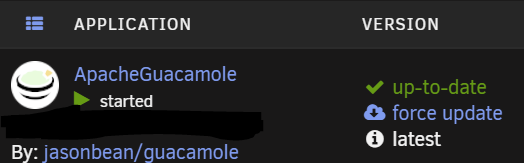
All good here - Unraid https://registry.hub.docker.com/r/jasonbean/guacamole/ Repository: jasonbean/guacamole
-
I stepped away from ApacheG for a bit due to some pending concerns. Thank you so much for the updates. I checked my dockers for updates and saw ApacheG was updated. Decided to add some connections and give it a test from the mobile phone... and everything is working well! One thing i found, i did attempt to change my settings to the 'touch and drag...to scroll' mouse function, and it didn't seem to save, or work when I selected it. Not a huge deal, touching the screen moves the pointer where you want. I will attempt some more testing moving forward. Great work here being Android 12 removed and older VPN protocol/profile which did not allow me to connect to my systems anymore (thanks Google for forcing the end users hand). ApacheG here to save the day. Keep up the awesome support and updates, this docker is TRUELY handy, very very good work here!
-
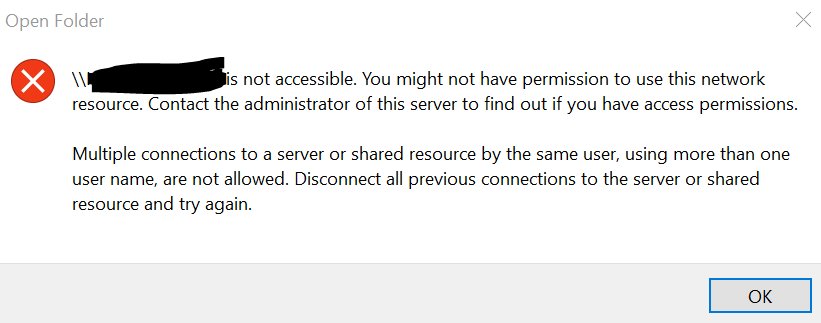
Appreciate the follow-up. Noted. Based on how Windows works with these shares/network resource, I will not be able to access Server 02 unless removing values out of windows credential manager. Therefore, I cannot access both Server 01 and Server 02 shares from the same system at the same time. The only way around this is the workaround I have setup via server 01, adding the SMB shares to server 01, to access the Server 02 shares. Or... disabling the private shares on Server 02 temporarily (setting to public) accessing the shares I need on Server 02, then enabling the private share option. Another alternative would be RDP to another system on the LAN and accessing the server 02 shares that way, which I have tested, and works. I also found since deploying server 02, my server 01 no longer displays under the 'network' section within Windows explorer, only server 02 I can still get to server one manually by entering \\Server01 to see and access all shares.
-
My apologies, To clarify, yes username added (other then root) to access file shares.
-
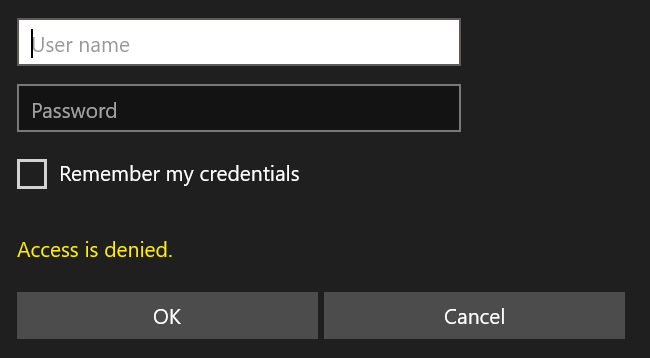
Hello, I have been down this line before but encountering concerns accessing my shares I have (2x) UnRAID servers (same workgroup) Server 01: no issues accessing shares Server 02: Prompts with username and password login to access shares Servers are setup the same. To overcome this temporarily I had to add the shares from Server 02 via SMB Shares | NFS Shares | ISO File Shares on Server 01 However, I am looking to sort this out once and for all to why I cannot access the shares directly via Windows of my Server 02. The admin usernames on each server are different as well as passwords and still get prompted for username and password creds I have reset the NIC to make sure all connections were disconnected. I am not sure what I am missing or why this keeps occurring. If I change security to public, of course I can access all shares on Server 02 without issue. This occurs when private shares are enabled on SMB security. Any suggestions? Thanks.
-
Not a bad idea. I will keep that in mind. I went another route being the second server is old hardware that I am using solely for storage 01. create NFS share 02. setup docker on the primary NAS with the host path pointing to the other NAS NFS share 03. follow the guide to setup the docker on the primary NAS 04. Done Why I couldn't get SWAG on the secondary nas to pull certs is beyond me. Thanks!
-
Cool. Is there a step guide that explains this? Been trying to point my SWAG to another docker service / system I have been trying to setup another swag instance on another unraid server without success. Not sure if I can run 2 instances on the same network on 2 different servers.
-
+1 I would like to know this too ! To be able to point SWAG running on unraid -> another unraid server running other dockers
-
Hello, I have successfully setup the SWAG docker on one of my unraid servers and has been working well for some time. I setup another unraid server I would like to run some dockers on separate from my current server. These servers are on the same network/subnet I have added the port forwarding rules and firewall rules I have added the swag to this new server and attempted to get the cert for this subdomain I would like to use on this second server however I always received the following error Certbot failed to authenticate some domains (authenticator: standalone). The Certificate Authority reported these problems: Domain: ***************** Type: unauthorized Detail: Invalid response from https:*************/.well-known/acme-challenge/GDsJPauIBpmR07lLXweaxJDIqW3wgFA10Fd3dKSUr1w [WAN IP ADDRESS]: " <html>\n <head>\n <title>Welcome to our server</title>\n <style>\n body{\n " Hint: The Certificate Authority failed to download the challenge files from the temporary standalone webserver started by Certbot on port 80. Ensure that the listed domains point to this machine and that it can accept inbound connections from the internet. Some challenges have failed. Ask for help or search for solutions at https://community.letsencrypt.org. See the logfile /var/log/letsencrypt/letsencrypt.log or re-run Certbot with -v for more details. ERROR: Cert does not exist! Please see the validation error above. The issue may be due to incorrect dns or port forwarding settings. Please fix your settings and recreate the container I can ping this domain (dns) from the internet and replies back as well If I add this same subdomain on my SWAG docker I already have setup it gets the cert with no issues.... the problem with that is I cannot point it to the other docker on the other server..... I cannot figure out why it is not working, I have tried different ports, rules, etc. and nothing seems to be working. Can I have 2 separate SWAG docker instance running on the same network/subnet... as I don't think there is a way to use my existing SWAG docker to point to another docker container on another unraid server Going to have to set it up on my server running swag successfully until I can figure this out or someone can assist Any ideas?
-
Hello, I have posted my diagnostics for some assistance. Keep in mind this NAS is sort of a test NAS I created from old hardware and upgraded RAM and CPU to what the motherboard would support. Fix uncommon problems is reporting: Rootfs file is getting full (currently 92 % used) Is this cause of the RAM? unraidNAS-diagnostics-20210808-1202.zip
-
Hey Frank, As always thanks for reaching out. I dug down into the firewall today and opened it up to test. Seems that was the concern. I will reach out if there are any further concerns. Thanks again!
-
I attempted to Deleting /boot/config/._Trial.key and Trial.key which allowed me to attempt to start the process over, same issue persists.
-
Hello, Attempting to use the trial key to test some hardware before purchase Prompted with: no connection and states cannot connect to the key server I am able to ping outside the network to public addresses with success here are the reoccurring logs Jul 8 15:11:36 Tower ntpd[3017]: ntpd [email protected] Tue Oct 20 18:42:21 UTC 2020 (1): Starting Jul 8 15:11:36 Tower ntpd[3017]: Command line: /usr/sbin/ntpd -g -u ntp:ntp Jul 8 15:11:36 Tower ntpd[3017]: ---------------------------------------------------- Jul 8 15:11:36 Tower ntpd[3017]: ntp-4 is maintained by Network Time Foundation, Jul 8 15:11:36 Tower ntpd[3017]: Inc. (NTF), a non-profit 501(c)(3) public-benefit Jul 8 15:11:36 Tower ntpd[3017]: corporation. Support and training for ntp-4 are Jul 8 15:11:36 Tower ntpd[3017]: available at https://www.nwtime.org/support Jul 8 15:11:36 Tower ntpd[3017]: ---------------------------------------------------- Jul 8 15:11:36 Tower ntpd[3019]: proto: precision = 0.042 usec (-24) Jul 8 15:11:36 Tower ntpd[3019]: basedate set to 2020-10-08 Jul 8 15:11:36 Tower ntpd[3019]: gps base set to 2020-10-11 (week 2127) Jul 8 15:11:36 Tower ntpd[3019]: Listen normally on 0 lo 127.0.0.1:123 Jul 8 15:11:36 Tower ntpd[3019]: Listen normally on 1 br0 10.1.0.108:123 Jul 8 15:11:36 Tower ntpd[3019]: Listen normally on 2 lo [::1]:123 Jul 8 15:11:36 Tower ntpd[3019]: Listening on routing socket on fd #19 for interface updates Jul 8 15:11:36 Tower ntpd[3019]: kernel reports TIME_ERROR: 0x41: Clock Unsynchronized Jul 8 15:11:36 Tower ntpd[3019]: kernel reports TIME_ERROR: 0x41: Clock Unsynchronized Jul 8 15:11:36 Tower root: Starting NTP daemon: /usr/sbin/ntpd -g -u ntp:ntp Jul 8 15:11:37 Tower emhttpd: error: get_limetech_time, 256: Invalid argument (22): -2 (60) Jul 8 15:11:37 Tower emhttpd: error: get_limetech_time, 256: Invalid argument (22): -2 (60) Jul 8 15:11:38 Tower emhttpd: error: get_limetech_time, 256: Invalid argument (22): -2 (60) Jul 8 15:11:39 Tower emhttpd: error: get_limetech_time, 256: Invalid argument (22): -2 (60) Jul 8 15:11:40 Tower emhttpd: error: get_limetech_time, 256: Invalid argument (22): -2 (60) Jul 8 15:11:43 Tower emhttpd: error: get_limetech_time, 256: Invalid argument (22): -2 (60) Jul 8 15:11:44 Tower emhttpd: error: get_limetech_time, 256: Invalid argument (22): -2 (60) Jul 8 15:11:45 Tower emhttpd: error: get_limetech_time, 256: Invalid argument (22): -2 (60) Any recommendations are welcome. Thank you,
-
Awesome thanks! Docker update pushed, updating now.
-
Hey, Awesome! I appreciate that. Glad to hear it is still alive and active. Thank you for your time and support. I look forward to more posts moving forward. Thank you to the whole community as well!
-
It would be nice to see a way to manage user 2FA from the admin GUI. There was a time I had a user created, but lost the 2FA code on the phone. The only work around was to make a new ADMIN user on AG and disable the old one as there was no way to reset that previous ADMIN user to setup 2FA again on that user (if I explained that correctly) Love the app, looking forward to new updates to come down the pipe!
-
Fair enough. Find it odd the change required on the workstation side, never had to have RDP exception enabled on the local workstation in the past and was functional with AG.... It makes sense it needs to be, was puzzled was all of what changed recently. Thanks again for the support and fast response, I wasn't sure if this thread was 'dead' Appreciate it !
-
Hello, Yes that is correct. Hostname = internal IP of system Port = RDP port Confirmed -- "GUACAMOLE PROXY PARAMETERS (GUACD)" are empty I was messing around with the local workstations 'Windows Firewall' It seems: Disabling the local workstations firewall allows AG to connect Adding the RDP exception to the windows firewall (while the firewall is enabled) works as well However, I am worried that may be a potential security risk of the sort. Thoughts?
-
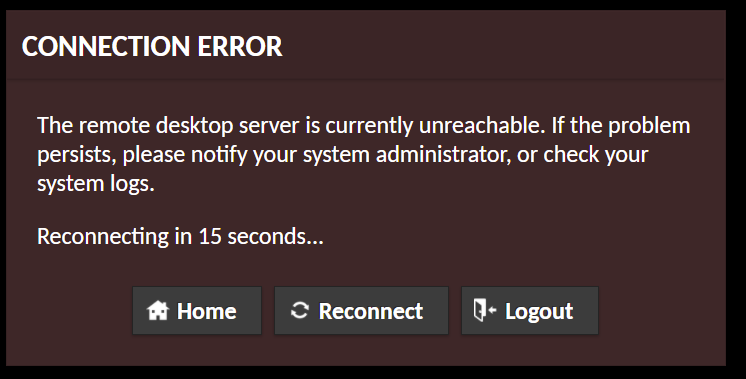
Hello, I was using AG with no issue and recently have ran into this concern I can connect to everything else but this one system. I can't see to track down what the concern may be. Anyone else have this concern? guacd[758]: INFO: User "@5835a4e1-fbd6-4273-a68c-b90cb9634f11" disconnected (0 users remain) guacd[758]: INFO: Last user of connection "$bc849b57-11d4-4807-83b1-39f9b0482739" disconnected guacd[30]: INFO: Connection "$bc849b57-11d4-4807-83b1-39f9b0482739" removed. guacd[30]: INFO: Creating new client for protocol "rdp" guacd[30]: INFO: Connection ID is "$0b6b9bd1-1933-4d62-81a3-065b121a6a41" guacd[775]: INFO: Security mode: NLA guacd[775]: INFO: Resize method: display-update guacd[775]: INFO: User "@491f6ba2-db58-42e9-adcd-30d53c12f8e7" joined connection "$0b6b9bd1-1933-4d62-81a3-065b121a6a41" (1 users now present) guacd[775]: INFO: Loading keymap "base" guacd[775]: INFO: Loading keymap "en-us-qwerty" guacd[775]: INFO: RDP server closed/refused connection: Connection failed (server unreachable?) guacd[775]: INFO: User "@491f6ba2-db58-42e9-adcd-30d53c12f8e7" disconnected (0 users remain) guacd[775]: INFO: Last user of connection "$0b6b9bd1-1933-4d62-81a3-065b121a6a41" disconnected guacd[30]: INFO: Connection "$0b6b9bd1-1933-4d62-81a3-065b121a6a41" removed. guacd[30]: INFO: Creating new client for protocol "rdp" guacd[30]: INFO: Connection ID is "$c4cf9241-1f9f-4654-8db4-305ccbb9228f" guacd[792]: INFO: Security mode: NLA guacd[792]: INFO: Resize method: display-update guacd[792]: INFO: User "@5cff0582-cef0-415e-9bdf-ea8e431fd464" joined connection "$c4cf9241-1f9f-4654-8db4-305ccbb9228f" (1 users now present) guacd[792]: INFO: Loading keymap "base" guacd[792]: INFO: Loading keymap "en-us-qwerty" guacd[792]: INFO: RDP server closed/refused connection: Connection failed (server unreachable?) EDIT: It seems that Windows Firewall prevents the connection now (maybe a windows update). Disabling Windows firewall or allowing RDP via the workstation firewall resolves this concern. What is strange, in the past, Windows firewall did not need the RDP exception set (enabled) to make the connection to the workstation via AG/RDP. Anyone else see this change as of recent? Thanks,
-
Running into a concern with AG. I have setup everything successfully, and I can access the drive share remotely, but I can only upload to the drive share. I cannot download or add any files to the download directory \\guacamole\rdp shares\<hostname>\Download when I attempt to access this share on the local system over the LAN it states I do not have permission to access the share. When I try to change/add an owner to this share, it does not allow it.... I get an error "an error occurred while applying security information to: <share name here> failed to enumerate objects in the container. Access is denied" "unable to set new owner on download. Access is denied" anyone run into this issue?
-
OK. I will let you know next time I cycle the array :-) Cheers!
-
Yes, I suppose no one knows a proper fix for my work around. Perhaps in time as the docker updates in the future. My workaround seems to be OK, but I would like to clean up AG docker so so I can better manage the users. Thank you for all the hard work, it's a really great docker!


