





mathomas3
Members
-
Joined
-
Last visited
Everything posted by mathomas3
-
I have around x16 8tb drives in my setup... also have a stack of x8 more should I have to expand... found a good deal on them for $45 each... I have not had a singe one of them fail...
-
It was only after I had the system open that I noticed that the existing memory had matching specs with the memory that I was installing... happy little 16gb surprise
-
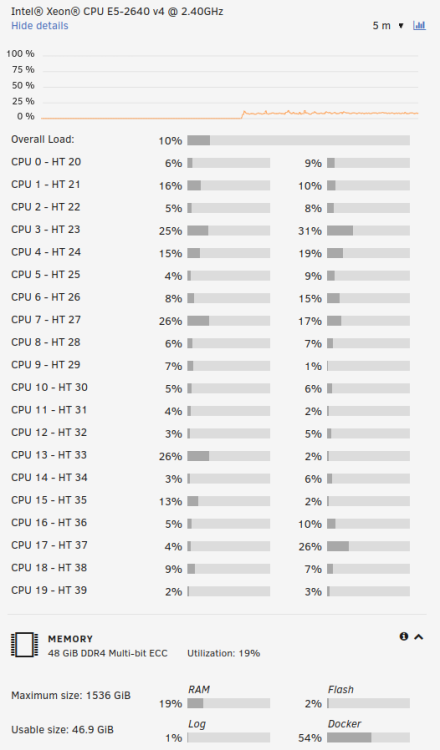
Just got everything together and it's up and running... so happy... and now I think I have enough cores
-
can you manually set the IP in the console and access the server after this?
-
While I am not an expert here... This is what I would try... replace the CMOS battery... validate that time/date in the bios is close to the real time... restart the machine...
-
I question the PSU then... I would connect everything up again and boot into the GUI... and while your there run a parity check
-
Hmmm so if you boot to gui mode it's fine but not a normal boot... when you booted into the GUI did you have everything still plugged in and running when you do this? have you added any disks into the array recently? Have you made any changes to the system recently... updates?
-
I would suggest that you take this to this docker's support thread... You really havent given much details here that would allow us to help you..
-
IE... you play for shipping plus a Starbucks GC? I would be willing to provide proof that the card works... I would need to use some of my older hdds+and under powered PSU to do so... the choice is yours
-
Heck... I have a sas controller that I was using 8 months ago(with breakout cables) that I would be willing to part with should you and I come to an agreeable arrangement...
-
another good reason to have a sas controller... should you decide to upgrade the mobo/CPU combo... the sas controller gives you greater flexibility on the combo you decide on...
-
Dont think about using WD green/red drives... If you are... you and I will have words
-
I have a box of the failed drives it's not light
-
The reason I like SAS controllers is that they are NOT consumer grade products... SAS is enterprise... I have had too many sata devices fail(over 10 disks) on me... I refuse to add them to my array due to failures... each sas contoller port can handle 8 disks each... normally they have two ports... thus they can handle 16hdd... this board was a quick search here... just searching google for sas+unraid should provide you with some good options... I would like to counter Trurl's post... "fewer larger disks instead of more smaller disks" I have 2x5tb disks and 20x8tb disks... the 8tb disks have never failed on me... and should I want to upgrade to something like a 16tb or 18tb... I would have to buy 3hdd just to increase the space by 8tb or 10tb... for me it makes more sense to add another 8tb disk then buying something newer... My point being is... dont be afraid to use renewed enterprise SAS HDD, they are built to last... The prices on these drives tend to be lower because SAS is enterprise thus many are not interested/know about these drives yet there are many on the market the sas controller should be a good fit for you due to your 15hdd requirement(breakout cables will be needed) and will provide you with better motherboard options(not needing 6sata ports on the MOBO) ... I would suggest this... find a good deal on a stack of hdds(used or not that are NOT consumer grade) 12tb or more and the build system around that... Im stuck on the 8tb drives as they are around 50 bucks a piece... IMO in the long run... you will find SAS drives are cheaper and they will last longer... (if you willing to use renewed drives and or find a good deal) this was a long post... im drunk, sorry... but in the ten years of using unraid... I strongly recommend using SAS drives... if you would like me to count the number of my sata vs sas drive failures I can... but it would be something like this... SASx0 SATAx12+
-
I think you have a pretty good idea as to what you need/have... I would still suggest a sas controller to make things easier for you down the road should you need more space... I would think that your cache drives could be stored inside the case vs using a tray for it and allowing you more room for hdds... Having a spare is always nice and you can avoid the stress of preclearing/testing a drive having a cache drive comes in handy when there are high r/rw operations. I think you could do without... Though having a app pool with two drives ssd would be a good idea One other suggestion I would make... when making the share permission and what not... I would suggest the allocation setting be set to 'fill-up'... reason being is that when you start transfer data to the pool... only 1 disk + parity drives are spinning and I think it's less wear and tear on the drives, because once the drive is full it only has to read from then on... it's a theory
-
I dont know what your budget is and if you already have the case or not but... I would recommend leaning on a larger case with spare HHD slots... I have been using unraid for 10 years now... and I have housed the hdds in 5 different cases now... Currently on a 24 bay DAS and I might have to get another one soon... I have had good luck with 8tb drives. I havent had a single one go bad on me. Before this 4,5,6tb drives failed right and left. something to think about... Oh and I would recommend using SAS controller. You can add a sata drive to a sas controller but you cant add a SAS drive to a sata controller. SAS drives have worked well for me as well In short... using SAS enterprise drives is what I would recommend and giving yourself room to expand is a good problem to have
-
normal CPU activity for this system is around 4-8%... I dont stream video from the server directly often... but shouldnt that be a LOW cpu task? why would the CPU spike to t49% on this task?
-
Not sure this belongs here before I make a large hardware change... but this issue started today... Emby playback is dim via a web browser... so I started streaming the video directly from the server... within 30mins CPU usage will spike to 49% and hover there... and while I have a number of dockers... streaming a video directly from the server should be devoid of docker issues/lag... Im welcome for comments... but again... I will be replacing this server in around 3-5 days with a much better CPU/RAM config... my concern is that I was streaming a file from the server and the CPU spiked to 49% which caused a lag in the video playback... Im all ears!

-
You might try looking for old DAS systems.... The one that I have is a 4u with 24 bays... perhaps it's not something you would be interested but thought that I would put that out there for you... I spent around $230 for the one I have
-
Hello all, I recently got a Dell R430 that has the Intel Xeon E5-2609 v4 CPU installed on it. I found a pair of Intel Xeon Processor E5-2640 V4 for $25 each. A comparison the two CPUs here plus the 3rd CPU is my current system's CPU Intel® Xeon® CPU X5650. My question is this, would it be worthwhile to install these CPUs? My main motivation for updating to this server was so save on power and noise. One last question, there is currently only 1 stick of ram for each CPU in the system currently. What would be the best number of RAM sticks to have for this system? 1x16gb vs 2x8gb vs 4x2gb etc... How much of a difference is there if I kept it in it's current configuration? I am waiting on a PCIE bracket to arrive before I migrate off of my current setup. Funny thing is that I bought this server on ebay and the darn thing still has 10 months on it's warranty
-
I would warn you on the temp of those drives! They will die a lot faster
-
So this one statement is conflicting... you say that you havent "make any changes" yet you just setup nextcloud... and now nextcloud isnt working... Please consider marking this thread as solved and make a new post on the relevant forum/thread to your new issue...
-
WOW... that's a load of plugins... I have been using unraid for 10y now... and I have only 2 plugins... something that I learned in the military is... KISS... Keep It Simple Stupid... Take things slowly and make measurable changes... just starting out and adding all of these changes will make it hard to figure out if something is wrong... IMO... remove the plugins and start from near stock... and then layer on the addons... this will make it simple to figure out what broke... Few here will want to troubleshoot a 100 changes in a short time frame... where as if you take your time to load the array and layer in the plugins, things will be easier to troubleshoot... Best of luck
-
I have been using 8tb drives for a while now... no failures in the years I have been using them... even renewed ones... Just my 10 cents
-
I had this problem this year... The way I figured it out was creating a new disk pool(2 ssd) and moving everything to that pool... this way dockers will run quickly but also have redundancy builtin... something to look into


