





spl147
Members
-
Joined
-
Last visited
Everything posted by spl147
-
What is the output of sensors-detect?
-
Just purchase a key and you will not have to worry about it
-
The ITE chip that controls your fans does NOT have a driver (not yet written) so you can not use unraid to control your fans
-
from command line run "modprobe jc42 it87 coretemp" or install the system temp plugin and the neardpack and from neardpack install pearl, the in the system temp plugin click detect
-
currently it only works if you have a single config file and a single controller! it's a known issue.
-
im telling you it only controls 1!
-
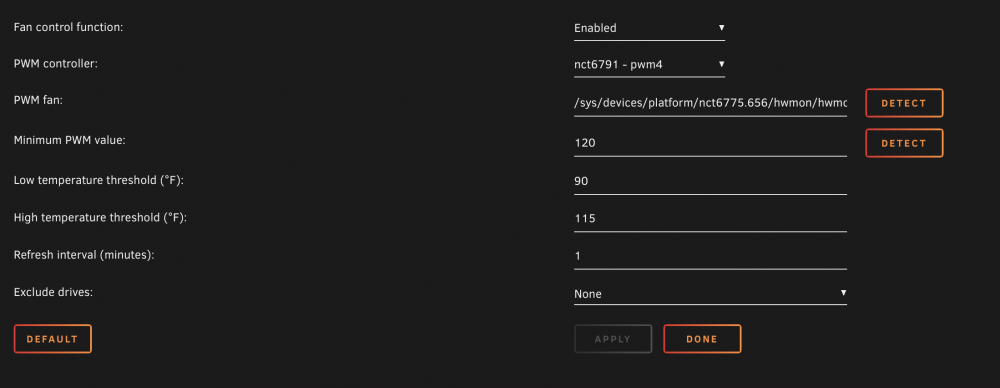
The fan control plugin will only control 1 header. Your middle and rear fans should be combined with a powered fan splitter and connecter to 1 system header and set to full speed in the bios. Cpu fans should be configured to auto in bios based on cpu temp. Run sensors detect, then load discovered drivers, in the fan speed plugin click detect then select the correct pwm output
-
Found `IPMI BMC KCS' at 0xca2... Success! (confidence 8, driver `to-be-written') Note: there is no driver for IPMI BMC KCS yet. your fans are controlled via the IPMI BMS KCS, but there is NO driver for it currently. so you cannot control your fans via the fanspeed plugin!
-
yes if other installed plugins required it, like wize if you uninstall a plugin and no other installed plugins require it. then it should be removed
-
Yea, I always felt it should be installed automatically as it is required by the plugin
-
i opened the issue for you and referenced you here
-
open a issue on the github page. i had the same issue a wihle back, deleting everything and starting over fixed it for me, but i only have 1 config file, i use a fan hub and connect to 1 fan header
-
I would set plugin to default, delete all configs and start over
-
so you have dynamix.system.autofan.cfg disabled then dynamix.system.autofan-1.cfg or something like that? delete the ones you don't use and rename the first used one to dynamix.system.autofan.cfg, and set service="1" iand the others to 1,2,3, etc. and reboot
-
Make sure the main config file has service=“1”
-
/flash/config/plugins/dynamix.system.autofan/dynamix.system.autofan.cfg here is the contents of mine: options="-c /sys/devices/platform/nct6775.656/hwmon/hwmon3/pwm4 -f /sys/devices/platform/nct6775.656/hwmon/hwmon3/fan4_input -l 150 -t 35 -T 45 -m 1" service="1" controller="/sys/devices/platform/nct6775.656/hwmon/hwmon3/pwm4" fan="/sys/devices/platform/nct6775.656/hwmon/hwmon3/fan4_input" pwm="150" low="35" high="45" interval="1" exclude=""
-
Auto fan does start automatically on system boots if the config file is set to enabled. Mine starts every time unraid starts, check the plugin folder for auto fan make sure the config file is correct
-
-
You need to run “sensors detect” from the command line to see what drivers you need to load
-
The log will tell you what parameters to pass for your optical drive
-
Just use a fan splitter hub to connect all your fans to the cpu fan header and set you fan curve in the bios
-
It is for fan speed control based on hdd temps only
-
All i did was install system temp plugin and fanspeed plugin, ran sensors-detect from command line, it reported coretemp and nct6775 So i ran modprobe coretemp and modprobe nct6775. Been working ever since. Rebooted numerous times.
-
run sensors-detect from command line, the run modprobe to add the sensors that are detected, then the fan speed plugin will see the headers
-
ok, so i have a Asrock Fatality x99M Killer. i am trying to reliably pass through a keyboard and mouse without having to hot plug them every time using the plugin. i found this article: https://sholland.org but it's a little over my head. but if i understand it correctly it will allow me to pass through certain ports to the VM using ONLY the chipset usb controller can someone break this down for me or perhaps a plugin to make this dummy proof?


