-C-
Members
-
Joined
-
Last visited
-
Thanks for the plugin, it works nicely. I tried to use Unraid's notification system to let me know when the preclear had finished. I used this: nwipe && /usr/local/emhttp/webGui/scripts/notify -i "alert" -s "Disk Wipe Complete" -d "The nwipe process finished successfully on $(date)." The notification was sent, but unfortunately only after I'd checked in and seen that the process had finished, then pressed enter on the main screen to exit. Is there a way to be notified when the preclear has finished?
-
There's currently a bad link. If you get this error: And click on the THIS link after the error message, you're taken to https://forums.unraid.net/topic/39097-video-demo-managing-game-libraries-with-unraid-user-shares/#comment-381697 but that 404s.

-
Yeah, all been good so far for me too.
-
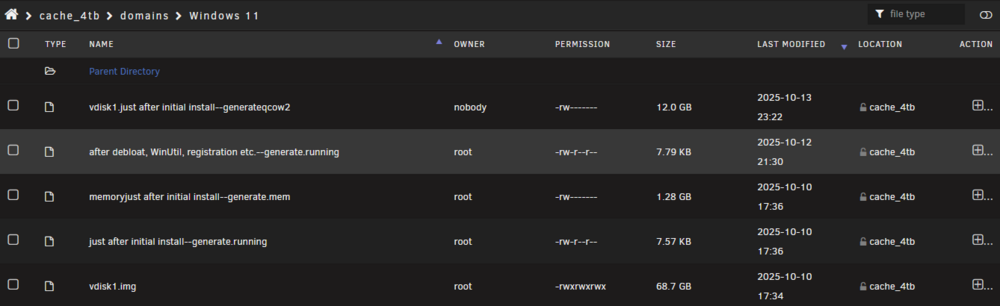
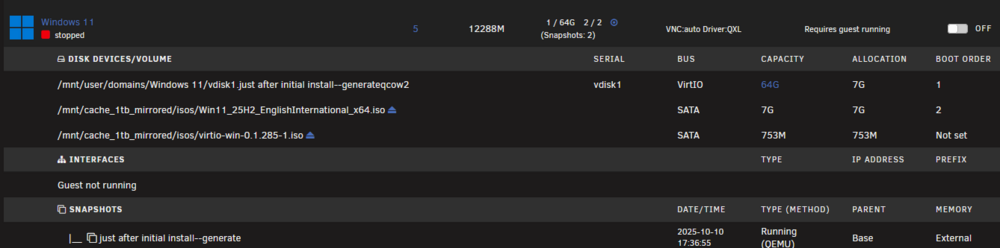
I've been setting up a Win 11 VM. All going well until this evening when I made some changes and it stopped booting. I need to roll back to the last snapshot. In the domains share, I can see the snapshot I want to roll back to. It's "after debloat, WinUtil, registration etc.--generate.running" here: But on the VMs page, even though it says (Snapshots: 2) at the top for this VM, there is only 1 snapshot listed in the Snapshots section at the bottom: Any way to get back to "after debloat, WinUtil, registration etc.--generate.running"? If not, what's the best way to roll back to the "just after initial install" snapshot?
-
No issues since updating 3weeks ago...
-
Thanks for the heads up. I've just updated both the 990s that make up my mirrored cache drive. After my primary drive disappeared again on 27th of June, I restarted the server and not had either 990 drop out since then. But it's not been good knowing that one or both drives could drop out at any time, especially if high throughput is the cause as with them mirrored they were being hit simultaneously. Anyway, I made it through a busy summer without issue, now hoping this latest firmware version finally, permanently resolves the problem. Will keep updating here if anything happens.
-
Noticed a typo in the notifications that appears to be coming from PCT regarding an unclean shutdown: should be documentation.

-
That's not good news. This'll be the 4th time I've had a different 990 Pro fail in this system. Although it's likely there wasn't actually a problem with the ones I returned and the issue with drives dropping out would have been cured with the edit to the boot section. This one that's now giving trouble was replaced under warranty in October last year. Any advice on how best to troubleshoot from here?
-
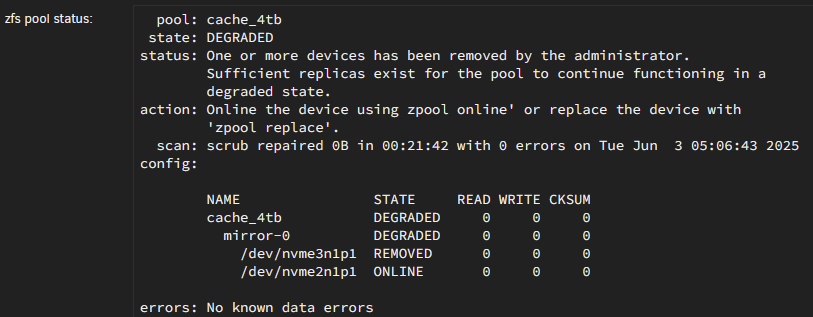
I have just received an alert that there's a problem with the same pool and found that the primary drive is showing as removed: Previously, I was having issues with the mirrored drive showing as removed. Does the code that I added back in March target a particular drive?
-
Troubles: Unable to update larger containers So needing to uninstall containers to keep things running Appdata backup failing which has never happened before Warnings from Fix Common Problems that I'm close to size limit Not enough spare room to do what I'm planning to do I'm asking here to confirm whether it looks like there's something awry, or if I'm OK to carry on with Docker set up as it is, but simply increasing the image size. Is it still recommended to go with an single Docker image at this size, or is there a size at which it is better to use folders?
-
I'm having troubles with Docker. In this thread, I think @trurl is advising against raising over 50GB: I asked there last week, but not had a response and even though I've removed some of my larger, lesser used containers, I'm still having issues. Would also like to dabble with some LLMs soon, so am definitely going to need more space. Here's what my Container Size looks like today. Does it look like I have issues? What's the best way for me to proceed from here? Name Container Writable Log immich 3.36 GB 188 MB 3.36 MB FileFlows 2.76 GB 898 MB 35.2 MB vw-rotata 2.55 GB 355 MB 1.01 MB nicotine-plus 2.40 GB 452 kB 76.3 kB binhex-plexpass 1.94 GB 228 MB 30.6 MB nextcloud 1.39 GB 269 MB 29.7 kB DiskSpeed 949 MB 34.9 MB 310 kB akaunting 887 MB 0 B 62.3 MB elasticsearch 842 MB 75.5 kB 24.5 kB Thunderbird 809 MB 7.25 kB 18.3 kB ApacheGuacamole 771 MB 34.5 MB 3.42 kB ChromiumUngoogled 708 MB 0 B 62.3 MB PostgreSQL_Immich 701 MB 63 B 27.8 kB HomeAssistant_inabox 681 MB 2.87 kB 3.68 MB youtube-dl-material 635 MB 19.0 MB 333 kB changedetection.io 603 MB 5.46 MB 436 kB ESPHome 573 MB 2.37 MB 1.57 MB Mealie 470 MB 4.40 kB 1.88 MB UptimeKuma 440 MB 217 kB 2.24 MB swag 402 MB 2.57 MB 877 kB kimai 391 MB 0 B 62.3 MB sonarr 360 MB 155 MB 12.2 MB Czkawka 330 MB 0 B 62.3 MB MariaDB-Official 327 MB 2 B 23.5 kB audiobookshelf 315 MB 0 B 76.4 kB imapsync 291 MB 0 B 144 kB CouchDB-Offical-Docker-v1.x2 272 MB 0 B 6.12 MB songkong 259 MB 0 B 62.3 MB vaultwarden 237 MB 0 B 511 kB radarr 207 MB 22.8 kB 14.5 MB UrBackup 202 MB 5.85 MB 15.7 MB Huntarr 184 MB 843 kB 8.16 MB Gitea 177 MB 0 B 62.3 MB sabnzbd 171 MB 24.7 kB 4.57 MB speedtest-tracker 169 MB 2.41 MB 2.20 MB diskover 146 MB 28.2 kB 46.4 kB tautulli 146 MB 22.3 kB 531 kB gotify 130 MB 0 B 62.3 MB adminer 121 MB 0 B 62.3 MB Syncthing 52.7 MB 21.8 kB 106 kB Duplicacy 50.9 MB 837 B 838 kB Unraid-Cloudflared-Tunnel 46.7 MB 37.8 MB 14.3 MB Total size 28.5 GB 2.24 GB 660 MB
-
Mine's at 50G and I'm getting warnings about it being close to limit. Here's the size stats from the Docker page. I'm hoping to start using some MLL containers soon, so will likely need to expand for those, but before I do, I'd like to make sure there's no issues with what I have now. Edit: Paging @trurl - are you able to help with this? I'm now unable to update larger containers due to running out of room. Thanks Name Container Writable Log immich 3.36 GB 188 MB 931 kB FileFlows 2.76 GB 898 MB 17.5 MB binhex-delugevpn 2.66 GB 0 B 62.3 MB vw-rotata 2.55 GB 355 MB 1.01 MB nicotine-plus 2.40 GB 401 kB 43.3 kB binhex-plexpass 1.96 GB 249 MB 37.7 MB nextcloud 1.39 GB 269 MB 29.7 kB DiskSpeed 949 MB 34.9 MB 309 kB akaunting 887 MB 0 B 62.3 MB elasticsearch 842 MB 75.5 kB 24.5 kB Thunderbird 809 MB 0 B 62.3 MB ApacheGuacamole 771 MB 34.5 MB 3.42 kB ChromiumUngoogled 708 MB 0 B 62.3 MB PostgreSQL_Immich 701 MB 63 B 25.9 kB HomeAssistant_inabox 681 MB 2.71 kB 3.47 MB youtube-dl-material 635 MB 19.0 MB 325 kB changedetection.io 607 MB 5.40 MB 2.30 MB ESPHome 573 MB 2.37 MB 3.26 MB Mealie 470 MB 4.40 kB 1.85 MB UptimeKuma 440 MB 217 kB 2.11 MB swag 402 MB 2.49 MB 845 kB kimai 391 MB 0 B 62.3 MB sonarr 364 MB 158 MB 48.4 MB Czkawka 330 MB 0 B 62.3 MB MariaDB-Official 327 MB 2 B 24.4 kB audiobookshelf 312 MB 0 B 377 kB imapsync 291 MB 0 B 144 kB CouchDB-Offical-Docker-v1.x2 272 MB 0 B 5.05 MB songkong 259 MB 0 B 62.3 MB vaultwarden 237 MB 0 B 376 kB radarr 207 MB 22.8 kB 8.91 MB UrBackup 202 MB 5.85 MB 18.1 MB Huntarr 184 MB 826 kB 10.8 MB Gitea 177 MB 0 B 62.3 MB sabnzbd 171 MB 24.7 kB 2.74 MB speedtest-tracker 169 MB 2.41 MB 686 kB diskover 146 MB 27.2 kB 26.5 kB tautulli 146 MB 22.3 kB 267 kB gotify 130 MB 0 B 62.3 MB adminer 121 MB 0 B 62.3 MB Syncthing 52.8 MB 21.8 kB 582 kB Duplicacy 50.9 MB 837 B 838 kB Unraid-Cloudflared-Tunnel 46.7 MB 37.8 MB 14.3 MB Total size 31.1 GB 2.26 GB 806 MB
-
Thanks for this JorgeB - it's been 2.5 months and no further issues, so I'm marking this is resolved. Do you have a link to what that line of code is doing?
-
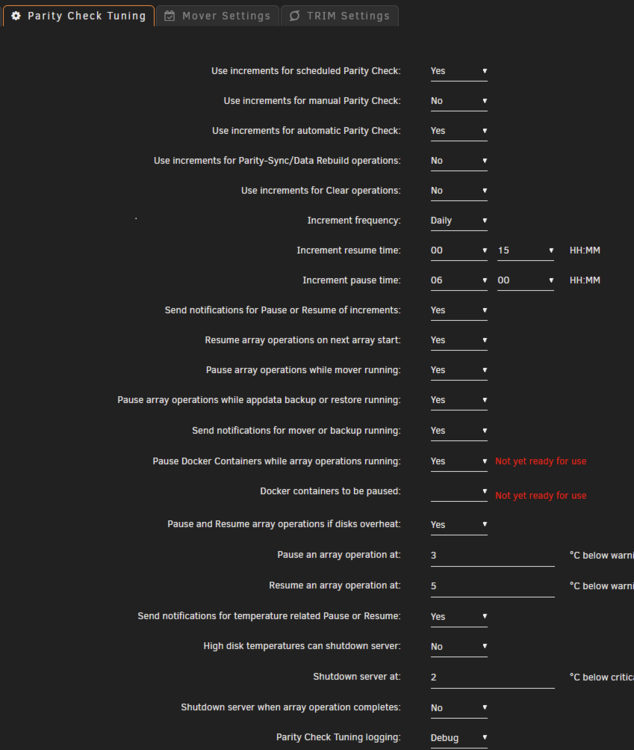
Ah OK, thanks for the explanation. I searched for the "Not yet ready for use" message and couldn't find anyone else mentioning that. Seems I'm certainly an outlier for some reason! Let me know if you need me to give you any more info.
-
Am getting "Not yet ready for use" errors for the Docker options. Not sure why. Docker is running correctly as far as I'm aware. Here's the PCT settings: There's nothing listed in the "Docker containers to be paused" option. Here's my diagnostics: tower-diagnostics-20250310-1751.zip TIA