d3m3zs
Members
-
Joined
Everything posted by d3m3zs
-
Dec 31 03:37:23 BlackBox emhttpd: Unmounting disks... Dec 31 03:37:23 BlackBox emhttpd: shcmd (157): /usr/sbin/zpool export -f zfs_cache Dec 31 03:37:23 BlackBox root: cannot export 'zfs_cache': pool is busy Dec 31 03:37:23 BlackBox emhttpd: shcmd (157): exit status: 1 Dec 31 03:37:23 BlackBox emhttpd: Retry unmounting disk share(s)... Dec 31 03:37:28 BlackBox emhttpd: Unmounting disks... Dec 31 03:37:28 BlackBox emhttpd: shcmd (158): /usr/sbin/zpool export -f zfs_cache Dec 31 03:37:28 BlackBox root: cannot export 'zfs_cache': pool is busy Dec 31 03:37:28 BlackBox emhttpd: shcmd (158): exit status: 1 Dec 31 03:37:28 BlackBox emhttpd: Retry unmounting disk share(s)... Dec 31 03:37:33 BlackBox emhttpd: Unmounting disks... Dec 31 03:37:33 BlackBox emhttpd: shcmd (159): /usr/sbin/zpool export -f zfs_cache Dec 31 03:37:33 BlackBox root: cannot export 'zfs_cache': pool is busy Dec 31 03:37:33 BlackBox emhttpd: shcmd (159): exit status: 1 Dec 31 03:37:33 BlackBox emhttpd: Retry unmounting disk share(s)... Dec 31 03:37:38 BlackBox emhttpd: Unmounting disks... Dec 31 03:37:38 BlackBox emhttpd: shcmd (160): /usr/sbin/zpool export -f zfs_cache Dec 31 03:37:38 BlackBox root: cannot export 'zfs_cache': pool is busy Dec 31 03:37:38 BlackBox emhttpd: shcmd (160): exit status: 1 Dec 31 03:37:38 BlackBox emhttpd: Retry unmounting disk share(s)... Dec 31 03:37:43 BlackBox emhttpd: Unmounting disks... Dec 31 03:37:43 BlackBox emhttpd: shcmd (161): /usr/sbin/zpool export -f zfs_cache Dec 31 03:37:43 BlackBox root: cannot export 'zfs_cache': pool is busy Dec 31 03:37:43 BlackBox emhttpd: shcmd (161): exit status: 1 Dec 31 03:37:43 BlackBox emhttpd: Retry unmounting disk share(s)... Dec 31 03:37:48 BlackBox emhttpd: Unmounting disks... Dec 31 03:37:48 BlackBox emhttpd: shcmd (162): /usr/sbin/zpool export -f zfs_cache Dec 31 03:37:49 BlackBox root: cannot export 'zfs_cache': pool is busy Dec 31 03:37:49 BlackBox emhttpd: shcmd (162): exit status: 1 Dec 31 03:37:49 BlackBox emhttpd: Retry unmounting disk share(s)... Dec 31 03:37:54 BlackBox emhttpd: Unmounting disks... Dec 31 03:37:54 BlackBox emhttpd: shcmd (163): /usr/sbin/zpool export -f zfs_cache Dec 31 03:37:54 BlackBox root: cannot export 'zfs_cache': pool is busy Dec 31 03:37:54 BlackBox emhttpd: shcmd (163): exit status: 1 Dec 31 03:37:54 BlackBox emhttpd: Retry unmounting disk share(s)... Dec 31 03:37:59 BlackBox emhttpd: Unmounting disks... Dec 31 03:37:59 BlackBox emhttpd: shcmd (164): /usr/sbin/zpool export -f zfs_cache Dec 31 03:37:59 BlackBox root: cannot export 'zfs_cache': pool is busy Dec 31 03:37:59 BlackBox emhttpd: shcmd (164): exit status: 1 Unraid 7.0.0-rc.2 infinity unmount disks for Array stop operation. I can only reboot system, but can not stop Array. Can anyone help? I also notice that one XFS 2TB nvme as pool worked much better without any issues than current raidz1 configuration 3x2TB drives. On XFS: Speed was better and overall system responsibility was better, also I have never seen such issues with unmounting.
-
The same question, created raidz1 pool from 3 x 2TB nvme diff manufactures and realized that motherboard has one more free slot, wanted to add #4 2TB drive, but don`t want to copy all data away from pool to array, then re-create and copy back...
-
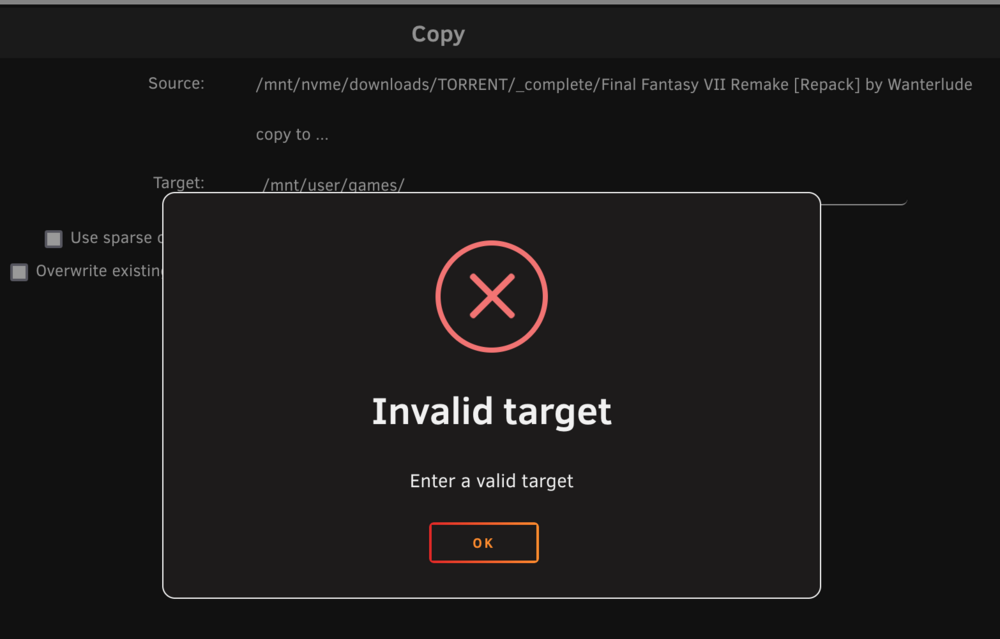
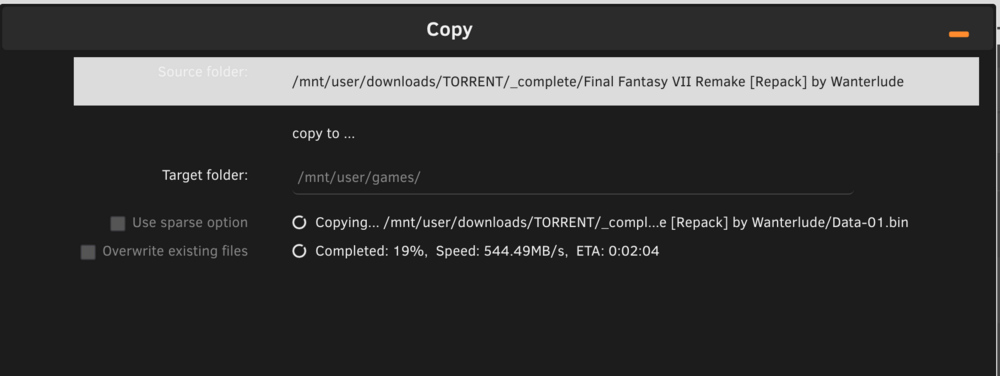
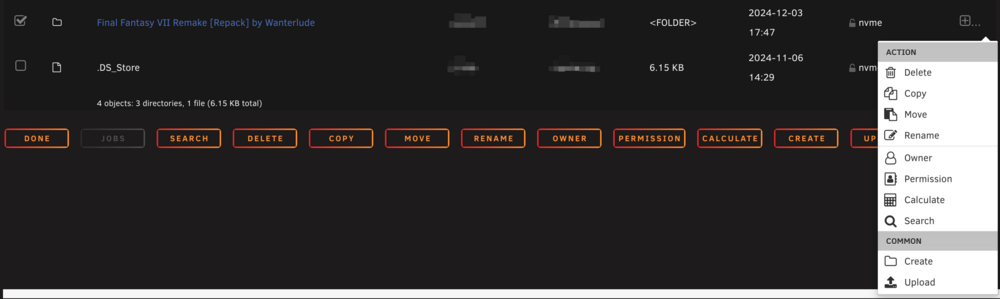
Hi, everyone! Unraid 7.0.0-rc.1 Does Dynamix File Manager support source path /mnt/<cache drive>/? Example: My qbittorent downloads torrents to my nvme cache drive. When I open download folder from main tab and try to copy or move folders it will fail. But successfully works if I open download folder from share So, issue in path, if source /mnt/user/... it works and if /mnt/<cache drive>/... it is not. So there is wrong error description - wrong source probably. Or it is expected behavior that this plugin works only in .../user/... paths? Also one more question: is it possible to remove duplicates buttons or action menu? One of them seems redundant. And last one: I noticed very slow speed for moving folders, usually I use Krusader and when I move folders it happens immediately, but this plugin does this few minutes with speed 500-900MB, but technically it should work also immediately because currently all data on one nvme drive.
-
Thanks, didn`t touch it and it stopped working, just run chmod -R 777 /mnt/user/data/backup_containers And now it seems fixed.
-
Hi @KluthR, I have error [26.08.2024 00:31:52][ℹ️][Main] 👋 WELCOME TO APPDATA.BACKUP!! :D [26.08.2024 00:31:52][ℹ️][Main] Backing up from: /mnt/user/docker [26.08.2024 00:31:52][ℹ️][Main] Backing up to: /mnt/user/data/backup_containers/ab_20240826_003152 [26.08.2024 00:31:52][❌][Main] Cannot create destination folder! [26.08.2024 00:31:56][ℹ️][Main] Checking retention... [26.08.2024 00:31:56][ℹ️][Main] DONE! Thanks for using this plugin and have a safe day ;) [26.08.2024 00:31:56][ℹ️][Main] ❤️ Debug log id = 5c5a43ea-cc18-4bf3-9cdc-af25581ed09a Could @KluthR take a look?
-
It is original archive, I just unpacked, checked that really has no sensitive information and packed in 7z.
-
Thank you! Here it is. blackbox-diagnostics-20240727-2252.7z
-
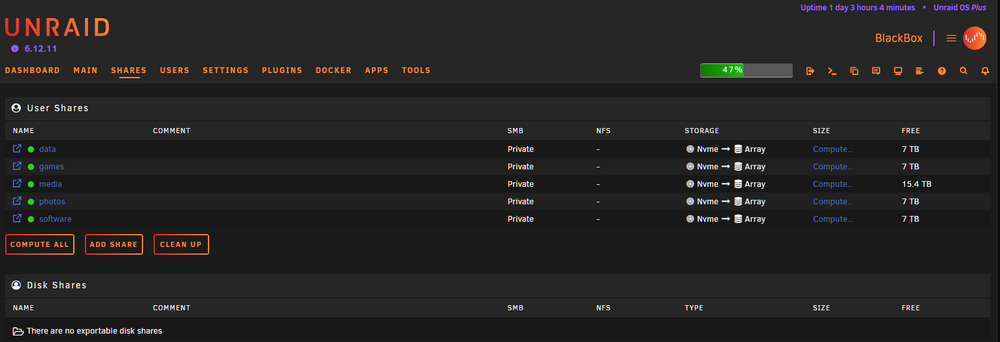
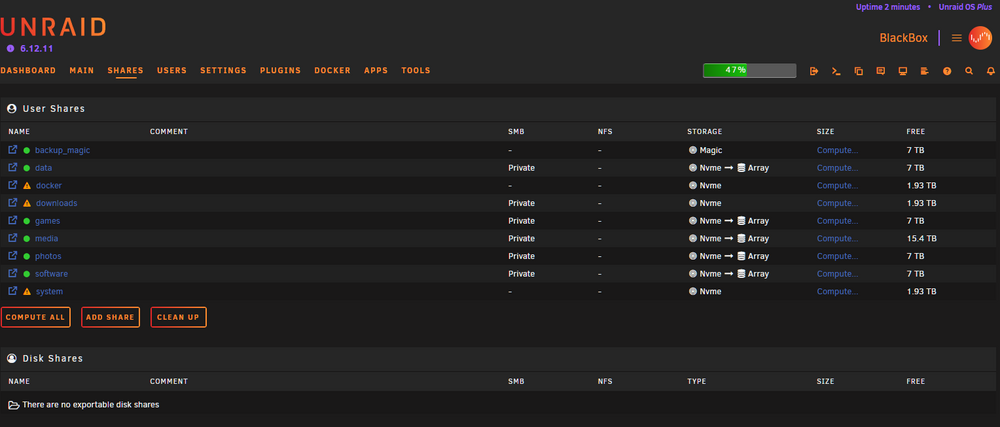
I noticed this yesterday, found many posts here and followed advice - reboot, it helped, today I have the same issue, again reboot helps me. How to fix it and what kind of log I have to check? Before reboot: After reboot:
-
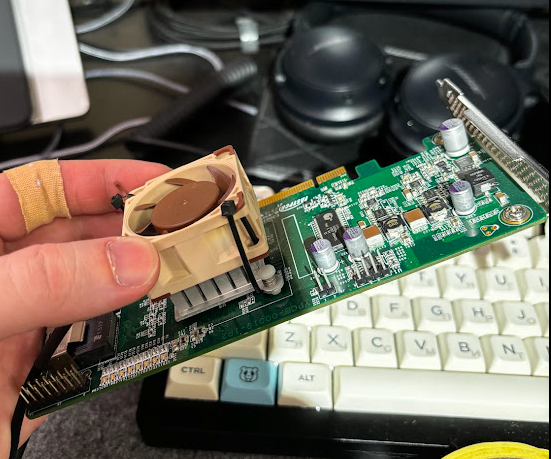
I want to say thank you, it seems issue is resolved, now I know how to backup flash drive and which logs can be important. Solution was - add active cooling to LSI adapter: I will take a look at my drives in few days to be sure.
-
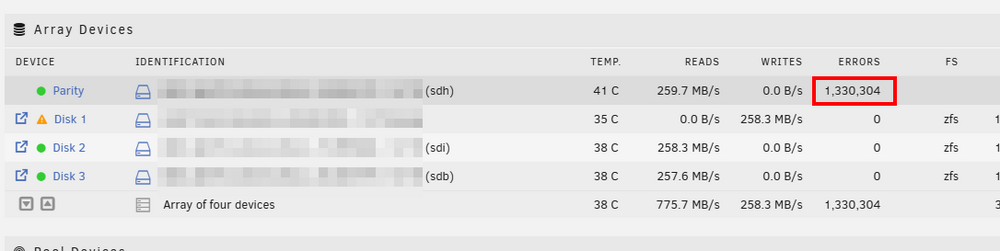
Replaced cables, don`t see errors for disk1 anymore, but now I can see errors on parity drive... Decided to delete backup_zfs pool. Can`t see log
-
Many these records 00 00 May 28 16:06:27 BlackBox kernel: I/O error, dev sdb, sector 23437770560 op 0x0:(READ) flags 0x80700 phys_seg 1 prio class 2 May 28 16:06:27 BlackBox kernel: sd 7:0:0:0: [sdb] tag#851 UNKNOWN(0x2003) Result: hostbyte=0x00 driverbyte=DRIVER_OK sdb is disk1. Thank you, on my way.
-
You are absolutely right. So, just copied syslog: syslog.txt
-
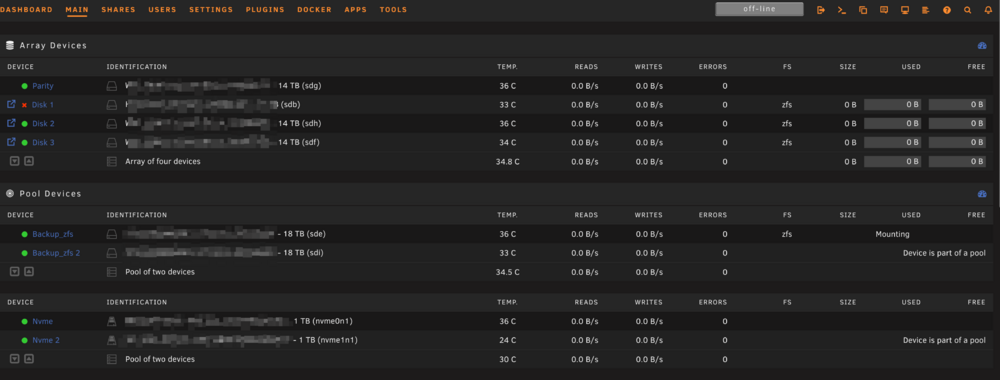
Almost 1 hour Array is trying to start sdb = disk1, and sde and sdi = both are "backup_zfs" pool What should I do? pool: disk1 state: ONLINE status: One or more devices has experienced an error resulting in data corruption. Applications may be affected. action: Restore the file in question if possible. Otherwise restore the entire pool from backup. see: https://openzfs.github.io/openzfs-docs/msg/ZFS-8000-8A scan: scrub repaired 348M in 1 days 03:05:31 with 7992612 errors on Tue May 28 10:56:43 2024 config: NAME STATE READ WRITE CKSUM disk1 ONLINE 0 0 0 /dev/md1p1 ONLINE 0 0 15.3M errors: 7992612 data errors, use '-v' for a list May 28 16:06:27 BlackBox kernel: I/O error, dev sdb, sector 24 op 0x0:(READ) flags 0x80700 phys_seg 1 prio class 2 May 28 16:06:27 BlackBox kernel: I/O error, dev sdb, sector 24 op 0x0:(READ) flags 0x0 phys_seg 1 prio class 2 May 28 16:06:27 BlackBox kernel: Buffer I/O error on dev sdb, logical block 3, async page read May 28 16:06:27 BlackBox kernel: I/O error, dev sdb, sector 23437770560 op 0x0:(READ) flags 0x80700 phys_seg 1 prio class 2 May 28 16:06:27 BlackBox kernel: I/O error, dev sdb, sector 23437770560 op 0x0:(READ) flags 0x0 phys_seg 1 prio class 2 May 28 16:06:27 BlackBox kernel: Buffer I/O error on dev sdb1, logical block 23437770496, async page read May 28 16:06:27 BlackBox kernel: I/O error, dev sdb, sector 23437770561 op 0x0:(READ) flags 0x0 phys_seg 1 prio class 2 May 28 16:06:27 BlackBox kernel: Buffer I/O error on dev sdb1, logical block 23437770497, async page read May 28 16:06:27 BlackBox kernel: I/O error, dev sdb, sector 23437770562 op 0x0:(READ) flags 0x0 phys_seg 1 prio class 2 May 28 16:06:27 BlackBox kernel: Buffer I/O error on dev sdb1, logical block 23437770498, async page read May 28 16:06:27 BlackBox kernel: I/O error, dev sdb, sector 23437770563 op 0x0:(READ) flags 0x0 phys_seg 1 prio class 2 May 28 16:06:27 BlackBox kernel: Buffer I/O error on dev sdb1, logical block 23437770499, async page read May 28 16:06:27 BlackBox kernel: I/O error, dev sdb, sector 23437770564 op 0x0:(READ) flags 0x0 phys_seg 1 prio class 2 May 28 16:06:27 BlackBox kernel: Buffer I/O error on dev sdb1, logical block 23437770500, async page read May 28 16:06:27 BlackBox kernel: I/O error, dev sdb, sector 23437770565 op 0x0:(READ) flags 0x0 phys_seg 1 prio class 2 May 28 16:06:27 BlackBox kernel: Buffer I/O error on dev sdb1, logical block 23437770501, async page read May 28 16:06:27 BlackBox kernel: I/O error, dev sdb, sector 23437770566 op 0x0:(READ) flags 0x0 phys_seg 1 prio class 2 May 28 16:06:27 BlackBox kernel: Buffer I/O error on dev sdb1, logical block 23437770502, async page read May 28 16:06:27 BlackBox kernel: Buffer I/O error on dev sdb1, logical block 23437770503, async page read May 28 16:07:58 BlackBox emhttpd: status: One or more devices has experienced an error resulting in data May 28 16:09:54 BlackBox kernel: I/O error, dev sdi, sector 592 op 0x0:(READ) flags 0x0 phys_seg 1 prio class 2 May 28 16:09:54 BlackBox kernel: zio pool=backup_zfs vdev=/dev/sdi1 error=5 type=1 offset=270336 size=8192 flags=b08c1 May 28 16:09:54 BlackBox kernel: I/O error, dev sdi, sector 35156654672 op 0x0:(READ) flags 0x0 phys_seg 1 prio class 2 May 28 16:09:54 BlackBox kernel: zio pool=backup_zfs vdev=/dev/sdi1 error=5 type=1 offset=18000207159296 size=8192 flags=b08c1 May 28 16:09:54 BlackBox kernel: I/O error, dev sdi, sector 35156655184 op 0x0:(READ) flags 0x0 phys_seg 1 prio class 2 May 28 16:09:54 BlackBox kernel: zio pool=backup_zfs vdev=/dev/sdi1 error=5 type=1 offset=18000207421440 size=8192 flags=b08c1 May 28 16:09:54 BlackBox kernel: I/O error, dev sdi, sector 592 op 0x0:(READ) flags 0x0 phys_seg 1 prio class 2 May 28 16:09:54 BlackBox kernel: zio pool=backup_zfs vdev=/dev/sdi1 error=5 type=1 offset=270336 size=8192 flags=b08c1 May 28 16:09:54 BlackBox kernel: I/O error, dev sdi, sector 35156654672 op 0x0:(READ) flags 0x0 phys_seg 1 prio class 2 May 28 16:09:54 BlackBox kernel: zio pool=backup_zfs vdev=/dev/sdi1 error=5 type=1 offset=18000207159296 size=8192 flags=b08c1 May 28 16:09:54 BlackBox kernel: I/O error, dev sdi, sector 35156655184 op 0x0:(READ) flags 0x0 phys_seg 1 prio class 2 May 28 16:09:54 BlackBox kernel: zio pool=backup_zfs vdev=/dev/sdi1 error=5 type=1 offset=18000207421440 size=8192 flags=b08c1 May 28 16:10:05 BlackBox kernel: I/O error, dev sde, sector 3597621920 op 0x0:(READ) flags 0x700 phys_seg 1 prio class 2 May 28 16:10:05 BlackBox kernel: zio pool=backup_zfs vdev=/dev/sde1 error=5 type=1 offset=1841982390272 size=4096 flags=1808a0 May 28 16:10:05 BlackBox kernel: I/O error, dev sde, sector 3597607896 op 0x0:(READ) flags 0x700 phys_seg 3 prio class 2 May 28 16:10:05 BlackBox kernel: zio pool=backup_zfs vdev=/dev/sde1 error=5 type=1 offset=1841975209984 size=12288 flags=40080ca0 May 28 16:10:05 BlackBox kernel: I/O error, dev sde, sector 3597616616 op 0x0:(READ) flags 0x700 phys_seg 1 prio class 2 May 28 16:10:05 BlackBox kernel: zio pool=backup_zfs vdev=/dev/sde1 error=5 type=1 offset=1841979674624 size=4096 flags=1808a0 May 28 16:10:05 BlackBox kernel: I/O error, dev sde, sector 3597627120 op 0x0:(READ) flags 0x700 phys_seg 1 prio class 2 May 28 16:10:05 BlackBox kernel: zio pool=backup_zfs vdev=/dev/sde1 error=5 type=1 offset=1841985052672 size=4096 flags=1808a0 May 28 16:10:05 BlackBox kernel: I/O error, dev sde, sector 592 op 0x0:(READ) flags 0x0 phys_seg 1 prio class 2 May 28 16:10:05 BlackBox kernel: zio pool=backup_zfs vdev=/dev/sde1 error=5 type=1 offset=270336 size=8192 flags=b08c1 May 28 16:10:05 BlackBox kernel: I/O error, dev sde, sector 35156654672 op 0x0:(READ) flags 0x0 phys_seg 1 prio class 2 May 28 16:10:05 BlackBox kernel: zio pool=backup_zfs vdev=/dev/sde1 error=5 type=1 offset=18000207159296 size=8192 flags=b08c1 May 28 16:10:05 BlackBox kernel: I/O error, dev sde, sector 35156655184 op 0x0:(READ) flags 0x0 phys_seg 1 prio class 2 May 28 16:10:05 BlackBox kernel: zio pool=backup_zfs vdev=/dev/sde1 error=5 type=1 offset=18000207421440 size=8192 flags=b08c1 May 28 16:10:05 BlackBox kernel: I/O error, dev sde, sector 2062909672 op 0x0:(READ) flags 0x700 phys_seg 1 prio class 2 May 28 16:10:05 BlackBox kernel: zio pool=backup_zfs vdev=/dev/sde1 error=5 type=1 offset=1056209719296 size=4096 flags=1808a0 May 28 16:10:05 BlackBox kernel: I/O error, dev sde, sector 2062950344 op 0x0:(READ) flags 0x700 phys_seg 1 prio class 2 May 28 16:10:05 BlackBox kernel: zio pool=backup_zfs vdev=/dev/sde1 error=5 type=1 offset=1056230543360 size=8192 flags=1808a0 May 28 16:10:05 BlackBox kernel: I/O error, dev sde, sector 2062952920 op 0x0:(READ) flags 0x700 phys_seg 1 prio class 2 May 28 16:10:05 BlackBox kernel: zio pool=backup_zfs vdev=/dev/sde1 error=5 type=1 offset=1056231862272 size=4096 flags=1808a0
-
I formatted drive, flashed, copied again /config folder and Array is starting for 30 minutes...
-
Will try to format, but what will be with license and how can I avoid losing all my settings? Copy again /config folder to drive?
-
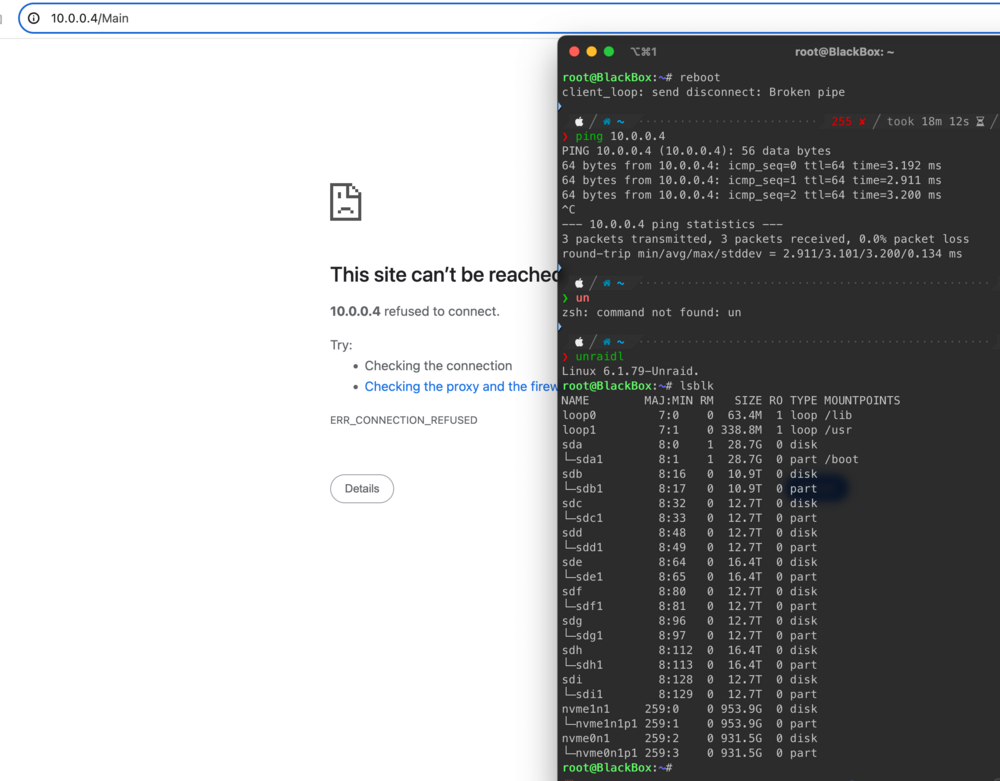
Oh, maybe it helpful - right now all 8 HDD`s connected via LSI controller, previously 4 were connected to LSI and 4 to motherboard. But command lsblk can return list of disks.
-
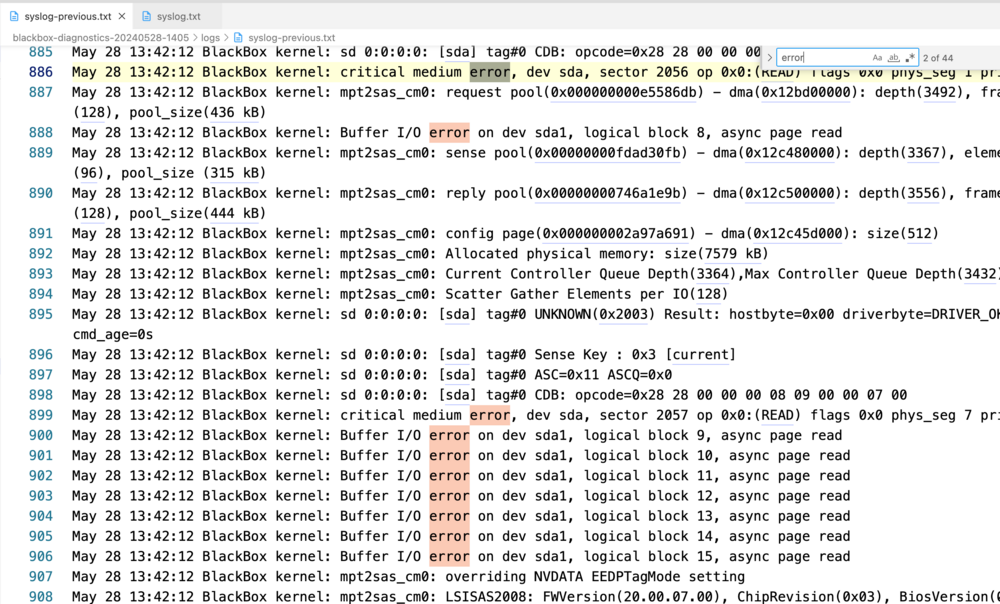
Tried, rebooted, changed cables. First reboot I couldn`t see GUI, but was able to login via ssh and removed network config, rebooted from ssh again and was able to see GUI. But array didn`t start, status "Starting " and that is it, created diagnostics archive (in attachment) and rebooted server again from console. And now again - don`t have GUI, but can login via ssh: Any ideas what should I do? I already copied all config folder from server, maybe need to remove all files from config folder and reboot one more time? Also, I checked logs from statistics archive and found few errors on sda drive, so maybe USB issue? May 28 13:42:12 BlackBox kernel: critical medium error, dev sda, sector 2057 op 0x0:(READ) flags 0x0 phys_seg 7 prio class 2 May 28 13:42:12 BlackBox kernel: Buffer I/O error on dev sda1, logical block 9, async page read May 28 13:42:12 BlackBox kernel: Buffer I/O error on dev sda1, logical block 10, async page read May 28 13:42:12 BlackBox kernel: Buffer I/O error on dev sda1, logical block 11, async page read May 28 13:42:12 BlackBox kernel: Buffer I/O error on dev sda1, logical block 12, async page read May 28 13:42:12 BlackBox kernel: Buffer I/O error on dev sda1, logical block 13, async page read May 28 13:42:12 BlackBox kernel: Buffer I/O error on dev sda1, logical block 14, async page read May 28 13:42:12 BlackBox kernel: Buffer I/O error on dev sda1, logical block 15, async page read May 28 13:42:12 BlackBox kernel: Buffer I/O error on dev sda1, logical block 8, async page read blackbox-diagnostics-20240528-1405.zip
-
Exactly, worked smoothly before... looks like it is now my turn to get this experience 👌 I thought to leave at least one ZFS drive for snapshots from nvme pool.
-
diagnosticS thanks! blackbox-diagnostics-20240526-2353.7z
-
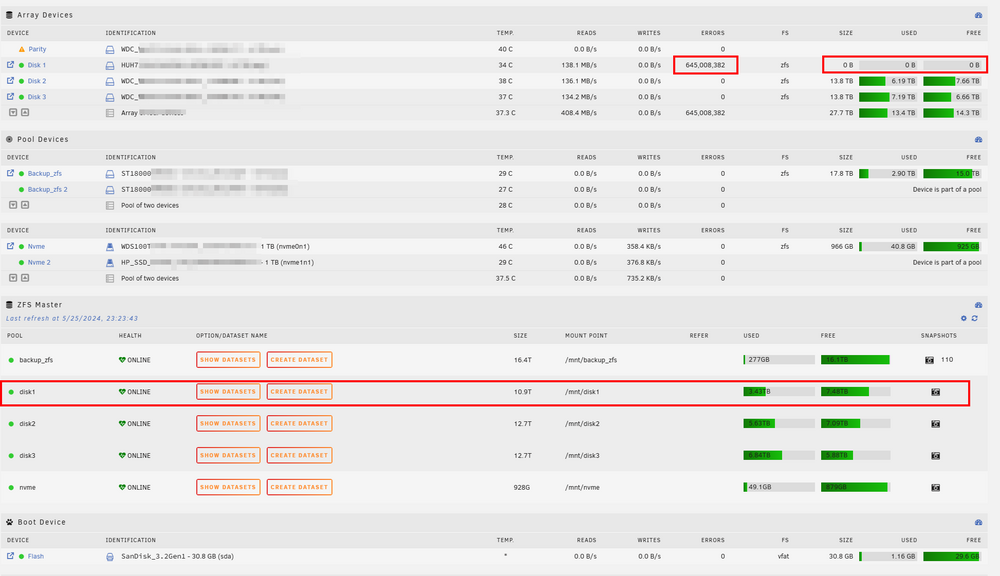
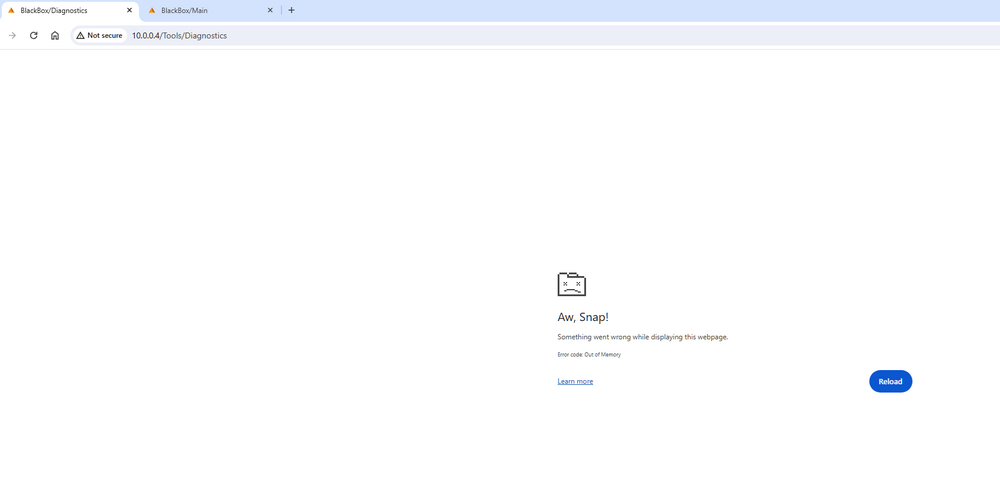
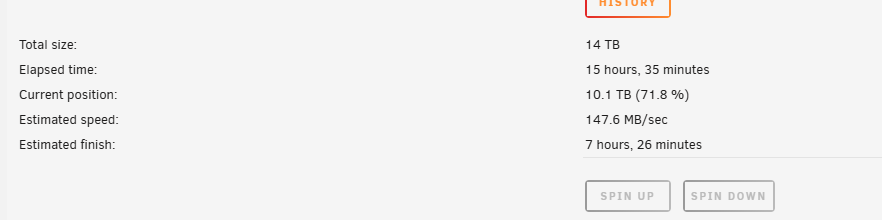
I executed yesterday ZFS scrub command on disk2 and after 14 hours see no issues: pool: disk2 state: ONLINE scan: scrub repaired 0B in 14:56:12 with 0 errors on Sun May 26 02:59:33 2024 config: NAME STATE READ WRITE CKSUM disk2 ONLINE 0 0 0 /dev/md2p1 ONLINE 0 0 0 errors: No known data errors Today I got errors on disk1 during parity sync (it is continue running) and according to screenshots - size is 0 and I can not open any files on this disk: pool: disk1 state: SUSPENDED status: One or more devices are faulted in response to IO failures. action: Make sure the affected devices are connected, then run 'zpool clear'. see: https://openzfs.github.io/openzfs-docs/msg/ZFS-8000-HC scan: scrub repaired 0B in 13:30:27 with 0 errors on Wed May 1 12:30:38 2024 config: NAME STATE READ WRITE CKSUM disk1 UNAVAIL 0 0 0 insufficient replicas /dev/md1p1 FAULTED 3 0 0 too many errors errors: 16 data errors, use '-v' for a list ZFS mirror "backup-zfs" still have the same status: pool: backup_zfs state: DEGRADED status: One or more devices could not be used because the label is missing or invalid. Sufficient replicas exist for the pool to continue functioning in a degraded state. action: Replace the device using 'zpool replace'. see: https://openzfs.github.io/openzfs-docs/msg/ZFS-8000-4J scan: scrub repaired 0B in 00:00:01 with 0 errors on Sat May 25 12:13:28 2024 config: NAME STATE READ WRITE CKSUM backup_zfs DEGRADED 0 0 0 mirror-0 DEGRADED 19 6.63K 0 /dev/sdd1 ONLINE 21 7.53K 0 /dev/sdb1 UNAVAIL 21 21.7K 0 errors: No known data errors A few months as I switched to ZFS and only yesterday it started happen and also what I don`t like that Unraid notified me only about these errors on disk1 during parity sync, nothing about ZFS DEGRADED or SUSPENDED statuses. I was trying to download diagnostic file, but it failed in chrome tab Will try to get it from boot/logs if it is created.
-
Hi! Today I faced very weird issues: pool: backup_zfs state: ONLINE status: One or more devices has experienced an unrecoverable error. An attempt was made to correct the error. Applications are unaffected. action: Determine if the device needs to be replaced, and clear the errors using 'zpool clear' or replace the device with 'zpool replace'. see: https://openzfs.github.io/openzfs-docs/msg/ZFS-8000-9P scan: scrub repaired 0B in 00:00:01 with 0 errors on Sat May 25 12:13:28 2024 config: NAME STATE READ WRITE CKSUM backup_zfs ONLINE 0 0 0 mirror-0 ONLINE 0 0 0 /dev/sdd1 ONLINE 0 0 0 /dev/sdb1 ONLINE 0 490 0 errors: No known data errors Another disk in array: pool: disk2 state: ONLINE status: One or more devices has experienced an error resulting in data corruption. Applications may be affected. action: Restore the file in question if possible. Otherwise restore the entire pool from backup. see: https://openzfs.github.io/openzfs-docs/msg/ZFS-8000-8A scan: scrub in progress since Sat May 25 12:03:21 2024 1.65T scanned at 1.28G/s, 255G issued at 197M/s, 5.63T total 0B repaired, 4.41% done, 07:57:55 to go config: NAME STATE READ WRITE CKSUM disk2 ONLINE 0 0 0 /dev/md2p1 ONLINE 0 0 0 errors: 5 data errors, use '-v' for a listhttps://openzfs.github.io/openzfs-docs/msg/ZFS-8000-8A Despite verifying the health of my disks and recreating the pool, I continue to encounter errors. Surprisingly, Unraid notifications remained silent, and I stumbled upon the issue while inspecting the pool status. I even ruled out data cable problems related to motherboard connectors or the LSI controller. Considering the persistent ZFS bug, I’m contemplating creating a Btrfs pool as an alternative. What should I do?
-
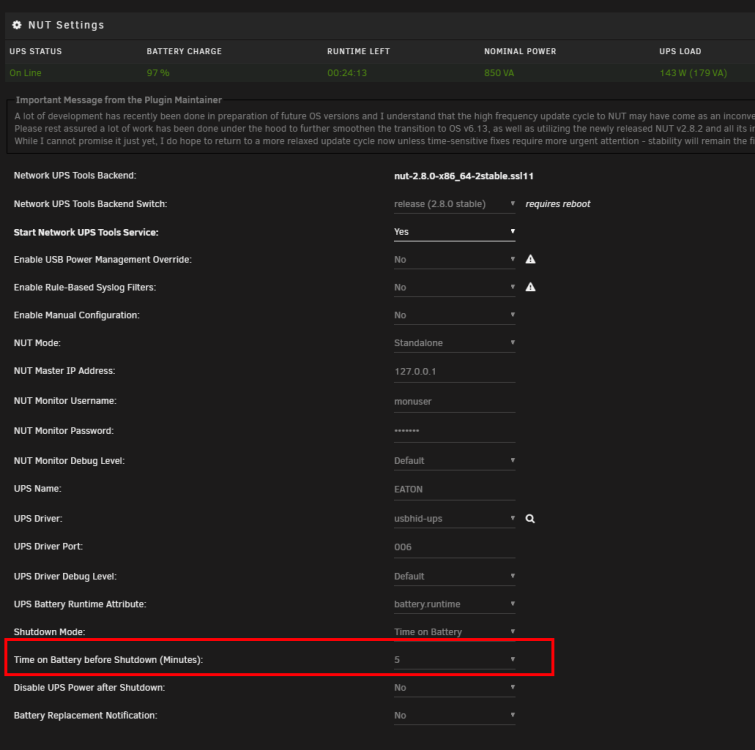
Sorry for weird question, but how can I change "Time on Battery before Shutdown " ? There is 5 minutes and all item are disabled.
-
Ah, thanks a lot. It is disabled.
-
I see in prometheus "Get "http://myIP:9100/metrics": dial tcp myIP:9100: connect: no route to host" Bu I can open myIP:9100 and see all information: # HELP go_gc_duration_seconds A summary of the pause duration of garbage collection cycles. # TYPE go_gc_duration_seconds summary go_gc_duration_seconds{quantile="0"} 2.7502e-05 go_gc_duration_seconds{quantile="0.25"} 3.3061e-05 go_gc_duration_seconds{quantile="0.5"} 3.9764e-05 go_gc_duration_seconds{quantile="0.75"} 4.5858e-05 go_gc_duration_seconds{quantile="1"} 6.8148e-05 go_gc_duration_seconds_sum 0.001682561 go_gc_duration_seconds_count 41 # HELP go_goroutines Number of goroutines that currently exist. # TYPE go_goroutines gauge go_goroutines 7 ...... Is it some issue in Prometheus Node Exporter plugin ?
-
How to install this awesome dashboard? I probably missed smt but don`t see some simple installation guide