





rorton
Members
-
Joined
-
Last visited
Everything posted by rorton
-
sorry only just got around to hooking the machine up to a monitor to test this. Ive looked through the BIOS and can only see something about above 4G which seems to be related to graphics. Ive set this to enabled anyway, but no difference. If I go into the memory section of the BIOS, it shows 2 4Gb sticks, but the main bios summary screen just shows the 4GB, most strange
-
Just tried upgrading to 7.1.0 and when rebooted, my parity and one array disk is missing. Diags attached - im just regressing back to 7.0.1 as I need the box running as there is a DNS docker on there I need for the house internet to work. unraid-diagnostics-20250506-2113.zip
-
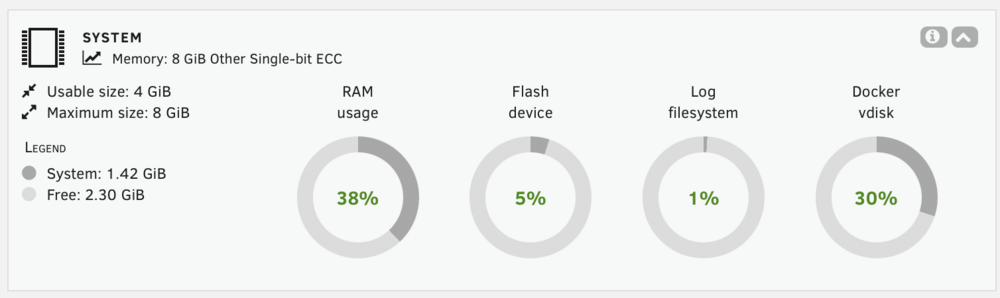
I have a second backup server setup, its an HP N40L microserver and installed are 2 x 4gb ECC sticks System profiler sees the 2 sticks ok, but htop, and the dashboard only seem to be addressing 4gb. Have attached diags. Any reason this is happening? Anything I have forgotten to do? backup-diagnostics-20250405-2258.zip
-
Not sure if it’s always been like this for me, but I can’t seem to view the running log of a script set to run in background. if I click the icon to view the log, a page opens up with an address of unraid.home/logging.htm and all that’s in that page is a button with the text UNDEFINED if I run a script in the foreground I can see it’s log running. Any ideas why this is happening?
-
hmm, looks like write cache isn't staying when rebooted. I tested last night, and was good, powered back up today, and not enabled, have enabled it again and transfer is now at around 600 - 650Mbps I just need to fix write cache so its on all the time, strange as my primary server doesn't have this problem
-
ah, spoke too soon once the disk cache (I assume) is full, speed drops back down again
-
think I have the solution! The backup server is an old chassis but a brand new install of Unraid with new disks. I was still getting it configured so hadn't installed plugins like fix common problems. Installed that, ran it, and it mentioned write cache not enabled on the hard disks! Switched it on, and boom, 650Mbps. nearly 3 x faster.
-
Just looking at smb copy. My concern is that I need to mount the shares for the destination host. my backup server is switched off most of the time, just switched on to run backups. how will the unassigned devices cope with the share disappearing and then reappearing? The beauty of doing this via ssh is it makes the connection as it needs it?
-
just installed GTPWOL and works great, I can use the gui to manually wake a machine on the lan. Im creating some scripts to do backups, and wondered if I could call the WOL tool from a script rather then having to use the cron scheduler in the gui to wake my server, then a separate script scheduled a few mins later to do the backup.
-
thanks, will try that, the sustained test was a 40GB mkv - im new to the backing up stuff and rsync in general, so I went reading and ssh seemed to be how a lot of people were doing it, ill see what happed with UD later on!
-
ok, done a test Reading from my primary machine to laptop over gig is at full line speed, no problems Writing from laptop to the backup server starts at full line speed, then after a while, the CPU gets unto high utilisation (its only an old HPN40L as a backup server with a Turion AMD Dual core 1.5g CPU), after 3 mins, the transfer drops to about 600Mbps So I know I can get line speed writing to the Backup Server not sustained, but it starts off at that at least. if I run the original test then, from Primary server to backup, using ssd drives at each end, then its stays around 500Mbps So could be the CPU is the factor at the remote end - but saying that, we can get 500Mbps ssd to ssd. That's 62.5MB/s, and they suggest a 3.5" spinning HD, 5400rpm should sustain 150 - 200MB/s When im copying from the Primary Server to laptop over gigabit, the data is on the parity array, so its reading from the array at gig line speed So im still thinking should be faster with a spinning disk? TBH, id he happy with 500Mbps from the spinning disks if they would do it.
-
need to setup some cabling, just wifi from laptop to network - will setup a gig switch port in same vlan and try it.
-
Recently setup a backup Unraid server, and moving files to it. Ive noticed that the copy speed is around 250Mbps (I have an SNMP app running detecting the speed of the interface) If I run iPerf between the 2 hosts, its full gig speed: [SUM] 0.00-10.00 sec 1.09 GBytes 935 Mbits/sec 71 sender [SUM] 0.00-10.00 sec 1.08 GBytes 924 Mbits/sec receiver My scripts are basic: echo -e "\n" echo "<b>***Backing up Appdata***<b>" rsync -avh /mnt/user/sysbackup/appdata/ [email protected]:/mnt/user/appdata/ --delete echo "<b>Finished Backing up appdata<b>" Any way to speed up rsync copies across a network? Backup server only had a single 4TB disk for now, no parity. I tried the same transfer with SSDs in both devices, and the speed did double, but that's still half of what gigabit is capable of (the data was scp'd from the ssd manually from the cli)
-
cheers will do
-
sadly no, when the machine was acting up, I just wanted to get it running, I did take some diags not long after I rebooted, but didnt capture anything before I rebooted
-
Had a strange one this weekend. Using the server as normal, went out, came back an hour later, and all the shares were gone. Read a few posts about what to do, and general consensus was a reboot, so stopped the array and rebooted. Device came backup, but with missing parity disk. Had to accept parity was missing and the array started. I assumed the disk had failed, so pulled the disk, put it in an external enclosure, it spun up ok, so put it back in the system, bought the system back up, and could assign the parity disk again - that's now calculating parity - after that's done, im going to run some smart tests and see if the disk is good. Unsure why it happened, but the stranger thing is, after putting the parity disk back in, one of my SSD's showed as missing. The SSD is a m.2 slot device direct on the motherboard. Went in to the BIOS and it's definitely not detected there either. Powered down, removed the ssd, re inserted the SSD, powered up, still not being detected in the BIOS. Looks like the SSD has died, so ive ordered another - im just wondering if the SSD dying caused the initial shares to disappear. Im guessing there is no historical logs I can go back and review?
-
you need to goto the cli of the docker container, and edit this file with vi or similar "/etc/cont-init.d/07-svc-cron.sh" add the below under existing section called echo "Creating LibreNMS cron artisan schedule:run" echo "Creating LibreNMS poller scheduler" echo "*/5 * * * * /opt/librenms/cronic /opt/librenms/poller-wrapper.py 16" >>${CRONTAB_PATH}/librenms Once you've added this, you need to stop/start the docker container, and then wait about 10/15 mins, then run validate again, and you should be running
-
Hi, the fix works great, thanks for sharing - I had a problem tho, where the file im editing seems to get overwritten. This evening ive had to add the line back into the file. Did you just go into the cli and using vi or similar, edit the file?
-
Hi. Struggling to get this to work are the line breaks at each of the echo lines (ie 2 entries to add into the svc.cron script? EDIT - got it working! In my 07-svc-cron.sh file, I already had an entry underneath echo "Creating LibreNMS poller scheduler". I added the entry echo "*/5 * * * * /opt/librenms/cronic /opt/librenms/poller-wrapper.py 16" >>${CRONTAB_PATH}/librenms and then hashed out the existing one, and it seems to work (at least I get no validate errors now)
-
I’ve been a long term user of LibreNMS. Works well
-
cheers, I thought I'd give it a go, its installed no problem, but got this message in the output: WARNING: Your kernel does not support swap limit capabilities or the cgroup is not mounted. Memory limited without swap.
-
Just popped in to say thank you, tried this today and worked perfectly, restored data and im up and running, very simple. I was looking at interest with the comments around the newer devices - sorry if this is taking the subject off topic - im also looking at a UXG Lite, but I have a config.json file running on my current usg3p to set certain things - IGMP Proxy for IoT devices on different vlan, and WAN DHCP Option 61 for SKY vdsl auth - unsure if these will work or there is an alternative to add this stuff into the newer devices. Assuming the config.json is gone now
-
That makes sense actually. I run adguard in a docker for all my network dns so I bet that my unraid it reaching out to the internet when there is no dns available till the docker is up
-
no problem, thanks for the reply though, much appreciated
-
I do have this in my syslog too... Aug 3 21:08:40 Unraid root: plugin: installing: vmbackup.plg Aug 3 21:08:40 Unraid root: plugin: creating: /boot/config/plugins/vmbackup/packages/xmlstarlet-1.6.1-x86_64-1_slonly.txz - downloading from URL https://raw.githubusercontent.com/jtok/unraid.vmbackup/master/packages/xmlstarlet-1.6.1-x86_64-1_slonly.txz if I then delete the plugin, and then reinstall, I see this in syslog... Aug 3 21:24:51 Unraid root: plugin: creating: /boot/config/plugins/vmbackup/packages/xmlstarlet-1.6.1-x86_64-1_slonly.txz - downloading from URL https://raw.githubusercontent.com/jtok/unraid.vmbackup/master/packages/xmlstarlet-1.6.1-x86_64-1_slonly.txz Aug 3 21:24:52 Unraid root: plugin: checking: /boot/config/plugins/vmbackup/packages/xmlstarlet-1.6.1-x86_64-1_slonly.txz - MD5 Aug 3 21:24:52 Unraid root: plugin: running: upgradepkg --install-new /boot/config/plugins/vmbackup/packages/xmlstarlet-1.6.1-x86_64-1_slonly.txz Aug 3 21:24:52 Unraid root: plugin: creating: /boot/config/plugins/vmbackup/vmbackup-v0.2.5-2022.12.25.txz - downloading from URL https://raw.githubusercontent.com/jtok/unraid.vmbackup/master/vmbackup-v0.2.5-2022.12.25.txz Aug 3 21:24:52 Unraid root: plugin: checking: /boot/config/plugins/vmbackup/vmbackup-v0.2.5-2022.12.25.txz - MD5 Aug 3 21:24:52 Unraid root: plugin: running: upgradepkg --install-new /boot/config/plugins/vmbackup/vmbackup-v0.2.5-2022.12.25.txz Aug 3 21:24:55 Unraid root: plugin: vmbackup.plg installed

