





rorton
Members
-
Joined
-
Last visited
Everything posted by rorton
-
sorry, I may have been assuming what @CodeGlitcher was experiencing was the same, is it is sort of uninstalling itself. My issue is that when I reboot, the box comes up and the plug-in sits in the Plugin file install errors (as image) If I delete and then manually install again, it works. I have just rebooted to get the screenshot, if there are any logs I can provide from anywhere please let me know Im using 6.12.3, and has been happening on all 6.12 versions
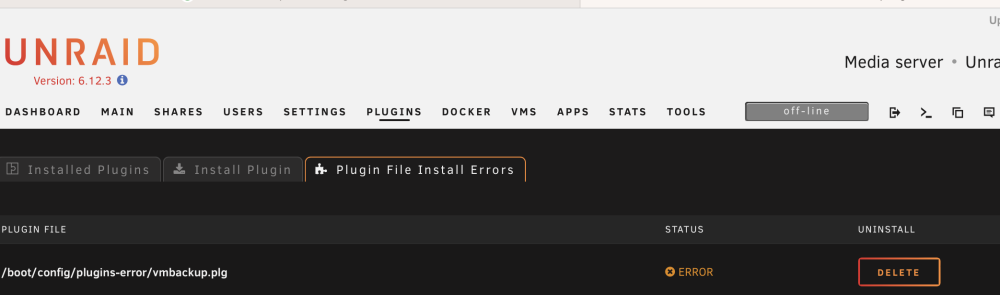
-
Just to say I have the same problem. Any time I reboot my server, this plugin appears n a list of plugins with errors. I can delete the plugin, reinstall and it works perfectly till the next reboot.
-
What ive just done, is build an Ubuntu VM and set this up as a VPN Server if you like, Its running Ubuntu server, and at the moment, I have a wireguard vpn connection to NORD VPN. My Ubuntu VPN VM has 2 interfaces, an external (going to the internet) and an internal (facing the network) and what I did, was changed the default gateway of the devices I want to go over the VPN to be the internal IP of the VPN VM, and my other devices have a normal default gateway and go out to the internet normally. Works well.
-
im struggling to get this to run. In my docker container log , I get the below... [2022-08-14T23:40:43+00:00] Enabling connection to eth0 192.168.1.9/25 [2022-08-14T23:40:43+00:00] Enabling connection to secure interfaces [2022-08-14T23:40:43+00:00] No interface network6 detected [2022-08-15T00:40:43+01:00] Enabling connection to network 192.168.0.0/16 [custom-init] no custom files found exiting... [ls.io-init] done. [2022-08-15T00:40:43+01:00] Finding the best server... [2022-08-15T00:41:40+01:00] Unable to select a server ¯\_(⊙︿⊙)_/¯ My docker command that runs.... root@localhost:# /usr/local/emhttp/plugins/dynamix.docker.manager/scripts/docker run -d --name='nordlynx' --net='br0.1' --ip='192.168.1.9' -e TZ="Europe/London" -e HOST_OS="Unraid" -e HOST_HOSTNAME="Unraid" -e HOST_CONTAINERNAME="nordlynx" -e 'PRIVATE_KEY'='MYKEYHERE' -e 'QUERY'='' -e 'NET_LOCAL'='192.168.0.0/16' -l net.unraid.docker.managed=dockerman -l net.unraid.docker.icon='https://s1.nordcdn.com/nordvpn/media/1.1527.0/images/global/logos/square/nordvpn-48.svg' --cap-add=NET_ADMIN --sysctl net.ipv4.conf.all.src_valid_mark=1 --sysctl net.ipv6.conf.all.disable_ipv6=1 'bubuntux/nordlynx' 042fa609105b4556acdc6d57fb5229c82e2d1a3694aa221d608554fdf55f105c
-
I did think that, but I have a USG and apparently the throughput really takes a hit
-
Is it possible to set this up to allow other hosts on your network to use the wireguard vpn for their traffic? for example, I have. Few smart tvs and fire sticks I’d like to send their traffic over a vpn, but everything else on my network to go out via my normal isp to the internet?
-
I did a backup of my config and went for the upgrade - all seemed ok, it did its usual upgrading database thing when it started up, but all running so far.
-
thanks, thats a great idea!
-
Ive resorted to giving each of my docker containers a dedicated static IP address instead of sharing the hosts address and it all works now so will mark this as resolved
-
thinking about this then.... I have an Unraid Server in 192.168.10.8 with a number of docker containers running on separate ports. One of these docker containers needs to make a DNS request, so another docker container in a different subnet 192.168.1.11 The request leaves 192.168.10.8, I see this in a tcp dump, gets to the router/firewall, and then leave the router/firewall on the 192.168.1.11 interface, dns does its thing, gives an IP address back, this gets to the firewall, then nothing happens, I dont see the packet again at the firewall. Now, if I have a host in the 192.168.10.0/25 network, like my Mac for example, I can make and resolve dns no problem at all with the docker container.
-
Also, forgot to add that my previous dns server was not a docker container, it was a rasp pi running pi hole, in the same subnet, it had an ip of 192.168.1.14. I think maybe I have something wrong with how my docker is setup for networking
-
Done a bit more testing. For info, my unraid is in 192.168.10.0/25 and DNS Server 192.168.1.0/25, thus my traffic has to go via my router/firewall (which is a USG) to get between the networks. As such, I can do a tcpdump on the dest subnet interface (the 192.168.1.0 network) and if I do an NSLOOKUP from inside the docker container for something like Amazon .co.uk, I can see the request... 14:40:27.089533 IP 192.168.10.8.56750 > 192.168.1.11.domain: 23259+ A? amazon.co.uk. (30) 14:40:27.090166 IP 192.168.10.8.56750 > 192.168.1.11.domain: 23259+ A? amazon.co.uk. (30) 14:40:27.115705 IP 192.168.1.11.domain > 192.168.10.8.34893: 23259 3/0/0 A 54.239.34.171, A 178.236.7.220, A 54.239.33.58 (78) my 192.168.10.8 address is the unraid box, so I see unraid make a DNS request to my DNS Server 192.168.1.11, and I see my DNS Server respond back with the IPs, so the docker container is making the request by the look of it. if I then tcp dump by interface in the 192.168.10.0 subnet, where the unraid box is, I see the initial request go out (good, we see that also on the vlan where the DNS Server is) but I dont see the reply.
-
Yep thats looks fine from the GUI toolbar, same as an ssh session to the Unraid box itself. , can ping out to bbc.co.uk, and can also nslookup bcc.co.uk and it talks to the new DNS Server I have setup and resolves the name ok I tried from inside on of the dockers consoles and cant get a resolution... root@7d549749badd:/# ping bbc.co.uk ping: bad address 'bbc.co.uk' root@7d549749badd:/# nslookup bbc.co.uk ;; connection timed out; no servers could be reached root@7d549749badd:/#
-
sorry, did you mean from inside Unraid or the docker container itself?
-
hi, all seems to be fine from Unraid OS itself, nslookups happen from the CLI and reference the new DNS Server, and the docker containers im running that have dedicated IP's also seem to resolve OK, it just seems to be an issue with the containers sharing the Unraid IP with separate port numbers
-
Ive configured a new DNS server on my network - old server ip 192.168.1.14 - new one is 192.168.1.11. I stopped the array, changed the ipv4 DNS Server in the NIC to the new address, restarted the array, and now docker containers that are using the bridged network connection (serverIP:port number, such as sonaar, nzbhydra etc) can no longer perform DNS lookups. Ive rebooted the server, no difference, if I stop the array, and change the DNS Server back to the old address, start the array, it all works perfectly again. I tried deleting one of the offending docker containers, and reloaded it, along with a new config directory, still the same. Any ideas - have I missed a setting somewhere? Thanks
-
So this maybe an odd scenario I need to deploy VM's of firewalls to test, they only have a 30 day licence, and then have to be rebuilt. Is there a fast way of having everything configured as a template for one of these vm's pointing to an iso, so I can just click a few times, start one up and it builds - if these were physical boxes I was building, I could script the config so I have a baseline config (management IP dns servers, basic password etc) which I was hoping I could also use
-
Im getting this error about not being able to run the script, even though it still exists, im running it manually now and its running fine, but the scheduling bit of the plugin doesnt wanna find it for some reason? Event: Unraid Status Subject: VM Backup plugin Description: cannot run /boot/config/plugins/vmbackup/configs/Weekly_Backups/ Importance: warning 2022-05-22 04:40 User script file does not exist. Exiting.
-
Thanks. Will try it. Do you have number of backups and number of days both set?
-
Hi, having issues with the plugin removing old backups. I have number of backups to keep set to 2 at the moment. I have a Windows 10 VM, and this works perfectly, the script runs, backs up, and then deletes any other than 2 versions, no problem - the file type is .img. I have 2 other VMs, LibreNMS which is also a .img file, and Home Assistant which is a qcow2 file. When the backup runs, it deletes all the config related files for any backup over 2, but doesnt actually remove the disk image, so im left with manually having to clear out just the disk images. Ive pasted the log from the last back-up job, and highlighted this... 2022-05-08 06:05:47 information: backup of /mnt/user/vms/librenms/old_librenms-ubuntu-20.04-amd64.img vdisk to /mnt/user/sysbackup/vms/autobackup/LibreNMS/20220508_0440_old_librenms-ubuntu-20.04-amd64.img complete. 2022-05-08 06:05:47 information: the extensions of the vdisks that were backed up are img. 2022-05-08 06:05:47 information: vm_state is shut off. vm_original_state is running. starting LibreNMS. 2022-05-08 06:05:48 information: backup of LibreNMS to /mnt/user/sysbackup/vms/autobackup/LibreNMS completed. 2022-05-08 06:05:48 information: number of days to keep backups set to indefinitely. 2022-05-08 06:05:48 information: cleaning out backups over 2 in location /mnt/user/sysbackup/vms/autobackup/LibreNMS/ 2022-05-08 06:05:48 information: removed '/mnt/user/sysbackup/vms/autobackup/LibreNMS/20220424_0440_LibreNMS.xml' config file. 2022-05-08 06:05:48 information: did not find any nvram files to remove. 2022-05-08 06:05:48 information: did not find any vdisk image files to remove. So the backup says it cant find a disk image to remove, but looking in the directory, its there...(24th April 2022) -rw-r--r-- 1 root root 20G Apr 24 05:47 20220424_0440_old_librenms-ubuntu-20.04-amd64.img -rw-rw-rw- 1 root root 6.4K May 1 05:39 20220501_0440_LibreNMS.xml -rw-r--r-- 1 root root 20G May 1 05:44 20220501_0440_old_librenms-ubuntu-20.04-amd64.img -rw-rw-rw- 1 root root 2.6K May 1 05:44 20220501_0440_unraid-vmbackup.log -rw-rw-rw- 1 root root 6.4K May 8 05:59 20220508_0440_LibreNMS.xml -rw-r--r-- 1 root root 20G May 8 06:05 20220508_0440_old_librenms-ubuntu-20.04-amd64.img -rw-rw-rw- 1 root root 2.8K May 8 06:05 20220508_0440_unraid-vmbackup.log Any ideas why its happy with the Windows 10 backup, sees the img file, and deletes anything older than 2 files, but won't do this for LibreNMS (and the qcow2 for the other VM) but does delete all the other data older than 2 for the other vms? Thanks 20220508_0440_unraid-vmbackup.log
-
does anyone know how to get the distribution to report back 'Unraid' instead of linux Unraid? I have librenms discovering my unraid server, but it detects it as Linux 5.10.28-Unraid, and LibreNMS then gives it a basic Linux Penguin Icon, and apparently, I need it just to return unraid This is a script they give you to put into /usr/bin and call it distro Ive done this, made it executable, but it returns Slackware 14.2 #!/usr/bin/env bash # Detects which OS and if it is Linux then it will detect which Linux Distribution. OS=`uname -s` REV=`uname -r` MACH=`uname -m` if [ "${OS}" = "SunOS" ] ; then OS=Solaris ARCH=`uname -p` OSSTR="${OS} ${REV}(${ARCH} `uname -v`)" elif [ "${OS}" = "AIX" ] ; then OSSTR="${OS} `oslevel` (`oslevel -r`)" elif [ "${OS}" = "Linux" ] ; then KERNEL=`uname -r` if [ -f /etc/fedora-release ]; then DIST=$(cat /etc/fedora-release | awk '{print $1}') REV=`cat /etc/fedora-release | sed s/.*release\ // | sed s/\ .*//` elif [ -f /etc/redhat-release ] ; then DIST=$(cat /etc/redhat-release | awk '{print $1}') if [ "${DIST}" = "CentOS" ]; then DIST="CentOS" elif [ "${DIST}" = "Mandriva" ]; then DIST="Mandriva" PSEUDONAME=`cat /etc/mandriva-release | sed s/.*\(// | sed s/\)//` REV=`cat /etc/mandriva-release | sed s/.*release\ // | sed s/\ .*//` elif [ -f /etc/oracle-release ]; then DIST="Oracle" else DIST="RedHat" fi PSEUDONAME=`cat /etc/redhat-release | sed s/.*\(// | sed s/\)//` REV=`cat /etc/redhat-release | sed s/.*release\ // | sed s/\ .*//` elif [ -f /etc/mandrake-release ] ; then DIST='Mandrake' PSEUDONAME=`cat /etc/mandrake-release | sed s/.*\(// | sed s/\)//` REV=`cat /etc/mandrake-release | sed s/.*release\ // | sed s/\ .*//` elif [ -f /etc/devuan_version ] ; then DIST="Devuan `cat /etc/devuan_version`" REV="" elif [ -f /etc/debian_version ] ; then DIST="Debian `cat /etc/debian_version`" REV="" ID=`lsb_release -i | awk -F ':' '{print $2}' | sed 's/ //g'` if [ "${ID}" = "Raspbian" ] ; then DIST="Raspbian `cat /etc/debian_version`" fi elif [ -f /etc/gentoo-release ] ; then DIST="Gentoo" REV=$(tr -d '[[:alpha:]]' </etc/gentoo-release | tr -d " ") elif [ -f /etc/arch-release ] ; then DIST="Arch Linux" REV="" # Omit version since Arch Linux uses rolling releases IGNORE_LSB=1 # /etc/lsb-release would overwrite $REV with "rolling" elif [ -f /etc/os-release ] ; then DIST=$(grep '^NAME=' /etc/os-release | cut -d= -f2- | tr -d '"') REV=$(grep '^VERSION_ID=' /etc/os-release | cut -d= -f2- | tr -d '"') elif [ -f /etc/openwrt_version ] ; then DIST="OpenWrt" REV=$(cat /etc/openwrt_version) elif [ -f /etc/pld-release ] ; then DIST=$(cat /etc/pld-release) REV="" elif [ -f /etc/SuSE-release ] ; then DIST=$(echo SLES $(grep VERSION /etc/SuSE-release | cut -d = -f 2 | tr -d " ")) REV=$(echo SP$(grep PATCHLEVEL /etc/SuSE-release | cut -d = -f 2 | tr -d " ")) fi if [ -f /etc/lsb-release -a "${IGNORE_LSB}" != 1 ] ; then LSB_DIST=$(lsb_release -si) LSB_REV=$(lsb_release -sr) if [ "$LSB_DIST" != "" ] ; then DIST=$LSB_DIST fi if [ "$LSB_REV" != "" ] ; then REV=$LSB_REV fi fi if [ "`uname -a | awk '{print $(NF)}'`" = "DD-WRT" ] ; then DIST="dd-wrt" fi if [ -n "${REV}" ] then OSSTR="${DIST} ${REV}" else OSSTR="${DIST}" fi elif [ "${OS}" = "Darwin" ] ; then if [ -f /usr/bin/sw_vers ] ; then OSSTR=`/usr/bin/sw_vers|grep -v Build|sed 's/^.*:.//'| tr "\n" ' '` fi elif [ "${OS}" = "FreeBSD" ] ; then OSSTR=`/usr/bin/uname -mior` fi echo ${OSSTR}
-
Great plugin, but i have a few oddities when the plugin runs at it schedule time, i get an email that says... Description: cannot run /boot/config/plugins/vmbackup/configs/Weekly_Backups/, and yet the plug does seem to run. When it running, it seems to take a copy of an existing backup first, 2021-12-05 15:31:47 information: copy of backup of /mnt/user/sysbackup/vms/autobackup/LibreNMS/20211205_0440_librenms-ubuntu-20.04-amd64.img vdisk to /mnt/user/sysbackup/vms/autobackup/LibreNMS/20211205_1527_librenms-ubuntu-20.04-amd64.img starting. '/mnt/user/sysbackup/vms/autobackup/LibreNMS/20211205_0440_librenms-ubuntu-20.04-amd64.img' -> '/mnt/user/sysbackup/vms/autobackup/LibreNMS/20211205_1527_librenms-ubuntu-20.04-amd64.img' 2021-12-05 15:36:48 information: copy of /mnt/user/sysbackup/vms/autobackup/LibreNMS/20211205_0440_librenms-ubuntu-20.04-amd64.img to /mnt/user/sysbackup/vms/autobackup/LibreNMS/20211205_1527_librenms-ubuntu-20.04-amd64.img complete. Then the backup runs, but it cant see any other files to remove in the backup directory, so im gradually building up backup files even though i have the number of files to keep set to 2... 2021-12-05 15:40:57 information: copy of /mnt/user/vms/librenms/librenms-ubuntu-20.04-amd64.img to /mnt/user/sysbackup/vms/autobackup/LibreNMS/20211205_1527_librenms-ubuntu-20.04-amd64.img complete. 2021-12-05 15:40:57 information: backup of /mnt/user/vms/librenms/librenms-ubuntu-20.04-amd64.img vdisk to /mnt/user/sysbackup/vms/autobackup/LibreNMS/20211205_1527_librenms-ubuntu-20.04-amd64.img complete. 2021-12-05 15:40:57 information: the extensions of the vdisks that were backed up are img. 2021-12-05 15:40:57 information: vm_state is shut off. vm_original_state is running. starting LibreNMS. Domain LibreNMS started 2021-12-05 15:40:59 information: backup of LibreNMS to /mnt/user/sysbackup/vms/autobackup/LibreNMS completed. 2021-12-05 15:40:59 information: number of days to keep backups set to indefinitely. 2021-12-05 15:40:59 information: cleaning out backups over 2 in location /mnt/user/sysbackup/vms/autobackup/LibreNMS/ 2021-12-05 15:40:59 information: removed '/mnt/user/sysbackup/vms/autobackup/LibreNMS/20211128_1302_LibreNMS.xml' config file. 2021-12-05 15:40:59 information: did not find any nvram files to remove. 2021-12-05 15:40:59 information: did not find any vdisk image files to remove. 2021-12-05 15:40:59 information: removed '/mnt/user/sysbackup/vms/autobackup/LibreNMS/20211128_1302_unraid-vmbackup.log' vm log file. 2021-12-05 15:40:59 information: removing local LibreNMS.xml. removed 'LibreNMS.xml'
-
Hi, running an Ubuntu 20.04 VM (its an appliance, provided by LibreNMS) and am struggling to get it to resolve internal IP addresses on my LAN. I have a PiHole acting as my local DNS Server - all my clients on my network point to the PiHole, and they can all resolve local addresses set-up in there, EG, if I ping the name UnRaid from a client, it resolves fine to 192.168.10.8 Now, on the Ubuntu box, this doesn't work, I can't ping anything local. I can ping stuff on the internet (ping bcc.co.uk for example) and that's perfect, its just the internal hosts. If I do an NSLOOKUP for 192.168.10.8 (the IP of the unraid box) I do get a response.. nslookup 192.168.10.8 8.10.168.192.in-addr.arpa name = UnRaid. But if I PING UnRaid from the Ubuntu box I get ping: unraid: Temporary failure in name resolution Any ideas? Im using Netplan to setup and my Netplan.yaml file is: network: version: 2 renderer: networkd ethernets: enp2s0: dhcp4: no addresses: [192.168.1.13/25] gateway4: 192.168.1.1 nameservers: addresses: [192.168.1.14]
-
forgot to mention, looking at my auto backups done within the app, they stopped some time in 2019 - so I think the corruption has been there for a good while
-
hi, yep, that works perfectly. At the moment, I have managed to install the 'older' docker container (5.13.32) and point it at my data and its working OK. My only problem is backups now. Every time I try to back up in the app - it fails. I can't seem to run 5.14 with my app data, so my logic was, work on 5.13, get it backing up, then build a new 5.14, and import the backup. I think I have corrupt db.


