





L0k1
Members
-
Joined
-
Last visited
-
Pass them through individually rather than (or in addition to) using the /mnt/user directory.
-
Certainly does. Thanks. This seems like a perfect middle ground between VM's and Docker, I can see myself using it for quite a few things so thanks for making it. The snapshotting and backup functionality are especially useful.
-
I've installed casaos inside an ubuntu container (to test out docker containers without polluting unraid) and it is able to see all my drives. lsblk lists them all out. Do I have to be careful here? Can I somehow hide my drives from the container?
-
Looking to get this working with a linux guest, I've read through the thread and it seems that this (at least in the past) required an identical kernel in the host and guest. I've read conflicting info elsewhere making it seem this may no longer be the case? Can it be made to with with a generic guest kernel? I've tried but the VM hangs on boot with a rombar error. Edited to add: I don't need graphics output from the guest, just wanting to pass the GPU through for transcoding while still being able to use it from the host.
-
Thanks, pretty sure I chose virtiofs but I've enabled/disabled it so many times troubleshooting it I must have picked 9p by mistake. Everything working now (well, except the VNC console seems to have broke now that I have it set to virtiofs, but that's not overly important and I'll look into it another time).
-
Please see my edit, I probably wouldn't have run into this problem had I set it up from the start but adding it to an existing VM changes the name of the interface. Thanks for looking. I've only been able to mount it with mount -t 9p -o trans=virtio ... rather than mount -v -t virtiofs ... but I guess that doesn't matter?
-
To eliminate that being the problem I've moved the VM to vhost0 and still get the same. It was using a static IP but I've changed it to DHCP so I can switch between networks, without virtiofs it gets an IP and connectivity, enabling virtiofs in the config kills the guest's networking. Edit: I've fixed it. Enabling virtiofs changes the network interface name, it was enp1s0 when I use virtiofs it gets changed to enp3s0. Working now. What's the recommended fstab syntax to have it auto mount?
-
virbr1 is a bridge I created to connect VM's directly to my pfSense VM, there shouldn't be any NAT. This is it's definition; The CasaOS VM connects to the pfSense VM through this so I can firewall it and keep it off my main network.
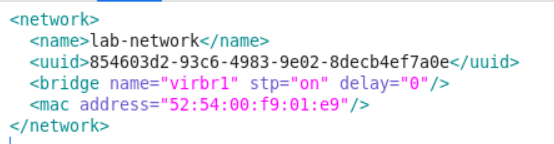
-
Sure, diagnostics attached, you'll find a bunch of old junk in there (the setup has gone through quite a few changes over the years, I've moved a few VM's and libvirt is complaining that I haven't updated the definitions). The VM in question is CasaOS, running on ubuntu jammy. Edit: I've just gone through the diagnostics myself as I was concerned that they might contain passwords, they do so I've removed them.
-
If I try to add virtiofs/9p to an existing ubuntu VM it hangs here for a few minutes; It does eventually boot but the network doesn't come up. I can mount the passed through directory from within the guest but networking is dead. If I manually bring the interface up it doesn't get an IP address. If I remove virtiofs from the VM config it goes back to normal and networking works. Any ideas?

-
Some read/writes are going to happen (lots of writing is the thing you really want to avoid to prolong the life of the USB). I wouldn't worry about a few small config files. You can do it either way but copying everything back and forth everytime you make a change is too much of a PITA if you ask me.
-
"ln -s /boot/custom/.config /root/.config" was just an example, you'd have to create the /boot/custom/.config directory and put your files there. You can also do something like; ln -s /boot/config/my_custom_scripts/telegramCodeHTML.sh /usr/local/bin/
-
Unraid runs from RAM the files in /root won't be saved. Instead of copying them back and forth i'd just softlink to them, e.g. put; ln -s /boot/custom/.config /root/.config In your /boot/config/go file. This behavior is by design, to minimize reading/writing to the boot flash drive.
-
Have you had any luck with this? I've been trying to get something similar up and running.
-
I've come up with a workaround but my plan was to move all my mission critical containers to this network and this setup seems too fragile to be able to do that. I'm currently running this at start of the array with the userscripts plugin; #!/bin/bash sleep 30 # Define the name of the network network_name="lab_net" subnet="192.168.100.0/24" gateway="192.168.100.1" # Check if the network exists if ! docker network inspect $network_name > /dev/null 2>&1; then echo "Docker network $network_name not found." exit 1 fi # List all containers using the network and make sure they're stopped containers=$(docker ps -a --filter "network=$network_name" --format '{{.Names}}') if [ -z "$containers" ]; then echo "No containers are connected to network $network_name." else for container_name in $containers; do docker stop $container_name echo "Stopped container: $container_name" done fi # Remove the network docker network rm $network_name # Recreate the network docker network create \ -d ipvlan \ --subnet=$subnet \ --gateway=$gateway \ -o ipvlan_mode=l2 \ -o parent=virbr1 \ -o com.docker.network.bridge.enable_icc=false \ $network_name # Connect containers to new network and start if [ -z "$containers" ]; then echo "No containers to start." else for container_name in $containers; do docker network connect $network_name $container_name docker start $container_name echo "Started container: $container_name" done fi Could really do with somebody who knows the unraid internals investigating why the network doesn't work to begin with, I think the proper solution may be to ensure virbr1 gets created before docker comes up. Does unraid start docker before libvirt? Any way to change this behaviour?

