





Joshwaaa
Members
-
Joined
-
Last visited
Everything posted by Joshwaaa
-
Thank you! Much appreciated!
-
I found that link by going here: https://docs.unraid.net/legacy/FAQ/replacing-a-data-drive/ but it seems I can't use that procedure because my drive will be bigger than the parity.
-
When I first got into unraid a few years back I bought a used HPE gen10 microserver that came with two 4TB drives that were used. I haven't had any problems but I wanted to get new and larger drives as my data is growing. Is there a guide or a step-by-step to do this on version 6.12.4? I tried to find it in the documentation but it's going to a dead link and I'm really not sure I was in the right place. Here's where I looked: https://docs.unraid.net/legacy/FAQ/replacing-a-data-drive/parity-swap-procedure.md/ Can someone direct me to the right procedure or copy and paste it here so I don't screw it up? Thanks in advance!
-
If you find yourself in this situation mine did work after updating the bios.
-
@steve1977Yeah I'm on a Lenovo p520 Xeon 3.70GHz W-2145. I threw in a windows nmve today and updated the bios that way to an August release of this year. I am going to uplug my array, use some old hdd, and try out a trial usb with 6.12.5 on it tonight.
-
@abhi.ko did you ever get this worked out? I luckily had a flash backup of 6.11.5 before I upgraded. I had to wipe my flash and put 6.11.5 back on it and running makebootable. I'm fine but unfortunately stuck for now. Was hoping to upgrade and get zfs going.
-
What did you rename it? I just upgraded from 6.11.5 to 6.12.4 and it's been rebooting for 1250 seconds.
-
I've been looking into this server. How is the power usage?
-
Did you happen to find this when trying to create a new proxy host? I have the same issue.
-
There's a forum abou this but I think it was in the wrong place. I was searching for it and stumbled on it. https://forums.unraid.net/topic/142123-scrolling-out-of-memory-log-errors/ . Regardless, i'm having similar issues. Any idea of the cause and any solution? Basically this on loop. 2023/07/23 20:28:00 [error] 2916#2916: *1201991 nchan: error publishing message (HTTP status code 500), client: unix:, server: , request: "POST /pub/devices?buffer_length=1 HTTP/1.1", host: "localhost" 2023/07/23 20:28:00 [error] 2916#2916: MEMSTORE:00: can't create shared message for channel /devices 2023/07/23 20:28:01 [crit] 2916#2916: ngx_slab_alloc() failed: no memory 2023/07/23 20:28:01 [error] 2916#2916: shpool alloc failed 2023/07/23 20:28:01 [error] 2916#2916: nchan: Out of shared memory while allocating message of size 7048. Increase nchan_max_reserved_memory. 2023/07/23 20:28:01 [error] 2916#2916: *1202000 nchan: error publishing message (HTTP status code 500), client: unix:, server: , request: "POST /pub/devices?buffer_length=1 HTTP/1.1", host: "localhost" 2023/07/23 20:28:01 [error] 2916#2916: MEMSTORE:00: can't create shared message for channel /devices 2023/07/23 20:28:02 [crit] 2916#2916: ngx_slab_alloc() failed: no memory 2023/07/23 20:28:02 [error] 2916#2916: shpool alloc failed 2023/07/23 20:28:02 [error] 2916#2916: nchan: Out of shared memory while allocating message of size 7048. Increase nchan_max_reserved_memory. 2023/07/23 20:28:02 [error] 2916#2916: *1202009 nchan: error publishing message (HTTP status code 500), client: unix:, server: , request: "POST /pub/devices?buffer_length=1 HTTP/1.1", host: "localhost" 2023/07/23 20:28:02 [error] 2916#2916: MEMSTORE:00: can't create shared message for channel /devices 2023/07/23 20:28:03 [crit] 2916#2916: ngx_slab_alloc() failed: no memory 2023/07/23 20:28:03 [error] 2916#2916: shpool alloc failed 2023/07/23 20:28:03 [error] 2916#2916: nchan: Out of shared memory while allocating message of size 7036. Increase nchan_max_reserved_memory. 2023/07/23 20:28:03 [error] 2916#2916: *1202016 nchan: error publishing message (HTTP status code 500), client: unix:, server: , request: "POST /pub/devices?buffer_length=1 HTTP/1.1", host: "localhost" 2023/07/23 20:28:03 [error] 2916#2916: MEMSTORE:00: can't create shared message for channel /devices 2023/07/23 20:28:04 [crit] 2916#2916: ngx_slab_alloc() failed: no memory 2023/07/23 20:28:04 [error] 2916#2916: shpool alloc failed 2023/07/23 20:28:04 [error] 2916#2916: nchan: Out of shared memory while allocating message of size 7036. Increase nchan_max_reserved_memory. 2023/07/23 20:28:04 [error] 2916#2916: *1202027 nchan: error publishing message (HTTP status code 500), client: unix:, server: , request: "POST /pub/devices?buffer_length=1 HTTP/1.1", host: "localhost" 2023/07/23 20:28:04 [error] 2916#2916: MEMSTORE:00: can't create shared message for channel /devices 2023/07/23 20:28:05 [crit] 2916#2916: ngx_slab_alloc() failed: no memory 2023/07/23 20:28:05 [error] 2916#2916: shpool alloc failed 2023/07/23 20:28:05 [error] 2916#2916: nchan: Out of shared memory while allocating message of size 7039. Increase nchan_max_reserved_memory. 2023/07/23 20:28:05 [error] 2916#2916: *1202036 nchan: error publishing message (HTTP status code 500), client: unix:, server: , request: "POST /pub/devices?buffer_length=1 HTTP/1.1", host: "localhost" 2023/07/23 20:28:05 [error] 2916#2916: MEMSTORE:00: can't create shared message for channel /devices 2023/07/23 20:28:06 [crit] 2916#2916: ngx_slab_alloc() failed: no memory 2023/07/23 20:28:06 [error] 2916#2916: shpool alloc failed 2023/07/23 20:28:06 [error] 2916#2916: nchan: Out of shared memory while allocating message of size 7039. Increase nchan_max_reserved_memory. 2023/07/23 20:28:06 [error] 2916#2916: *1202046 nchan: error publishing message (HTTP status code 500), client: unix:, server: , request: "POST /pub/devices?buffer_length=1 HTTP/1.1", host: "localhost" 2023/07/23 20:28:06 [error] 2916#2916: MEMSTORE:00: can't create shared message for channel /devices 2023/07/23 20:28:07 [crit] 2916#2916: ngx_slab_alloc() failed: no memory 2023/07/23 20:28:07 [error] 2916#2916: shpool alloc failed 2023/07/23 20:28:07 [error] 2916#2916: nchan: Out of shared memory while allocating message of size 7045. Increase nchan_max_reserved_memory.
-
Same. I don't think you'll get much response here. I'm going to post this in the NPM forum but there's not a lot of action there either.
-
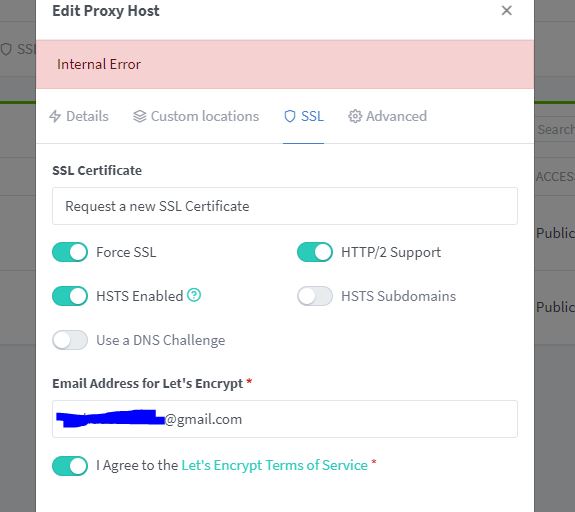
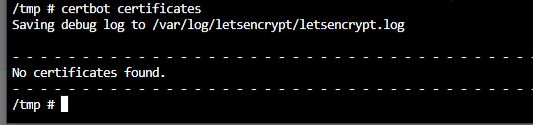
If anyone comes across this and happens to have the same problem it was a permissions issue. Solution is a folder permission issue I had to chmod thanks to a very nice redditor.
-
Here is logs pulled from Dozzle. Hopefully these last 3 posts will be enough to see the problem! How do I not have root permission running as the admin? 07/15/2023 6:06:18 AM [app ] [7/15/2023] [6:06:18 AM] [Nginx ] › ℹ info Reloading Nginx 07/15/2023 6:06:23 AM [app ] [7/15/2023] [6:06:23 AM] [SSL ] › ℹ info Requesting Let'sEncrypt certificates for Cert #27: nextcloud.xxxx.com 07/15/2023 6:06:23 AM [app ] [7/15/2023] [6:06:23 AM] [SSL ] › ℹ info Command: certbot certonly --config "/etc/letsencrypt.ini" --cert-name "npm-27" --agree-tos --authenticator webroot --email "[email protected]" --preferred-challenges "dns,http" --domains "nextcloud.xxxx.com" 07/15/2023 6:06:24 AM [app ] [7/15/2023] [6:06:24 AM] [Nginx ] › ⬤ debug Deleting file: /data/nginx/temp/letsencrypt_27.conf 07/15/2023 6:06:24 AM [app ] [7/15/2023] [6:06:24 AM] [Nginx ] › ℹ info Reloading Nginx 07/15/2023 6:06:24 AM [app ] [7/15/2023] [6:06:24 AM] [Express ] › ⚠ warning Command failed: certbot certonly --config "/etc/letsencrypt.ini" --cert-name "npm-27" --agree-tos --authenticator webroot --email "xxxx" --preferred-challenges "dns,http" --domains "nextcloud.xxxx.com" 07/15/2023 6:06:24 AM [app ] The following error was encountered: 07/15/2023 6:06:24 AM [app ] [Errno 13] Permission denied: '/var/log/letsencrypt/letsencrypt.log' 07/15/2023 6:06:24 AM [app ] Either run as root, or set --config-dir, --work-dir, and --logs-dir to writeable paths. 07/15/2023 6:06:24 AM [app ] Ask for help or search for solutions at https://community.letsencrypt.org. See the logfile /tmp/certbot-log-fa6dp8rp/log or re-run Certbot with -v for more details. 07/15/2023 6:19:56 AM [app ] [7/15/2023] [6:19:56 AM] [SSL ] › ℹ info Renewing SSL certs close to expiry... 07/15/2023 6:19:57 AM [app ] [7/15/2023] [6:19:57 AM] [SSL ] › ✖ error Error: Command failed: certbot renew --non-interactive --quiet --config "/etc/letsencrypt.ini" --preferred-challenges "dns,http" --disable-hook-validation 07/15/2023 6:19:57 AM [app ] The following error was encountered: 07/15/2023 6:19:57 AM [app ] [Errno 13] Permission denied: '/var/log/letsencrypt/letsencrypt.log' 07/15/2023 6:19:57 AM [app ] Either run as root, or set --config-dir, --work-dir, and --logs-dir to writeable paths. 07/15/2023 6:19:57 AM [app ] at ChildProcess.exithandler (node:child_process:402:12) 07/15/2023 6:19:57 AM [app ] at ChildProcess.emit (node:events:513:28) 07/15/2023 6:19:57 AM [app ] at maybeClose (node:internal/child_process:1100:16) 07/15/2023 6:19:57 AM [app ] at Process.ChildProcess._handle.onexit (node:internal/child_process:304:5)
-
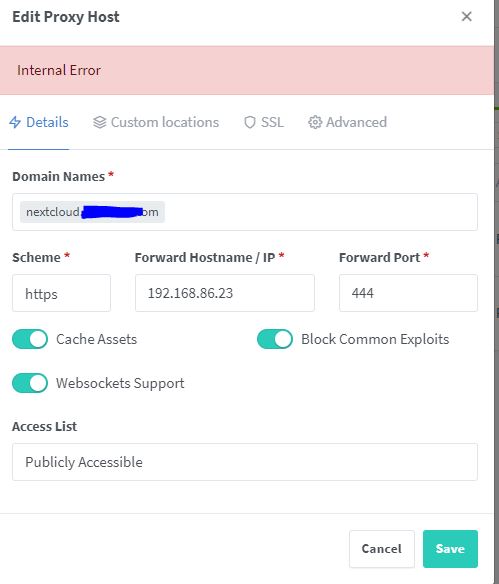
Here, also, is my conf if it helps. I thought it would be a validation limit but I slept all night and tried in the AM and it gave the same "internal error" # ------------------------------------------------------------ # nextcloud.xxxx.com # ------------------------------------------------------------ server { set $forward_scheme http; set $server "192.168.86.23"; set $port 444; listen 8080; listen [::]:8080; server_name nextcloud.xxxx.com; # Asset Caching include conf.d/include/assets.conf; # Block Exploits include conf.d/include/block-exploits.conf; proxy_set_header Upgrade $http_upgrade; proxy_set_header Connection $http_connection; proxy_http_version 1.1; access_log /data/logs/proxy-host-1_access.log proxy; error_log /data/logs/proxy-host-1_error.log warn; location / { proxy_set_header Upgrade $http_upgrade; proxy_set_header Connection $http_connection; proxy_http_version 1.1; # Proxy! include conf.d/include/proxy.conf; } # Custom include /data/nginx/custom/server_proxy[.]conf; }
-
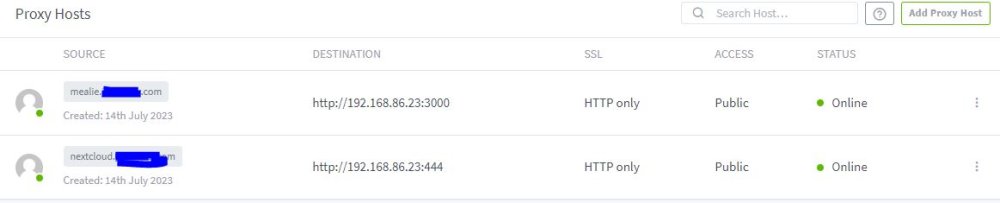
I pulled my domain back to Google from Cloudflare but I can't get my nextcloud going again. Mealie has no problem and was running immediately. NC will not get a certificate and will not do https. With http it doesn't go to a webpage at all. What is the internall error?

-
A fallback error log in nginx?
-
@mgutt Network/server/appdata/nginxproxymanager/logs/fallback_error
-
I have a brand new setup of unRAID 6.11.5 and I'm only running nginx and nextcloud and pihole. 'm using a cloudflare tunnel. When I'm away from home I am frequently getting a cloudflare host error screen. After a few refreshes I can eventually reach NC. These are the errors from this evening. Any ideas what they mean and how can I solve them? 2023/07/11 16:13:45 [error] 1291#1291: *14225 open() "/var/www/html/index.php" failed (2: No such file or directory), client: 213.109.202.66, server: localhost-nginx-proxy-manager, request: "GET /index.php?s=/Index/\think\app/invokefunction&function=call_user_func_array&vars[0]=md5&vars[1][]=HelloThinkPHP21 HTTP/1.1", host: "50.82.174.108:80" 2023/07/11 17:41:16 [error] 1319#1319: *14744 open() "/var/www/html/manager/text/list" failed (2: No such file or directory), client: 107.170.242.12, server: localhost-nginx-proxy-manager, request: "GET /manager/text/list HTTP/1.1", host: "50.82.174.108" 2023/07/11 17:44:07 [warn] 1319#1319: 512 worker_connections are not enough, reusing connections 2023/07/11 17:44:07 [alert] 1319#1319: 512 worker_connections are not enough 2023/07/11 17:44:07 [error] 1319#1319: *15536 recv() failed (104: Connection reset by peer) while reading response header from upstream, client: 127.0.0.1, server: localhost-nginx-proxy-manager, request: "GET /favicon.ico HTTP/1.1", upstream: "http://127.0.0.1:8080/favicon.ico", host: "mealie712.duckdns.org" 2023/07/11 18:24:59 [error] 1347#1347: *15810 "/var/www/html/console/index.html" is not found (2: No such file or directory), client: 213.109.202.66, server: localhost-nginx-proxy-manager, request: "GET /console/ HTTP/1.1", host: "50.82.174.108:80" 2023/07/11 19:18:07 [error] 1375#1375: *16152 open() "/var/www/html/client/get_targets" failed (2: No such file or directory), client: 159.65.119.51, server: localhost-nginx-proxy-manager, request: "GET /client/get_targets HTTP/1.1", host: "50.82.174.108" 2023/07/11 19:18:08 [alert] 1375#1375: 512 worker_connections are not enough 2023/07/11 19:18:08 [error] 1376#1376: *16922 recv() failed (104: Connection reset by peer) while reading response header from upstream, client: 127.0.0.1, server: localhost-nginx-proxy-manager, request: "GET /favicon.ico HTTP/1.1", upstream: "http://127.0.0.1:8080/favicon.ico", host: "50.82.174.108" 2023/07/11 19:18:09 [error] 1375#1375: *16924 open() "/var/www/html/1.php" failed (2: No such file or directory), client: 159.65.119.51, server: localhost-nginx-proxy-manager, request: "GET /1.php HTTP/1.1", host: "50.82.174.108" 2023/07/11 19:18:10 [alert] 1375#1375: 512 worker_connections are not enough 2023/07/11 19:18:10 [error] 1375#1375: *17757 recv() failed (104: Connection reset by peer) while reading response header from upstream, client: 127.0.0.1, server: localhost-nginx-proxy-manager, request: "GET /bundle.js HTTP/1.1", upstream: "http://127.0.0.1:8080/bundle.js", host: "50.82.174.108" 2023/07/11 19:18:12 [error] 1375#1375: *17761 "/var/www/html/files/index.html" is not found (2: No such file or directory), client: 159.65.119.51, server: localhost-nginx-proxy-manager, request: "GET /files/ HTTP/1.1", host: "50.82.174.108" 2023/07/11 21:15:35 [error] 1458#1458: *19372 open() "/var/www/html/actuator/gateway/routes" failed (2: No such file or directory), client: 213.109.202.66, server: localhost-nginx-proxy-manager, request: "GET /actuator/gateway/routes HTTP/1.1", host: "50.82.174.108:80" 2023/07/11 21:18:27 [error] 1458#1458: *19574 "/var/www/html/HNAP1/index.html" is not found (2: No such file or directory), client: 223.130.30.57, server: localhost-nginx-proxy-manager, request: "POST /HNAP1/ HTTP/1.0", host: "50.82.174.108:80"
-
@itimpi Yup that was it! I nuked a 3 year old setup this last weekend and did a new setup and it all went smoothly except for that. I could't remember for the life of me how I did it before. Thank you!
-
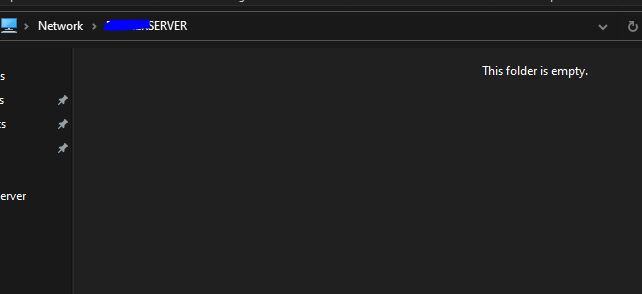
It seems like the issue would be resolved on the unRAID side of things as I tried on different deviced including a network file explorer on my android and it shows empty, but my photos share, for example, definitely has photos in it.
-
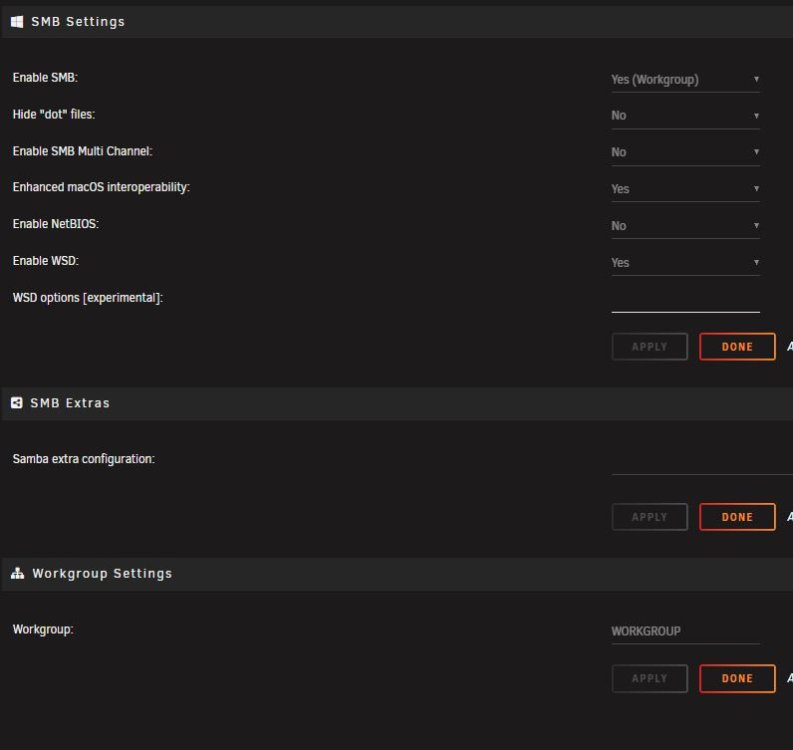
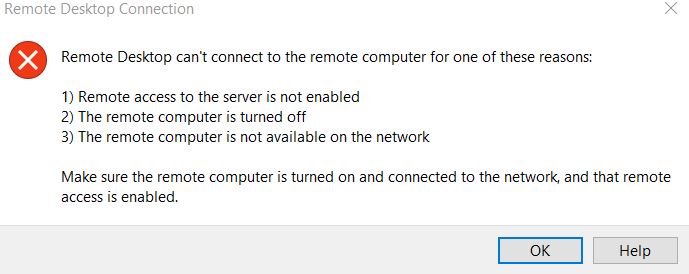
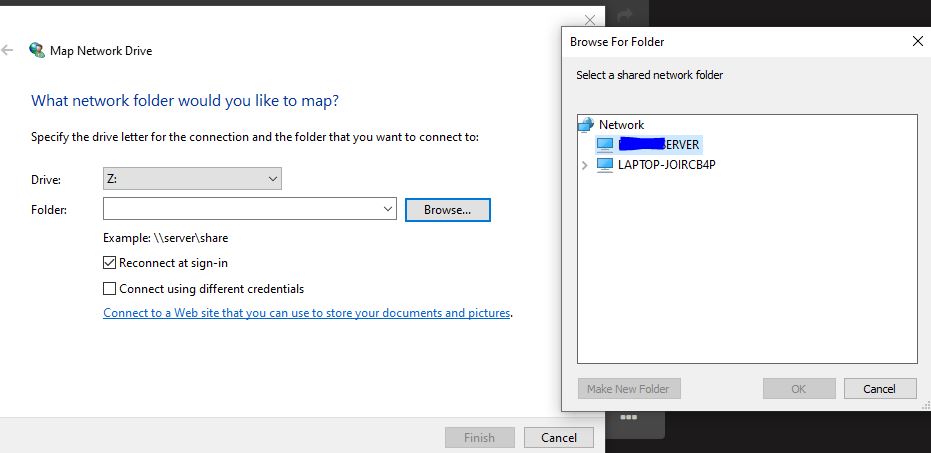
I can easily access my new unRAID setup from my PC but I can't access the shares. I have gone through several threads but no solutions are working. Here's what I have set at the moment. What am I missing?
-
Getting the emhttp error as listed in the OP. My file looks like this #!/bin/bash # Start the Management Utility /usr/local/sbin/emhttp -p 112 & Should I remove everything after emhttp?
-
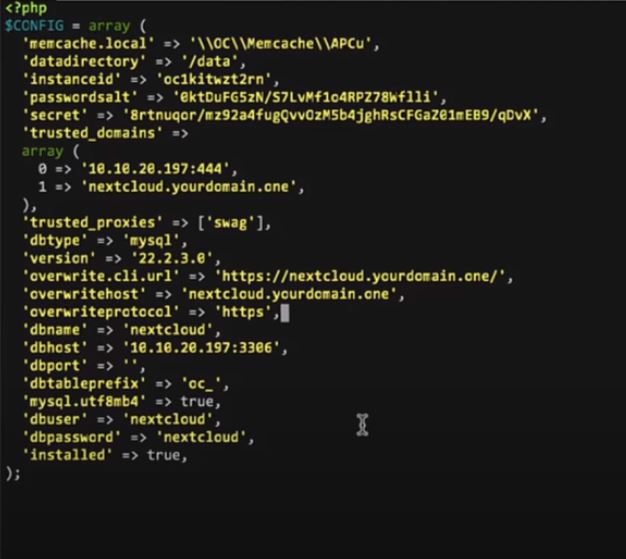
@Kilrah how can I edit this config to use the IP when I'm home and WAN when away?
-
I just did a fresh install of nextcloud and after I modified the config my web UI defaults to the WAN address instead of my LAN IP. What usually causes that? I followed SI1's vid so it's like this but using Nginxpm.
-
Disregard. A reboot didn't fix it so I went to the template, deleted one number, and then typed the same number I deleted and installed it again. That fixed it. Now I have a new problem. My WEB UI is going to a WAN site and not my LAN IP. It's a config issue. What usually causes that?


