





Everything posted by Xandarr
-
Pretty sure this is a config issue in unraid vpn settings.
-
Yes, I meant the dns in the unraid settings. It has been a while since I set it up, but it did take a bit to get it right. I see you're not the only one who has had this issue. Have you seen this? Wireguard DNS leaks with ProtonVPN - General Support - Unraid
-
What Dns are you using in the settings? I use surfshark and have to use their dns servers
-
So, I fixed it. I also had to change it in the Tunarr gui to renderD129 and it works again. Still unsure how my GPU's flipped and I wish they didn't but its all working agian!
-
Thanks for the suggestion. I don't use plex but that did make me dig deeper. I found that it the iGPU is identifying as card1. So, it should use --device=/dev/dri/renderD129 but it still doesn't work. In the Tunarr errors it still shows renderD128. I'm not sure how to fix this
-
Ever since I updated to 7.3.1 I have been having issues with my iGPU and docker. I was not working with Frigate, Jellyfin and Tunarr. I have no clue how I got Frigate working again but it is. Jellyfin I was using vaapi and switched it to quicksync and it started working agian. Now for Tunarr, I cannot get it to work with the iGPU no matter what I do. --device=/dev/dri in extra parameters /dev/dri in add device even tried adding /dev/dri/renderD128 and /dev/dri/renderD129 (also have an nvidia) In Tunarr it doesn't matter if I use vaapi or quicksync it does work with software transcode and direct play though ERROR from Tunarr [AVHWDeviceContext @ 0x555be1fa8380] Failed to initialise VAAPI connection: -1 (unknown libva error). Device creation failed: -5. Failed to set value '/dev/dri/renderD128' for option 'vaapi_device': Input/output error Error parsing global options: Input/output error Original command: -nostdin -hide_banner -nostats -loglevel warning -fflags +genpts+discardcorrupt+igndts -vaapi_device /dev/dri/renderD128 -headers 'X-Emby-Token: REDACTED' -ss 14972ms -reconnect 1 -reconnect_on_network_error 1 -reconnect_streamed 1 -multiple_requests 1 -c:v hevc -readrate 1 -readrate_initial_burst 60 -i http:/192.168.21.4:8096/Videos/bc8c878b7430a4426efadaf04ad83424/stream?static=true -filter_complex [0:0]scale=iw*sar:ih,setsar=1,scale=1920:1080:flags=bicubic:force_original_aspect_ratio=decrease,format=nv12|p010le|vaapi,hwupload,pad_vaapi=w=1920:h=1080:x=-1:y=-1:color=black[v];[0:1]aresample=async=1,apad[a];[v]hwdownload,format=nv12[vpf] -map [vpf] -map [a] -muxdelay 0 -muxpreload 0 -flags cgop -movflags +faststart -t 605038.667ms -video_track_timescale 90000 -b:v 2000k -maxrate:v 2000k -bufsize:v 4000k -c:v libx264 -sc_threshold 1000000000 -c:a aac -b:a 192k -maxrate:a 192k -bufsize:a 384k -ar 48k -g 96 -keyint_min 96 -force_key_frames expr:gte(t,n_forced*4) -f hls -hls_time 4 -hls_list_size 0 -segment_list_flags +live -hls_segment_type mpegts -hls_segment_filename /config/tunarr/streams/stream_aded6889-3c26-40df-af18-624cb77e9350/data%06d.ts -hls_base_url /stream/channels/aded6889-3c26-40df-af18-624cb77e9350/hls/ -master_pl_name playlist.m3u8 -hls_flags program_date_time+append_list+independent_segments+omit_endlist+discont_start -mpegts_flags +initial_discontinuity /config/tunarr/streams/stream_aded6889-3c26-40df-af18-624cb77e9350/stream.m3u8
-
Does the power profiles change the unraid power modes. i.e. in autotweak power profile if I pick balanced does it change the unraid power mode from powersave to performance based on cpu load and demand?
-
So is this like file bot?
-
Same issue for me
-
No issues on two servers and 7.2 seems to be running more efficient. Great update!
-
This has finallly solved my problems, anyone running Surfshark needs to do this! @xieve you are a saint
-
Turns out the drive was 2.05tb instead of the normal 2tb. I know this isn’t unraids fault but I wish there was an option to shrink a drive since this created issues. I ended up using my NVR 2tb nvme in the cache pool and using the 2.05tb as my NVR storage. That was painful, thanks Micron for the 50gb of extra storage.
-
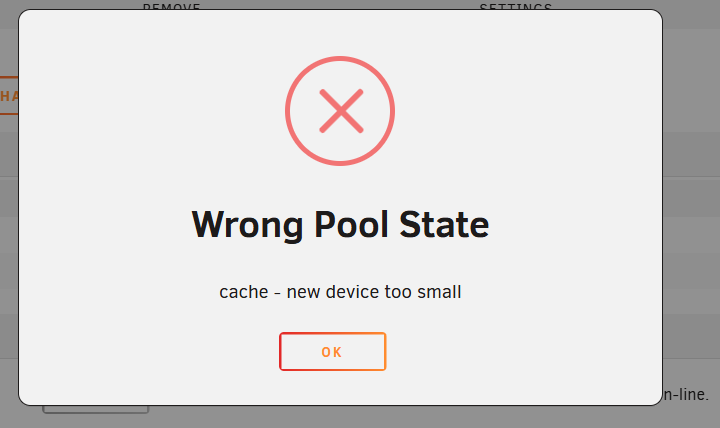
I have a 2tb and a 1tb mirrored zfs cache drive pool. Went to replace the 1tb with a 2tb nvme and get the following. "Cache drive too small". Running 7.1.4
-
https://www.newegg.com/p/0D9-0022-000S3?Item=9SIAJZYKBU8813&tpk=1
-
Thank you, that worked! I actually had a folder that I was not syncing at the moment and it was paused and it did not have a destination folder on the other end. This was my problem, deleted the folder and all is good. Funny thing is I have had the folder there for a good while through many updates and it was never an issue. Anyway thanks again
-
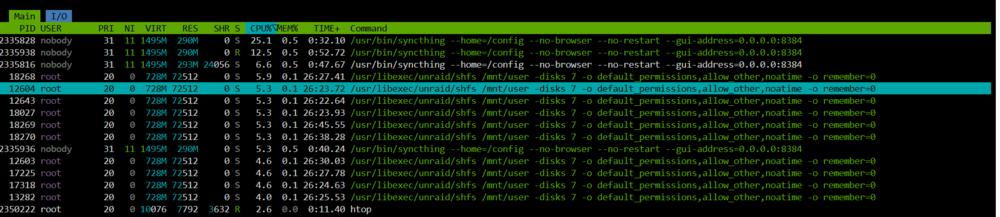
Having my first issue with Syncthing(v2.0.6) on UNRAID 7.1.4. It is useing a lot of cpu resources while seemingly doing nothing. Syncthing is not scanning, transferring data and I dont use "watch for changes". In the past it would us 0% cpu and just site at idle. Now I can pause all folders and remote devices(another UNRAID server with the same specs) and I still get this unless I stop the docker. I have reverted back to older versions of syncthing and nothing has worked. I need some help, Thanks.

-
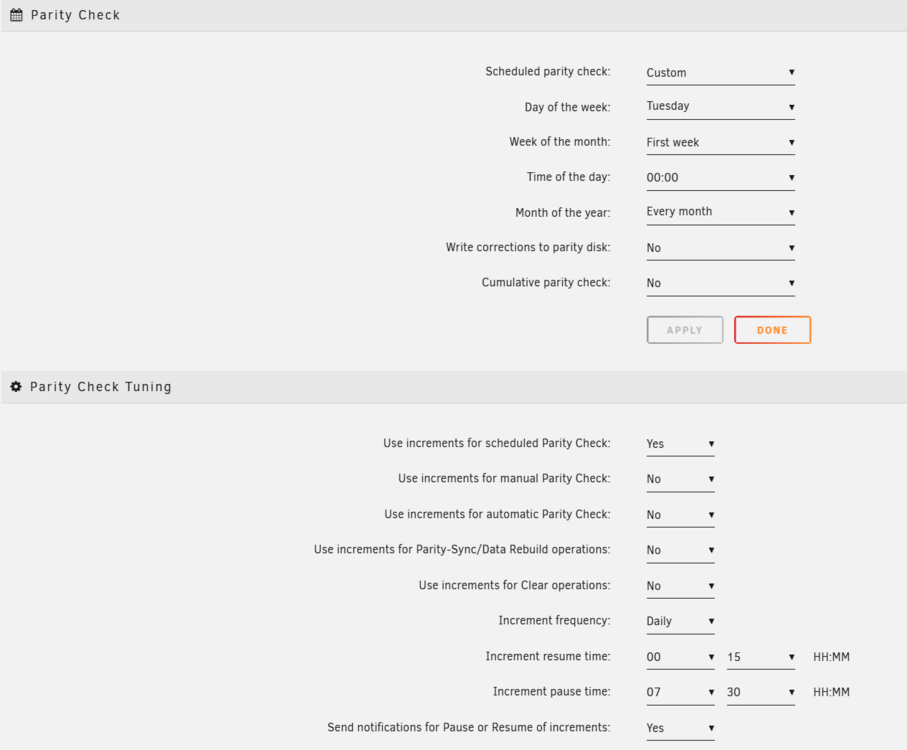
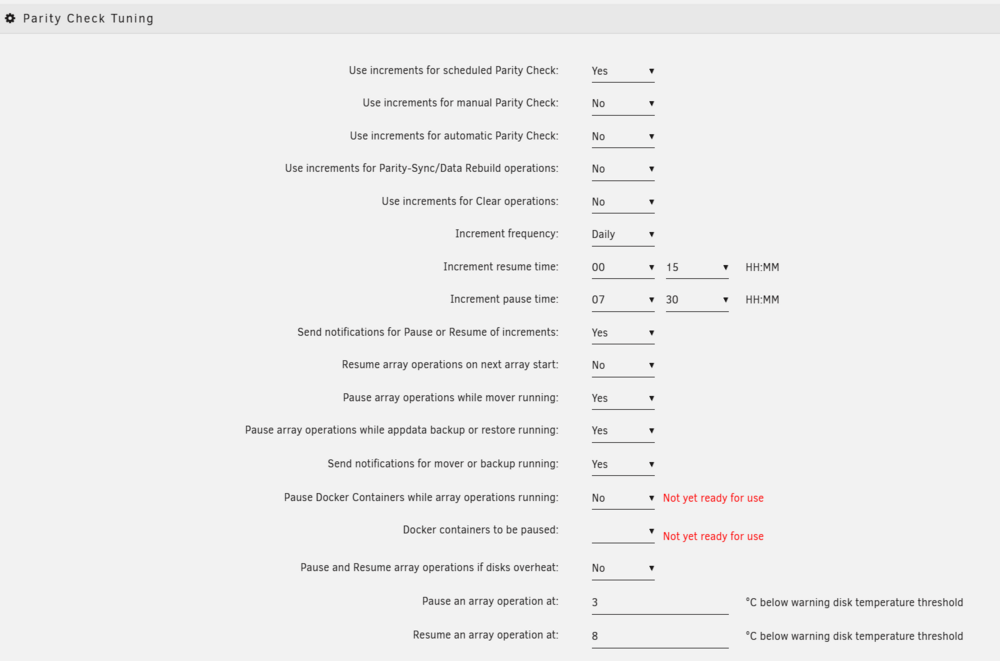
I do not get how it's "not ready to use". I need some help.
-
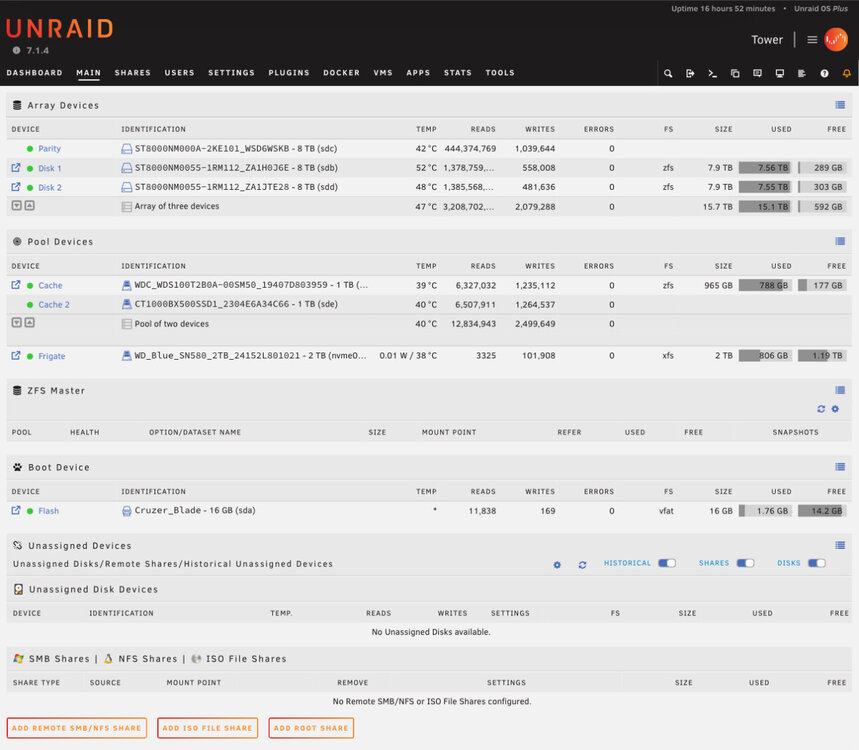
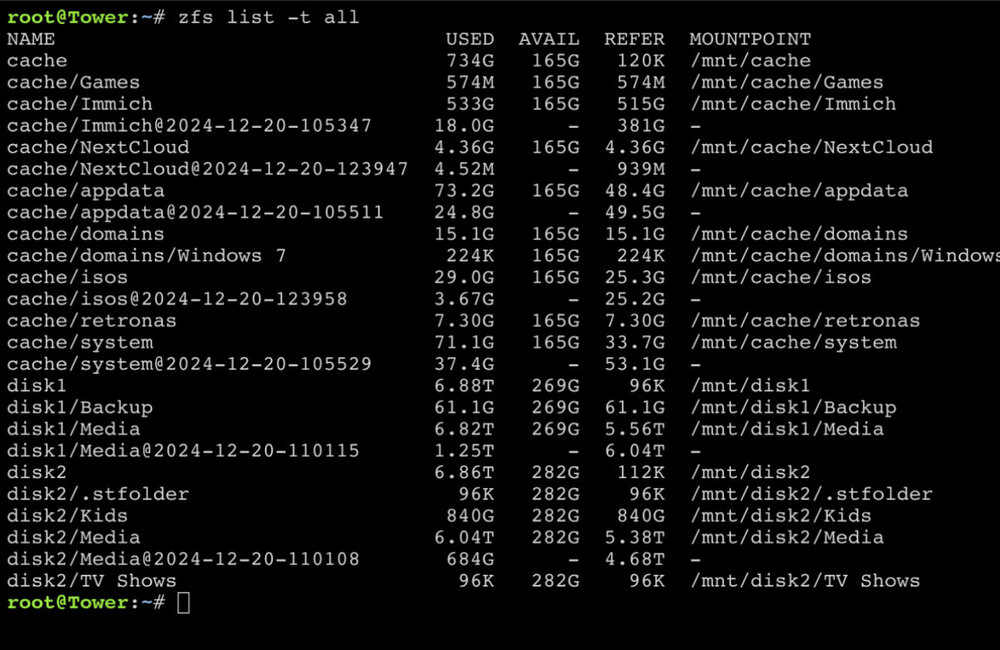
Wow. Reinstalled zfs master and deleted those snapshots(forgot I snapped those). My free data is back. Thank you both for your help!
-
Maybe a reinstall?
-
Okay, how do I delete them? Zfs master doesn’t show on the main page like it used to
-
I just don’t get the data discrepancies. If I go to my media share via smb and check the properties it show a 10.9tb file size
-
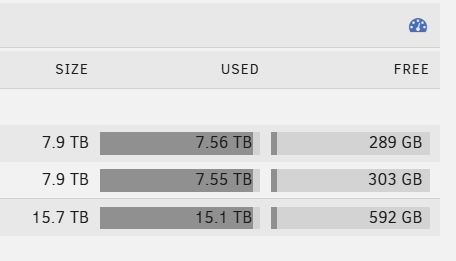
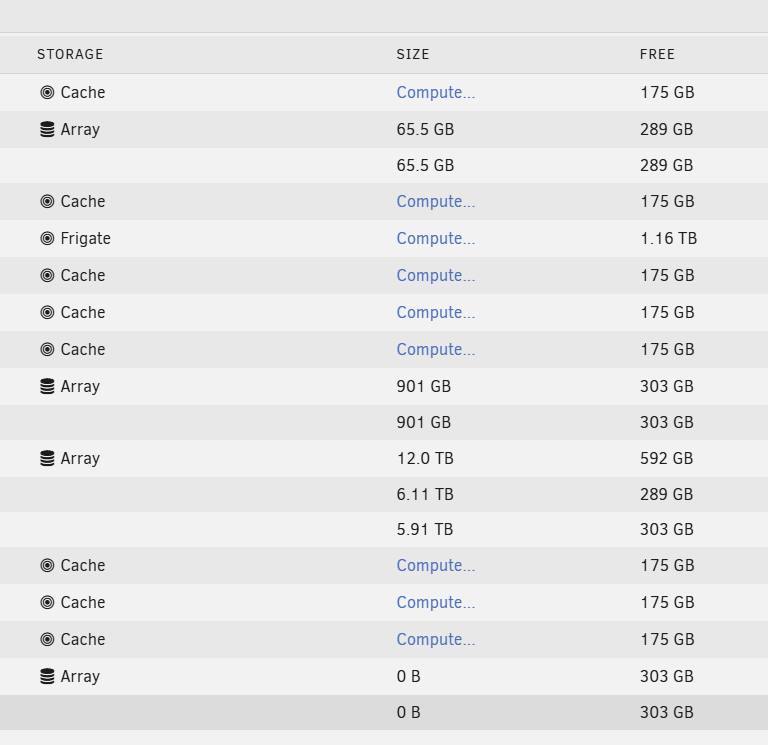
My disk usage is not adding up and I cant seem to figure out the issue. All the data on the array does not add up to what it says I'm using. This is running 7.1.4 with the disks in zfs format. Thanks
-
Wow, this worked for me. I could not do the initial vm setup and this worked like a charm. Thanks
-
Wow, at only two watts it doesn’t even matter about ASPM. I didn’t realize they where such low power.
-
Does anyone know if the difference in power consumption is worth it? Is ASPM worth it or will it cause me problems? The ASM1166 is $15 more and I don't need the extra sata. So, is it worth it? The difference in money is negligible. Thanks




