amuzhaqi
Members
-
Joined
-
Last visited
-
Same here, it blacklisted itself and some other applications: Fatal: GitHub user appears to be different between template repository and xml/plugin Plugin URL /unraid/community.applications/master/plugins/community.applications.plg /unraid/community.applications/master/plugins/community.applications.plg /hussainalhaddad/docker-templates/master/limetech/community.applications.xml
-
I just received this today after upgrading to 7.1.2 and restarting the nginx server fixed it. Hopefully I don't have to keep doing that but this is the error message that I received before regarding this: May 20 14:05:53 NASTower nginx: 2025/05/20 14:05:53 [error] 13932#13932: *569 open() "/usr/local/emhttp/installHook.js.map" failed (2: No such file or directory) while sending to client, client: 192.168.1.230, server: , request: "GET /installHook.js.map HTTP/1.1", host: "nastower.lan" May 20 14:05:58 NASTower nginx: 2025/05/20 14:05:58 [error] 13932#13932: *569 open() "/usr/local/emhttp/installHook.js.map" failed (2: No such file or directory) while sending to client, client: 192.168.1.230, server: , request: "GET /installHook.js.map HTTP/1.1", host: "nastower.lan"
-
I have noticed the same issue with my Plex instance and I don't think it has anything to do with unraid. I am on version 6.12.15 and still get the same error. I have only noticed it when recording a tv program and watching it live at the same time. I am assuming something about transcoding with the audio. It fills up the memory slowly until the limit I have set (16GB) Apr 30 22:58:37 NASTower kernel: oom-kill:constraint=CONSTRAINT_MEMCG,nodemask=(null),cpuset=3f8cc82a4753f22582e35c1899828212a266e48a78c1617f22d4746025a65279,mems_allowed=0,oom_memcg=/docker/3f8cc82a4753f22582e35c1899828212a266e48a78c1617f22d4746025a65279,task_memcg=/docker/3f8cc82a4753f22582e35c1899828212a266e48a78c1617f22d4746025a65279,task=Plex Media Serv,pid=25392,uid=99 Apr 30 22:58:37 NASTower kernel: Memory cgroup out of memory: Killed process 25392 (Plex Media Serv) total-vm:299332kB, anon-rss:65404kB, file-rss:40712kB, shmem-rss:4kB, UID:99 pgtables:604kB oom_score_adj:0
-
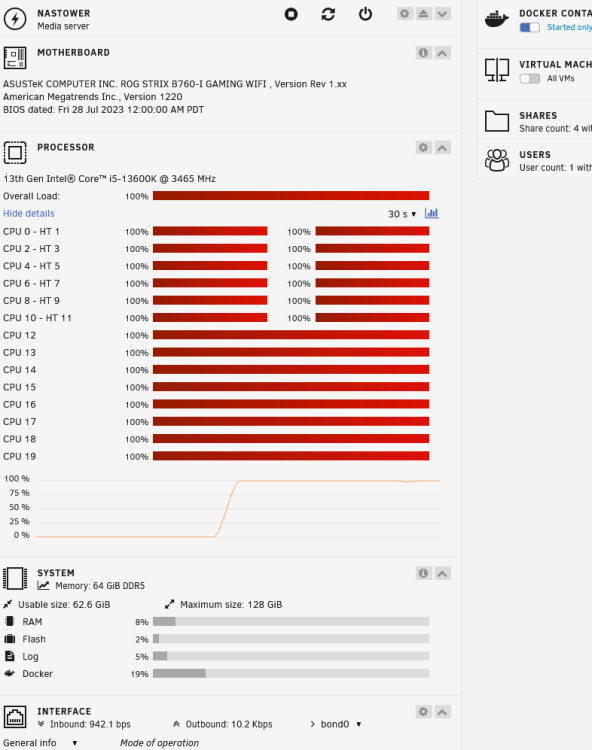
I have an intel i5-13600k cpu, could that be causing this, since when I use the intel default settings this never happenes but when I switched to asus AMP settings it happens after a few days.
-
I am on unraid 6.12.10 and latest version of watchtower, same issue. Watchtower will update but then unraid says that there are updates but when I click update it pulls nothing.
-
I am having the same issue with watchtower, it will update the containers successfully but there seems to be an issue with unraid catching up that there is no update. Did anyone find a solution to this?
-
I have been running into this issue where the main login page loads successfully but after entering my username and password the main page never completes loading. It is in the loading state for a very long time until it timeouts. Usually restarting the server fixes this for 2-3 days and the same thing happens again. Everything else works fine, all the VM and dockers are still running. I can SSH into the machine successfully. Anyone encountered this issue before? ps_output.txt syslog-previous nastower-diagnostics-20240601-1543.zip

-
I have currently the same thing happening to my system when I enable XMP and I only have two memory sticks not 4. I got an Asus B760-I GAMING WIFI motherboard with the latest BIOS update of December 15th.
-
Disabling Fast Boot worked for me.
-
I just had the same issue, for me it was caused by one of the docker containers.
-
I have allocated 4GB of memory for Nextcloud docker and using Redis for Memory caching. Still it looks like only Nextcloud uses all my resources. Does nextcloud use all the cores by default or does it use only one core? Trying to figure out if I should pin multiple cores?