





CALMSURF
Members
-
Joined
-
Last visited
-
it is a very old box for sure and has the max ram that can be added already. never seen the error before - will reboot.
-
7.2.2 install reboot did not happen cleanly - had to hard power down after reboot hung for more than 25 minutes. Every thing seems fine except this memory error the following morning. diagnostics attached per https://forums.unraid.net/topic/120220-fix-common-problems-more-information/?tab=comments#comment-1098721 casaserver-diagnostics-20251208-1416.zip
-
Opened in the beta channel and closing here. Got unstuck by changing ssl port for management to 6443.
-
Enabled ssl with Unraid connect settings by mistake. diabled. config is stuck. unraid is listening and nginx is bound to 443: root@CASASERVER:~# lsof -i :443 COMMAND PID USER FD TYPE DEVICE SIZE/OFF NODE NAME nginx 8544 root 10u IPv4 15985 0t0 TCP CASASERVER:https (LISTEN) nginx 14358 root 10u IPv4 15985 0t0 TCP CASASERVER:https (LISTEN) uninstalled tailscale reboot - no change unsinstalled URConnect reboot no change kill all nginx, delete certs, remove configs reboot and it all comes back as: root@CASASERVER:~# lsof -i :443 COMMAND PID USER FD TYPE DEVICE SIZE/OFF NODE NAME nginx 8544 root 10u IPv4 15985 0t0 TCP CASASERVER:https (LISTEN) nginx 14358 root 10u IPv4 15985 0t0 TCP CASASERVER:https (LISTEN) 443 port conflict is blocking access to services via traefik on another machine.
-
even after ripping the certs out it just wont die.... root@CASASERVER:~# lsof -i :443 COMMAND PID USER FD TYPE DEVICE SIZE/OFF NODE NAME nginx 9386 root 10u IPv4 17296 0t0 TCP CASASERVER:https (LISTEN) node\x20/ 10411 root 28u IPv4 19347 0t0 TCP casaserver.almidalan:51400->104.26.2.117:https (ESTABLISHED) tailscale 11425 root 11u IPv4 21922 0t0 TCP casaserver.almidalan:49178->ec2-54-161-152-147.compute-1.amazonaws.com:https (ESTABLISHED) nginx 16701 root 10u IPv4 17296 0t0 TCP CASASERVER:https (LISTEN) root@CASASERVER:~#
-
Accidentally, through a pure brain fart, I turned on SSL at http://192.168.1.171/Settings/ManagementAccess#UnraidNetSettings. Realized after a head slap that it needs to stay off, as it conflicts with Cloudflared/Traefik and a bunch of services I access via the internet, so I turned it off again. The config says SSL is off but NGINX won’t let go. root@CASASERVER:~# lsof -i :443 COMMAND PID USER FD TYPE DEVICE SIZE/OFF NODE NAME nginx 65389 root 14u IPv4 110916 0t0 TCP CASASERVER:https (LISTEN) nginx 65389 root 15u IPv4 110917 0t0 TCP casaserver.almidalan:https (LISTEN) nginx 65389 root 16u IPv4 110918 0t0 TCP 100.85.18.43:https (LISTEN) nginx 65389 root 19u IPv6 110921 0t0 TCP localhost:https (LISTEN) nginx 65389 root 20u IPv6 110922 0t0 TCP [fd7a:115c:a1e0::1301:122f]:https (LISTEN) nginx 65390 root 14u IPv4 110916 0t0 TCP CASASERVER:https (LISTEN) nginx 65390 root 15u IPv4 110917 0t0 TCP casaserver.almidalan:https (LISTEN) nginx 65390 root 16u IPv4 110918 0t0 TCP 100.85.18.43:https (LISTEN) nginx 65390 root 19u IPv6 110921 0t0 TCP localhost:https (LISTEN) nginx 65390 root 20u IPv6 110922 0t0 TCP [fd7a:115c:a1e0::1301:122f]:https (LISTEN) node\x20/ 65916 root 29u IPv4 1111503 0t0 TCP casaserver.almidalan:32854->104.26.2.117:https (ESTABLISHED) tailscale 596647 root 11u IPv4 1067936 0t0 TCP casaserver.almidalan:58782->ec2-54-161-152-147.compute-1.amazonaws.com:https (ESTABLISHED) root@CASASERVER:~# Unraid is ignoring the ssl = "no" in config I have nuked the certs to get myself back up but I am not confident they wont get regenerated. I am on the 7.2 beta Appreciate any help on how to get this cleaned up properly
-
So......I updated to OS 7 RC-1 and have been experiencing fully pegged CPU and daily hangs after running 24 hours or so requiring a power button shutdown - UI and terminal become totally unresponsive. In full transparency I removed several docker containers from UR after the upgrade to another machine and UR is now just acting as NAS with Lidarr and Immich among others reading and writing to SMS shares. What's left should NOT be even close to pegging the CPU. casaserver-diagnostics-20241214-1903.zip
-
Hello! I am in Portugal and looking to replace/upgrade my current Unraid HW (Hp Proliant MicroServer Gen7 N36L) ( - I am covered on HD's (49TB all new) but interested in in the Cooler Master Stacker 810 case, and the CPU. Do you have a compatible MB or RAM or anything else ? Could we arrange shipping to Portugal? TIA
-
I am rebooting now - not sure what happened and have never seen this before. Diagnostics attached. casaserver-diagnostics-20240618-2007.zip
-
I followed the steps I found here: PSA/HOW-TO Proper fix for SMB stale file handle - General Support - Unraid and it would appear (so far) that the issue is resolved. We shall see for sure by same time tomorrow - let's hope!
-
I recently ditched Umbrel and went direct on Ubuntu with Docker Desktop for all my 'arr apps. Ever since I keep having issues where the two unraid shares I use for storing some of my media mapped via fstab on the unbuntu machine (same as when with Umbrel) keep losing access and producing errors when trying to access: ls: cannot open directory '.': Stale file handle The shares are NOT using a cache drive (array only) and I have set the tunable Hard Link option to NO per this thread: NFS is about useless in Unraid 6.8.0 - Page 2 - Stable Releases - Unraid These shares ONLY get restored when I restart the Ubuntu machine and they get "lost" within an hour. I do have Pi-Hole as DHCP running on Unraid but both the Unraid server and the Ubuntu box have static IP addresses and use 1.1.1.1 for dns. I can ping the Unraid machine no problems form the Ubuntu box and vice versa. Tearing my hair out here - any thoughts?
-
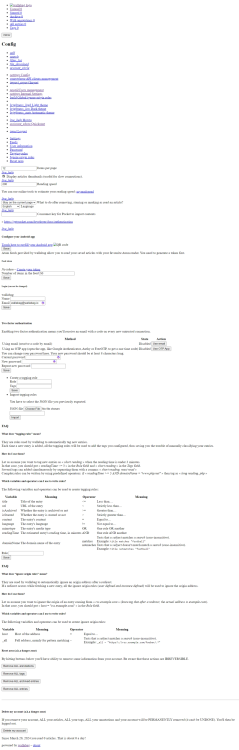
Just installed Wallabag and seems to work - no erros - I made the DB dir and added the permissions. Hwoever the UI is totally broken - no images, all text no css etc. I know it isn't supposed to look like this. Any clue as to what I may have done wrong?
-
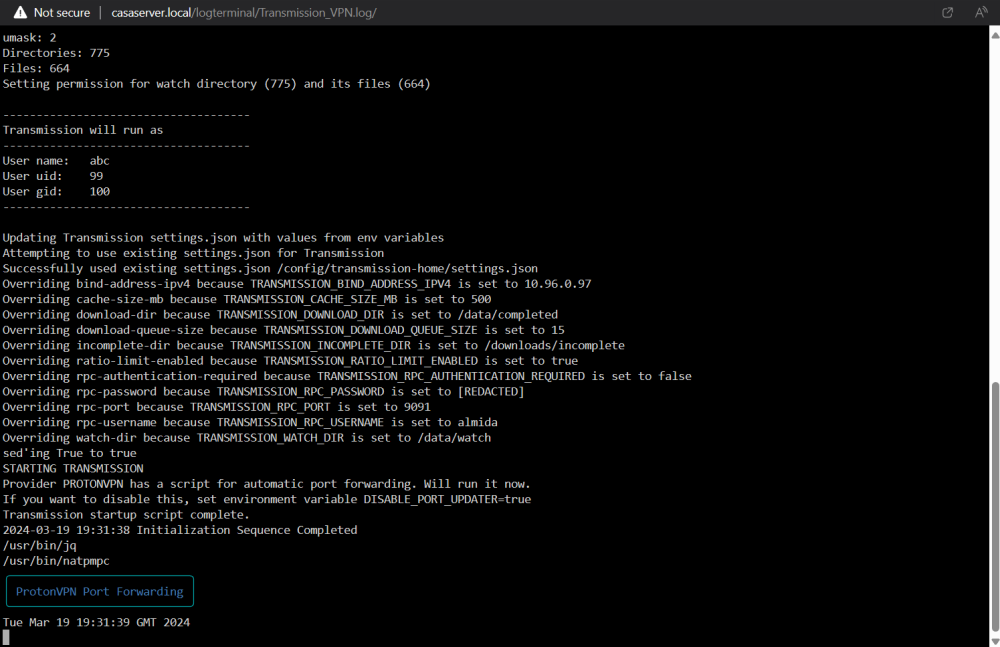
Looking for support with TransmissionBT +OPENVPN I am using ProtonVPN as my VPN provider - everything connects successfully and TransmissionBT works but the port assigned by the script is NOT open according to TransmissionBT or if I find the IP and check on yougetsignal.com. According to the logs: STARTING TRANSMISSION Provider PROTONVPN has a script for automatic port forwarding. Will run it now. If you want to disable this, set environment variable DISABLE_PORT_UPDATER=true Transmission startup script complete. 2024-03-19 19:31:38 Initialization Sequence Completed and it shows a box with ProtonVPN Port Forwarding in blue. How do I TS this and get the port forwarding working?
-
Have an HP Proliant MicroServer Gen7 N36L runnig latest unraid 8GB ram and 40 TB of storage. Runs cpu pegged most of the time - mostly NAS for Windows, Apple and Linux machines (SMB and NFS) with several docker containers: immich Cloudflare DDNS flaresolver NGP postgresql14 Redis Transmission_VPN All my media related dockers are on Umbrel on Ubuntu (Dell AIO) on another machine with 12 TB storage. I'm looking for an upgrade on RAM (16-32 GB) and CPU with a basic case and of course accommodation for the 6 drives on a ~500 budget and I am in Europe. Appreciate pointers in advance.
-
I'm interested in this. Why docker inside a vm versus unraid docker? would an ubuntu docker container accomplish the same thing?

