





bonienl
Community Developer
-
Joined
-
Last visited
Everything posted by bonienl
-
-
I added a new setting "Device activity monitoring" which allows a selection of device monitoring. By default it is set to "Status & Counters", meaning it monitors both the hardware status and the read/write counters of the device. If this doesn't work properly, you can select to use "status only" or "counters only". Try it out!
-
It is S3-sleep plugin related, it is missing the compatibility functions needed for Unraid legacy support. Did this error occur after you installed the preclear plugin?
-
Starting with Unraid 6.8, the sensors-detect file is included with the stock installation. I haven't checked what version is exactly used.
-
I can't really explain what happened. The plugin has an updated sleep script which is able to handle the upcoming multi cache pool feature, it should work to just do the update. A uninstall and re-install does however ensure a "clean" installation.
-
I updated ALL plugins, and released the new versions on the same day (of course it took me a much longer time to make all the updates)
-
The plugin itself has no drivers, it can only detect them. If detection doesn't work for some reason, you can enter the name of the driver manually (if known of coursee).
-
What version of Unraid are you using? I tested all plugins on version 6.8.3 and everything runs without errors, though I am not using the UD plugin
-
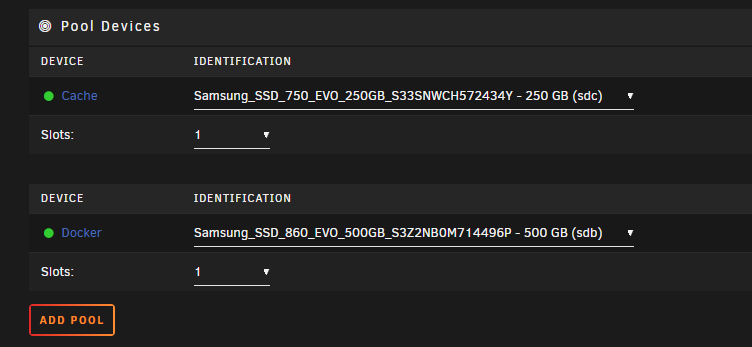
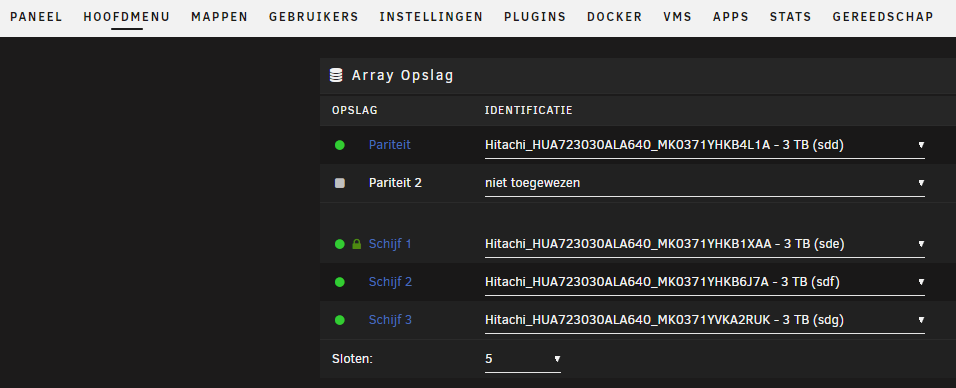
Some teasers ... (to get you excited) Multi cach pool support Unraid in Dutch
-
Dynamix plugin suite update Today an update of ALL Dynamix plugins is made available to you. This update includes outstanding fixes and improvements for several of the plugins, and new in these plugins is the support for the upcoming features of Unraid 6.9, namely - Multi cache pool support - Multi-language support The implementation in the plugins is made such that backward compatibility is in place, this means the plugins keep running on your existing version of Unraid, eventhough it doesn't have the new features of Unraid 6.9. It is always recommended to use the latest version of Unraid, but you are not forced to do so when updating the Dynamix plugins. Once Unraid 6.9 becomes available, it will automatically make use of the new features, prepared in the plugins. Go ahead and enjoy the updated Dynamix plugins suite.
-
The firewall function on the WG tunnel can only deny/permit access to devices other than Unraid itself.
-
Also, anything stored inside the image will be lost as soon as the container is updated.
-
Delete the file "sensors.conf" on your flash device in the folder /config/plugins/dynamix.system.temp
-
When a default theme store its style files as "default-<name>.css" and "dynamix-<name>.css", it will automatically appear as a choice
-
For those using the Dynamix File Integrity plugin, I (finally) made an update to make the plugin compatible with Unraid 6.8 and higher, which allows to re-use again the "Disk Verification Schedule".
-
Temperature display is controlled independently and its interval is determined by the setting "Tunable (poll_attributes)" which by default is set to 30 minutes. You may make this interval shorter, eg. 3 minutes (180s) to get faster updates.
-
This is BIOS related, check for a BIOS update of your motherboard
-
Yes, hub and spoke connectivity is possible (see built-in help)
-
Remove the IPv6 addresses from the configuration file and test with IPv4 only.
-
Available in Unraid 6.8.2
-
Are your containers installed using CA? Each container needs to have an XML file with its settings. The CPU pinning information is stored in this XML file.
-
Your system doesn't get a proper IP address assigned when starting up. The reason is the interface goes down while inquiring for an IP address. This prevents docker from assigning br0 as valid network Disable "bonding" in your network configuration and retest. It is also recommended to update to Unraid 6.8.2
-
Did you click on the grey circles to make a selection?
-
You should never use a script to create the br0 network. The br0 network is automatically created when the docker service is started. If docker can not create the network, an error is logged in the syslog. Post diagnostics so we can check.
-
You need to add these commands to the 'go' script after the 'cp' commands in the "auto unlock array" section.


