





bonienl
Community Developer
-
Joined
-
Last visited
Everything posted by bonienl
-
Correct, you need to set a spin down time otherwise disks will stay active all the time.
-
Check if the parity disk has a spin down time set. Do you have any docker containers or VMs running? Whenever something is written to the array, the parity disk gets involved.
-
Enable DEBUG, it will show in the system log what events are happening, and give a clue.
-
sensors-detect is already included with Unraid 6.8, hence it is skipped.
-
The load values which Linux reports includes IOWAIT time. If your drives have issues or are very busy, this is reflected in the load and makes your system sluggish. One cause can be that the folder "appdata" is located on the array instead of the cache and consequently all containers make heavy use of the array.
-
Yeah, sorry missed that. See my answer above.
-
Post your diagnostics. See Tools -> Diagnostics Looking at your earlier diagnostics. I see the 'avahi' protocol overruling your DNS settings and use DNS server 192.168.0.1 I guess this is coming from your router. And perhaps it can be disabled on your router. An alternative solution is to disable 'avahi' on your server. You need to edit the flie /config/share.cfg on your flash device and set shareAvahiEnabled="no" Save the file and reboot your system.
-
It is resolv.conf which is used to store DNS entries. DNS servers you configure in the GUI under network settings. The settings are stored on flash in the network.cfg file. Upon reboot the network settings are read, and resolv.conf is populated with the DNS entries. If this is not working for you, there is something amiss with your system. Try starting in safe mode and see if this solves the issue.
-
Though, I don't recommend to write logs to unassigned devices, it is possible to do. You need to manually edit the file /config/rsyslog.cfg on your USB device and change the setting "server_folder" to the desired destination. Restarting the syslog server is required to take the new setting into account and the GUI will display "custom" as location.
-
Duplicate serial numbers is clearly a bug at the manufacurer's side (WD). A serial number is used to uniquely identify a product and is used in the RMA process of the vendor.
-
This will be a kind of mitigated in the next Unraid version, by dereferencing a /mnt/user/ path internally to the actual disk location.
-
Not weird, but a protection against too many changes at once (and loosing data).
-
I am not sure if this plugin is still maintained. The last update was 2 years ago, to fix plugin issues with Unraid 6.5. Meanwhile Unraid is at version 6.8 and lots has changed since.
-
Longevity, I used this tool when I build my very first server back in 2010 😄
-
The way it is implemented in 6.8 and later, is that the passphrase is no longer stored in a file, but internally cached by the emhttpd process. This makes the passphrase invisible/non-retrievable once entered at startup of the array. When using a keyfile, this file is copied to /root prior to starting the array. The option exists to delete the file from /root after the array is started/
-
I made a new version available with the correction, please update and retest.
-
There might be an improvement when Unraid 6.9 is released, this version will use linux kernel 5.6, which has several Ryzen enhancements. I am testing on an ASRock X570M Pro4 motherboard with an AMD Ryzen 5 3400G processor, and all temperatures can be read.
-
For those having issues with the S3 sleep plugin, can you provide diagnostics? I can not reproduce the error, and it is strange that a file goes missing. Additional question: is there anything set in your 'go' file, which is related to S3 sleep?
-
Each time you choose a different PWM controller from the dropdown menu, it allows you to change the settings (including enabling/disabling) for this controller.
-
Nice job. I can add these to the stock GUI, if you update your source files.
-
shim networks are created when the Docker setting "Host access to custom networks" is enabled. This allows Unraid to talk directly with docker containers, which are using macvlan (custom) networks. Docker does not allow this direct communication, and network trickery is done to bypass the restriction. Here is an example of my network
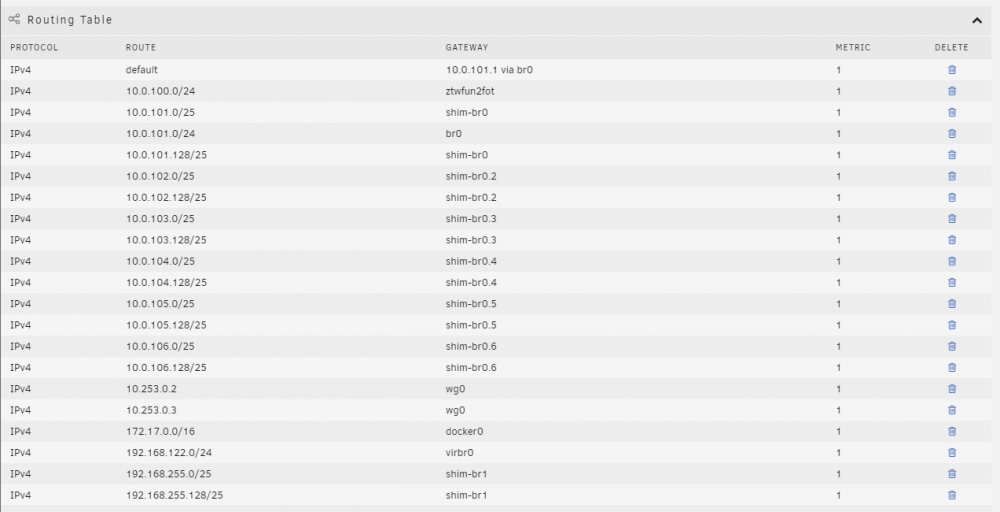
-
Try a uninstall and re-install of the plugin, and see if the error disappears (you are missing some PHP files)
-
This is about how to use the "plugin" script, the specific syntax and construction of *.plg files does need more explanation. 😉
-
Unfortunately that documentation doesn't exist. It is one of those "open" actions.
-
You can have a look at the Dynamix plugins. Dynamix System Temp maybe a good example for your case. About the use of <FILE> and <LOCAL> <FILE> = indicates the final destination of the file location and name <LOCAL> = indicates where a local copy (previously downloaded) version of the file is placed. In your example, it would be <FILE Name="/boot/config/plugins/snmp/icon.png"> <URL>https://raw.githubusercontent.com/path/to/file/icon.png</URL> </FILE> <FILE Name="/usr/local/emhttp/plugins/snmp/icon.png"> <LOCAL>/boot/config/plugins/snmp/icon.png</LOCAL> </FILE> Always make a dedicated folder for your plugin, i.e. "snmp" and store files in there. The use of <LOCAL> has the advantage that once a file is downloaded and locally stored on flash, it doesn't need to be redownloaded, it will be copied locally during installation of the plugin. The disadvantage of this method is that a updated version of the file doesn't get automatically installed. Your plugin script needs to remove the local copy first, then redownload the file, if a new version is required. This is all additional coding you have to provide yourself.




