





bonienl
Community Developer
-
Joined
-
Last visited
Everything posted by bonienl
-
One more command to test ip -6 route show dev br0 2408:8256:5682:7a50:182f::2cd/128
-
This coming weekend I will look into the PRs made by @Falcosc (thx for the contribution) and merge them. After internal testing I will release a new version of this plugin.
-
virtio-net was introduced as a solution for people using both VMs and docker custom networks on the same interface, e.g. br0. The virtio driver would cause system crashes when docker containers are active at the same time. Hence the help text talking about stability when using virtio-net. Stability was chosen as default above performance.
-
Thx. I need this one too ip -6 route show dev br0
-
Sorry for the confusion, I mean editing the rsyslog.cfg file on the USB stick.
-
Ultimately the "Allocation method" and "Split level" settings of a share are going to determine how files will end up on the array. By default files are distributed over the available disks, but the user can change this and tell Unraid how to keep files together on the same disk. Keep in mind: changing the share settings will only affect new files, Unraid will never move existing files.
-
The manual edit was introduced so people with "special" cases could make use of it, but obviously they must know what they are doing. Another use case is a sub-folder of a share to be used as syslog destination. There is nothing wrong to explain this in the online documentation, after all it is a "feature" (albeit hidden).
-
Can you show the output of ip -6 addr
-
Manually entering a name is purposely not in the GUI to avoid issues when the user makes a mistake, which may cause syslog (and the system) to halt. It is assumed that people editing the file "know" what they are doing! The use of UA is not mandatory. I have a dedicated SSD pool and created a syslog share on this pool, which holds the syslog messages
-
There is a driver fork on github, but last update is two years ago, and doesn't look like active development. A safer bet would be to take a different 10G NIC (I am using ASUS).
-
I fear the day that the community succeeds and the Limetech staff won't survive these relentless attacks
-
In the 10+ years of using Unraid, I have never experienced a case of bitrot (I am using the Dynamix File Integrity plugin to monitor this).
-
Nice tutorial, works well just following your guidance. This is a very similar approach as to ZeroTier, which allows you to set up a network without port forwarding requirements. The built-in WireGuard solution of Unraid, has one advantage over this (or ZeroTier) approach. It is active all the time without dependency on docker or VM or array running. This is essential when you want to stop the array to make modifications.
-
Unraid 6.10 will have IPv6 support for the docker bridge network. It uses a private network range and NAT to access the outside world, similar to the IPv4 set up of docker0. Below an example of a container with a bridge network and IPv6 enabled. / # ip -6 route fd17::/64 dev eth0 metric 256 fe80::/64 dev eth0 metric 256 multicast ff00::/8 dev eth0 metric 256 default via fd17::1 dev eth0 metric 1024 / # ping -6 google.com PING google.com (2a00:1450:4009:815::200e): 56 data bytes 64 bytes from 2a00:1450:4009:815::200e: seq=0 ttl=115 time=10.079 ms 64 bytes from 2a00:1450:4009:815::200e: seq=1 ttl=115 time=10.037 ms 64 bytes from 2a00:1450:4009:815::200e: seq=2 ttl=115 time=10.087 ms ^C --- google.com ping statistics --- 3 packets transmitted, 3 packets received, 0% packet loss round-trip min/avg/max = 10.037/10.067/10.087 ms
-
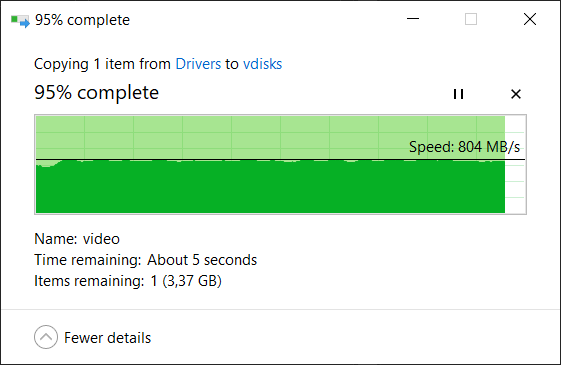
Yup, but this is without the SMB multi channel feature that Jon is talking about Spoiler....
-
It should not, but please test. Host access is a hack to circumvent the network protection of docker itself. Normally host access is not required and should be disabled.
-
Yet, in my testing I get a transfer rate of 800 MB/s when copying a 80 GB file from Windows (nvme disk) to a user share on Unraid (nvme RAID0 pool)
-
The wireguard configuration of wg0 is alright. You said that you have configured multiple tunnels. Have you tried testing with only one tunnel active at the time?
-
I would go for the "straightforward" way and start from scratch. This is the right time to start with a 'clean' system. Copy your existing *.key file on your USB drive to your PC or another safe place, you'll need it later Take a screenshot of your current disk assignments, it allows you to re-enter them later Make a list of your current user names Download the installer for your preferred system Use the installer to create a new Unraid OS on your existing USB drive Copy your license key to the folder /config on your USB drive Start your Unraid system with the updated USB drive Configure your disk assignments as before (see earlier screenshot) Set a root password Create the user names as listed before All shares will be automatically created as public accessible Configure each share with the access permissions as desired You have now a basic installation with disks and shares running as before Do further tweaking and installations as desired (there is a lot more in Unraid V6 that can be done)
-
What IP address are you using to access the server from the peer side? Is this 10.249.0.1 or 192.168.10.x ?
-
Are you sure the peer has the correct configuration? It needs to include your LAN subnet. You need to set Local server uses NAT = Yes This allows other devices on your LAN to communicate over the tunnel to the remote peer. If you are trying to access docker containers on their custom network address, you will need to do additional steps, which are explained in the Wireguard guide.
-
If you want the peer to access your LAN, change the type of access to "Remote access for LAN" and the LAN subnet will be added to the peer configuration (don't forget to update the peer configuration). The setting "Peer allowed IPs" tells what the Unraid server is allowed to access on the peer, and since 192.168.10.0/24 is your local subnet it can not exist on the peer as well. This is from the help in the GUI This field is automatically filled in with the tunnel address of the peer. This allows the server to reach the peer over the tunnel. When the peer is another server or router with additional networks, then their subnets can be added here to make these networks reachable over the tunnel.
-
No, it is not the cause of a crash. The call trace took place at 12:51, your system keeps running and reporting until 19:31 (7 hours later) One hour later at 20:36 the system restarts. Not clear why. Did you do anything? Perhaps unrelated but your syslog is littered with error messages from Pulseway, either remove it or fix it.
-
Open a terminal session from your browser (>_ button) and type wg-quick up wg0 Assuming wg0 is the tunnel you want to activate, check the responses for errors.
-
Gaat werken, dit moederbord heeft PCIe 3.0 uitbreidingsloten.




