





bonienl
Community Developer
-
Joined
-
Last visited
Everything posted by bonienl
-
Unraid version 6.9 supports IPv6 for custom (macvlan) networks only. A docker container gets an IPv6 address out of the subnet announce by your router on the LAN network. 2003 is indeed a public IPv6 address, and when obtained by SLAAC it stays the same after each container update/edit unless you change the MAC address of the container (which is a manual thing) Unraid version 6.10 also supports IPv6 for the standard bridge network. In this case the container gets a private IPv6 address and NAT is used to connect to the outside world. This is similar to how IPv4 works with private IPv4 addresses on your LAN and NAT to a public address to go outside on the Internet.
-
Yes, these are things I have in mind for future releases, but wanted to start with the basics and get feedback. Development simply takes time
-
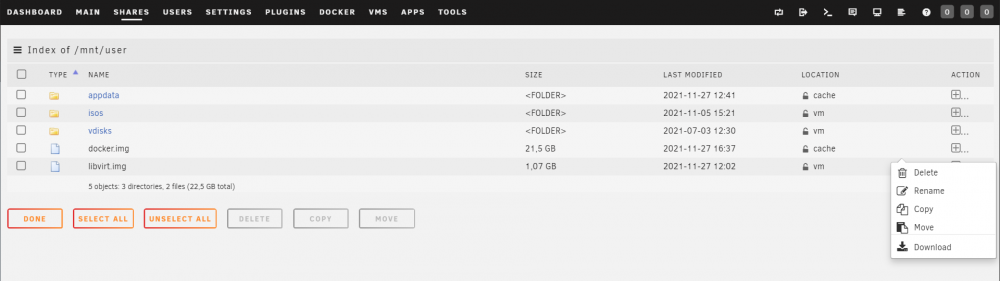
You need to be smart in using "Move" or "Rename". In the latter case nothing is moved and the folder or file is just renamed instantly. As a protection the file manager doesn't allow renaming of User Shares, because it will destroy the associated share settings. A User Share is renamed using the Share Settings page instead.
-
Rename and Move are given as two distinct operations. A rename is limited to renaming the selected object, it can’t be moved. Moving an object is actually a copy first and delete after.
-
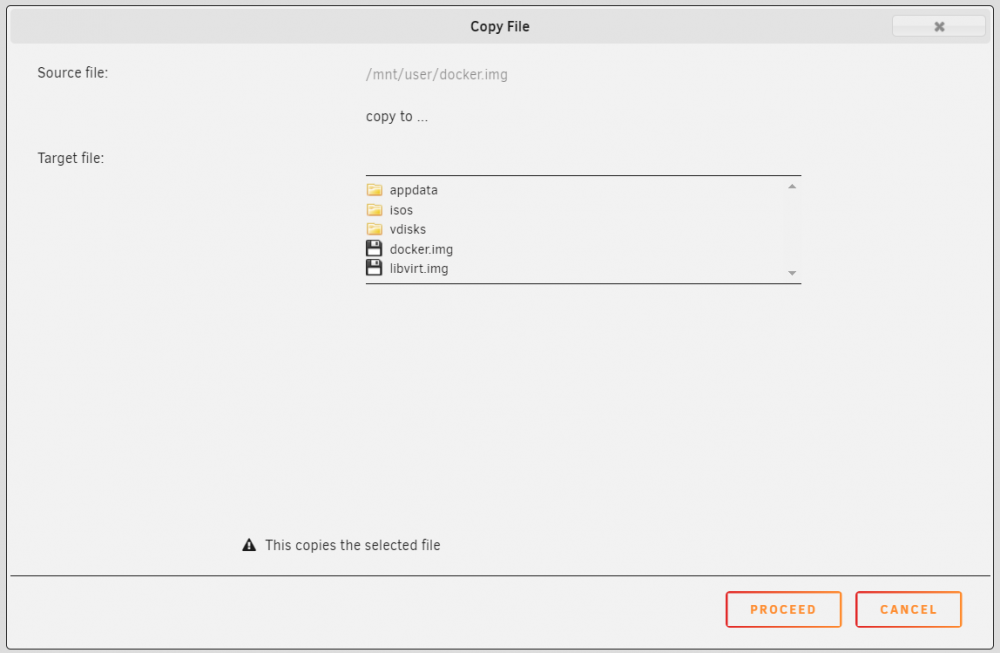
Unlike generic file managers, this file manager is Unraid aware and takes the specialties of Unraid in to consideration. Within the file manager the user performs either a disk-to-disk operation or a share-to-share operation, this is specifically done to protect the user against the so-called "Copy" bug. This file manager version is a first iteration, and further development will be done based on user feedback, hence the availability as a plugin, which allows for continuous updates.
-
I have a created a file manager plugin, which I will release when the next Unraid 6.10 version comes out, This plugin extends the already present Browse function of Unraid with file management operations, such as copy, move, rename, delete and download. Operations can be performed on either folders and/or files and objects can be selected using a selection box at the left (in case multiple objects need to be copied or moved for example) or by clicking on a selection popup to an operation on a single object. All operations need to be confirmed before proceeding, this should avoid accidental mistakes. The file manager gives direct access to all resources on the array and pools and should be handled with care. Below two screenshots to give a first impression. Once released more info will be given in the plugins section.
-
Hmm, okay this is a bug on the dashboard page, it shouldn’t color red. I’ll make a correction. Tks.
-
For both thresholds?
-
Check your “disk utilization thresholds”, see Settings -> Disk settings
-
The firewall function is specific for remote clients and prevent them from accessing other sources in your network. Any local connectivy is unaffected.
-
There is a firewall function available in the WireGuard configuration which can be set to either allow or deny access to certain IP addresses/ranges. This firewall function works for devices external to the Unraid server, but not for docker containers on dedicated IP addresses. Docker containers run on Unraid itself, despite having a different IP address these are accessed directly before the firewall kicks in (which happens only when the physical ethernet interface is used).
-
Make sure that each peer has a unique peer tunnel address (this is normally all done automatically)
-
I made a fix for the next release.
-
Unraid version 6.10 has WireGuard support natively built-in, the plugin is no longer required.
-
Alternatively you can use themes Azure or Gray which have a scrollable vertical bar for the Menu section. This way all selections are always accessible.
-
Tested this with Unraid 6.10.0-rc2 and Chrome / Firefox / Safari (Monterey) / Edge / Brave, and all is working.
-
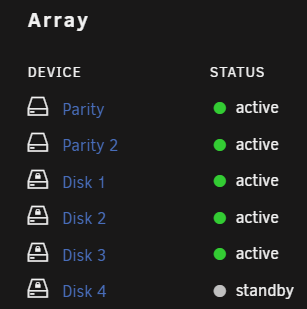
The dashboard uses a different disk icon to indicate an encrypted disk.
-
Does this happen only when you access the GUI from a local terminal using firefox?
-
I am in the same boat as you are. Limetech is looking into this together with the vendor, and hopefully there will be a solution soon(tm). No ETA given though.
-
I made a correction in the German translation, because it included some invalid lines, which are now removed. To translators: do not add extra lines (such as ========).
-
The title on the settings page is set in the translation of settings, this is not included in the plugin. The title of the plugin page can be translated by the plugin.
-
To work with Unraid the interface has to report itself as ethernet type, i.e. ethX.
-
If you have updated the list of excluded folders or files, you need to run the "Clear" command on your disks to remove an existing hash from those excluded items. This will prevent skipped files.
-
When a plugin creates its own .page file, it can have all the necessary translations for that page, including the title of that page. You need to create a translation file with the appropriate name to get translations automatically included. For example the URL for the File Integrity settings is http://tower/Settings/FileIntegrity Then the file fileintegrity.txt holds the translations of that page. A number of plugins do this already, you might want to look at these. Of course plugins themselves must be written to support translations. There is a guideline document, but can't find it at the moment.
-
Made a correction. You can uninstall and then re-install the language pack to update to the latest version. Or wait until the system offers the update.





