





bonienl
Community Developer
-
Joined
-
Last visited
Everything posted by bonienl
-
I never had any slow Plex issue with Unraid 6.8 ...
-
Unraid relies on the information given by the BIOS of your motherboard. Check if there is any newer BIOS available.
-
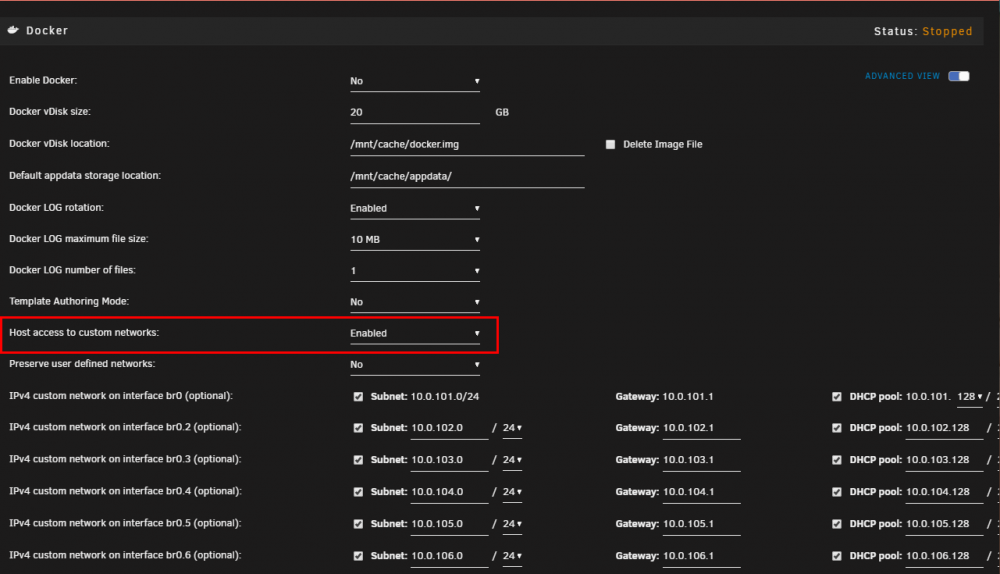
In version 6.8.1 a new setting is introduced "Host access to custom networks" which allows Unraid to communicate with docker containers on the same (macvlan) network. Unfortunately 6.8.1 is missing a update which causes the new setting not to function yet, this will be corrected in 6.8.2.
-
If all is pingable then routing-wise everything is in place. I suspect something on a higher level is blocking the communication, hence my firewall hint.
-
Is the remote peer a Windows machine? Could be a firewall issue, try to disable temporary and see if that makes a difference.
-
There is NO such entry. The allowed IPs for the peer are automatically generated based on the interfaces/networks present on the server. Three possible approaches: 1. Configure an IP address + subnet on the VLAN interface for the server. This will add an entry to the peer config 2. Use "Remote tunneled access". This sets a default route (=all subnets) on the peer 3. Manually add the entry at the peer side. What you are doing right now
-
Can you ping the DNS IP address 192.168.44.254 ? Otherwise try DNS 8.8.8.8
-
Check and fix your USB stick for file system corruptions
-
This setting has no effect when talking to custom (macvlan) networks, but it is used when talking to other devices in your LAN network. With NAT enabled, all other devices in your LAN "think" they are talking to the server instead of the WG tunnel and hence don't require additional routing. Yes, I need to make that clearer in the WG configuration page. Not done yet.
-
Sorry I am a little lost here. Can you give a description of your current situation? Are there still crashes?
-
With Unraid containers may have either fixed addresses or dynamic addresses when used on a custom (macvlan) network. To ensure that "any" container can be accessed by the host, I took the approach as described in the blog, and modified it to the needs for Unraid. Instead of defining a subnet associated with the DHCP pool for containers, the complete macvlan subnet is split in two smaller subnets, e.g. a 1 x /24 becomes 2 x /25 and these subnets are used to set up a "shim" network which allows the host (Unraid) to access any container in the associated macvlan network. To make use of this feature it is a simple matter of enabling it in the Docker settings page (new setting which defaults to "disabled"). Now I can ping the container "Pi-hole" with (fixed) address 10.0.101.100 on custom network br0 root@vesta:/# ping 10.0.101.100 PING 10.0.101.100 (10.0.101.100) 56(84) bytes of data. 64 bytes from 10.0.101.100: icmp_seq=1 ttl=64 time=0.096 ms 64 bytes from 10.0.101.100: icmp_seq=2 ttl=64 time=0.040 ms 64 bytes from 10.0.101.100: icmp_seq=3 ttl=64 time=0.032 ms 64 bytes from 10.0.101.100: icmp_seq=4 ttl=64 time=0.020 ms And I can ping the container "Tautulli" with (dynamic) address 10.0.101.128 on custom network br0 root@vesta:/# ping 10.0.101.128 PING 10.0.101.128 (10.0.101.128) 56(84) bytes of data. 64 bytes from 10.0.101.128: icmp_seq=1 ttl=64 time=0.111 ms 64 bytes from 10.0.101.128: icmp_seq=2 ttl=64 time=0.032 ms 64 bytes from 10.0.101.128: icmp_seq=3 ttl=64 time=0.026 ms 64 bytes from 10.0.101.128: icmp_seq=4 ttl=64 time=0.024 ms There is ONE CAVEAT ... When remotely accessing a container on a custom network over a WireGuard tunnel, you MUST define a route on your router (gateway) which points back to the tunnel on the server. E.g. route 10.253.0.0/24 ==> 192.168.1.2 (Unraid server) This is required because it is not possible to use NAT between a custom network and a WG tunnel, since everything is handled internally on the server and never leaves the physical interface, hence NAT is never in the picture here.
-
Your diagnostics are from AFTER a reboot and don't show anything that can help. A couple of observations: 1. Try to correct the items which Fix Common Problems reports about 2. You are using a single interface eth0, disable the bond function and see if that makes a difference 3. Your interface eth0 is set to a speed of 100M, while it supports 1000M. Check for cable issues or replace the cable As a test I created 10 peers on the same tunnel, which works fine for me. In your case are all peers active at the same time?

-
Interesting workaround. I'll have a look how to integrate with Unraid.
-
Can you post a screenshot of your network settings and a screenshot of your Docker settings (docker service stopped and advanced view)
-
A VPN connection in essence means your system is only reachable over its VPN connection. Any other path is considered 'route leaking' and usually not what you want (security breach). You mean certain containers are still reachable? This is expected when these containers run on a custom (macvlan) network.
-
Then it looks like you have a routing issue. When Unraid is configured for VPN access, it will have a default route 0.0.0.0/0 pointing to the WG tunnel. Any containers with a host or bridge network will then not remotely accessible via your external IP/port
-
All remote peers need a correct setting for "AllowedIPs" to reach the Unraid server and/or containers over the tunnel.
-
All that typing makes me thirsty ... heading for the fridge 😁
-
Damn @Squid you beat me every time 😉
-
Depends, but you can install the plugin "Dynamix Stop Shell" which automatically terminates all open sessions before rebooting/shutting down.
-
Something keeps your mount point busy Jan 5 20:40:07 unRAID root: umount: /mnt/user: target is busy. You did SSH in 6 minutes before attempting to reboot. Jan 5 20:34:44 unRAID sshd[1289]: Accepted password for root from 10.0.0.46 port 57890 ssh2 Did you 'cd' to /mnt/user/something in your SSH session?
-
The problem is pi-hole tries to allocate port 53 for each available interface on the server, and consequently fails because libvirt (VM) is already using port 53 for its own virtual interface. The solution is to limit pi-hole in its interface assignment and use only the management interface br0. See this and in particular steps 4 and 5
-
Try the following. 1. Uninstall the SSH plugin, if not already done 2. Delete (or rename) the folder /config/ssh on your USB device 3. Reboot your server. This will create automatically a new set of ssh keys
-
If remote connection is completely lost, a solution can be to enable syslog mirroring to the flash device. See Settings -> Syslog Server This saves a copy of your syslog information on the flash device in the /logs folder. If you still can SSH (telnet) into your system, you can manually start diagnostics by typing diagnostics
-
It definitely is important that local subnets are unique. A routing issue will occur when setting up a WireGuard tunnel and both peers use the same LAN subnet.




