





KillerK
Members
-
Joined
-
Last visited
Everything posted by KillerK
-
ouch, can you test a zpool to get an exclusive access share to prove/disprove its your disk and share layout?
-
FWIW I've 4 disks in a zpool with a samba share built ontop and this has exclusive access no issues.
-
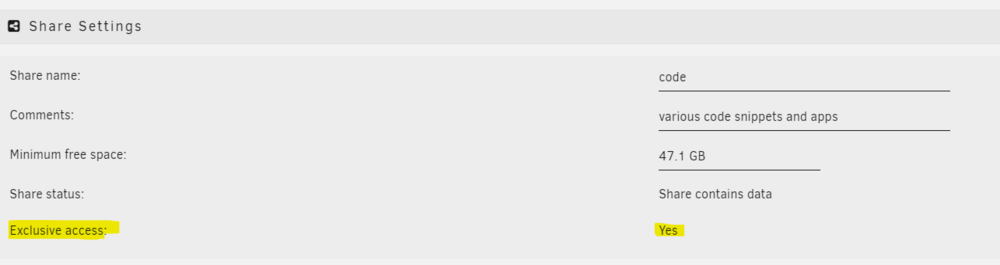
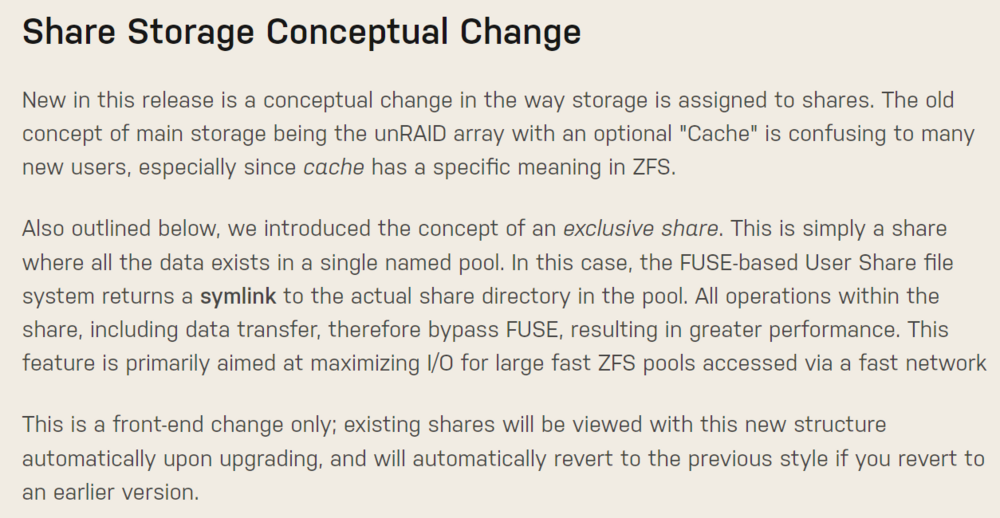
Have you actually set the shares to have Exclusive Access? I'm trying to think back to my Synology migration to Unraid...I think I went for rsync via ssh rather than using a Samba or NFS share mounted in either direction. Anyway I noticed a Samba performance increase post migration after setting the above. https://unraid.net/blog/6-12-0-stable
-
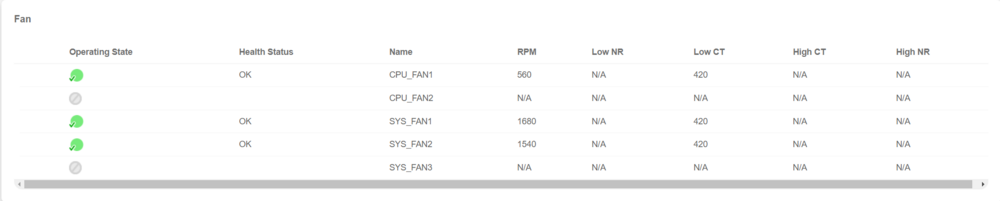
Thanks for this, have you edited the IPMI sensors config to get that Low CT of 140 for the CPU? Mines as below but operating on default IPMI configs still?
-
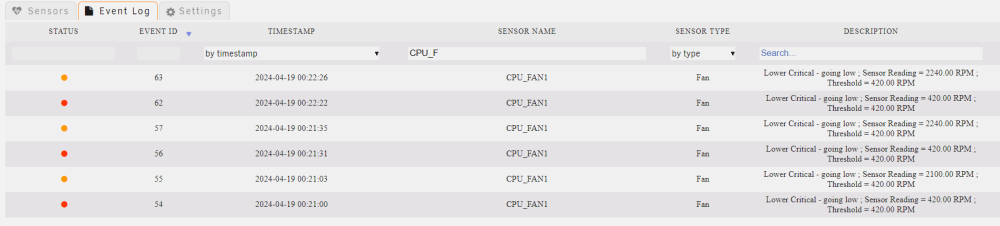
Any experience on this welcomed... Supermicro X13SAE-F running latest BMC v01.02.01 which I think is their only BMC version for this board. I've only had this server 5 months, its a new build of my own. This morning for the 2nd time I can remember the BMC flags "CPU_FAN1, Lower Critical - going low" and as a result spins up the chassis fans to full. It spams my email and log repeated with this warning until I intervene with a soft reset of the BMC which clears the issue. The servers uptime will be around 30 days and if my memory serves then this happened before it had a similar number of days up. So I currently believe this is a fantom report...delving a little deeper into the logs the BMC is reporting the CPU fan RPM is 420 against a threshold of 420 hence the alert. However watching the real-time BMC states the CPU fan is intermittently dropping below the 700 RPM value I typically see. FWIW the CPU fan is a Noctua NH-L9i-17xx, again 5 months new. Given this problem goes away with a soft-reset of the BMC coupled with zero temp issues on the CPU itself am I right to be dismissive of a real problem and this is just a BMC bug?
-
Looks to be this... 00:01.1 PCI bridge [0604]: Advanced Micro Devices, Inc. [AMD] Family 17h (Models 00h-0fh) PCIe GPP Bridge [1022:1453] Subsystem: Advanced Micro Devices, Inc. [AMD] Family 17h (Models 00h-0fh) PCIe GPP Bridge [1022:1453] Kernel driver in use: pcieport Have you searched and found/read this?
-
Have you traced the PCI ports throwing the "Corrected Errors" back to the actual devices?
-
Fond memories of XP for sure but it was 98 Second Edition which is my M$ home, fewer BSOD 🤣
-
Erm I recall a lot of Win11 nonsense with SMB shares. When you get an error msg on Windows do a logout and login again and I found the shares were then accessible.
-
So I not long ago completed a Synology migration to unraid. Taking the drives out of Synology and popping them into an unraid server **might** work but this depends on whether you have a more vanilla raid configuration on the drives or not. In my case I'd had my Synology for years and had upgraded disks over time and ended up utilising Synology's Hybrid Raid tech (SHR I think its called) which is not going to work in unraid. The other factor here is that even if you did do this and it worked you would likely be limiting yourself to an old filesystem and substandard disk layout, unraid is way more capable with newer technologies such as ZFS which I'd recommend you consider. If you have the ability to backup your data to free up any disks you want to reuse from Synology then I would advocate this approach and let unraid set those up disks up like new and later you can transfer the data back onto your new system. I'm certain that Synology's SHR RAID layout system was a large part of my IO bottleneck. Lastly I transfered about 20TB of data using rsync over a wired lan between my Synology and new unraid server, it took a few days as I monitored the transfers and put them into batches for managability but its robust and removes the risk of data corruption on transfer. I don't believe you will find an automated process with unraid in terms of discovering your Synology and transfer the data, you will need to learn some process here. Depending on how you want to use your system you may/may not benefit from upgrading the CPU and RAM. You mentioned wanting to run VMs which I agree requires CPU cores and RAM but if you could instead use containers as an alternative then you will realise a lot of efficiencies in terms of hardware resource usage, speed and performance. I'm currently running 26 containers all a mix of different apps e.g. I use Jellyfin instead of Plex but also websites, home assistant, tdarr and many more. My total memory utilisation is 14GB and the majority of that will be ZFS for cache. Granted how you use your apps will drive resource utilisation differently but if you are just all about the arr's and grabbing then storing media you do not need lots of RAM. If you do still look at upgrading your CPU, consider whether moving to an iGPU would be better than trying to preserve your GTX 980. @Frank1940 recommended you setup a trial licenses to get to know unraid better and I think this is a really good point. Unraid is nothing like Synology and you should get to grips with the unraid concepts such as Array Devices vs. Pool Devices and be clear about what/how you want to setup unraid i.e. using ZFS or XFS.
-
I'm in agreement a better solution is needed than the current web GUI but given the absolute plethora of possibilities would it not be simpler/better to formally allow publishing an overridge file into /etc/rsyslog.d/, showing this in the web page and storing the file on the USB drive? I've had to hack rsyslog for the couple of changes I needed, whilst its simple enough I'm clearly concerned about whether the config will preserve through upgrades but mainly whether I'll remember when the inevitable happens and I need to tshoot a years old fix.
-
Sharing a thank you for running this down, saved me lots of time.
-
Thanks. So the original issue causing me to jump down the rabbit hole (ESPHome container not being able to resolve client mDNS addresses) looks to be resolved by moving back to a macvlan network for my containers (no linux bridge used). This is how I used to run my containers on my old Synology. You prompted me to look back at older unraid versions as I'm new to unraid as of 6.12.10 and I saw the threads and changelogs regards the macvlan driver causing system instability. Looks like the kernel bug report has now found a conclusion with a fix accepted and it looks like their are some changes in-progress to the Docker Settings for the next unraid release too, will keep an eye on this. Provided I'm stable in this configuration I'm happy to live as-is for the now.
-
bump
-
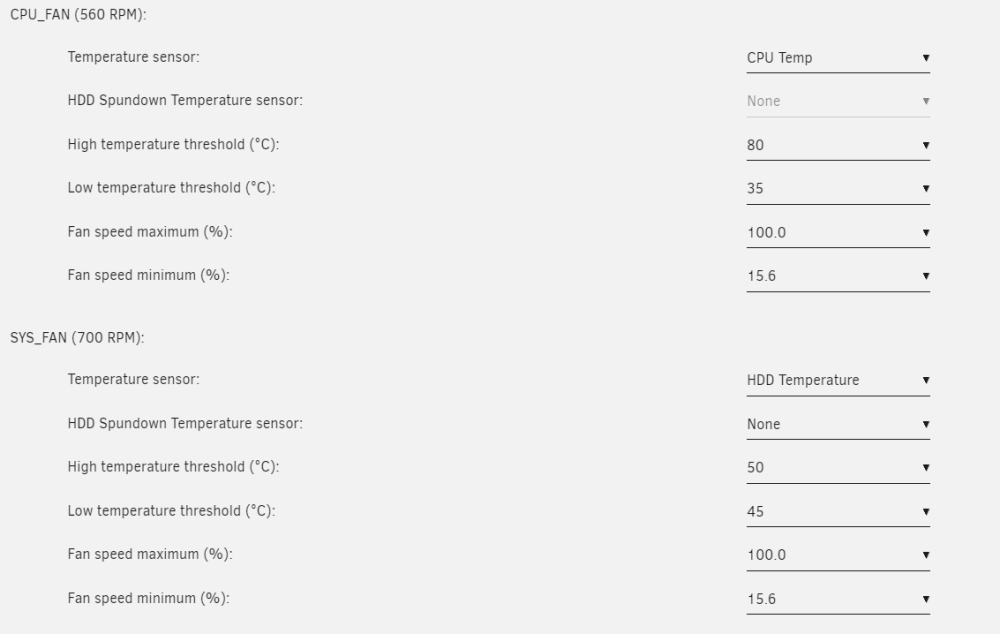
Hi, I'm trying interpret the /var/log/ipmifan to better train my fans vs. temps and have come up with a couple of questions I'd appreicate a steer with. Physically my server has 4 system fans fed from 2 SYS_FAN headers and a single CPU+Fan. The below all suggests everything is as it should be and correctly mapped although where are the HDD Temps being sourced from (device id 99 in the cfg file)? FAN1234 being mapped as my CPU fan is a little unintuitive for me, whilst its certainly something I can live with I was wondering whether a simple edit of the fan.cfg is supported/recommend to alter this? Thanks # tail /var/log/ipmifan 2024-04-23 11:14:13 Fan:Temp, FAN1234(25%):CPU Temp(40C), FANA(16%):HDD Temp(36C) 2024-04-23 11:14:43 Fan:Temp, FAN1234(16%):CPU Temp(35C), FANA(16%):HDD Temp(36C) 2024-04-23 11:15:14 Fan:Temp, FAN1234(19%):CPU Temp(37C), FANA(16%):HDD Temp(36C) # cat /boot/config/plugins/ipmi/fan.cfg FANCONTROL="enable" FANPOLL="3" FANIP="" HDDPOLL="6" HDDIGNORE="ST4000VN000-1H4168_S300LXWX" HARDDRIVES="enable" FAN_FAN1234="674" TEMP_FAN1234="4" FAN_FANA="808" TEMP_FANA="99" TEMPHI_FANA="50" TEMPLO_FANA="45" FANMAX_FANA="64" FANMIN_FANA="10" TEMPHDD_FANA="0" TEMPHI_FAN1234="80" TEMPLO_FAN1234="35" FANMAX_FAN1234="64" FANMIN_FAN1234="10" # ipmi-sensors ID | Name | Type | Reading | Units | Event 4 | CPU Temp | Temperature | 36.00 | C | 'OK' 71 | PCH Temp | Temperature | 59.00 | C | 'OK' 138 | System Temp | Temperature | 32.00 | C | 'OK' 205 | Peripheral Temp | Temperature | 33.00 | C | 'OK' 272 | VRMVCORE Temp | Temperature | 33.00 | C | 'OK' 339 | VRMIN_AUX Temp | Temperature | 33.00 | C | 'OK' 406 | M2_SSD1 Temp | Temperature | N/A | C | N/A 473 | M2_SSD2 Temp | Temperature | N/A | C | N/A 540 | M2_SSD3 Temp | Temperature | N/A | C | N/A 607 | DIMMAB Temp | Temperature | 34.00 | C | 'OK' 674 | CPU_FAN1 | Fan | 560.00 | RPM | 'OK' 741 | CPU_FAN2 | Fan | N/A | RPM | N/A 808 | SYS_FAN1 | Fan | 840.00 | RPM | 'OK' 875 | SYS_FAN2 | Fan | 840.00 | RPM | 'OK' 942 | SYS_FAN3 | Fan | N/A | RPM | N/A 1009 | MB 12V | Voltage | 12.13 | V | 'OK' 1076 | MB 5VCC | Voltage | 5.00 | V | 'OK' 1143 | MB 3.3VCC | Voltage | 3.29 | V | 'OK' 1210 | VBAT | Battery | N/A | N/A | 'battery presence detected' 1277 | MB 5V_AUX | Voltage | 4.94 | V | 'OK' 1344 | MB 3.3V_AUX | Voltage | 3.31 | V | 'OK' 1411 | PCH 1.8V | Voltage | 1.80 | V | 'OK' 1478 | PCH PVNN | Voltage | 0.83 | V | 'OK' 1545 | PCH 1.05V | Voltage | 1.05 | V | 'OK' 1612 | BMC 2.5V | Voltage | 2.56 | V | 'OK' 1679 | BMC 1.8V | Voltage | 1.81 | V | 'OK' 1746 | BMC 1.2V | Voltage | 1.20 | V | 'OK' 1813 | BMC 1.0V | Voltage | 1.02 | V | 'OK' 1880 | VDimmAB | Voltage | 1.11 | V | 'OK' 1947 | CPU 1.8V_AUX | Voltage | 1.80 | V | 'OK' 2014 | CPU 1.05V | Voltage | 1.05 | V | 'OK' 2081 | Chassis Intru | Physical Security | N/A | N/A | 'OK'
-
I'm new to unraid so still finding my way around. TL;DR Why does unraid create a linux bridge and then build the ipvlan network against that? As opposed to just defining the ipvlan network against the host interface directly (eth0 as an example). Why doesn't unraid allow you to select ipvlan as a custom network if bridging has been set to 'No' in the Network Settings? Am I correct to state (as below) that no macvtap or ipvlan host interface is created when 'Host access to custom network' is set to 'No' in the Docker Settings. So docker is just using the linux bridge (br0) interface? I opted put this post in the General section as I didn't think it fit well with the other posts in the Docker section which I quickly skimmed, apologies in advance if this was a mistake. The Long Version I'm successfully up and running with containers using a mix of the docker default bridge for some and ipvlan assigned containers for others. I purposefully enable Host access in the docker settings as I run pihole as my dns server internally which the other containers need to use. However I noticed the other day that my ESPHome container would lose connectivity with my ESPHome devices (or vice versa) but whilst those same devices are still working in/withHome Assistant. It got me to jump down a rabbit hole and I'm not sure its been good/worthwhile, hoping the replies to this post will answer this. My ESPHome container was set to use the ipvan network and I think the problem was mDNS not playing well with either the ipvlan network (shim-br0) or the linux bridge the ipvlan network was built against (br0). Moving the ESPHome container on the host network resolved this issue. However the rabbit hole I'm in was based on the question; Why does unraid create a linux bridge and then build the ipvlan network against that? As opposed to just defining the ipvlan network against the host interface directly (eth0 as an example). On the journey I realised that unraid won't allow you to select ipvlan as a custom network type if you have set bridging to 'No' in the Network Settings. Further more I think I found that unraid doesn't honour the custom network selection (ipvlan or macvlan) if you don't enable 'Host access to custom network'. Anyways I've put my findings below and would appreicate being schooled as needed to correct my understanding. My scenario: server with 2 physical interfaces but with only 1 connected (eth0) and 'Enable Bonding' set to 'No' in the Network Settings. I've therefore ommitted capturing details of the eth0, eth1 and docker0 network interfaces which are present.
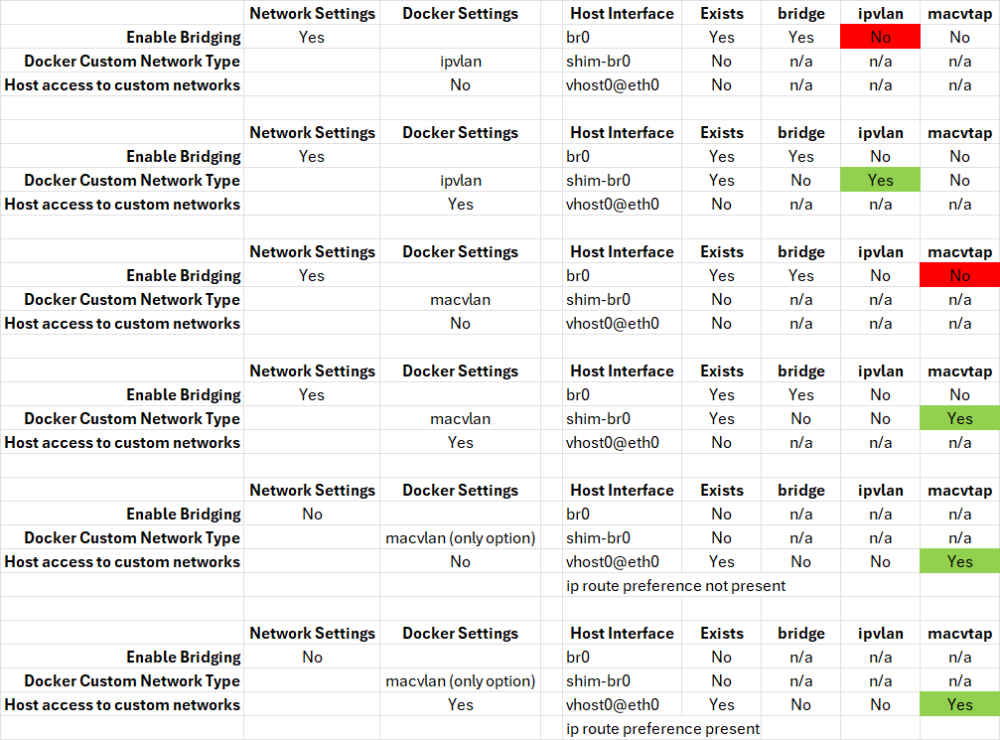
-
Thanks, space isn't an issue so I'll take your feedback onboard, I'm now looking to move my docker appdata anyway to get the data on an exclusive share so I can migrate to datasets as part of this process. Unfortunately my remote storage isn't ZFS, at least not to me...Google Drive is the best I can do. Appreicate this confirmation also.
-
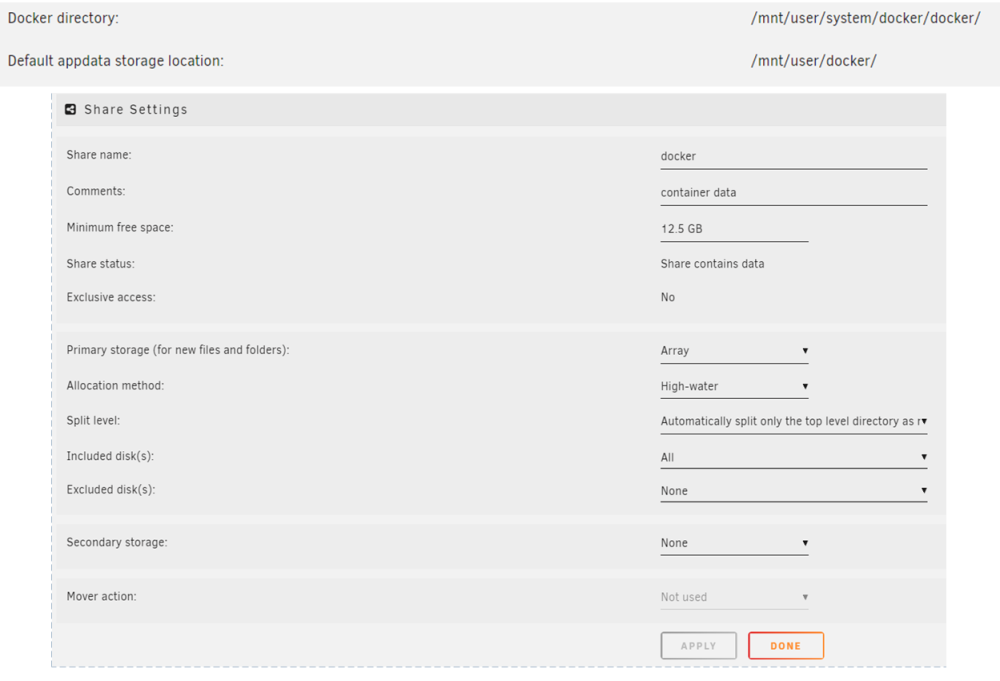
Thanks for the reference, every day is a school day! So I've enabled Exclusive shares now and can see all my shares which are built atop native ZFS Pools are now showing as exclusive. However the share holding my Docker appdata isn't accepting Exclusive Access, maybe this where I'm still learing the correct language as whilst ZFS Master reports I have 3 pools (blacknet, cache and disk1) only the first 2 are true/native ZFS Pools with disk1 being an unRaid Array formatted as ZFS which is not the same? Which Guide are you meaning sorry, maybe I've misunderstood and not read/watched the correct one? Why Compose, well previously I used a Synology NAS and the docker UI in their OS is pretty useless so I ended up using native Docker CLI for a while. But as my collection of containers grew this became quite cumbersome to administer. Also I wanted to control startup dependencies between groups of containers e.g. to ensure networks and databases have started before apps etc, so I moved to Compose. If others in this thread have previously raised the concern about the snapshots being reported and the resolution was to use the 'Dataset Exclusion Pattern' why do you believe something is still wrong in my case? In case this helps...
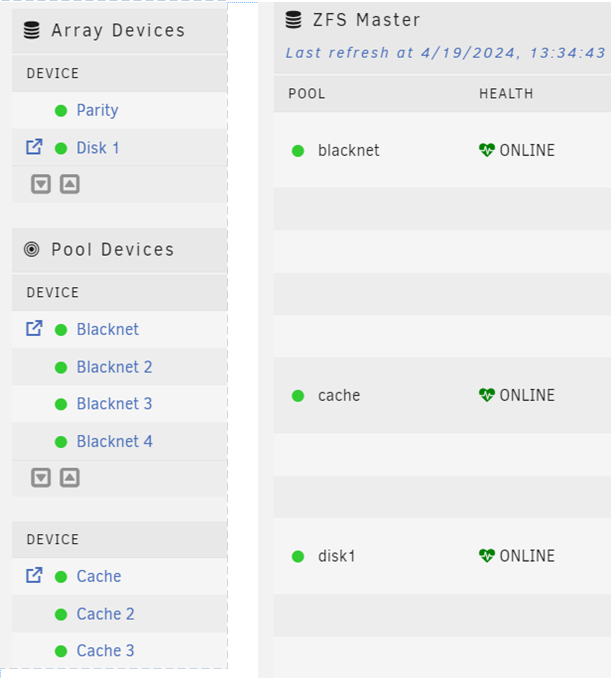
-
Thanks, I think I have just found the error in configuration. My IPMI wouldn't accept 300 or 150 but it would accept 140 for the lower critical threshold. Once I set that and re-enabled fan control in the pluging my BMC started to complain the CPU fan was inoperable even though it was reporting RPM above this new lower threshold. However the CPU Fan RPM had dropped below 700, so I then realised the 'Fan Speed Minimum %' parameter was down at 1.5% which my BMC has issue with regardless of the detected RPM. So nudging this % up so the fan idles around 500 RPM seems to get the BMC happy again.
-
Hi, new user here. I have a Supermicro X13SAE-F so installed this plugging primarily for fan control. It does indeed control the fans via IPMI which is great so thank you! However I've noticed an odd behaviour which my attempts to correct have so far failed. Basically the plugin is detecting that my CPU Fan RPM is hitting the low threshold and shifting the entire system fan profile to full untill the next polling interval where the CPU Fan RPM is reporting normal. It then oscilates between these 2 states untill my BMC has enough and falls over needing a reset. The CPU fan is a Noctua NH-L9i-17xx, I dont believe it is dropping down to or below 420 RPM but suspect that because its an atypical fan for this board its being misreported, all my observations are that the fan sits consistently at 700 RPM. I've no issues with temps at all on the CPU or PCH. I tried reducing the low critical threshold below 420 but I get an error on the values I enter. I suspect the value I need to enter should be a derivative of a formulae or condition but I'm not finding this detail/understanding. Would appreicate any steerage here? Thanks.
-
Thank you I think I understand better now. My docker appdata is located at /mnt/user/docker which is a share I created on my Array. When you say "exclusive" here are you refering to a share dedicated to holding docker appdata only, or are you refering to file/folder permissions, sorry I do not understand? I watched SpaceInvaderOne's video detailing the difference between folders and ZFS datasets and how to convert them to make use of snapshots but I can see little use in that process for me and would prefer off-site backups over snapshots (I will consider this more though). I've a large number of containers, all managed via docker-compose (with the plugin). Really appreicate your time and support, thank you.
-
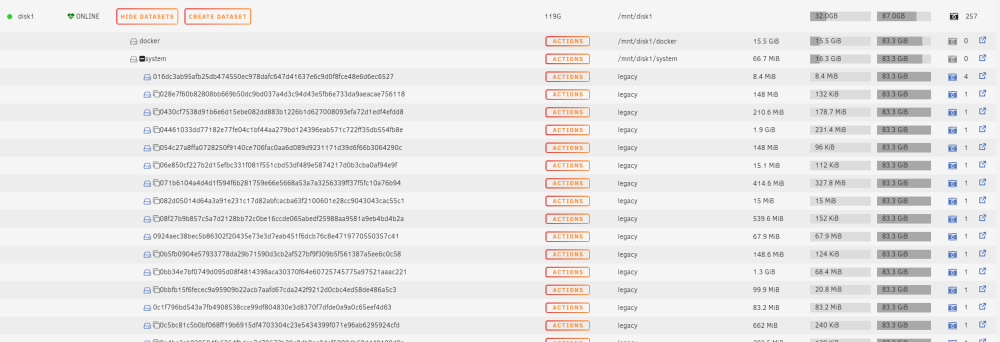
Thanks @Niklas and @Revan335. I've added the string "/system/.*" under the 'Datasets Exclusion Patterns' option in the ZFS Master settings which has limited the output the plugin displays. I'm a new user to unraid and started with 6.12 so I'm not familiar with the pre 6.12 operating expereince. I can confirm however I've very recently altered the docker settings in my unraid from using a docker image file to a docker directory, and yes my array is ZFS which is where the location is defaulted to. Appreciate the quick help 🙂
-
Hi, new user here, just noticed all these supposed snapshots appear. After googling I think I understand this is the plugin finding 'other' data and mislabeling as a snapshot. Have I got this correct and if so how do I go about remedying it?
-
Hi, I'm new to unraid and as of typing I'm 24 days and 1 hour away from buying my first license 🙂 First impressions are good, I'm getting out of unraid what I put in (pun kinda intented), but I'm honestly surprised at the lack of some basic security on the front door. I mean its 2024 and MFA should be considered a hygine factor not an "enhancement"! I've read a few posts on this topic and was linked to an unraid blog with the overaching point being 'just don't expose your unraid server to the internet'...there are several reasons why MFA should still be considered a minimum regardless of whether its exposed on a public edge or not. I appriecate there are several options availble for me to add MFA by proxying the unraid dashboard and adding a 3rd party app like Authelia but the remaining concern this doesn't mitigate is the basic password auth option is still their in unraid and can be exploited by a threat actor. In terms of roadmap here I strongly feel that basic TOTP should be added, its a minimal investment in dev time to add, you've already done it for the forum itself and the forum here seems productive from what I have read so support could be divested to that for the most part. If I'm being honest I also think that more dev time should be invested to take this further to enable a push based MFA process either via third parties like Cisco DUO or via your own mobile app but I acknowledge thats why its called a roadmap, for now I'd get happy with just a basic TOTP step. Whinge over and thanks for taking the time to read this.





