





hYtas
Members
-
Joined
-
Last visited
-
Ok, das erklärt einiges :D Da Unraid bisher ohne Probleme läuft, hatte ich noch nicht so das Verlangen tiefer zu suchen. Vielen Dank :)
-
Danke für den Tipp. Ich habe bisher immer direkt Pihole geupdated. Liegt aber wohl an meinem Proxmox Hintergrund. Du meinst den Container zu updaten reicht aus?
-
Moin, ich wollte eben PiHole per console updaten und bekomme im Fenster nur ns:/# angezeigt. Dies ist bei beiden PiHole Dockern so und noch bei 2-3 anderen Dockern. Auf meinem zweiten Unraid Server kann ich die Docker per console erreichen. Die Docker auf dem zweiten Server laufen nur, wenn der erste Server nicht online ist. PiHole läuft soweit und blockt alles, was es soll. Auf dem WebUI steht auch rechts oben ns als hostname. Außer ein Update auf 7.1.4 habe ich nichts getan. Der zweite Server wurde auch auf 7.1.4 geupdated und dort geht es. Evtl. hat jemand ja einen Tipp, woran es hakt. Der Log sieht so aus: 2025-06-26 20:40:22.980 CEST [90M] INFO: ########## FTL started on ns! ########## 2025-06-26 20:40:22.986 CEST [90M] INFO: FTL branch: master 2025-06-26 20:40:22.986 CEST [90M] INFO: FTL version: v6.2.2 2025-06-26 20:40:22.986 CEST [90M] INFO: FTL commit: 044ef46d 2025-06-26 20:40:22.986 CEST [90M] INFO: FTL date: 2025-06-05 05:32:56 +0200 2025-06-26 20:40:22.986 CEST [90M] INFO: FTL user: pihole 2025-06-26 20:40:22.986 CEST [90M] INFO: Compiled for linux/amd64 (compiled on CI) using cc (Alpine 14.2.0) 14.2.0 2025-06-26 20:40:22.990 CEST [90M] INFO: Wrote config file: 2025-06-26 20:40:22.990 CEST [90M] INFO: - 155 total entries 2025-06-26 20:40:22.990 CEST [90M] INFO: - 146 entries are default 2025-06-26 20:40:22.990 CEST [90M] INFO: - 9 entries are modified 2025-06-26 20:40:22.990 CEST [90M] INFO: - 0 entries are forced through environment 2025-06-26 20:40:22.993 CEST [90M] INFO: Parsed config file /etc/pihole/pihole.toml successfully 2025-06-26 20:40:22.993 CEST [90M] INFO: No other running FTL process found. 2025-06-26 20:40:22.993 CEST [90M] WARNING: Insufficient permissions to set process priority to -10 (CAP_SYS_NICE required), process priority remains at 0 2025-06-26 20:40:22.995 CEST [90M] INFO: PID of FTL process: 90 2025-06-26 20:40:22.995 CEST [90M] INFO: listening on 0.0.0.0 port 53 2025-06-26 20:40:22.995 CEST [90M] INFO: listening on :: port 53 2025-06-26 20:40:22.997 CEST [90M] INFO: PID of FTL process: 90 2025-06-26 20:40:22.998 CEST [90M] INFO: Database version is 21 2025-06-26 20:40:22.998 CEST [90M] INFO: Database successfully initialized 2025-06-26 20:40:23.369 CEST [90M] INFO: Imported 26169 queries from the on-disk database (it has 80991 rows) 2025-06-26 20:40:23.369 CEST [90M] INFO: Parsing queries in database 2025-06-26 20:40:23.408 CEST [90M] INFO: 10000 queries parsed... 2025-06-26 20:40:23.445 CEST [90M] INFO: 20000 queries parsed... 2025-06-26 20:40:23.464 CEST [90M] INFO: Imported 26169 queries from the long-term database 2025-06-26 20:40:23.464 CEST [90M] INFO: -> Total DNS queries: 26169 2025-06-26 20:40:23.464 CEST [90M] INFO: -> Cached DNS queries: 16542 2025-06-26 20:40:23.464 CEST [90M] INFO: -> Forwarded DNS queries: 6935 2025-06-26 20:40:23.464 CEST [90M] INFO: -> Blocked DNS queries: 2510 2025-06-26 20:40:23.464 CEST [90M] INFO: -> Unknown DNS queries: 0 2025-06-26 20:40:23.464 CEST [90M] INFO: -> Unique domains: 1712 2025-06-26 20:40:23.464 CEST [90M] INFO: -> Unique clients: 22 2025-06-26 20:40:23.464 CEST [90M] INFO: -> DNS cache records: 329 2025-06-26 20:40:23.464 CEST [90M] INFO: -> Known forward destinations: 2 2025-06-26 20:40:23.546 CEST [90M] WARNING: Insufficient permissions to set system time (CAP_SYS_TIME required), NTP client not available 2025-06-26 20:40:23.546 CEST [90/T132] INFO: NTP server listening on 0.0.0.0:123 (IPv4) 2025-06-26 20:40:23.546 CEST [90/T133] INFO: NTP server listening on :::123 (IPv6) 2025-06-26 20:40:23.547 CEST [90M] INFO: FTL is running as user pihole (UID 1000) 2025-06-26 20:40:23.547 CEST [90M] INFO: Reading certificate from /etc/pihole/tls.pem ... 2025-06-26 20:40:23.547 CEST [90M] INFO: Using SSL/TLS certificate file /etc/pihole/tls.pem 2025-06-26 20:40:23.547 CEST [90M] INFO: Web server ports: 2025-06-26 20:40:23.547 CEST [90M] INFO: - 0.0.0.0:80 (HTTP, IPv4, optional, OK) 2025-06-26 20:40:23.547 CEST [90M] INFO: - 0.0.0.0:443 (HTTPS, IPv4, optional, OK) 2025-06-26 20:40:23.547 CEST [90M] INFO: - [::]:80 (HTTP, IPv6, optional, OK) 2025-06-26 20:40:23.547 CEST [90M] INFO: - [::]:443 (HTTPS, IPv6, optional, OK) 2025-06-26 20:40:23.547 CEST [90M] INFO: Restored 0 API sessions from the database 2025-06-26 20:40:23.550 CEST [90M] INFO: Blocking status is enabled 2025-06-26 20:40:23.679 CEST [90/T134] INFO: Compiled 2 allow and 0 deny regex for 22 clients in 30.8 msec 2025-06-26 20:40:23.679 CEST [90/T134] WARNING: List with ID 35 (https://www.technoy.de/lists/malware2.txt) was inaccessible during last gravity run
-
Den RAM habe ich: 64GB (2x 32GB) Crucial DDR4-3200 DIMM CL22-22-22- Dual Kit aber Achtung du brauchst DDR4!
-
Wenn du weniger Platz hast, geht auch das Board von meinem 2. System. Ist genau so stromsparend. zu ECC kann ich dir nichts sagen. Hatte ich noch nie benutzt.
-
Schau dir mal mein System Unraid1 in der Signatur an, ist eigentlich das wonach du suchst. Mit dockern bin ich bei um die 9-10W im Spindown. Bei mir ist es ein 19Zoll Gehäuse, aber passt auch in alles andere.
-
Das die Lüfter ab und zu mal auf Max hochdrehen hatte ich jetzt auch schon ein paar Mal -> nur ein reboot half. Ist aber extrem unregelmäßig. Zu warm wird die CPU nicht die idled bei 24 Grad und die HDDs sind auch fast immer aus und wenn dann super gekühlt. Mit der 7.0.0 hatte ich es bisher noch nicht, bei mir was es die letzte 6er stable.
-
Unfortunately, I only got around to testing the plugin today. Everything worked without any problems. First there were problems because I had not deleted a <, but it was my own stupidity. Tomorrow evening I will simulate the failure of my Unraid1.
-
Du meinst also wie ein Outlook Archiv nur nicht lokal sondern in einem Docker? Bei Outlook kannst du ein Netzlaufwerk hinterlegen, wo das Archiv liegt.
-
Hier nachzulesen: Bin da noch kein "Profi": Wenn keine Platten dran sind und fast alles wie bei mir ist, kann es ja nicht viel mehr als das Netzteil sein oder? Hast du den Rechner mal in Ruhe gelassen und den Browser geschlossen? Anfangs waren es auch so um die 11-15W, nach ein paar Stunden Ruhe waren es dann ca. 7W. Bei beiden Servern zusammen bin ich aktuell im idle bei um die 20W. Laufen im Moment nur 9 Docker und 1 HomeAssistant VM.
-
smb work like a charm! Thanks for the advice.
-
When I search for the shares it only finds nfs shares, so I haven't tried smb at all. But then I can't mount the shares via UD?
-
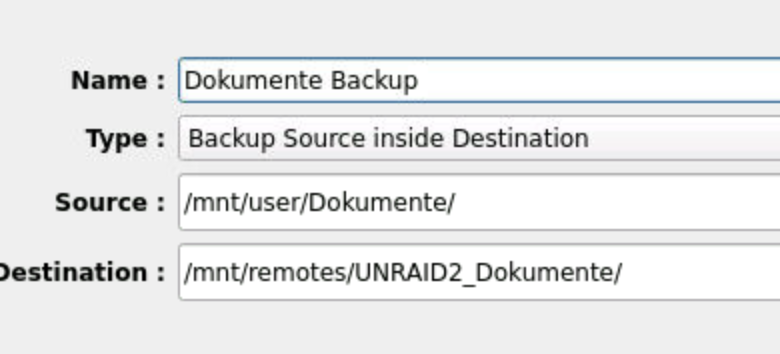
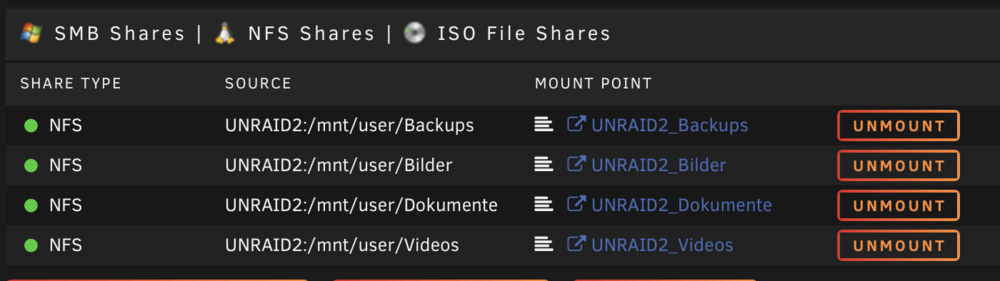
I have a second Unraid server on which I want to backup my pictures and documents etc. I have mounted the second Unraid server as individual nfs shares( pictures/docs/videos etc.) . Luckybackup tells me that the path is read only. NFS shares are mounted under: mnt/remotes/UNRAID2_Bilder etc. Every share has read/write permissions for groups/owner/others. It's actually not difficult but somehow I can't figure out where it sticks...

-
I dared to carry out an update... does the plugin only back up the docker or can it also back up the shares?
-
I fucked up many times for being an early adopter. I’ll wait some time. Even if the beta was stable, the stable version always has bugs. I will only use my second new server as a data backup until a few versions have been released. I like your plugin but I don't want to break everything


